
Key takeaways
A free branded link is only as durable as your control of its domain: on a provider's domain, the link dies with the provider, while on a domain you own, you can move it to another service. Before choosing a free plan, check its caps on links, domains and click history, whether you can export your links, and whether visitors see ads or a preview page. Use HTTPS and a single redirect hop, pick 301 or 302 by how long the destination will last, and register the domain to your organization, not to one person.
If your free link provider disappeared tomorrow, would the URLs on your posters still work? That's the question a search for “branded links free” rarely answers. A readable address helps people recognize your business, but ownership determines whether you can rescue that address when a service closes or an account changes hands.
Free Branded Links at a Glance#
A free branded link is a short or readable address on a domain you choose that redirects visitors to another destination. Free use may be limited by the number of links, connected domains, or available features, and domain registration isn't necessarily included.
Think of the difference between a street address on a building you own and a mailbox rented from someone else. You can replace the people managing your building without changing its address. If the rented mailbox closes, you can't necessarily keep receiving mail there.
Say a florist prints a promotion on a poster. The important question isn't just whether the address looks tidy, but whether the florist can keep using it after replacing the redirect service.

Free branded link setups compared#
| Setup | Domain Owner | Survives Provider Shutdown | Typical Catch |
|---|---|---|---|
| Free shortener on the provider's domain | Provider | No reliable recovery under your control | The domain identifies the provider, not your business |
| Free plan with your own domain attached | You, with registration and DNS control | Recoverable by moving the domain and rebuilding mappings | Check caps on links, domains, and click history |
| Your own domain connected through DNS to a redirect service | You | Recoverable after replacing the redirect service | Needs DNS access and a working redirect setup |
| Redirects inside your existing website | You | Yes, if your website and rules remain operational | Needs access to the site platform |
DNS doesn't perform an HTTP redirect itself. It directs requests to the server or service that sends the redirect response. Owning the domain gives you a recovery route, not automatic continuity.
The Wikipedia history of URL shortening[1] records TinyURL's launch in 2002 and 2.1 billion accesses to Bitly links in November 2009. It also describes a May 2012 study in which 61% of URL-shortening services examined had shut down, with spam abuse the most common cause.
How a Branded Link Actually Works#
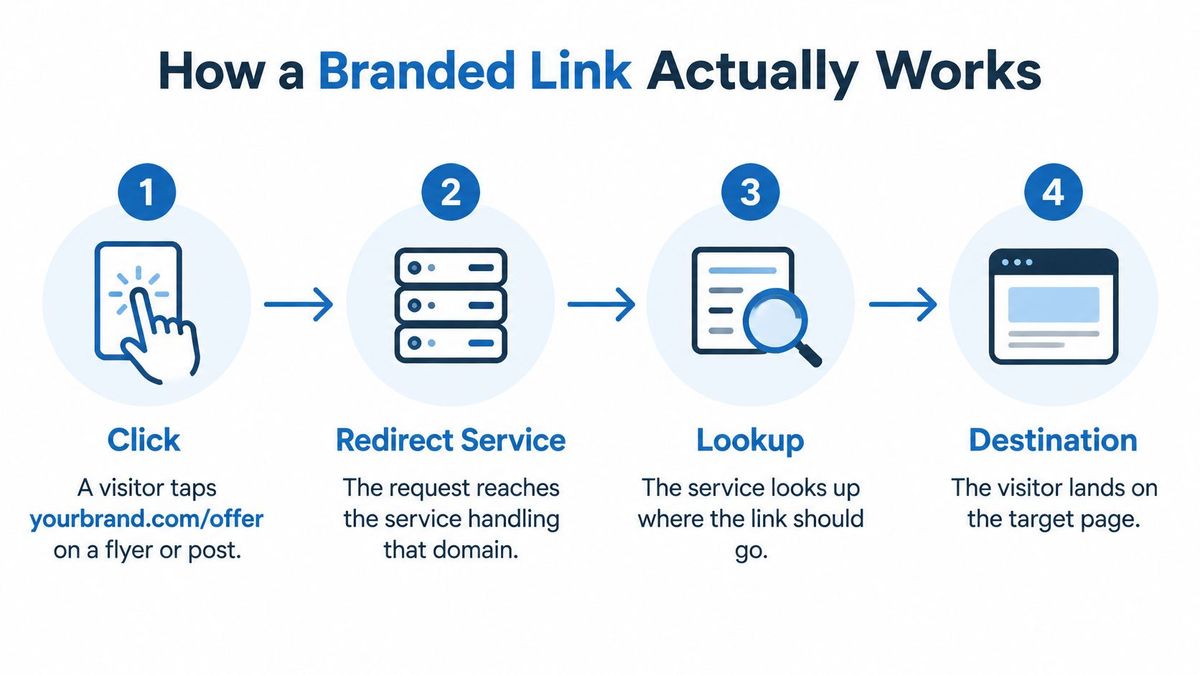
A branded link works like a reception desk. Visitors give the receptionist a familiar address, and the receptionist directs them to the right room. Changing the room assignment doesn't require changing the address visitors already know.
The browser follows a straightforward path:
- A visitor clicks the branded address on a post or types the address printed on a flyer.
- The request reaches the redirect service responsible for that domain.
- The service looks up the destination assigned to the requested path.
- It returns an HTTP redirect response containing the destination address.
- The browser loads that destination, while the service may record the click.
Why the redirect layer matters for printed codes#
Say a restaurant prints a QR code on its takeaway packaging. If that code contains a branded redirect address, the restaurant can switch from a seasonal menu to its regular menu without replacing the packaging.
The distinction is the encoded payload, not the appearance of the QR code. A static code that directly contains the final landing-page address can't have that payload edited after printing. A dynamic setup puts a manageable redirect between the printed code and the destination, as OpenQR's explanation of dynamic campaign tracking[2] describes.
For useful measurement, assign separate branded paths to packaging, counter cards, and event signage. Otherwise, a shared address won't tell you which placement brought the visitor. Keep scan-specific addresses separate from ordinary clickable links when that distinction matters.
Inspect the journey rather than judging only the destination page. Check for unnecessary intermediate redirects, HTTPS throughout the route, and preservation of relevant paths and UTM parameters. A page that loads correctly can still receive incomplete attribution if the redirect drops the campaign tags.
How long the redirect itself takes#
Every visit to a branded link waits for the redirect service to answer before the destination starts loading, and how long that takes depends on the service. Our redirect speed benchmark times public redirects from Washington, D.C., Frankfurt and Tokyo every hour, over a fresh connection and without following the redirect (RedirHub redirect speed benchmark[3]). For 20–27 November 2026, the median time to first byte of the link services it measures was:
| Service | Median time to first byte |
|---|---|
| RedirHub | 17 ms |
| Dub | 37 ms |
| Short.io | 55 ms |
| Bitly | 111 ms |
| TinyURL | 119 ms |
| Rebrandly | 265 ms |
| Cuttly | 377 ms |
| BL.INK | 461 ms |
Each figure is the median over a service's measured links, averaged across the three locations, and the benchmark updates every hour. The wait comes before the destination starts loading, on every click and every scan of a printed code.
Redirect Codes and HTTPS for Branded Links#
Redirect codes for branded links
| Code | Use It When | Search Engine Effect |
|---|---|---|
| 301 | A permanent move, such as a retired campaign path | Signals that the destination permanently replaces the original URL |
| 308 | A permanent move where the request method must stay the same | Sends the same permanent signal while preserving the method |
| 302 | A temporary test or campaign with a changing destination | Signals a temporary move rather than a permanent replacement |
| 307 | A temporary move where the request method must stay the same | Sends the same temporary signal while preserving the method |
Use a permanent redirect for a durable replacement and a temporary redirect when the destination is expected to change.
Google's redirect documentation[4] recommends permanent server-side redirects for permanent URL changes and distinguishes their canonicalization signals from temporary redirects. These are signals to search engines, not guarantees that a particular address will always remain indexed.
The request method describes what the browser is doing, such as requesting a page or submitting information. For an ordinary promotional link, the permanent-versus-temporary decision is usually the main concern. Application workflows need closer attention to method preservation.
Our guide to permanent and temporary redirects provides additional context for choosing between them.
HTTPS belongs at the entrance too#
A secure destination doesn't excuse an insecure starting address. The redirect service must accept an HTTPS connection before it can send visitors onward, so its certificate needs to cover the branded hostname.
Check these controls before publishing:
- Certificate automation: Confirm certificates are issued and renewed without someone remembering a calendar reminder.
- Status control: Make sure the configuration matches your intended permanence.
- Path and query handling: Test the actual forwarding behavior rather than assuming every component is retained.
- Chain prevention: Send visitors directly to the intended final page instead of through retired campaign destinations.
Limits Free Plans Usually Hide#
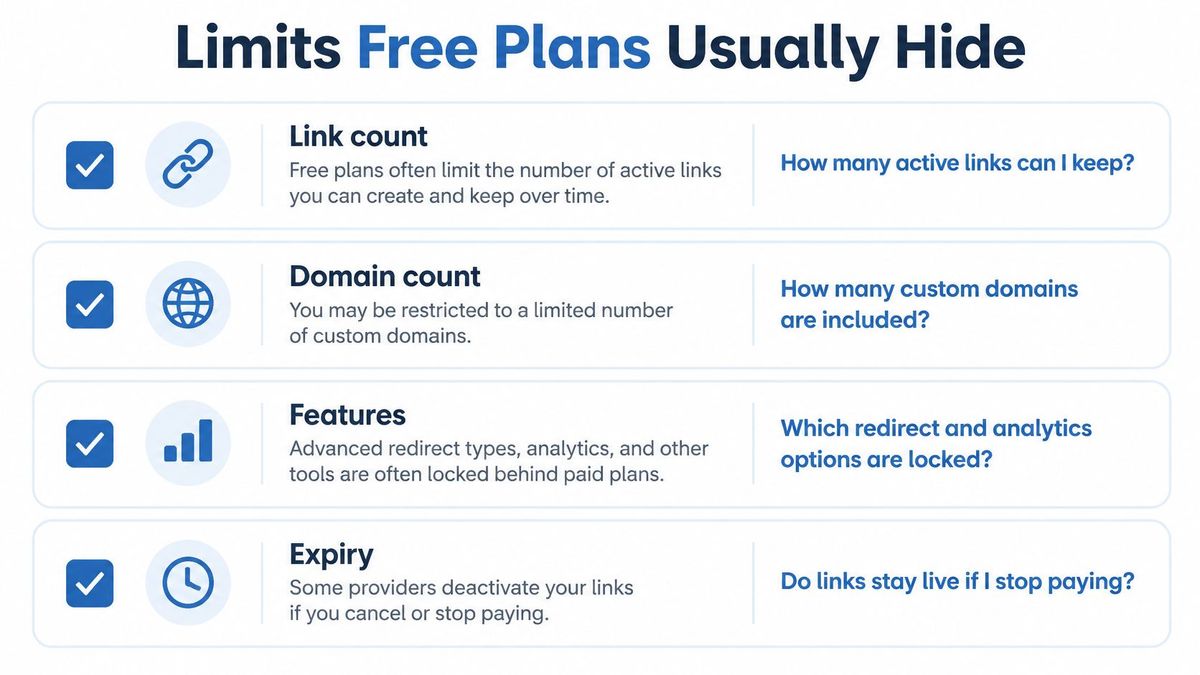
Treat a free plan like storage space offered with a rental agreement. The empty room looks generous until you discover which doors are locked, what counts toward capacity, and whether you can retrieve your belongings afterward.
The same comparison habit applies outside link management. Live Tourney's discussion of hidden limits in free plans[5] is a useful reminder to compare operational restrictions rather than the signup price alone.
Turn plan descriptions into answers#
- Link count: How many active links can you retain, and do paused links consume capacity? Distinguish a creation allowance from the total inventory you can maintain.
- Domain count: How are connected hostnames counted? Record whether a root domain and its subdomain require separate allocations.
- Click-data retention: How many days of history remain available? Your reporting window must cover the campaigns you intend to compare.
- Team access: Can colleagues use individual accounts with appropriate permissions? A shared login makes accountability and staff departures harder to manage.
- Export: Can you retrieve source addresses, destinations, redirect types, and useful metadata? We support bulk export as CSV or Excel, so teams can retain a portable copy.
- Broken-link support: What assistance is available when a published address stops resolving? Record the support channel and any stated response commitment.
- Presentation: Does the visitor encounter ads, sponsored content, or a preview screen? On every plan, we never add those elements to redirects, branded links, or QR codes; an in-between page appears only when you choose a Frame or Custom HTML redirect.
Use the plan comparison to record the relevant allowances alongside your requirements. Put numeric limits in a worksheet, mark unavailable features explicitly, and include the work required to replace a missing capability.
Free should describe the software charge, not hide the operating requirements. Domain renewals, administration, and recovery work still need an owner.
How to Set Up a Branded Link on Your Own Domain#
Choose the public address before creating campaign artwork. A dedicated subdomain separates link operations from your main website, while a path on the main domain requires the website's platform to handle those requests correctly.

Build a testable route#
- Choose a consistent pattern. Decide between a dedicated link subdomain and a path such as
/go/offeron your existing site, so campaign creators follow the same convention. The common mistake is treating a website path as something DNS can route separately. - Confirm administrative access. Identify the person who controls domain registration, DNS, and, where relevant, website routing. To connect a domain to RedirHub through DNS, you add a CNAME or A record at your DNS provider (or use Automatic setup on Cloudflare), and the HTTPS certificate is issued once DNS is in place; don't replace records supporting a live website without understanding their purpose.
- Attach the domain and verify ownership. Follow the connection workflow for your chosen service or website integration so requests reach the intended redirect handler. A frequent error is connecting the wrong hostname or leaving an old configuration active.
- Create a readable slug and destination. Use a short path such as
/menu, then enter the complete intended landing-page address. Don't assume that changing the landing page's own slug will automatically repair a destination you previously saved. - Select the redirect behavior. Choose the status that matches the link's intended lifespan and whether it handles anything beyond normal page visits. The mistake to avoid is declaring an experimental destination permanent because that option appears first.
- Test the full request. Open the address in a browser and inspect it with a redirect checker, including a test containing campaign parameters. RedirHub can forward the path and query parameters on every plan, but you should still verify that your chosen mapping sends the visitor to the intended page rather than an unintended matching path.
- Document responsibility. Record the domain registrant, renewal date, administrator, public address, and saved destination in your team's documentation. Don't leave the only recovery information inside a departing employee's account.
Our custom-domain short URL guide provides additional setup context.
Check before sharing#
Confirm that the HTTPS version opens without a certificate warning and reaches the final page in a single redirect hop. Check the landing page on a phone as well as a desktop, then scan the final QR artwork if the campaign uses one.
Security and Ownership Checks Before You Publish#
A branded domain is not automatically a safe domain. It identifies the address visitors see, but it doesn't prove that the account controlling its destination is secure.
A 2025 NDSS study of dedicated URL-shortening services[6] found that roughly one-quarter were susceptible to misdirection attacks. Attackers can exploit the trust people place in shortened or branded links to support phishing or code injection.
Think of the domain as a recognizable company sign. A familiar sign helps visitors find the entrance, but someone still needs to control who can change what's behind it.
Assign control before assigning traffic#
- Business ownership: Register the domain to the organization, using a recoverable business-controlled account. For an agency, establish whether the client or agency is responsible for renewal.
- Least-privilege access: Give each person only the permissions needed for their work. Separate routine campaign editing from domain and account administration.
- Change accountability: Keep a record of who changed a destination and when. Include the reason for sensitive changes so another administrator can distinguish an approved update from misuse. On Pro and Enterprise, RedirHub's audit log lists who changed a link and what it was before.
- Destination review: Inspect the final page before launch and after material changes. Check that it belongs to the intended organization and doesn't unexpectedly request credentials or payment.
- Abuse handling: Name a contact who can investigate reports and pause a compromised route. Decide who can act when the normal campaign owner is unavailable.
- Recovery planning: Keep domain access and portable mappings outside the redirect account. In RedirHub, links import from a CSV file, with a review of what will be added, updated or removed before anything is written, and export as CSV or Excel.
Test the exit, not just the entrance#
Ask what remains operational after cancellation, who receives access when a staff member leaves, and how a malicious destination is disabled. Don't interpret migration assistance as a promise that an unrenewed domain or closed account will continue working indefinitely.
Free is a governance decision as well as a price decision. The right setup lets your organization identify changes, respond to misuse, and restore service without asking customers to find a replacement address.
Choose Your Domain Setup Before You Publish#
A disposable, low-risk campaign can use a free shortener when losing the address would have little consequence. Packaging, signage, and printed menus deserve a domain your organization controls and a destination you can manage. Agencies should ensure each client can retain its domain and take its mappings elsewhere.
Before committing, complete a small acceptance test:
- Inventory: List the domains your organization controls.
- Pattern: Select a consistent subdomain or website path.
- Attribution: Create a test link with a UTM tag and verify its arrival.
- Handover: Confirm the owner, administrator, and export route.
- Maintenance: Assign a destination review date.
A managed workspace is another option alongside your website's own redirect tools. At RedirHub, we manage branded links, QR codes, and redirects on your domains from one Links page. Core costs $49/month and includes 25 domains and 2,500 managed links; Pro offers a 14-day free trial for testing before committing.
Choose according to the cost of losing control, not merely the cost of creating the address.
Keep your branded links on a domain you own
Connect your own domain and create branded links and dynamic QR codes whose destination you can change after printing, with HTTPS issued automatically and no ads or preview pages in between. Links import from and export to CSV, so they stay portable.
See branded linksSources
- [1]URL shortening - Wikipedia
- [2]How Dynamic QR Codes Enhance Campaign Tracking - OpenQR
- [3]RedirHub redirect speed benchmark, 20–27 November 2026
- [4]Redirects and Google Search | Google Search Central
- [5]Online Golf League Management Free: 10 Options Compared
- [6]Misdirection of Trust: Demystifying the Abuse of Dedicated URL Shortening Service - NDSS Symposium
Frequently asked questions
Some link services have free plans that let you attach your own domain, usually with caps on links, connected domains and click history. You still pay to register the domain itself, and someone has to renew it and manage its DNS.
Links on the provider's own domain stop working, and you cannot recover them. Links on a domain you own can be rebuilt with another redirect service, as long as you have a copy of each path and its destination.
Use a 301 when the destination is a permanent replacement and a 302 when it is a test or a campaign you expect to change. Google treats permanent server-side redirects as a signal that the destination replaces the original URL.
No. You can use a dedicated subdomain, such as a go. or link. subdomain, pointed at a redirect service with a DNS record, or a path on your main site that your website platform redirects. A subdomain keeps link operations separate from the main website.
A branded domain shows visitors who the link belongs to, but it does not prove the destination is safe. Register the domain to your organization, give each person only the access they need, keep a record of who changed each destination, and review destinations before launch.

Leo Astarothman is the Brand & Content Lead at RedirHub, where he shapes the company's visual identity, educational content, product experiences, and marketing strategies. He also specializes in system design. Simplifying complex redirect infrastructure into practical resources, product experiences, and campaigns that help businesses understand and adopt modern redirect management.
Related Articles
View All Articles