
Every link change, on record.Undo any of them in one click.
See who changed a destination, UTM, redirect type, status or note, what it was before, and whether it came from the dashboard, the API or an AI assistant. Then revert a mistake in one click.
Included on Pro and Enterprise. 14-day free trial on Pro.

Every change answers three questions
Who, what it was before, and how to undo it
Who changed it?
A teammate, an API token under its own name, or an AI assistant acting for a teammate. With where it came from: the dashboard, the API, MCP, a CSV import or Auto-redirect.
What was it before?
The old value next to the new one, for the destination, UTM, redirect type, status and note. Passwords are never shown, only that one changed.
Can I undo it?
Yes. Revert puts the previous value back in one click. If the link has changed again since, the log marks it.
Trusted by teams that run their own domains
- Global PoPs
- 130
- median first byte. Bitly: 116ms*
- 16ms
- platform uptime
- 99.99%
* From our public redirect speed test: median time to first byte over the last 7 days, averaged over Washington, D.C., Frankfurt and Tokyo. See the provider rankings · Uptime status page
When you'll reach for it
The day something changes, you'll know why
Traffic dropped overnight
Find the change that sent a link somewhere else, and revert it before more visits are lost.
Redirect analytics →An AI assistant changed links for you
Every change made through MCP is recorded with its source, so you can review it and undo any of it.
MCP server →A client asks who moved their QR code
Search the link, see every change to it, and export the answer as a CSV file.
For agencies →A security or compliance review
Give reviewers the Viewer role, export the log as CSV, and keep history for as long as each link exists.
Security →Find any change in seconds
The whole workspace, or one link
Filters that narrow it down
By person or API token, source, date range and field, or search a link or URL.
Activity at a glance
A heatmap of the last 5 weeks, with totals for changes, links, and people and tokens.
Export CSV
Download the changes you filtered, for a review or to share with your team.
History on every link
Open any link to see its own Destination history, newest first.
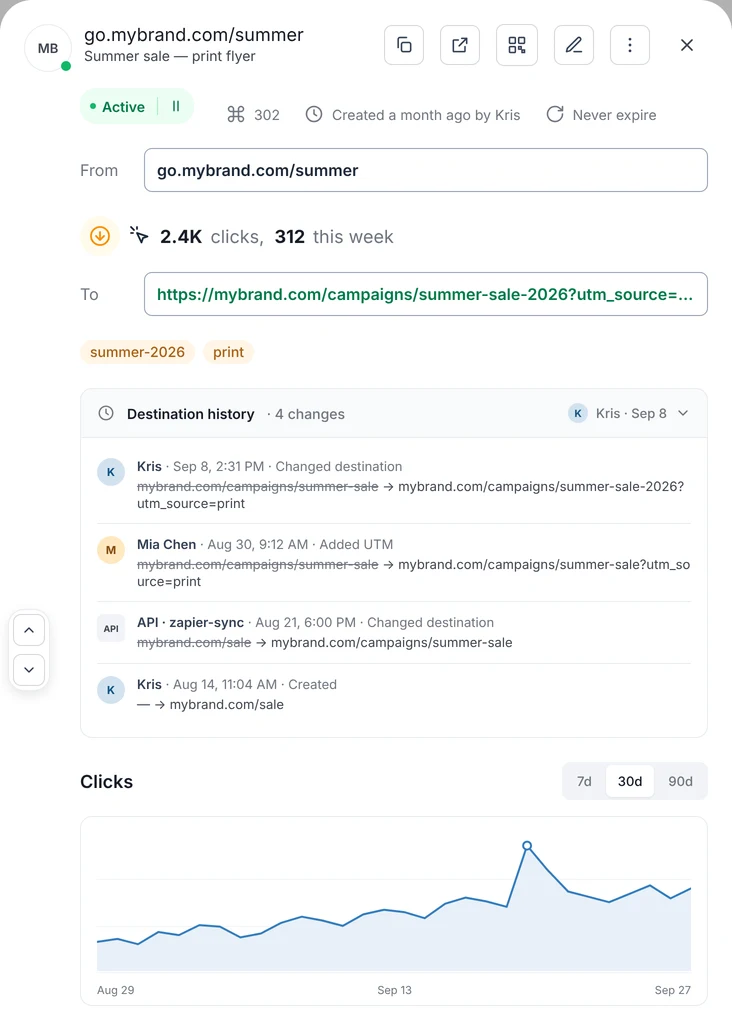
Changes are recorded on every plan. Core shows how many changes a link has had; Pro and Enterprise show who made each one, what it was before, and the audit log.
How to use the audit log →FAQ