



Role-Based Access — Not Everyone Needs the Keys#
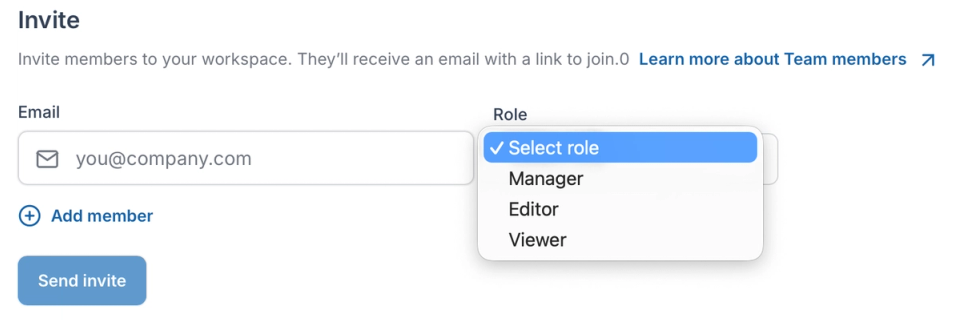
Marketers don't need admin access. Developers don't need to approve every campaign link. Role-based permissions let each person do their job without stepping on anyone else's.
- Role-based permissions: Define what each team member can see and change — full admin, edit access, or view-only.
- Granular domain control: Restrict access at the domain level — a team managing one brand has no visibility into another.
- Unlimited team members: Invite your entire team without per-seat pricing penalties scaling against you.
Stop Being the Bottleneck#
Every time marketing waits on IT to create a redirect, campaign momentum is lost. The right access model lets each team move independently — without risk.
- Self-serve for non-technical teams: Marketers and campaign managers create and update redirects themselves — no tickets, no waiting on developers.
- No shared credentials: Every team member logs in with their own account — access is individual, traceable, and revocable instantly.
- SSO support: Connect RedirHub to your identity provider for centralized access management across your organization.

Built for Agencies and Multi-Brand Teams#
Managing redirects for multiple clients or brands from one account — with clean separation between each.
- Per-domain organization: Redirects are organized by domain so each team or client sees only what is relevant to them.
- Centralized oversight: One account to manage everything — delegate to teams while keeping full visibility at the top level.
- Instant access revocation: Remove a team member's access immediately when needed — their changes remain, their access does not.
Role-Based Access Control for Secure Redirect Management#
Managing redirects across multiple users requires more than simply inviting teammates into a shared dashboard. Without structured role-based access control, organizations risk accidental configuration changes, shared credentials, and unclear ownership over redirect rules that directly impact SEO, campaigns, and infrastructure routing.
A dedicated team management layer for redirect management ensures that permissions are clearly defined and consistently enforced. By assigning role-based access to each user, organizations protect domain-level configurations while allowing marketing, SEO, and growth teams to create, edit, and monitor redirects independently - without developer dependency or security compromise.
Redirect Permissions Management with Domain-Level Access Control#
As redirect inventories expand across brands, campaigns, and client accounts, granular redirect permissions management becomes essential. Agencies and multi-brand organizations need domain-level access control to prevent cross-account visibility and reduce the risk of unauthorized configuration changes.
Core redirect access control capabilities include:
- Role-based access control (RBAC) with clearly defined admin, editor, and viewer roles
- Domain-level permissions to restrict visibility by brand or client
- Individual user accounts with full activity traceability and accountability
- Instant access revocation without affecting existing redirect rules
- SSO integration for centralized identity management and secure authentication
By implementing structured redirect permissions management, organizations eliminate shared credentials, reduce security exposure, and enable secure, scalable collaboration across marketing, SEO, and infrastructure teams.
Multi-User Redirect Management with Audit Logs and Activity Tracking#
When multiple teams manage redirects across environments, visibility and accountability become critical. Without structured oversight, it becomes difficult to understand who changed a destination URL, modified a status code, or updated domain routing rules. Multi-user redirect management must include transparent activity tracking to reduce operational risk and maintain infrastructure integrity.
Enterprise-ready team management features include:
- Detailed audit logs that record redirect creation, edits, and deletions
- User-level activity tracking with timestamped change history
- Domain-specific visibility to isolate activity by project or brand
- Change accountability to prevent unauthorized configuration updates
- Centralized access management across multiple domains
By combining multi-user redirect management with structured audit visibility, organizations gain operational clarity. Redirect governance becomes measurable and traceable rather than dependent on informal communication or shared credentials.
Secure Team Management for Scalable Redirect Collaboration#
As organizations scale, redirect management shifts from an isolated technical task to a shared operational responsibility. Marketing teams launch campaigns, SEO specialists handle migrations, and infrastructure teams maintain routing stability. Without structured team management software and role-based permissions, collaboration introduces unnecessary security and configuration risk.
A centralized redirect access control system ensures that each team member operates within clearly defined boundaries. Domain-level permissions prevent cross-project overlap, RBAC enforces structured control, and SSO integration aligns redirect management with existing identity policies. This reduces dependency on engineering while preserving enterprise-grade security standards across domains.
Start managing redirect access with structured role-based permissions, domain-level control, and secure team collaboration built for growing marketing and infrastructure teams.
Why Our Customers Love RedirHub

Very useful website for redirects and creating short URLs. Highly recommend RedirHub.

Our project has been using their 301 redirect service for six months, and it has remained consistently stable.
bgz Wh
Frequently asked questions