
Domain portfolio management
Manage thousands of domain redirects in one place.
Import a whole portfolio at once, change destinations across hundreds of domains with a preview, and get HTTPS on every domain automatically. One console and one API for every domain, whichever registrar holds it.
- Bulk import and bulk changes
- Automatic HTTPS
- REST API and MCP
- One console for every registrar
- domains parked with RedirHub
- 800k+
- domains on a self-serve plan
- 50,000
- gets HTTPS automatically
- Every domain
- from save to live
- Seconds
Who it is for
Built for portfolios too big to manage one domain at a time
Large domain portfolios
Thousands of owned and acquired domains, each pointing somewhere on purpose: the main site, a product page, a for-sale page. Filter by tag or status and change a whole group in one action.
Brand protection domains
Country domains, typo variants and defensive registrations. Send every one to the right regional site over HTTPS, so none of them shows a parking page, an error or a browser warning.
Domains across many registrars
Keep each domain where it is registered. Point its DNS to RedirHub once, and manage redirects, HTTPS and traffic for all of them from one console instead of a login per registrar.
The console
One console for the whole portfolio
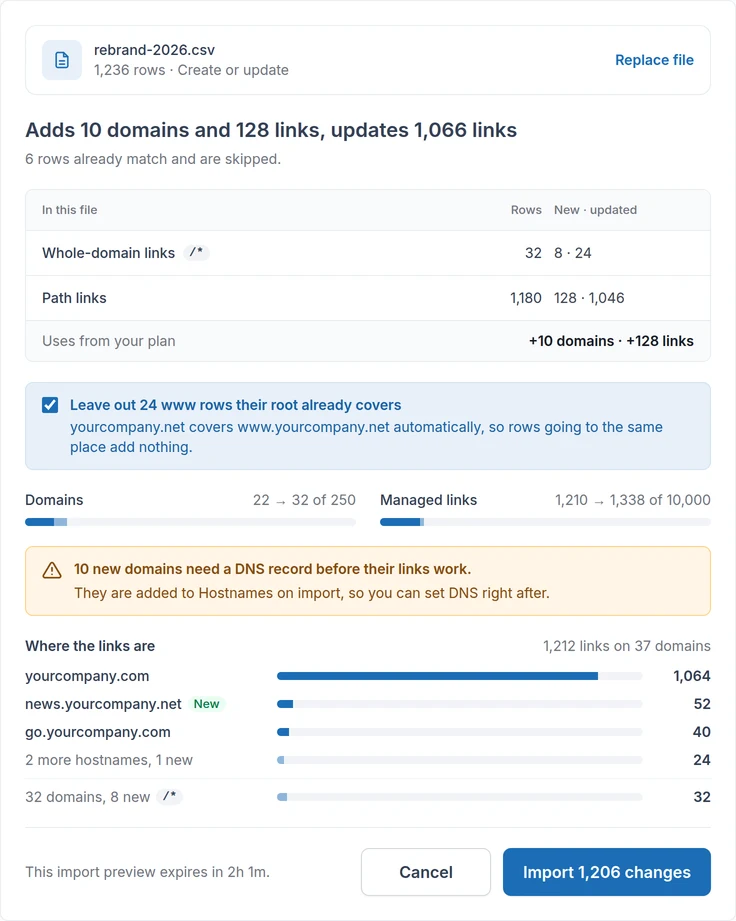
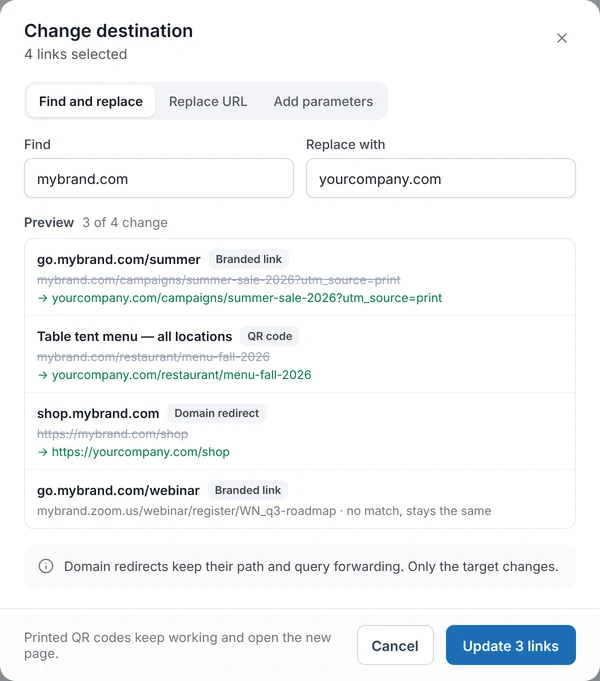
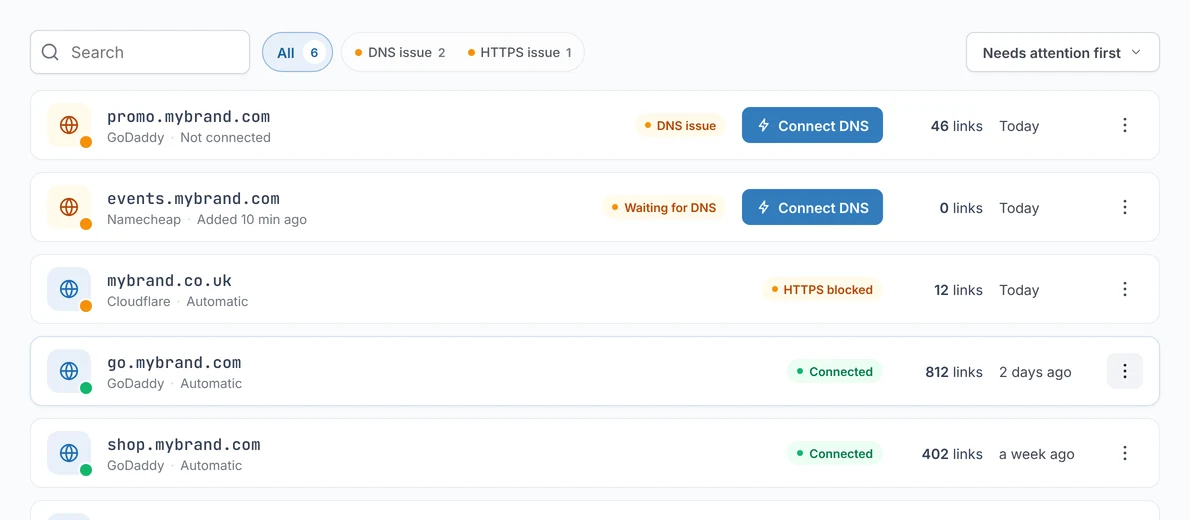
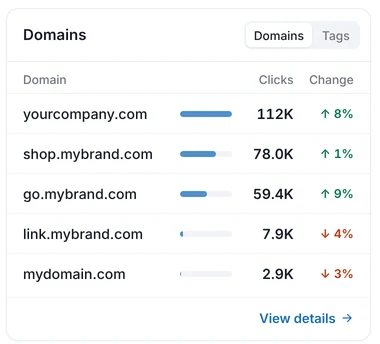
Import, change, check and measure thousands of domains in the same place your team already manages redirects.
Getting started
From a spreadsheet to a live portfolio in five steps
- 1
Import domains
Upload a CSV or registrar export, or add them through the API. Review what will be added before anything runs.
- 2
Configure destinations
Set a destination per domain or per group, with 301 or 302, path forwarding and URL rules.
- 3
Complete DNS
Point each domain to RedirHub with dedicated nameservers or A and CNAME records. The console lists which domains still need it.
- 4
Verify HTTPS
Certificates are issued and renewed automatically, wildcards included. Each domain shows when it is live.
- 5
Manage continuously
Change destinations in bulk, watch status and traffic, and automate with the API as the portfolio grows.
Why move
The work you stop doing
Registrar forwarding works for a few domains. Your own redirect server works until someone has to maintain it. At portfolio scale both turn into a job.
| Task | Registrar, one domain at a time | Your own redirect server | RedirHub |
|---|---|---|---|
| Add 1,000 domains | A forwarding form per domain, per registrar account | Config entries, deploys and a DNS change for each | One CSV import, reviewed before it runs |
| Change where a group points | Edit each domain again | Edit config, test, redeploy | Find and replace across a tag, with a preview |
| HTTPS | Often missing on forwarded domains | Issue, renew and monitor certificates yourself | Automatic on every domain, renewed for you |
| Know what is broken | Check registrars one by one | Build your own checks | DNS and HTTPS status for every domain in one list |
| Uptime and scale | Depends on each registrar | Servers, patching and on-call are yours | A global edge network, nothing to run |
| Team access and automation | Shared registrar logins | Whoever has server access | Roles for your team, REST API and MCP |
Capacity and pricing
Priced by the domains and links you run
Every plan counts two things: connected domains, and managed links (URL rules, branded links and migration mappings). Pick your portfolio size to see the monthly price.
Core
For teams running reliable redirects, branded links, QR codes and migrations.
$249/mo
- 1,000 domains
- 2,500 managed links
Pro
More capacity plus monitoring, analytics and control for business-critical infrastructure.
$349/mo
- 1,000 domains
- 10,000 managed links
Enterprise
For very large portfolios, high traffic, advanced security and tailored infrastructure.
Tailored to your portfolio
Domains, managed links, and traffic capacity agreed for your operating requirements.
Contact salesUSD per month, billed monthly. Annual billing and extra managed links are on the pricing page.
Customers
Portfolios already running on RedirHub
The team behind ExpiredDomains.com, the research workspace for expired, auction and aftermarket domains.
- domains live on HTTPS, certificates renewed automatically
- 300,000+
“It works like a charm. Redirecting domain names with SSL is a huge pain, and I have to do it frequently, often at mass. Now it is a few clicks. It just works.”
- URL rules managed
- 10,000+
- visits redirected each month
- 150k+
- workspace for the whole team
- One
“Simple and straightforward with no fluff. The redirect tool is particularly useful, especially for mass URL redirection and capturing old traffic from an unused subdomain to our main site.”
“It works well for redirecting multiple domain names to the same website. Setting it up is very easy, and I appreciate how it saves money by not needing a web server for every domain.”
“I use RedirHub to manage URL forwarding and bulk redirects without manual server configuration. Unlike self-hosted Nginx rules, it is built specifically for technical redirects with automatic SSL, bulk management, and wildcard support.”
“Easy interface to set up and manage my domains. Automatic SSL certificate setup. Best service on the market.”
FAQ