DNS in CNAME: Setup Rules, Limits, and Common Mistakes

Key takeaways
A CNAME makes a hostname an alias for exactly one other name, and a name that holds a CNAME can hold nothing else: no MX, TXT, A or AAAA record. That rules it out for the bare domain, mail hostnames and any name that carries a verification TXT. Use it on subdomains such as www, handle the apex with A and AAAA records or a provider alias plus a redirect to www, list a name's existing records before you add one, and test from more than one resolver after the change.
A CNAME record makes one DNS name an alias that points to another name, and resolvers then look up that second name to get the final answer. It has been part of DNS since November 1987, it permits exactly one canonical target, and it cannot share a hostname with anything else.
Which raises the question most site owners only ask after something breaks. If a CNAME is just an alias, a forwarding note attached to a name, why does adding one stop password-reset emails from arriving? Why does a domain-verification token disappear?
The alias isn't the problem. What the alias takes over is the problem. A CNAME doesn't add a mapping alongside a hostname's existing data. It replaces the name's identity, and anyone who treats DNS in CNAME setups as a web-hosting shortcut is one record away from an outage that never announces itself.
What a CNAME Record Does in DNS#
The mailbox picture is the right one to hold onto. Mail forwarded from an old apartment still reaches you after you move, and the forwarding note can be rewritten without every sender updating their address book. A CNAME works the same way for names. The hostname people type stays fixed, while the target it resolves to can change as often as the hosting provider needs.
That convenience has a boundary that surprises site owners. A CNAME is a constraint on the whole hostname, not a small alias marker attached beside the other records. Once a name carries a CNAME, the normal records for that exact name step aside. This is why a change that looks like a hosting tweak can affect mail routes, verification text or the bare domain in one move.
RFC 1034[1] defined the canonical-name record as part of the Domain Name System's core concepts and facilities. The same document set the integrity rule that governs every decision below: a name carrying a CNAME carries no other ordinary DNS data. The record also has one canonical target. A hostname can point through a single target, but it cannot hold several competing destinations.
The records themselves sit on authoritative servers in facilities that answer DNS questions for a zone. The network path between a resolver and those facilities belongs to the transport layer, including work done by a telecom infrastructure partner for carriers[2]. DNS operators still control the zone itself: the names, record types, targets and TTLs that define what each hostname means.
The four parts of a CNAME line#
Every record entry reads as four pieces in a row. The owner name is the alias, the hostname visitors use. The record type is CNAME. The target is the canonical name the alias points to, written in full. The TTL is a number of seconds that tells caches how long to keep the answer, so a short TTL lets a change travel quickly and a long one holds an old answer for hours.
| Record | Stores | Points to | Example |
|---|---|---|---|
| CNAME | Alias to another hostname | Another DNS name | shop.example.com CNAME hosting.example.net |
| A | IPv4 address | An IP address | example.com A 192.0.2.10 |
| AAAA | IPv6 address | An IPv6 address | example.com AAAA 2001:db8::10 |
| MX | Mail server route | A mail host name | example.com MX 10 mail.example.net |
| TXT | Text data for verification and policy | Text value | example.com TXT domain-verification token |
| NS | Authoritative nameservers | A nameserver host name | example.com NS ns1.example.net |
Read the table by asking what each record holds rather than what it does. A and AAAA records hold addresses, one per IP version. A CNAME holds another name and nothing else. MX holds a route to a mail host, TXT holds text for verification and mail policy, and NS holds the servers that answer for the zone.
One test settles most cases. If a hostname should follow another hostname, use a CNAME. If it should hold an address, a mail route or a text value, use the record type that holds that thing. The two never sit side by side, which is where DNS in CNAME work gets awkward in practice.
The bare domain needs extra care. If example.com carries a CNAME, the same rule that applies to shop.example.com still applies. Mail routing, verification records and host-based services that depend on data at the root can be displaced. The deployment-safe pattern is to keep the root authoritative for its own records and place the alias on a hostname that has no competing data.
A CNAME also isn't a redirect. If the goal is moving a visitor from an old URL to a new one, the difference between a DNS redirect and a server redirect decides which layer you configure, and CNAME vs redirect explains why a CNAME alone cannot send a domain's visitors to another site.
How a Resolver Follows a CNAME Chain#
Every visitor who loads a page on an aliased hostname triggers the same short sequence. You never see it in the browser, but it runs on each cold lookup, and knowing the order tells you where a failure came from when one name in the path misbehaves.
- The browser asks its resolver for app.example.com.
- The resolver queries the authoritative server for example.com and gets back a CNAME pointing app.example.com to app.cdn.net. It matters that the answer is a name, not an address.
- The resolver stops looking for an address at the alias and asks for app.cdn.net instead, because the alias has no address of its own to give.
- The authoritative server for cdn.net returns an A record holding the destination address.
- The resolver hands that address to the browser and caches each answer for its own TTL.
The flow looks like this in practice.
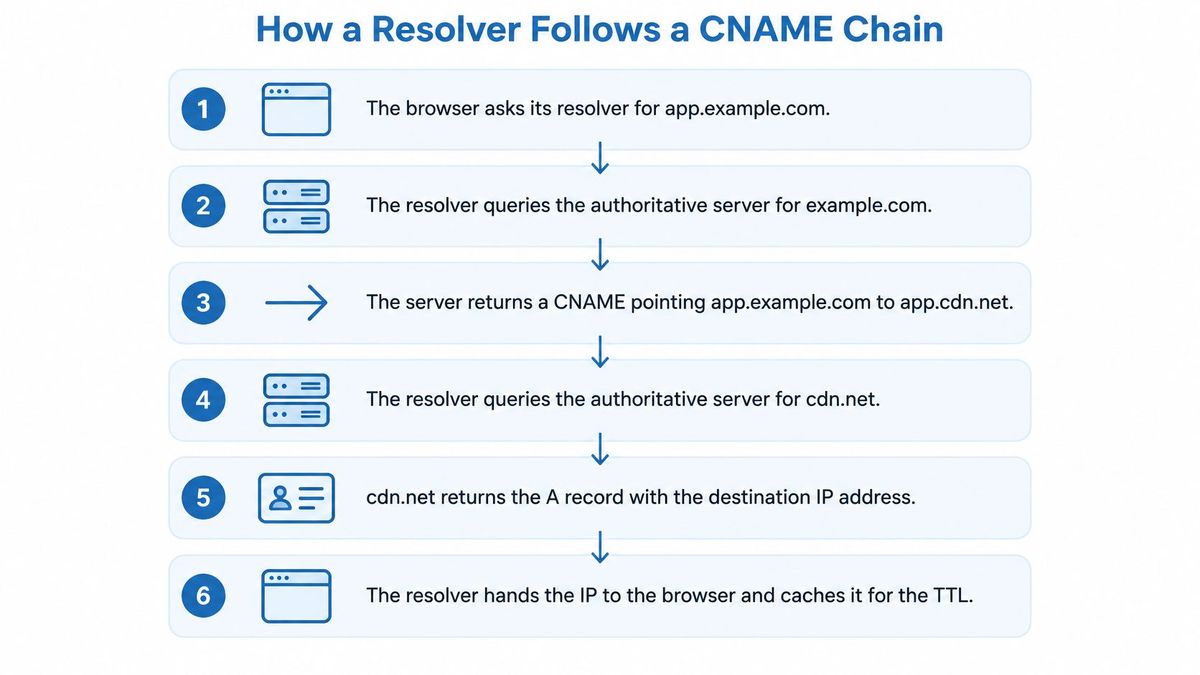
The visitor never sees the chain, only the final address. That invisibility cuts both ways: the alias can be changed without touching links or bookmarks, and it can break without anyone noticing which hop failed.
When chains get long#
A CNAME can point at another CNAME. The hosting platform may alias its own hostname to a CDN, and the CDN may alias once more. Each hop adds a lookup and a dependency on a different company's DNS being healthy at the moment your visitor arrives. Long chains slow the first visit for every new user and make troubleshooting a guessing game across providers.
Reading a chain yourself#
Running dig app.example.com prints the CNAME line before the address line, which confirms the alias is answering at all. dig +trace app.example.com walks each delegation from the root down, which is how you spot the hop that's failing. A healthy answer shows the alias, then the final record with an address, and no error status in between.
Rules That Decide Where a CNAME Fits#
One rule explains nearly every CNAME surprise: a name that holds a CNAME holds nothing else, and it can point to only one target. The reason is mechanical. A resolver that finds a CNAME at a name has been told to look somewhere else, so an A, AAAA, MX or TXT record at that same name would be data the resolver is instructed to ignore. Rather than leave that ambiguity open, the standards forbid it outright.
Operational guidance has said so plainly for decades. RFC 1912[3], the February 1996 document on common DNS configuration errors, states that an alias cannot also carry an MX record for email, an A record for an address, or even a TXT record, and warns against pairing CNAMEs with records that point to other names, including NS, PTR and other CNAMEs.
| Owner name | CNAME allowed? | Reason |
|---|---|---|
| www.example.com | Yes | Nothing else lives at the name |
| blog.example.com | Yes | Only if no other records exist there |
| example.com (bare domain) | No | SOA and NS records must exist at the apex |
| mail.example.com | No | MX must point to a real host, not an alias |
| _dmarc.example.com | No | Holds the TXT record for the DMARC policy |
| app.example.com with verification TXT | No, unless the TXT moves | The TXT record conflicts with the alias |
The names where it goes wrong#
A plain www is the easy case, since the name exists only to send traffic to a platform and nothing else wants to live there. A blog subdomain behaves the same way until someone adds a verification TXT for a marketing tool, at which point the record set has to change.
The bare domain is ruled out because the apex carries SOA and NS records by definition, and often MX, TXT and address records too. A mail hostname fails for a related reason: its MX record has to identify a real mail exchanger, not a name that is itself an alias. A DMARC record name exists solely to hold its policy text, so an alias there would erase the policy. An app subdomain with a verification TXT has to choose: keep the TXT and skip the alias, or move the alias to a name with nothing else on it.
Why a CNAME Fails on the Bare Domain#
The usual advice stops at "no CNAME at the apex" and walks away. That's accurate and useless on its own, because the bare domain still has to send traffic somewhere. The question worth answering is what replaces the record you can't use.

Three replacements work, and they aren't interchangeable. The gap most CNAME guides leave at the apex[4] is exactly here: providers sell features under names that sound like the same thing, and buyers find out the differences later.
- Provider apex aliasing, sold as ALIAS, ANAME or CNAME flattening. The DNS operator resolves your target itself and hands back A and AAAA answers, so the apex behaves as though it pointed at a hostname. Behavior differs between providers, DNSSEC handling differs too, and the ANAME proposal at the IETF never became a standard, so each provider's version works only on that provider.
- Plain A and AAAA records pointing at a stable address the host gives you. Direct, portable, and fully under your control, at the cost of updating them yourself when the address changes.
- An HTTP redirect from the bare domain to www, a 301 configured at the web server or the edge layer. Nothing in DNS performs that redirect; the record only decides where the request lands.
Changing a DNS record doesn't create a redirect or an HTTPS certificate. Those are separate pieces of work, and teams that assume otherwise spend a morning debugging a site that resolves perfectly. If the bare domain already reaches your own CDN, app or CMS and you'd rather not touch the zone, Integration Mode connects it to RedirHub without changing its DNS or adding any DNS record: your platform serves the redirects and keeps its own HTTPS.
For a brand moving domains, the complete arrangement is the one to plan for up front: a CNAME for www, the apex handled by a provider alias or by A and AAAA records, and an explicit redirect between the apex and www so both addresses land on the same final URL.
What the redirect between the two names costs#
The apex-to-www redirect adds one HTTP round trip for every visitor who types the bare domain, on top of the DNS lookups, and how long it takes depends on who answers it. Our redirect speed benchmark times public redirects from Washington, D.C., Frankfurt and Tokyo every hour, over a fresh connection and without following the redirect (RedirHub redirect speed benchmark[5]). Across the 29 providers it measured, the median time to first byte for 18–25 November 2026 ran from 12 ms to 450 ms:
| Provider | Median time to first byte |
|---|---|
| Amazon CloudFront | 12 ms |
| Fastly | 13 ms |
| RedirHub | 15 ms |
| Cloudflare | 107 ms |
| Bitly | 109 ms |
| nginx | 141 ms |
| Apache | 360 ms |
| BL.INK | 450 ms |
Each figure is the mean of the three locations' medians. A redirect answered on an edge network close to the visitor costs a few milliseconds; one answered by a single origin server costs as much as the distance to that server. Time your own with curl -sS -o /dev/null -w '%{http_code} %{redirect_url} %{time_starttransfer}' https://example.com from more than one region.
Set Up a CNAME Without Breaking Live Records#
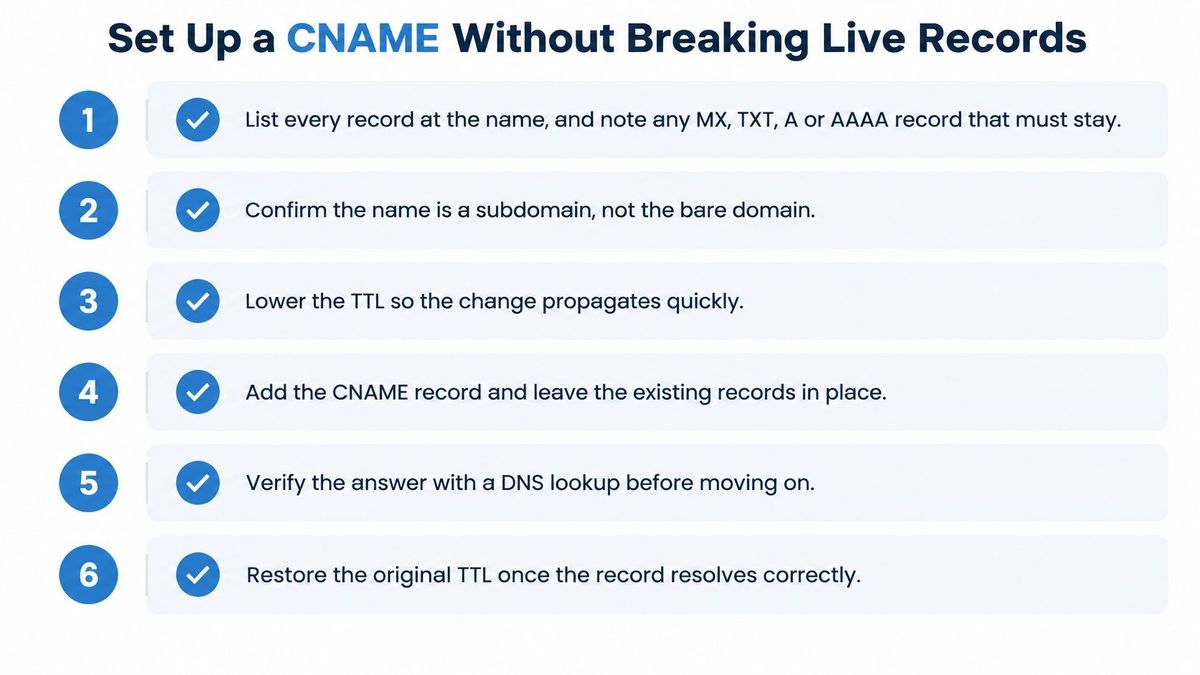
A CNAME change replaces everything at a hostname rather than adding to it. The moment the record saves, that name holds only the alias, so whatever used to live there has to be accounted for first. The order of the steps matters more than any single one, and that order is where failures in this work happen.
- List what already lives at the name. Query the hostname for MX, TXT, A and AAAA records and write down everything that has to survive. A non-empty list means the name cannot take a CNAME at all. Stop and pick a different hostname rather than deleting records to make room.
- Confirm it is a subdomain. www, go, links and app can all hold an alias safely. The bare domain cannot.
- Lower the TTL a day ahead. A shorter TTL makes caches release the old answer sooner, which shrinks the window where different resolvers disagree about what the name points to.
- Add the CNAME with the full target name. Provider interfaces sometimes append your zone name automatically, so read the preview before saving. A target saved as "cdn.vendor.com.yourdomain.com" resolves nowhere.
- Wait out the old TTL, then test from two directions. Query the authoritative server and a public recursive resolver separately. Cached answers persist after the target changes, and RFC 2181[6] lets every cache keep an answer until its TTL runs out, so one clean lookup proves very little.
- Confirm the destination over HTTPS. Load the page in a browser. The alias moves traffic; it does not issue a certificate on its own, so a hostname that resolves correctly can still throw a browser warning.
- Keep the old target active for one full TTL. If the new answer turns out wrong, you roll back in seconds instead of waiting for caches to expire again.
If the domain is being connected to a redirect platform rather than migrated between hosts, the Connect DNS walkthrough covers automatic and manual setup and flags a missing record before the domain goes live.
What the change does not touch#
This procedure never moves nameservers. The domain stays with its registrar, the zone stays where it is, and every record you do not edit keeps working exactly as before. Mail delivery, verification tokens and the other hostnames in the zone are unaffected, because a CNAME only rewrites the one name it sits on.
Mistakes That Break Email, Verification and Chains#
Most CNAME mistakes never produce an error page. The site keeps loading, which is precisely why nobody investigates until something quieter stops working days later.
A CNAME dropped onto a mail hostname breaks routing because MX records must name a real mail exchanger rather than an alias. The fix is to move mail to a name that holds the MX and the related text records, and leave aliasing to names that serve web traffic only.
A CNAME on a name that owes a verification TXT is the second silent failure. A SaaS tool asks for a TXT record to prove domain ownership, someone adds an alias at that same name, and the token can no longer exist. Keep the TXT where the vendor expects it, or run the alias on a different subdomain. The records email authentication actually needs belong at names that are never aliased.
Guidance on the record's wider role warns against pointing NS, MX or PTR roles at a CNAME target, and notes that an alias can prevent required records from existing at a hostname while the site itself appears fine, as these notes on CNAME rules and their knock-on effects[7] describe.
Measurement work shows how much of this stays hidden. A 2025 study that explored the full DNS tree, 87 TB of data covering 812 million domains, found that the shortcuts common measurement tools take can hide corner cases and alter conclusions, according to the study's authors[8].
Two more failures are worth naming. A chain through a provider that renames its target turns your alias into a moving object, so point at the vendor's documented stable hostname and watch the whole chain rather than the page. And a new web host doesn't repair DNS, because the record set travels with the domain, not with the server it happens to reach today.
What to check after any change#
Confirm the authoritative answer first, then follow the complete chain to the final record rather than stopping at the first response. If the zone uses DNSSEC, check that validation still passes. Test A, AAAA, MX and TXT from more than one resolver, since a single vantage point can hide a cached or geo-specific answer. HTTPS behavior is the last check, not the first.
Redirect a domain without rebuilding its zone
Point a subdomain at RedirHub with a CNAME, or the root domain with an A record, and the HTTPS certificate is issued automatically once DNS is in place. A root domain covers its www variant in one domain slot when both go to the same destination, and every other record in the zone stays as it is.
See the redirect serviceSources
- [1]RFC 1034, USPTO PTAB document
- [2]Southern Tier Resources
- [3]RFC 1912: Common DNS Operational and Configuration Errors, RFC Editor
- [4]Why You Cannot Put a CNAME on the Apex Domain, DEV Community
- [5]RedirHub redirect speed benchmark, 18–25 November 2026
- [6]RFC 2181: Clarifications to the DNS Specification, RFC Editor
- [7]CNAME rules in DNS - what you need to know, Simon Painter
- [8]A Tree in a Tree: Measuring Biases of Partial DNS Tree Exploration, Passive and Active Measurement 2025
Frequently asked questions
No. A name that holds a CNAME can hold no other ordinary DNS data, so an MX, TXT, A or AAAA record at the same name conflicts with it. RFC 1912 states plainly that an alias cannot also carry an MX, an A or even a TXT record.
No. The bare domain must carry SOA and NS records, so a CNAME cannot sit there. Use A and AAAA records or your DNS provider's ALIAS, ANAME or CNAME flattening feature at the apex, put the CNAME on www, and redirect one name to the other.
No. A CNAME only tells resolvers which name to look up next, and the browser keeps showing the original hostname. Sending visitors to a new URL needs an HTTP redirect such as a 301, answered by a web server or a redirect service.
Resolvers keep the old answer until its TTL runs out, so the change reaches everyone once the previous TTL has passed. Lowering the TTL a day before the change shortens that window. Query the authoritative server and a public resolver separately to confirm the new answer.
Run dig followed by the hostname: the answer shows the CNAME line and then the final address record. dig +trace walks the delegation from the root down, which shows the hop that fails when a chain breaks.

Leo Astarothman is the Brand & Content Lead at RedirHub, where he shapes the company's visual identity, educational content, product experiences, and marketing strategies. He also specializes in system design. Simplifying complex redirect infrastructure into practical resources, product experiences, and campaigns that help businesses understand and adopt modern redirect management.
Related Articles
View All Articles