Key takeaways
Email DNS records do separate jobs: MX routes inbound mail, SPF lists authorized senders, DKIM signs messages and DMARC ties the result to the visible sender address. SPF stops working past 10 DNS lookups across its whole chain, so test the chain before adding a sender. Start DMARC in monitoring mode, review the aggregate reports and enforce only when every legitimate sender is accounted for. Check records at the authoritative server and with a real test message, and keep a named owner for every sender and every change.
Your campaign is ready, but test messages keep landing in spam. Meanwhile, finance has received a suspicious invoice that appears to come from your domain, and a customer says their password-reset email never arrived. Before you change the subject line or blame the sending platform, check the shared dependency: email DNS records.
Why Email DNS Records Matter More Than Most Teams Realize#
Email DNS records aren't just settings you copy during onboarding. They're operational controls that receiving servers consult when routing messages, evaluating sender identity, and deciding how to handle authentication failures. An incomplete setup can undermine legitimate mail while leaving your domain vulnerable to impersonation.
That doesn't mean every delivery problem starts in DNS. Treat DNS as an early diagnostic checkpoint, not a universal explanation for spam placement or missing messages.

Think in jobs, not acronyms#
Each record family answers a different operational question:
- MX handles inbound routing. Where should another server deliver mail addressed to your domain?
- SPF identifies authorized infrastructure. Is the connecting sender permitted to send for the domain being checked?
- DKIM supports signature verification. Can the receiver validate the message's cryptographic signature using a published public key?
- DMARC connects identity to policy. Does authentication support the sender identity the recipient sees, and what handling does the domain owner request when it doesn't?
These controls work together, but publishing them isn't the same as operating them successfully. A marketing platform might be authorized in SPF while using an identity that doesn't satisfy your DMARC policy. A DKIM record might exist while the sending service uses a different selector.
Presence isn't protection#
A useful historical warning comes from the Logicalis and Sendmarc cyberthreat report[1]: its cited 2022 industry findings estimated fewer than 6 million DMARC records worldwide, with only 19.6% of email domains using the strongest rejection policy. Monitoring was the most common policy.
The practical lesson isn't to rush into blocking. It's to assign someone responsibility for the distance between publication and enforcement: checking legitimate senders, reviewing failures, and approving changes. A green check beside a DNS record can't do that work for you.
The Four Core Record Types and What Each One Actually Does#
Start with direction. Receiving mail and authenticating outgoing mail are separate jobs. Your mailbox provider might handle both, but that doesn't make the records interchangeable.

Read the record by its purpose#
| Record family | Mental model | What to recognize in your DNS panel |
|---|---|---|
| MX | The receiving address | A mail-server destination and a priority field |
| SPF | The sending guest list | A TXT entry containing the sending provider's authorization instructions |
| DKIM | A tamper-evident signature | A selector-specific public-key entry or provider-directed delegation |
| DMARC | The identity-policy layer | A dedicated TXT entry containing handling and reporting instructions |
MX directs inbound delivery. Its priority field expresses preference among receiving servers, allowing an alternative destination when the preferred route isn't available. Changing MX won't authorize a campaign platform to send mail.
SPF is published as TXT, even if your DNS interface offers other record types. The important distinction is that it authorizes infrastructure for the identity SPF evaluates, not automatically every address displayed to a reader.
DKIM relies on a signing system holding the private key and receivers retrieving the corresponding public key. The selector identifies which key to retrieve, so knowing only the sending domain isn't enough to check the setup.
Understand the relationship before editing#
DMARC adds the connection between authenticated identities and the visible sender address. Think of SPF and DKIM as evidence, then DMARC as the rule for deciding whether that evidence supports the claimed identity.
For another conceptual explanation to share with colleagues, MailAdept's SPF, DKIM and DMARC explained[2] is a useful companion. When translating provider instructions into DNS-panel fields, consult the guide to supported DNS record types.
Recipient-provider requirements have also influenced adoption. A review of DMARC adoption during 2024[3] describes accelerated publication after stricter sender requirements.
Don't substitute illustrative values for your provider's instructions. Identify the family, confirm the intended hostname, and establish which service owns the configuration before saving anything.
The SPF Lookup Limit and How Records Break in Production#
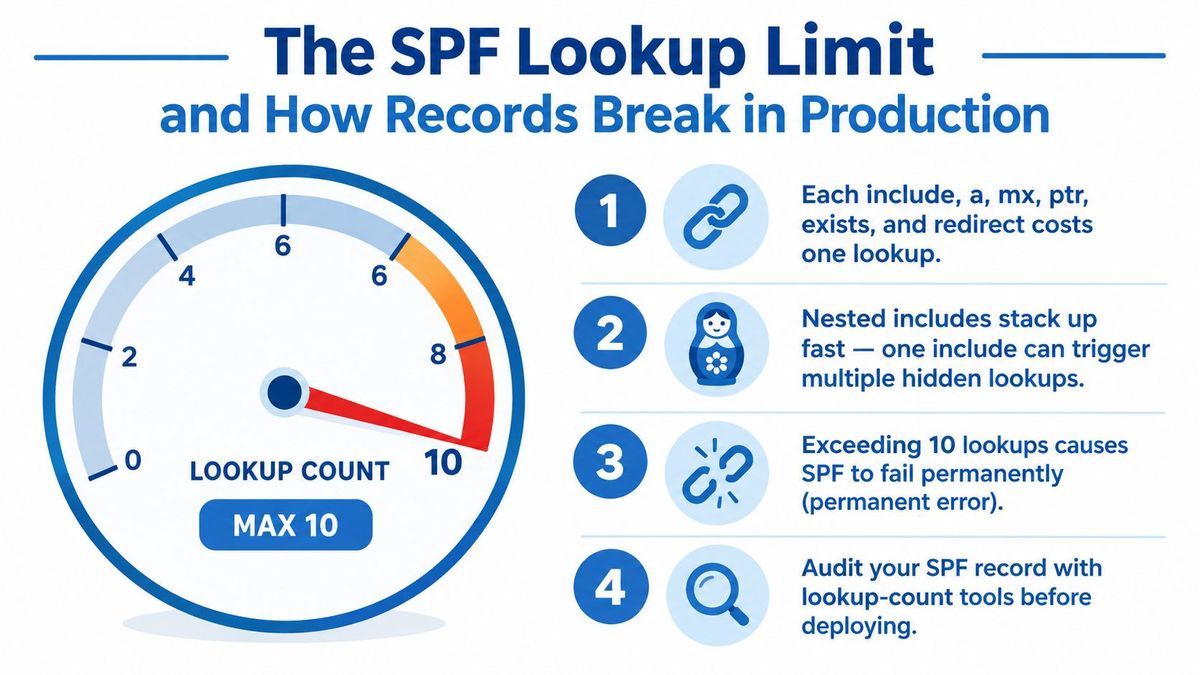
SPF has a scaling constraint that isn't obvious from a DNS editor: the text you can save isn't necessarily a policy receivers can evaluate successfully. Adding another authorized platform can break the evaluation even when its individual instructions are valid.
The SPF specification[4] limits evaluation to 10 DNS-querying mechanisms or modifiers across the lookup chain. The counted terms include include, a, mx, ptr, and exists, plus redirect; nested authorization records consume the same budget, and exceeding it requires a permerror result.
Count the chain, not the visible entries#
A provider authorization can lead to additional provider-managed records. Your editor shows the entry you added, but the receiver follows the underlying chain. That's why counting visible vendor names isn't a reliable capacity check.
Before adding a sender, use a lookup-aware validator such as the mailX SPF checker[5]. Inspect the nested dependencies as well as the top-level syntax, then retain the results with the change request.
Practical rule: Treat every new sending provider as a change to a shared authentication dependency, not an isolated marketing setting.
Choose maintainability over a crowded record#
Explicit IPv4 and IPv6 authorization mechanisms don't consume that DNS-querying budget. They're useful where your team can reliably maintain the sending addresses, but replacing provider-managed authorization with copied addresses creates its own upkeep obligation.
The same specification recommends keeping SPF-related DNS responses within traditional 512-octet guidance. That's response-size guidance, not a separate character allowance for your editor.
Prefer a deliberate sender inventory over an ever-growing list. Remove retired services, review recursive dependencies, and test after additions. A syntactically accepted record is only the beginning of verification.
What a published setup looks like: RedirHub's own domain#
On 22 October 2026 we queried RedirHub's own domain through Google Public DNS, a resolver anyone can use, with the two commands below, run from a cloud server. The published DMARC policy was p=reject, the strongest policy and the one the Logicalis report counted on 19.6% of email domains. The domain has one MX record, and its SPF record authorizes three sending services through include mechanisms, which uses three of the ten DNS lookups before any nested records are counted.
bashcurl -s "https://dns.google/resolve?name=_dmarc.redirhub.com&type=TXT"
curl -s "https://dns.google/resolve?name=redirhub.com&type=MX"
Method: one query per record type, with the answers read as published at that moment. The TTL on these records is 300 seconds, so a later run can differ after an edit. Change the name to check any domain you manage.
DMARC Rollout Without Breaking Legitimate Mail#
DMARC alignment is the distinction that causes the most confusion. A message can pass SPF for a vendor-controlled sending identity without authenticating the brand identity displayed to the recipient.
Under the DMARC specification[6], a passing, aligned SPF result or a passing, aligned DKIM result can satisfy DMARC. Relaxed alignment allows organizationally related domains; strict alignment requires an exact domain match. You don't need both methods to pass, but you do need the successful method to support the visible sender identity.

Let observed traffic determine readiness#
Begin with monitoring mode and an owned reporting destination. Aggregate reports provide the evidence for distinguishing legitimate services from unknown or unauthorized sources.
- Inventory actual senders. Compare observed sources with your marketing, support, transactional, and internal-mail systems.
- Investigate alignment failures. An approved vendor isn't necessarily configured correctly. Check its sending identity and DKIM setup.
- Review awkward paths. Include delegated subdomains, forwarding, and less-frequent business workflows rather than testing only the main newsletter.
- Approve enforcement deliberately. Advance to quarantine and then rejection when reviewed traffic supports the decision.
The rua tag identifies aggregate-report destinations. Don't confuse it with ruf, which concerns failure reports rather than the aggregate stream. Build the migration around evidence you receive, not the assumption that every requested reporting channel will supply complete visibility.
Monitoring needs an exit criterion#
Use the MailGenius DMARC checker[7] to inspect published policy, then compare the result with reports and test messages. A checker can't tell you whether an unrecognized sender is a forgotten billing platform.
The distinction matters: Fortra's 2025 analysis of DMARC adoption[8] counts domains with a valid DMARC record separately from domains whose policy is quarantine or reject. Publication and enforcement remain different milestones.
Monitoring is a discovery phase, not a permanent substitute for enforcement.
Assign an owner to every unresolved legitimate source. Don't advance on a calendar deadline while critical mail remains unexplained, and don't leave monitoring unattended once discovery is complete.
Transport Security with MTA-STS and TLS-RPT#
Authentication addresses identity. Transport security addresses the connection carrying the message. Those are different questions, so successful SPF, DKIM, and DMARC results shouldn't be treated as evidence that SMTP transport was protected.
The distinction is described in this overview of email DNS and transport-security controls[9]: MTA-STS publishes a policy for requiring TLS when receiving mail, while TLS-RPT provides reports about transport-encryption failures. Together, they help teams investigate problems that authentication reporting doesn't explain.
Separate the policy from the reporting channel#
| Control | Operational purpose | What your team must own |
|---|---|---|
| MTA-STS | Publish receiving transport requirements | DNS signaling, the hosted policy, receiving-host coverage, and certificate readiness |
| TLS-RPT | Receive transport failure information | Reporting destination, report review, and incident follow-up |
| Authentication records | Establish sender identity and handling policy | Authorized senders, signing configuration, alignment, and enforcement |
MTA-STS isn't solely a DNS entry. Your team also needs a reachable hosted policy that agrees with the receiving infrastructure. A DNS change without the corresponding endpoint checks leaves an incomplete deployment.
TLS-RPT supplies a separate troubleshooting view. Certificate problems, failed TLS negotiation, and potential downgrade conditions belong in this investigation, rather than prompting unrelated SPF edits.
Treat receiving-provider changes as security changes#
Before moving mail providers, compare the proposed receiving hosts with the transport policy. Confirm who manages certificates and who can update the hosted policy if the cutover changes.
Assign someone to read the reports, too. A reporting mailbox without a review process provides storage, not operational visibility.
Deployment check: Verify the policy endpoint and the receiving service together. Neither proves the other is ready.
Don't assume adoption elsewhere means your domain is protected. For agencies and multi-domain teams, assess readiness domain by domain, especially where mailbox hosting, DNS ownership, and website hosting belong to different organizations. The control only works operationally when those owners can coordinate changes.
Common Email DNS Problems and How to Diagnose Them#
The following are hypothetical troubleshooting scenarios, not customer case studies. Each starts with a symptom and a narrowly targeted check, because random DNS edits make incidents harder to understand.
A vendor addition breaks unrelated mail#
Marketing authorizes a new sending platform. Later, the transactional provider reports SPF errors even though nobody changed its settings.
Inspect the receiving system's authentication results for permerror, then evaluate the complete SPF chain using the lookup method described earlier. Compare the previous and current records, including provider-controlled dependencies. Don't assume the transactional application is responsible just because its messages exposed the failure.
A key rotation leaves queued messages behind#
An administrator activates a new DKIM key and immediately removes the previous selector. Messages signed before the change are still working through delivery queues.
Take an affected message's signing domain and selector from its DKIM signature, then inspect that precise DNS location. Checking only the newest selector misses the relevant key. The recovery decision should focus on whether the retired public key must remain available for outstanding mail.
A website migration omits a mail control#
A team moves DNS hosting for a website launch. The new website works, but a comparison with the old zone reveals that the DMARC entry wasn't copied.
Check the authoritative DNS response for the expected policy location, then compare the complete mail-related inventory against the migration export. Avoid assuming that website success proves the zone migration was complete.
- Separate absence from caching. Confirm what the authoritative service publishes before interpreting a resolver's older answer.
- Record the timeline. Capture the edit time, previous values, and TTL assumptions.
- Check migration expectations. Use the DNS change timing guide when planning verification.
The diagnostic habit is consistent: identify the failing stage, collect evidence from that stage, and change only what the evidence supports.
A Practical Toolkit for Checking Your Records#
Choose tools by the question you're trying to answer. DNS inspection, policy validation, and received-message verification aren't interchangeable. A successful DNS lookup doesn't prove that your application signed the message you just sent.
Verification Methods Compared#
| Method | Best for | Example use |
|---|---|---|
| dig, nslookup, or host | Inspecting published DNS answers | Compare MX, TXT, and CNAME responses with approved provider instructions |
| Authoritative-server queries | Establishing the publisher's current state | Distinguish an unapplied edit from a cached answer |
| mailX SPF checker | Reviewing SPF evaluation constraints | Examine nested authorization dependencies |
| MailGenius DMARC checker | Inspecting the published DMARC policy | Confirm the intended handling and reporting settings |
| MXToolbox tools | Supplementary DNS and mail diagnostics | Cross-check findings from another interface |
| Google's Dig tool | Browser-based DNS inspection | Check a record without a local terminal |
| Received-message inspection | Seeing what a receiver evaluated | Review SPF, DKIM, and DMARC results for an actual test |
For command-line work, select the record type explicitly and confirm which nameserver answered. When checking DKIM delegation, inspect the CNAME path as well as the eventual public-key entry. Otherwise, you might verify a destination key while overlooking an incorrect alias.
Test the sending path, not just the domain#
Send a test from each relevant platform to an inbox you control. In Gmail, open Show original and inspect the authentication results alongside the message's signing identity.
Keep the message and DNS observations together in the change ticket. If they disagree, investigate timing, the queried hostname, and the sending path before editing again. Repeat checks after the relevant cache window rather than treating an immediate mixed result as conclusive.
An Operational Playbook for Email DNS#
Operate email DNS like a small production service: named owners, reviewed changes, observable outcomes, and a recovery path. The objective isn't to accumulate records. It's to preserve legitimate communication while reducing opportunities to misuse your domain.
Establish ownership before changing policy#
Start with an inventory that connects business services to technical owners. Include the DNS zone, sending platforms, receiving provider, signing-key management, reporting destinations, and transport-policy hosting.
Make that inventory useful during an incident. Someone should be able to identify who can disable a compromised sender, restore a missing selector, or approve a policy rollback without searching old onboarding emails.
- Validate the foundation. Compare published records with current provider instructions and remove obsolete authorizations through review.
- Close the monitoring loop. Turn unexplained sources and failures into assigned work, not an indefinitely growing report archive.
- Approve enforcement with evidence. Use the alignment review process already described, with explicit acceptance from owners of critical mail.
- Include transport readiness. Check policy hosting, certificate responsibilities, and report handling before receiving-service changes.
Make every edit reproducible#
Store approved record values and their purpose in version control or an equivalent change history. Plan TTL behavior before migrations, retain a known-good rollback, and test the affected sending and receiving paths after deployment.
If connecting a domain to a redirect service means moving its DNS hosting, copy the MX, SPF, DKIM and DMARC records across first. RedirHub's Connect DNS offers automatic setup through Domain Connect (Cloudflare today), manual setup with a CNAME or A record, and a Nameservers add-on, and the HTTPS certificate is issued automatically once DNS is in place (product facts as published in October 2026).
Keep web and email work coordinated without confusing their controls. Teams updating campaign destinations can use this guidance on email campaign links, while mail owners review authentication separately. A functioning redirect isn't an authentication test.
Schedule a review this week with whoever owns DNS and whoever approves sending vendors. Leave with an agreed inventory, an owner for unresolved failures, and a documented next enforcement decision. That's a more useful deliverable than another screenshot showing that the records exist.
Keep redirects and DNS in one place
Connect your domain to RedirHub with a CNAME or A record, or an automatic Domain Connect setup, and the HTTPS certificate is issued once DNS is in place. Core and Pro come with a 14-day free trial.
See how to connect DNSSources
- [1]2024 Cyberthreat Report: Exploring the state of email security & DMARC
- [2]Email Authentication: SPF, DKIM, DMARC & BIMI
- [3]2.3 million organizations embrace DMARC compliance
- [4]RFC 7208 - Sender Policy Framework (SPF) for Authorizing Use of Domains in Email, Version 1
- [5]SPF Checker: Free SPF Record Lookup & Syntax Check
- [6]RFC 7489 - Domain-based Message Authentication, Reporting, and Conformance (DMARC)
- [7]Free DMARC Checker Tool - Verify your DMARC Record Now!
- [8]DMARC Adoption Trends Q2 2025
- [9]DNS Records for Email: The Complete Guide
Frequently asked questions
MX records route inbound mail to your receiving servers. SPF lists the infrastructure allowed to send for a domain, DKIM publishes a public key so receivers can verify a message signature, and DMARC ties those results to the visible sender address and sets the policy. They do separate jobs, so one never replaces another.
The SPF specification (RFC 7208) limits evaluation to 10 DNS-querying mechanisms or modifiers, such as include, a, mx, ptr, exists and redirect, across the whole lookup chain. Nested records count against the same budget, and going over produces a permerror result. Test the full chain with a lookup-aware checker before adding a sending provider.
No. A passing, aligned SPF result or a passing, aligned DKIM result can satisfy DMARC. The method that passes must support the sender domain the recipient sees, so a vendor can pass SPF for its own domain and still fail DMARC for yours.
Start in monitoring mode with a reporting address you own, then use the aggregate reports to inventory real senders and fix alignment failures. Move to quarantine and then reject only when the reviewed traffic supports it, and assign an owner to every legitimate source that is still unexplained.
Use dig, nslookup, host or a browser-based DNS tool to read the published MX, TXT and CNAME answers, and query the authoritative server to tell an unapplied edit from a cached answer. Then send a test message from each platform to an inbox you control and read the SPF, DKIM and DMARC results, for example with Show original in Gmail.

Leo Astarothman is the Brand & Content Lead at RedirHub, where he shapes the company's visual identity, educational content, product experiences, and marketing strategies. He also specializes in system design. Simplifying complex redirect infrastructure into practical resources, product experiences, and campaigns that help businesses understand and adopt modern redirect management.
Related Articles
View All Articles