CNAME vs Redirect: What Each Does and When to Use It

Key takeaways
A CNAME works at the DNS layer and maps a hostname to another hostname. It never changes the URL in the visitor’s address bar. A redirect works at the HTTP layer. A server answers the request and sends the browser to a new URL. A CNAME alone cannot forward a domain. CNAME records are not HTTP redirects, so something still has to answer the request and issue the redirect. Use a CNAME to connect a subdomain to a service. Use a redirect to send traffic from one URL to another, keep SEO value, or preserve paths. Don’t put a CNAME on a name that also needs email records, and avoid it at the root of a domain.
A CNAME and a redirect solve different problems. A CNAME is a DNS alias: it tells the internet that one hostname is another name for a second hostname, so both end up at the same server. A redirect is a web server response that tells a browser to go to a different URL, and the visitor sees the address change. If you want a visitor who types old-domain.com to land on new-domain.com/page, you need a redirect. If you want go.yourbrand.com to be served by a platform you don’t host yourself, you need a CNAME. Most real setups use both, in that order.
What a CNAME record actually does#
CNAME stands for canonical name. A CNAME record maps one hostname to another domain name, and DNS then resolves that second name to an IP address. Hetzner’s DNS documentation[1] describes it this way and notes that CNAME records are often called alias records.
Say you create this record in your DNS zone:
go.yourbrand.com. CNAME edge.provider-example.net.When someone’s device looks up go.yourbrand.com, the resolver sees the alias, looks up edge.provider-example.net, and gets an IP address back. The browser then connects to that IP and asks for go.yourbrand.com. Nothing in this exchange tells the browser to go somewhere else. The address bar still reads go.yourbrand.com.
Why people reach for a CNAME#
A CNAME is the standard way to give a service your own hostname without hosting it yourself. Typical cases:
- Pointing
wwworshopat an e-commerce platform - Connecting
help.yourbrand.comto a support-desk tool - Pointing
go.yourbrand.comat a branded link platform - Verifying domain ownership or delegating a subdomain to a third party
The benefit is that the provider can change its servers and IP addresses without asking you to edit anything. Your record points at a name, and they maintain what the name resolves to.
CNAME chains slow things down#
A CNAME can point at another CNAME, but that is discouraged. TechTarget notes[2] that chained CNAMEs mean multiple DNS lookups before the final address is found, and the delay adds up with each hop. Keep your aliases one step away from the name that holds the real address.
Trailing dots matter#
When you enter a full hostname as the target, write it as a fully qualified name. Hetzner warns[1] that leaving off the trailing period can cause your own zone name to be appended to the target, which sends the alias to the wrong place. Many dashboards add the dot for you, so check how yours displays the saved record.
What a redirect actually does#
A redirect is an instruction from a web server. The browser requests a URL, the server replies with a status code and a Location header, and the browser makes a second request to that new address. The visitor sees the URL change.
That means a redirect needs three things a CNAME doesn’t provide:
- A server that receives the request for the original hostname
- A valid HTTPS certificate for that hostname, if the visitor typed
https:// - A rule that says where to send the request
The rule can be as simple as “everything on old.com goes to new.com” or as detailed as “old.com/pricing goes to new.com/plans.” Because redirects work at the URL level, they can keep paths and query strings intact, send different visitors to different places, and tell search engines whether a move is permanent. If you’re deciding between permanent and temporary status codes, our guide to 301 vs 302 redirects explains the SEO consequences of each.
CNAME vs redirect, side by side#
| CNAME record | HTTP redirect | |
|---|---|---|
| Layer | DNS | Web server (HTTP) |
| What it does | Makes one hostname an alias of another | Sends the browser to a new URL |
| Visitor sees | The original hostname stays in the address bar | The address bar changes to the target |
| Keeps paths and query strings | Not applicable, no URL handling | Yes, if the rule is built to |
| Needs a server to answer | Yes, at the target | Yes, at the original hostname |
| Works at the root domain | Not in standard DNS | Yes |
| SEO signal | None | Permanent or temporary status code |
| Typical use | Connecting a subdomain to a service | Moving, merging or forwarding domains |
The row to remember is “needs a server to answer.” TechTarget explains[2] that a CNAME doesn’t produce a redirect on its own: the server receiving the HTTP request has to be configured to return one. That is why people who set up a CNAME and expect forwarding end up with a certificate error or a default page.
Can a CNAME redirect a domain?#
No. A CNAME points to another domain or subdomain, and it can’t be used to create an HTTP redirect[1]. The confusion comes from the word “alias.” It sounds like “send visitors there,” but it only means “treat this name as that name for lookup purposes.”
Here is what happens if you point old-domain.com at new-domain.com with a CNAME and nothing else:
- The visitor’s browser resolves
old-domain.comto the IP ofnew-domain.com’s server. - It connects and requests a page for the host
old-domain.com. - The server either doesn’t recognize that hostname, returns the wrong site, or fails the certificate check, because the certificate doesn’t cover
old-domain.com.
The visitor never gets sent to new-domain.com. For forwarding to work, the server answering for old-domain.com must know about that hostname, hold a valid certificate for it, and return a redirect response.
The root domain problem#
There is a second reason a CNAME rarely works for whole-domain forwarding: the apex. The apex, also called the root or naked domain, is yourbrand.com without any prefix. It already carries required records such as the SOA and NS records, and a CNAME can’t share a name with other records. Hetzner states[1] that CNAME records generally belong on subdomains, can’t coexist with other records at the same name, and shouldn’t be used at the zone apex in standard DNS.
Some DNS providers offer their own workaround under names like ALIAS or ANAME. These are provider-specific mechanisms that resolve the target for you and return an address, which is a different thing from a standard CNAME. They solve the lookup problem but still don’t redirect: you need a server answering at that name to send visitors on.
The usual pattern for root domain forwarding is:
- Point the apex at the forwarding service with an A record (or an ALIAS/ANAME if your DNS host supports one).
- Point
wwwat the same service with a CNAME if needed. - Let the service return the redirect over HTTPS.
What happens to email#
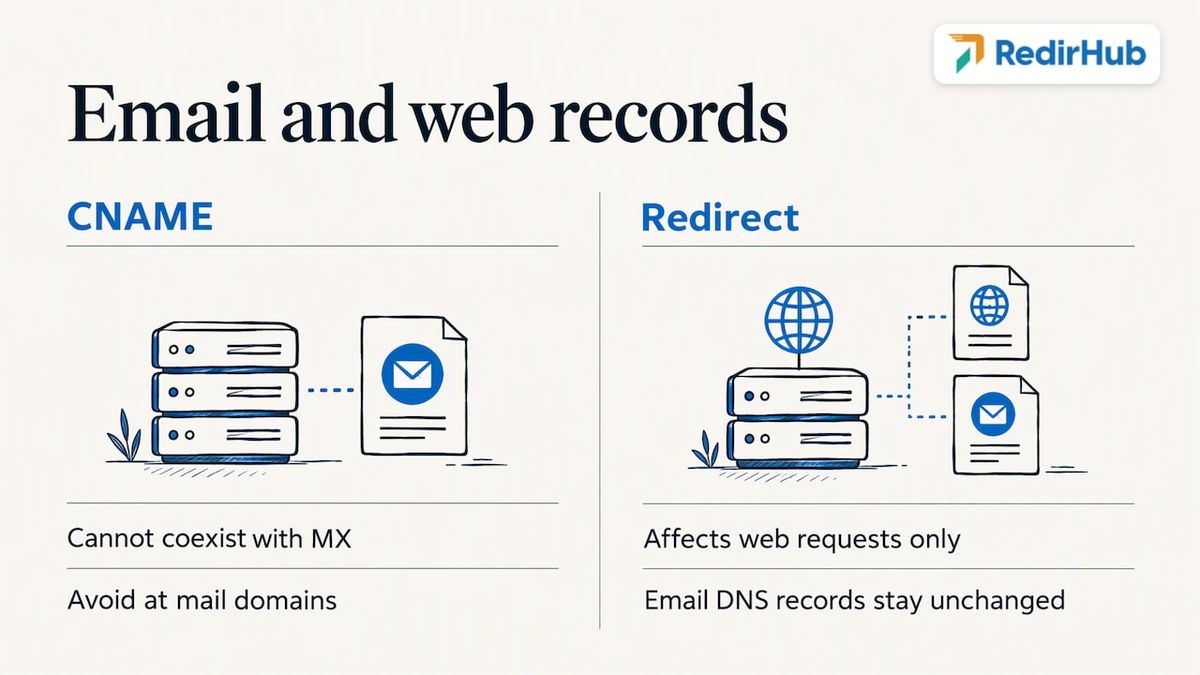
If you forward a domain, your mail needs to keep working. The rule is simple: a hostname with a CNAME can’t also hold other records such as MX[2], and a domain that receives email shouldn’t have a CNAME at that name. That is one more reason not to try forcing a CNAME onto the root of a domain that handles mail.
A redirect doesn’t touch email at all. It acts only on web requests. Your MX, SPF, DKIM and DMARC records stay in DNS as they were, and mail keeps flowing to the same servers. If you’re adding a forwarding service to a domain that sends or receives mail, change only the web records (A, AAAA or the www CNAME) and leave the email records alone. Our practical guide to email DNS records lists what each one does so you can see which ones to leave untouched.
How to redirect one domain to another#
This is the question most people searching for “CNAME vs redirect” actually want answered. The process is the same whichever provider you use.
Step 1: Decide the type of redirect#
Use a permanent redirect when the move is final, such as a rebrand or a retired domain. Use a temporary one when the original address will return, such as a campaign or maintenance page. Permanent redirects tell search engines to transfer the old URL’s standing to the new one.
Step 2: Decide what happens to paths#
Do you want old.com/anything to land on the new homepage, or on new.com/anything? Preserving paths is almost always better for visitors and for search, because each old page lands on its equivalent. If you need a catch-all for many subdomains, a wildcard redirect handles that in one rule.
Step 3: Point DNS at the service that will redirect#
- For the root domain: an A record (or ALIAS/ANAME) to the redirecting service.
- For subdomains such as
wwworgo: a CNAME to the hostname the service gives you.
Here the two concepts work together. DNS gets the request to the right server, and the server does the redirecting.
Step 4: Make sure HTTPS works for the old domain#
Visitors who type or click https://old.com need a valid certificate for old.com, or they’ll see a browser warning before any redirect can happen. This is the step that most DIY setups skip; serving redirects over HTTPS covers how to get the certificate in place first.
Step 5: Test it#
Open the old URL in a private window, confirm that it lands on the right page, and check that the address bar shows the target. Test a deep link, not just the homepage. Also test both http:// and https://, and both www and non-www. A redirect checker lists every hop with its status code, so you can confirm the old URL answers with a single permanent redirect rather than a chain.
DNS redirect or server redirect?#
Many registrars sell “domain forwarding” or “web forwarding” as a feature. It works by pointing your domain at the registrar’s own forwarding servers, which then return a redirect. That is a redirect service, not a CNAME trick. Whether it is enough depends on how much control you need over status codes, HTTPS, paths and reporting. We compare the two approaches in more detail in DNS redirect vs server redirect.
Speed matters as well. Every redirect adds a request before the visitor sees content, so a slow redirecting server costs you directly. See why redirection speed matters for how to keep that hop short.
How fast the redirecting server answers#
Whichever server you point DNS at, its response time is added to every visit that comes through the old URL. Our redirect speed benchmark[3] measures that hop for 27 providers from Washington, D.C., Frankfurt and Tokyo. From October 27 to November 3, 2026, the median time to first byte of a redirect ranged from 9 ms (Amazon CloudFront) to 586 ms (Apache). Redirects served by RedirHub answered in a median 15 ms, redirects answered by nginx in 143 ms and redirects from Amazon S3 in 293 ms.
| Provider | Median time to first byte |
|---|---|
| Amazon CloudFront | 9 ms |
| RedirHub | 15 ms |
| Cloudflare | 87 ms |
| nginx | 143 ms |
| Amazon S3 | 293 ms |
| Apache | 586 ms |
Which one should you use?#
| Your goal | Use |
|---|---|
| Serve shop.yourbrand.com from an e-commerce platform | CNAME |
| Serve go.yourbrand.com from a link platform | CNAME to the platform, then the platform handles redirects |
| Send old-brand.com to new-brand.com | Redirect (with DNS pointing at a redirecting server) |
| Send yourbrand.net and yourbrand.org to yourbrand.com | Redirect |
| Make yourbrand.com and www.yourbrand.com both work | Redirect from one to the other, with DNS records for both |
| Move a site to new URLs and keep rankings | Permanent redirects, page by page |
| Route visitors by country | Redirect rules that match the visitor’s country |
| Verify domain ownership for a third-party tool | CNAME or TXT, as the tool instructs |
A simple test: if the visitor should see a different URL afterward, you need a redirect. If the visitor should keep seeing your hostname while another provider serves the content, you need a CNAME.
Common mistakes#
- Using a CNAME and expecting forwarding. The alias resolves but nobody sends the visitor anywhere.
- Putting a CNAME at the root domain. It conflicts with the records that must live there, including mail records.
- Forgetting HTTPS on the old domain. The redirect never gets a chance to run if the browser blocks the connection first.
- Redirecting everything to the homepage. Deep links lose their relevance and visitors lose their destination.
- Chaining redirects and aliases. Each extra hop adds delay. Point straight at the final target.
- Using a temporary redirect for a permanent move. Search engines may keep treating the old URL as the main one.
Our perspective#
That is why we built RedirHub around your own domain. You keep your hostname, you point a CNAME or A record at us, and we handle the part that DNS can’t: the redirect, the SSL certificate for your hostname, and the rules that decide where each URL goes. Because the link or redirect lives on a domain you control, the destination can change without touching a printed flyer, a packaging code or a campaign asset.
Our view is that a redirect should be treated as a long-term piece of infrastructure, not a one-time setting. Domains outlive campaigns, brands get merged, and old links keep getting clicked years later. Having analytics on those redirects, and one place to manage them across brands and domains, is what keeps a migration from quietly leaking traffic.
Handling redirects without running servers#
If you manage several domains, or you want branded links and QR codes that you can repoint later, running your own redirect servers and certificates is a lot of upkeep. RedirHub lets you use your own domain for branded links and domain redirects, with SSL managed for you and analytics on the traffic that passes through.
Plans start at $49 per month for Core and $119 per month for Pro, and Enterprise is set by contract; see the pricing page for what each includes. If you are moving a site, our website migration service covers mapping old URLs to new ones. For printed materials, dynamic QR codes let you change the destination after printing.
Point Your Domain, We Handle the Redirect
Connect your domain with a CNAME or A record, and RedirHub issues the HTTPS certificate and serves the redirect from the edge.
Set up a domain redirectSources
Frequently asked questions
You need one when a service should answer to your hostname but runs on infrastructure you don’t control. The CNAME lets the provider change its IP addresses without any edit on your side. It is most often used for subdomains like www, shop, help or go.
Point your domain’s DNS at a server or service that can return HTTP redirects, make sure it has a valid HTTPS certificate for your domain, then create a rule that sends requests to the new domain. Use a permanent redirect for a lasting move, and keep paths intact so each old page lands on its equivalent.
A redirect only handles web traffic, so mail isn’t affected as long as your MX and other mail records stay in place. The risk comes from DNS changes: a name with a CNAME can’t also hold MX records, so never replace the root’s records with a CNAME on a domain that handles email.
A standard CNAME is itself often called an alias record: it points a name to another domain or subdomain that the name server then looks up. Some DNS providers also offer their own ALIAS or ANAME records, which work at the root domain. They are separate, provider-specific features and still don’t perform HTTP redirects.

Leo Astarothman is the Brand & Content Lead at RedirHub, where he shapes the company's visual identity, educational content, product experiences, and marketing strategies. He also specializes in system design. Simplifying complex redirect infrastructure into practical resources, product experiences, and campaigns that help businesses understand and adopt modern redirect management.
Related Articles
View All Articles