Vanity URL: What It Is, Examples and How to Create One

Direct Answer
A vanity URL is a short, readable web address that uses your brand's domain and a meaningful word, such as go.mybrand.com/summer or mybrand.com/demo, and redirects visitors to a longer page. It is easier to remember, say out loud and trust than a long or random link. You create one with a redirect: in your website's CMS or server for a path on your own site, at your domain registrar for a separate vanity domain, or with a link manager for a branded short domain.
What is a vanity URL?#
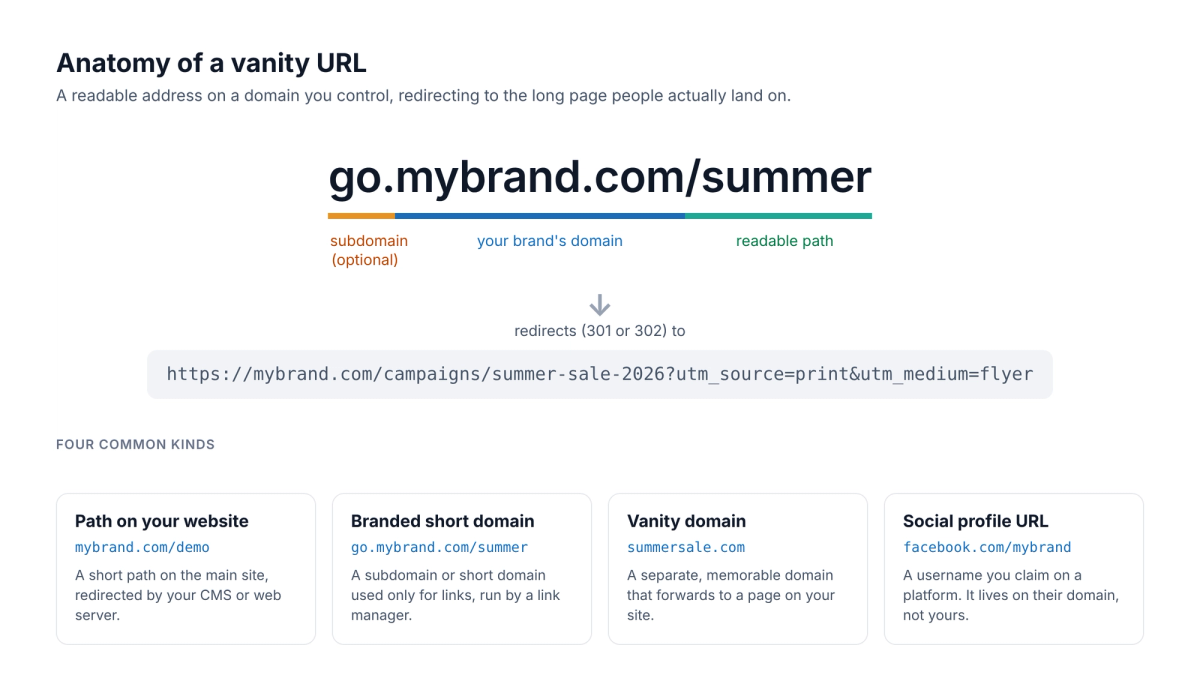
A vanity URL (also called a custom URL, branded URL or vanity link) is an address chosen to be read by people rather than generated by software. It has two parts you pick: a domain your audience recognises and a path that says what is behind the link. It is not a separate web page. When someone opens it, the server answers with a redirect, usually a 301 or 302, and the browser moves on to the real page.
Compare go.mybrand.com/summer with mybrand.com/campaigns/summer-sale-2026?utm_source=print&utm_medium=flyer. Both reach the same page, but only the first fits on a flyer, can be read out on a podcast, and still makes sense when someone sees it out of context. A vanity URL does not make a page more secure or guarantee more clicks on its own; it is a readable front door that you can point at a different page later.
Vanity URL examples#
Vanity URLs come in four common shapes. The examples use a fictional brand, mybrand.com.
| Kind | Example | Sends visitors to | Typical use |
|---|---|---|---|
| Path on your website | mybrand.com/demo | mybrand.com/book-a-demo?utm_source=podcast | Podcasts, radio, slides, business cards |
| Branded short domain | go.mybrand.com/summer | mybrand.com/campaigns/summer-sale-2026 | Social posts, SMS, email, printed QR codes |
| Branded link to another site | go.mybrand.com/survey | A form, chat group, app store page or event ticket shop | Anything you don't host yourself |
| Vanity domain | summersale.com | mybrand.com/summer | TV, billboards, packaging |
| Social profile URL | facebook.com/mybrand | Your Facebook Page | Profiles on social networks (the platform owns the domain) |
The third row is more common than most guides suggest. On RedirHub, about 97 in 100 links created on a customer's own short domain send visitors to a different domain, such as a sign-up form, a chat group, a video or an online shop (RedirHub platform data, October 2026). The branded part of the link tells people who is sending them, even when the page belongs to another service.
Vanity URL vs short link vs branded link#
| Term | What it means | Example |
|---|---|---|
| Vanity URL | Readable words on a domain you control or have claimed | mybrand.com/demo, go.mybrand.com/summer |
| Generic short link | A short code on a link shortener's shared domain | bit.ly/3xYz9Ab |
| Branded short link | A short link on your own domain; the path can be readable or a code | go.mybrand.com/x7Kp2 |
| Redirect | The mechanism behind all of them: a response that sends the browser to another URL | 301 Moved Permanently, 302 Found |
In short, every vanity URL is a redirect, but not every short link is a vanity URL. A link becomes "vanity" when both the domain and the words are yours. For more on links that live on your own domain, see what branded short links are and branded vs generic short links.
Why use a vanity URL#
- People can remember and type it. That matters wherever nobody can click: print, packaging, radio, a talk or a TV spot.
- People can see who sent it. A link on your own domain looks less like spam in a message or post than a random code on a shared shortener.
- It hides the clutter. UTM tags and long campaign paths stay on the destination, not in the link people see.
- You can change where it goes. Once a link is printed or shared, you update the destination instead of reprinting.
- You can measure each placement. /webinar and /partner-a can lead to the same page while you count visits from each one separately.
Do vanity URLs help SEO?#
Not directly. A vanity URL that redirects does not rank in its own right. Google explains that a permanent redirect shows the redirect target in search results, while a temporary redirect keeps the source page[1]. Either way, the page people land on is what earns rankings, so put your keywords and effort there.
What a vanity URL can do is avoid SEO problems. Use a 301 for a vanity domain that will always point to the same page, go straight to the final URL instead of chaining through a second shortener, and don't publish copies of the same page on several vanity domains. Readable words may also make people more willing to click a link they see shared, which is a user benefit rather than a ranking factor.
How to create a vanity URL: three ways#
Which route fits depends on where the link should live. One limit applies to all of them: DNS points whole hostnames, not paths. You cannot send only mybrand.com/summer to a link service while the rest of mybrand.com stays on your website. Either redirect the path on the website itself, or use a separate hostname such as go.mybrand.com. Our guide to choosing a vanity URL domain walks through that decision.
1. A path on your own website#
If your site runs on a CMS, add a redirect from the short path to the long page. In WordPress, the free Redirection plugin (Tools > Redirection, 2+ million active installs)[2] does this without code; our WordPress redirect guide covers the plugin, .htaccess and PHP. On Apache or Nginx, add a redirect rule to the server configuration. This is free and keeps the link on your main domain, but every new link needs someone with access to the site.
2. A separate vanity domain at your registrar#
For a memorable extra domain such as summersale.com, most registrars offer free forwarding. At GoDaddy you open the domain, go to DNS, then Forwarding, choose Add Forwarding, enter the https:// destination and pick Permanent (301). GoDaddy says HTTPS is applied automatically, most changes work within an hour (up to 48 hours), and a domain on outside nameservers is switched to GoDaddy's[3]. See our GoDaddy forwarding guide for the full steps. Registrar forwarding handles one destination per domain or subdomain, so it suits a few vanity domains rather than a library of links.
3. A branded short domain with a link manager#
When marketing creates links every week, give them their own hostname, usually a subdomain such as go.mybrand.com or a short domain you own, and connect it to a link manager. Your website and email stay where they are, anyone with access can create a new path in seconds, and every link gets click counts. The steps below use RedirHub; other link managers follow the same pattern.
How to create a vanity URL in RedirHub#
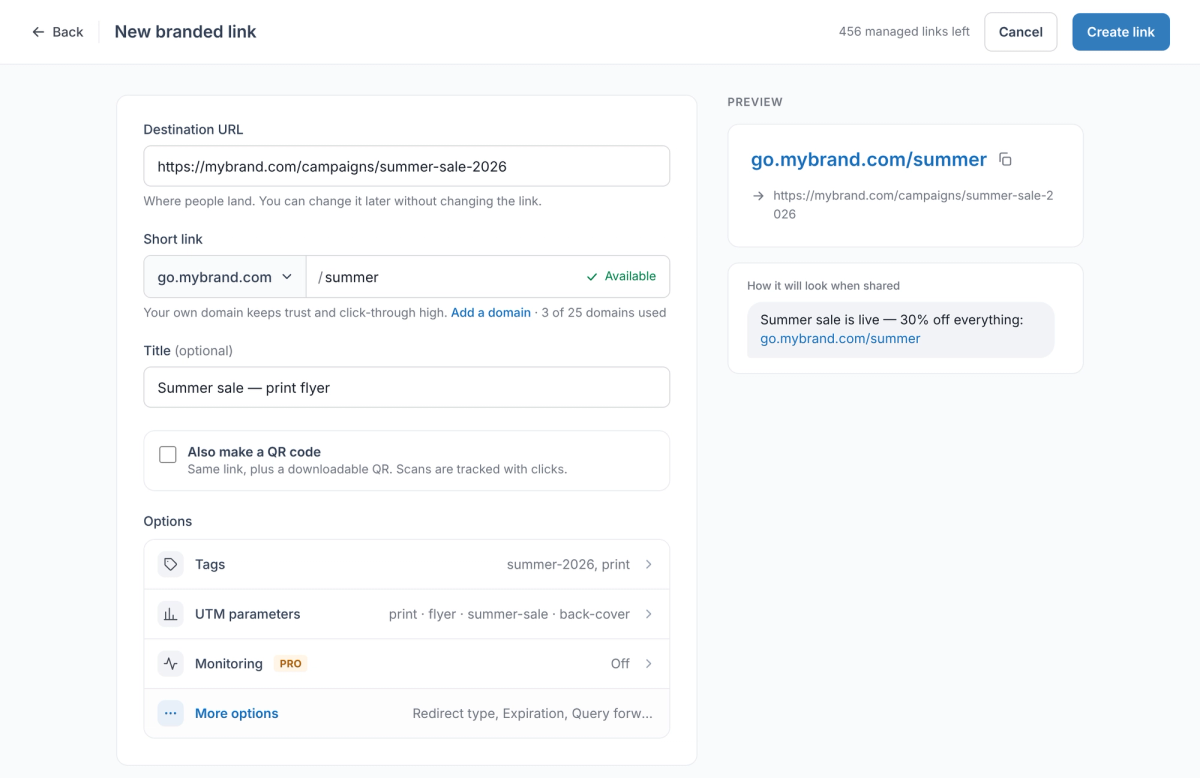
- Pick the hostname for your links. A subdomain such as go.mybrand.com keeps your website exactly where it is.
- In the dashboard, click Create, then Branded Link.
- Paste the page people should land on into Destination URL.
- Under Short link, choose your domain and type a readable slug, such as summer. Check that it shows Available.
- If the domain isn't connected yet, choose Add a domain in the same menu. You can create the link straight away; it starts redirecting once DNS points to RedirHub.
- Open Hostnames and click Connect DNS. A subdomain needs one CNAME record: Automatic adds it for you at Cloudflare, Manual shows the record to copy for any other provider. The HTTPS certificate is issued automatically once DNS is in place.
- Optional: open UTM parameters to tag the destination, or tick Also make a QR code for print.
- Click Create link.
- Test the link before you share it: open it on a phone, then run it through the redirect speed test to confirm the status code, the final page and a valid certificate.
Is your redirect working? Enter your domain. You'll see the status code (301 or 302), where it lands, whether HTTPS is valid, and how fast it answers from Washington, Frankfurt and Tokyo, ranked against every redirect tested in the last 7 days.
Test my redirectRegistrar forwarding vs RedirHub for vanity URLs#
RedirHub runs branded short links on your own domain from 130 global edge locations, close to each visitor. Any number of paths can share one hostname, the same link can become one of your QR codes you can update after printing, and a long list of vanity links can be added with bulk CSV import on every plan. Automatic HTTPS covers each connected domain, and the root domain and www count as one domain.
| Registrar forwarding (e.g. GoDaddy) | RedirHub | |
|---|---|---|
| Links per domain | One forwarding destination per domain or subdomain | Any number of readable paths on one domain |
| DNS and email | GoDaddy switches a domain on outside nameservers to its own | Nameservers and email stay put; only the record for the link hostname changes |
| HTTPS | Applied automatically | Issued and renewed automatically; root and www count as one domain |
| Redirect types | 301, 302, forward with masking | 301, 302, 307, 308 and frame |
| Where it answers | Your registrar's forwarding servers | 130 global edge locations |
| Reporting | Not covered on GoDaddy's forwarding help page | Clicks and unique visitors with bots filtered out, top links per domain |
| Bulk setup | One domain at a time | CSV import on every plan |
| Price | Included with the domain | From $49/month (Core, 25 domains); 14-day free trial on Pro |
If you only need one vanity domain that forwards to your home page, your registrar's free forwarding is enough, and a path redirect in your CMS costs nothing. A link manager pays off when you create vanity links regularly, print them on QR codes, or need to know which placement brought the visits.
If the vanity path should live on your main website's domain, such as yourbrand.com/spring, you don't need a separate domain or a DNS change. With Integration Mode, the site's own platform (Cloudflare Workers, Next.js on Vercel or Caddy) serves the short links you manage in RedirHub.
Vanity URL best practices#
- Keep the path short, lowercase and easy to say: /demo, /summer, /spring-menu. Use hyphens between words.
- Avoid characters people mix up when reading aloud or from print, such as 0 and O or l and 1.
- Make the words specific enough to make sense out of context, and never reuse a path for something with a different meaning.
- Use a 301 for links that will always point to the same page and a 302 for campaign links whose destination will change.
- Keep the domain renewed. If a vanity domain lapses, every printed copy of the link stops working, or worse, someone else buys it.
Avoid dates and version numbers in paths that should last: /demo can stay for years, /q3-2026-final-v2 confuses people quickly. Keep a list with the path, owner, destination, campaign and review date. For larger teams, a central redirect management workflow prevents duplicate paths and links that point at pages nobody owns any more.
Common vanity URL mistakes#
- Pointing the root domain's DNS at a link service while the website still lives there. The website goes offline; use a subdomain instead.
- Chaining redirects: a vanity URL that goes to a generic shortener, which then goes to the page. Each hop adds a round trip; link straight to the final URL.
- Using masking (forwarding inside a frame) so the vanity domain stays in the address bar. Many sites refuse to load in a frame, and visitors can't bookmark or share the real page.
- Printing before testing. Check the link over HTTPS, on a phone, with and without www, before it goes on anything you can't change.
To see every hop a link takes before launch, run it through a redirect checker and confirm the path is not dropped or rewritten on the way.
Put your domain to work.
Manage branded links, QR destinations, and redirects from one reliable control layer.
Get StartedSources
Frequently asked questions
A vanity URL is a short, readable web address chosen for people to remember, such as go.mybrand.com/summer or mybrand.com/demo. It uses a domain you control and a meaningful word, and redirects visitors to a longer page.
mybrand.com/demo redirecting to mybrand.com/book-a-demo?utm_source=podcast is a vanity URL on a main website. go.mybrand.com/summer on a link subdomain, a separate domain such as summersale.com that forwards to a campaign page, and a social profile address such as facebook.com/mybrand are other common examples.
A short link is any compact link, often a random code on a shortener's shared domain, such as bit.ly/3xYz9Ab. A vanity URL uses words you choose on a domain you control. A vanity URL can be a short link, but not every short link is readable or on your own domain.
Not directly. A vanity URL that redirects does not rank on its own; search engines show and rank the page it leads to. Use a 301 for vanity links that always point to the same page, avoid redirect chains, and put your SEO work into the destination page.
If your website already runs on the root domain, use a subdomain such as go.yourbrand.com so the site stays where it is. A separate short domain makes sense when every character counts, for example on packaging, but it is another domain to renew and secure.
For a path on your own site, add a redirect in your CMS (for example the Redirection plugin in WordPress) or web server. For a separate vanity domain, use your registrar's domain forwarding. For many links on a branded short domain, connect a subdomain such as go.yourbrand.com to a link manager, create a readable path, set the destination and test it over HTTPS.
Yes, if you already own the domain. A path redirect in your CMS or server costs nothing, and most registrars include domain forwarding. Paid link managers add many links per domain, click analytics and team access.
Keep the visible link the same once it has been shared, and change the destination behind it instead. Create a new path only when the old words would become misleading or when you need to measure a new placement separately.
Give each placement its own path, such as /podcast and /flyer, count the clicks on each, and add UTM tags to the destination so your analytics shows what those visitors did next. Compare the results with a similar campaign that used a plain link.
On social networks, a vanity URL is the username you claim for your profile or page, which becomes part of its address, such as facebook.com/mybrand. Unlike a vanity URL on your own domain, it lives on the platform's domain and can only lead to that profile.

Leo Astarothman is the Brand & Content Lead at RedirHub, where he shapes the company's visual identity, educational content, product experiences, and marketing strategies. He also specializes in system design. Simplifying complex redirect infrastructure into practical resources, product experiences, and campaigns that help businesses understand and adopt modern redirect management.
Related Articles
View All Articles