Direct Answer
To redirect a URL in WordPress, install a redirect plugin such as the free Redirection plugin, open Tools > Redirection, enter the old path as the source and the new URL as the target, and keep it a 301 for a permanent move. If you changed a post's slug, WordPress usually redirects the old one for you. On Apache hosting you can add a Redirect 301 line to .htaccess instead, above the # BEGIN WordPress block. If the whole site moved to a new domain, the old domain needs its own 301s, either from its old hosting or from a redirect service that answers for that domain.
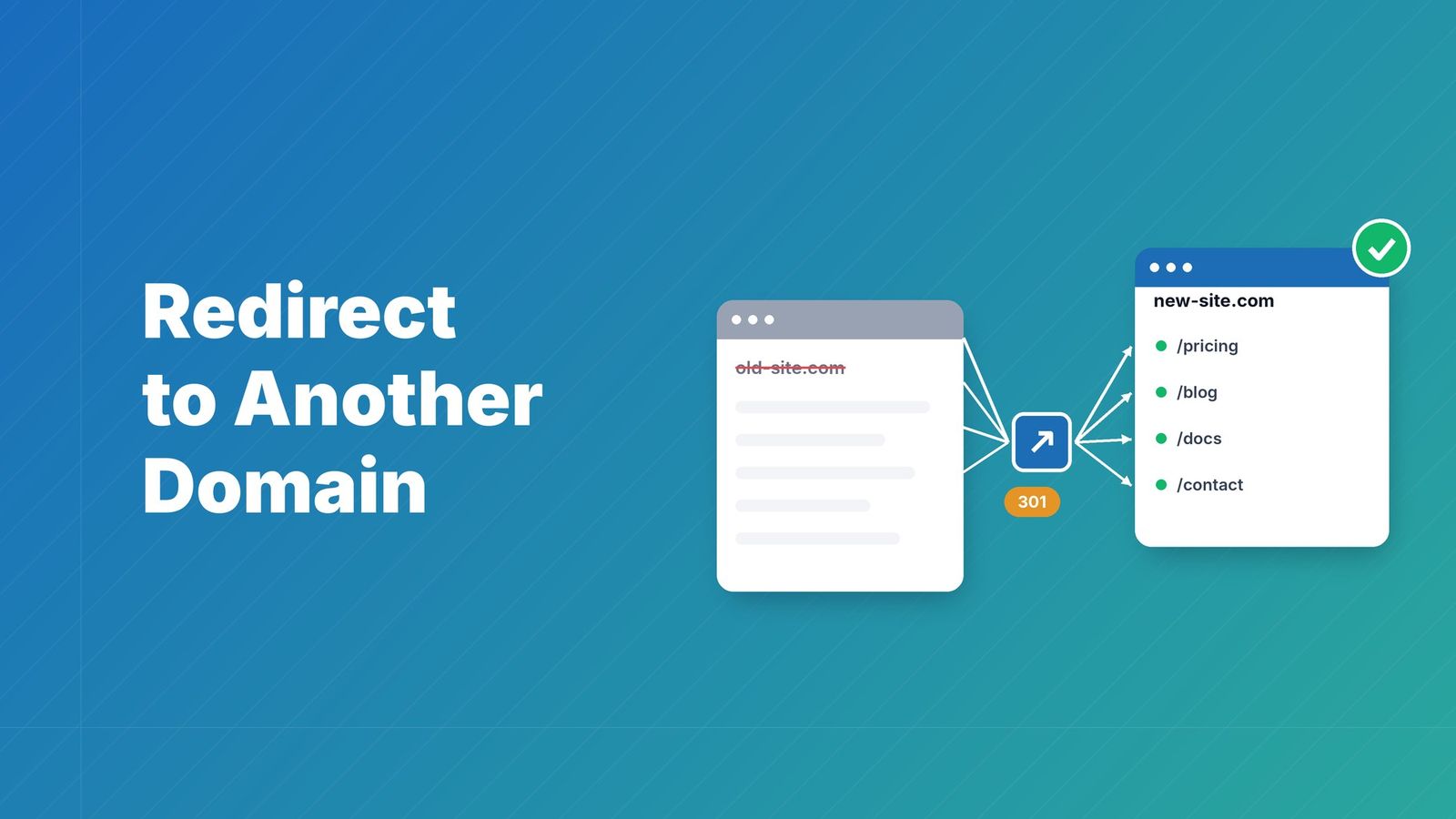
Pages get renamed, posts get merged, and sometimes the whole site moves to a new domain. A redirect sends visitors and search engines from the old address to the new one, so links, bookmarks and rankings keep working. This guide shows the four ways to do it in WordPress, starting with the one most sites need, and what to do when the old domain itself has to redirect.
Pick the redirect type first: 301 or 302#
Every method below asks you for a status code. Use 301 when the page has moved for good: Google treats the new URL as the one to index and passes the old URL's signals to it. Use 302 only when you will switch back, for example during maintenance or a short campaign. Google prefers server-side redirects[1] (a plugin, .htaccess or code) over meta refresh or JavaScript.
| Code | Use it in WordPress when |
|---|---|
| 301 Moved Permanently | A page, post or the whole site has moved for good. The default choice. |
| 302 Found | The move is temporary and the old URL should stay in search results. |
| 307 / 308 | Same as 302 / 301, but the browser repeats the same request method. Rarely needed for normal pages. |
| Meta refresh | You can't add server-side redirects at all. An instant one is read as permanent, a delayed one as temporary. |
In practice almost everyone needs a 301: on RedirHub, about 96 in 100 redirects are 301s (RedirHub platform data, October 2026). The 301 vs 302 guide covers the edge cases.
Check first: WordPress may already redirect it#
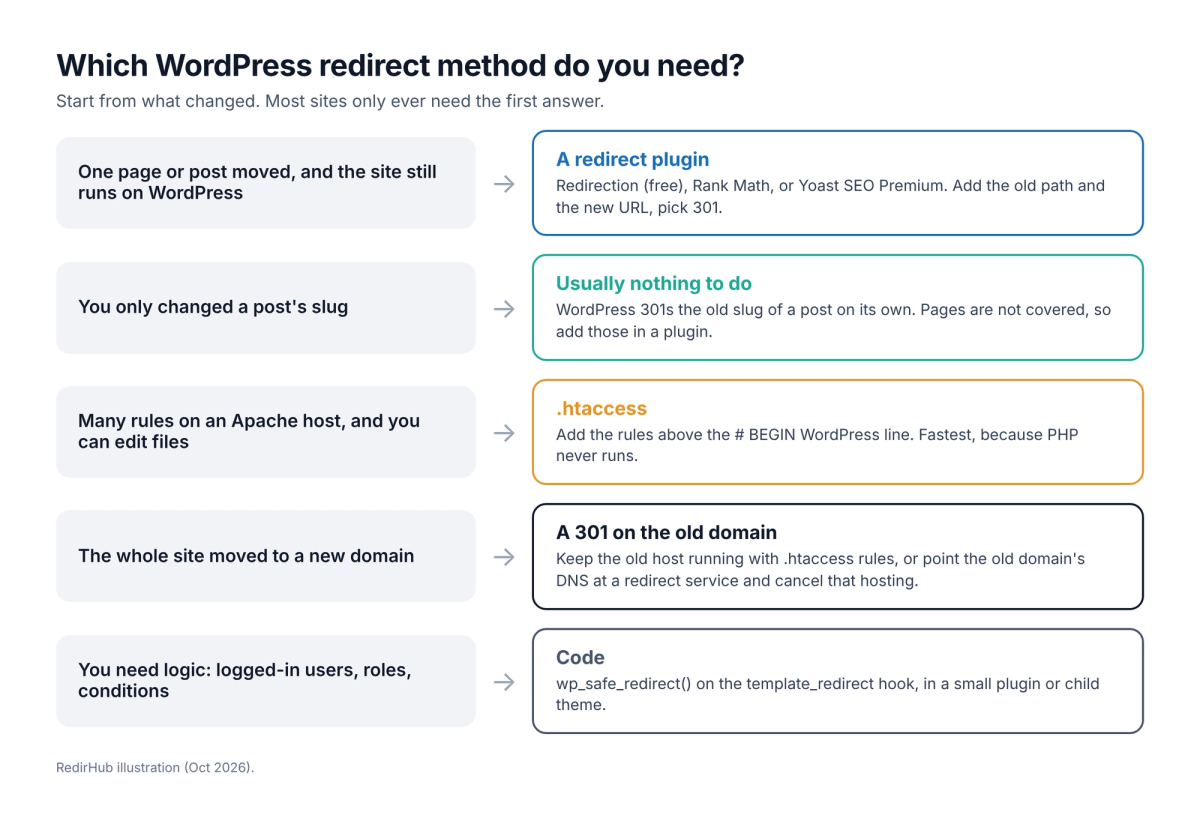
If you only changed the slug of a post, open the old URL before installing anything. WordPress remembers old post slugs and sends a 301 to the post's current permalink[2]. This does not cover pages (or other hierarchical post types), redirects to another site, or URLs that never belonged to a post, so for those you need one of the methods below.
Method 1: Redirect a page with a plugin (easiest)#
A plugin is the right answer for most WordPress sites: no code, no server access, and you can undo it from the admin. The most used one is Redirection[3], which is free, has more than 2 million active installs, and adds its screen under Tools > Redirection. Here is how to redirect one page with it:
- In your WordPress admin, open Plugins, add a new plugin, search for “Redirection” and install and activate it.
- Go to Tools > Redirection and finish the short first-time setup.
- Add a new redirect and enter the old path as the source, for example /old-page/.
- Enter the full new URL as the target, for example https://mybrand.com/new-page/.
- Keep it a 301 (permanent) and save the redirect.
- Open the old URL in a private window and check that it lands on the new page, or run it through the redirect speed test to see the status code.
Redirection also logs 404 errors so you can redirect them in bulk, supports regular expressions, can create a redirect automatically when a post's permalink changes, and imports or exports redirects as CSV, .htaccess or Nginx rules. It needs WordPress 6.7 or later and PHP 7.4 or later.
Other plugins that do the same job#
- Rank Math SEO: the free plugin has a Redirections module (Rank Math SEO > Redirections) once you switch to Advanced mode and enable it under Modules. It supports 301, 302 and 307. CSV import and export and .htaccess sync are Pro features[4].
- Yoast SEO: the free plugin has no redirect manager. Yoast SEO Premium[5], $118.80 a year, adds one and offers a redirect when you move or delete content.
- Safe Redirect Manager: a lightweight free plugin by 10up under Tools > Safe Redirect Manager, with regex and wildcard support and a default cap of 1,000 redirects[6].
If you already use Rank Math or Yoast Premium, use their redirect module instead of adding a second plugin. Two plugins that both redirect can fight each other.
Method 2: Redirect in the .htaccess file (Apache)#
On Apache hosting, redirects in .htaccess run before WordPress loads, so they are the fastest option and keep working even if a plugin is turned off. A mistake in this file can take the site down, so back it up first. One page, a whole folder, and the whole site to a new domain look like this:
apache# One page
Redirect 301 /old-page/ https://mybrand.com/new-page/

# A whole folder
RedirectMatch 301 ^/old-blog/(.*)$ https://mybrand.com/blog/$1

# The whole site to a new domain, keeping each path
RewriteEngine On
RewriteCond %{HTTP_HOST} ^(www\.)?oldbrand\.com$ [NC]
RewriteRule ^(.*)$ https://mybrand.com/$1 [R=301,L]

# BEGIN WordPress
# ... leave WordPress's own rules as they are ...
# END WordPress- Download a copy of .htaccess from your site's root folder (the folder with wp-config.php), using your host's file manager or SFTP.
- Open it and add your rules above the # BEGIN WordPress line.
- Save and upload the file.
- Open the old URL in a private window, or run it through the redirect speed test, and check for a 301 to the right page.
Keep your rules outside the # BEGIN WordPress / # END WordPress markers: WordPress rewrites that block when permalinks are saved and replaces what's between the markers[7]. Nginx servers don't read .htaccess at all. If your host runs Nginx, ask them to add a return 301 rule, or use a plugin.
Method 3: Redirect with code (developers)#
Use code when the redirect depends on logic, such as sending logged-out visitors from a members page to the login page. Hook into template_redirect, which runs once WordPress knows which page was requested, and use wp_safe_redirect(). Two details catch people out: both wp_redirect() and wp_safe_redirect() default to a 302[8], so pass 301 yourself, and neither stops the script, so call exit right after.
phpadd_action( 'template_redirect', function () {
    if ( is_page( 'old-page' ) ) {
        wp_safe_redirect( home_url( '/new-page/' ), 301 );
        exit;
    }
} );
Put this in a small custom plugin or a child theme's functions.php, so a theme update doesn't wipe it. wp_safe_redirect() only goes to your own site and other allowed hosts and falls back to wp-admin otherwise[9], which protects you from open redirects. To send visitors to another domain, add that host with the allowed_redirect_hosts filter, or use wp_redirect() with a fixed URL.
Method 4: Meta refresh (last resort)#
A meta refresh is an HTML tag that tells the browser to load another page. Use it only when you can't change the server or install plugins, for example on some locked-down hosted plans:
html<meta http-equiv="refresh" content="0; url=https://mybrand.com/new-page/">Set the delay to 0. Google reads an instant meta refresh as a permanent redirect and a delayed one as temporary[1], and visitors see the old page flash first either way.
Redirect a whole WordPress site to a new domain#
Moving to a new domain is where most WordPress redirects go wrong. Plugin and code redirects only run while the old site is still installed, so they stop the moment you cancel the old hosting. Every old URL then breaks, and the rankings it built go with it. What you need is a 301 from each old URL to the same page on the new domain, served by whatever still answers for the old domain:
- Keep the old hosting: leave a bare .htaccess on the old domain with the whole-site rule from Method 2. Cheap, but you keep paying for and patching a server that does nothing else.
- Use a redirect service: point the old domain's DNS at a service that answers with the 301s, then cancel the old hosting. This is what the RedirHub section below covers.
Then tell Google. With both domains verified in Search Console, the Change of Address tool[10] moves signals to the new domain over 180 days. Keep the redirects for at least that long, and keep the old domain registered for at least a year so nobody else can pick it up.
How to check that a WordPress redirect works#
- Open the old URL in a private window. Your normal browser may have cached an earlier 301 or be logged in to WordPress.
- Look at the status code, not only where you land: run
curl -I https://oldbrand.com/old-page/and look for 301 and the right Location. - Make sure it takes one hop. Old URL to final page directly, not through an HTTP version, then www, then the new path.
- Clear your caching plugin or CDN cache if the old page still shows. A cached copy can be served before the redirect runs.
Is your redirect working? Enter your domain. You'll see the status code (301 or 302), where it lands, whether HTTPS is valid, and how fast it answers from Washington, Frankfurt and Tokyo, ranked against every redirect tested in the last 7 days.
Test my redirectWhen RedirHub is the better route#
For a page that moved within a WordPress site that's still live, use a plugin: it's free and it's enough. RedirHub is for redirects that shouldn't depend on WordPress at all. The common case is an old domain after a move, but it also fits extra domains you own (typos, old brand names, country domains) that should all land on your WordPress site.
RedirHub answers for the old domain at the DNS level, from 130 global edge locations (PoPs) close to each visitor, so the old hosting can go. For a WordPress website migration you either keep the same paths with one rule, or map each old URL to its new page; hundreds of mappings go in through bulk CSV import, which is on every plan. RedirHub issues automatic HTTPS for the root and www of the old domain, which count as one domain, so https:// links to the old site keep working too.
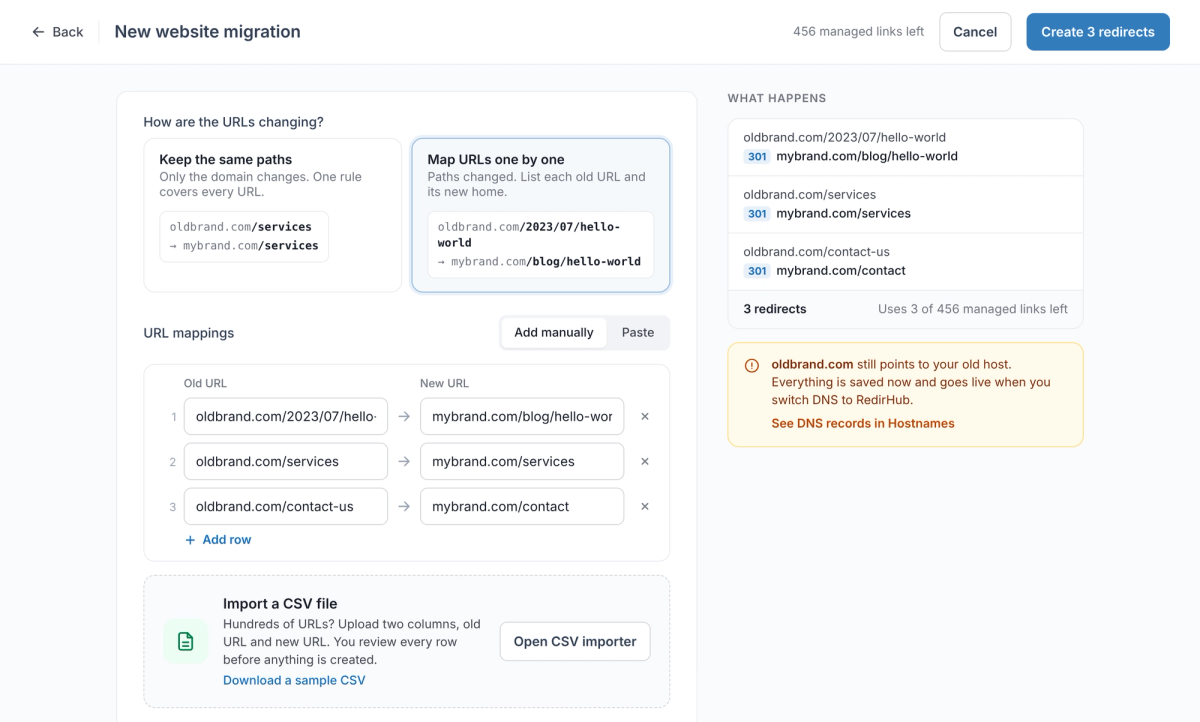
- In RedirHub, start a new link and choose Website Migration.
- Under How are the URLs changing?, pick Keep the same paths if only the domain changed, or Map URLs one by one if your permalinks changed too.
- Enter the old and new URLs, or click Open CSV importer and upload two columns: old URL, new URL.
- Check the What happens panel: each old URL should show 301 and the right new page. Then create the redirects.
- Open Hostnames, choose Connect DNS and Manual, and change only the root and www records at your registrar as shown (for example A @ 3.33.236.10 and CNAME www to your rediredge.com host). DNS for email and other subdomains stays where it is.
- Click I've made the changes. RedirHub re-checks DNS every 10 minutes, or use Check now.
- Test a few old URLs with the redirect speed test.
| Redirect plugin on WordPress | RedirHub | |
|---|---|---|
| Best for | Pages and posts that moved within a live site | An old or extra domain that should redirect without its own site |
| Needs the old site running | Yes, every redirect runs inside WordPress | No. DNS points the domain at RedirHub and the old hosting can go |
| DNS and email | Unchanged | Unchanged: only the root and www records change, no nameserver switch |
| HTTPS on the old domain | Needs a certificate on the old hosting | Issued and renewed automatically for root and www |
| Many URLs | Plugin-dependent; Redirection imports CSV | Keep the path with one rule, or map each URL; CSV import on every plan; several source domains per redirect |
| Redirect types | Depends on the plugin; usually 301, 302, 307 | 301, 302, 307, 308 and frame redirects |
| What you can see | Hit counts or a log, depending on the plugin | Clicks and unique visitors with bots filtered out, top links per domain |
| Price | Free (Redirection) or part of an SEO plugin | From $49/month (Core, 25 domains), 14-day free trial |
RedirHub doesn't replace a plugin for paths on a domain that still serves your WordPress site: the domain points either at your WordPress host or at RedirHub, not both. Keep page-level redirects in WordPress and use RedirHub for domains that only need to redirect.
Common WordPress redirect mistakes#
- Chains. Old URL to an older redirect to the new page. Each hop adds a round trip; point every old URL straight at the final page and update older rules when you add new ones.
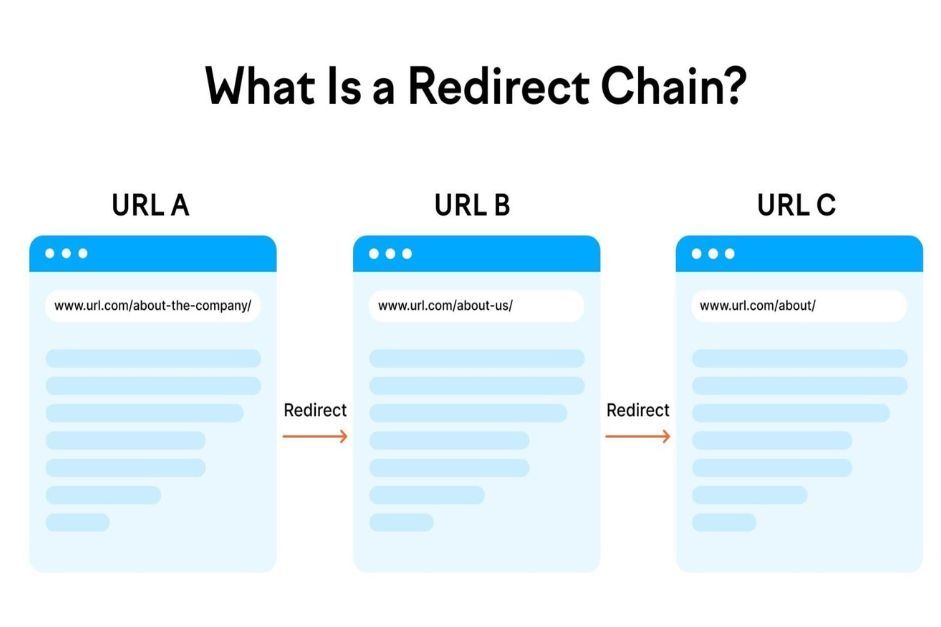
- Loops. A redirect that points back at itself, often a plugin rule fighting the WordPress Address and Site Address settings or an HTTPS setting. Browsers show “too many redirects”.
- 302s left in place. wp_redirect() and some plugin defaults send 302. If the move is permanent, change it to 301.
- Everything to the home page. Send each old URL to its closest new page. A home-page redirect for a specific article leaves both visitors and Google without the content they were looking for.
- Cancelling the old hosting too early. After a domain move, plugin redirects die with the old site. Keep something answering for the old domain.
If a redirect still doesn't behave, the redirect troubleshooting guide walks through the usual causes.
Put your domain to work.
Manage branded links, QR destinations, and redirects from one reliable control layer.
Get StartedSources
- [1]Google Search Central: Redirects and Google Search
- [2]WordPress Developer Resources: wp_old_slug_redirect()
- [3]WordPress.org: Redirection plugin
- [4]Rank Math: How to set up redirections
- [5]Yoast: Redirect manager in Yoast SEO Premium
- [6]WordPress.org: Safe Redirect Manager
- [7]WordPress Developer Resources: insert_with_markers()
- [8]WordPress Developer Resources: wp_redirect()
- [9]WordPress Developer Resources: wp_safe_redirect()
- [10]Search Console Help: Change of Address tool
Frequently asked questions
Add a Redirect 301 line to the .htaccess file in your site's root folder, above the # BEGIN WordPress block, if your host runs Apache. On Nginx hosting, ask your host to add the rule. Developers can also use wp_safe_redirect() on the template_redirect hook in a small custom plugin.
Redirection is the most widely used free option, with more than 2 million active installs, 404 logging and CSV import. If you already use Rank Math, its free Redirections module does the same job without another plugin.
Partly. When you change a post's slug, WordPress sends a 301 from the old slug to the new permalink. It doesn't do this for pages or for links to other sites, so add those redirects yourself.
Add a 301 from every old URL to the same path on the new domain, either with a whole-site rule in the old domain's .htaccess or by pointing the old domain's DNS at a redirect service. Then use Google Search Console's Change of Address tool and keep the redirects for at least 180 days.
Use a 301 for anything that has moved for good, which is almost every redirect. Use a 302 only for temporary moves you plan to undo, such as maintenance.
The usual causes are a cached old page (clear your caching plugin and CDN), a browser that remembers an earlier redirect (test in a private window), two plugins with conflicting rules, or .htaccess rules placed inside the WordPress block, where they get overwritten.

TC is the Operations Manager at RedirHub, leading the company’s operational strategy and execution to ensure reliable, scalable redirect infrastructure. He oversees internal processes, cross-team coordination, and platform readiness while supporting customers through complex redirect implementations. With a strong understanding of large-scale domain operations and real-world edge cases, TC plays a key role in aligning product and customer success to deliver stable, high-performance redirection solutions.
Related Articles
View All Articles