
Create redirects
Create a 301 redirect, a wildcard redirect or a whole site move. Live in seconds.
Set up redirects online, from one page to a connected domain. Choose the source, destination and redirect behavior in the dashboard, then verify DNS and HTTPS before relying on the live redirect.

Start from the job
Tell us what you want to do. The form is built for it.
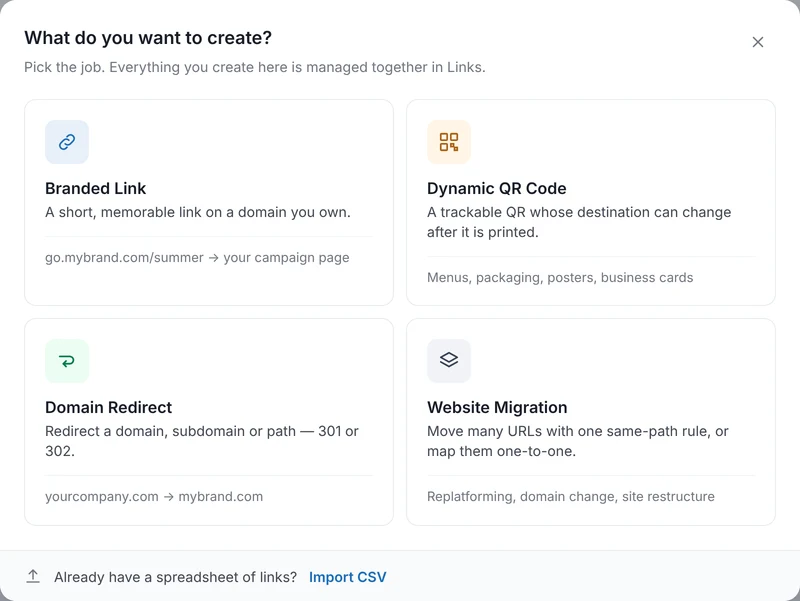
Create asks whether you are redirecting a domain, moving a website, shortening a link or printing a QR code, then opens a form with only the fields that job needs. Everything you create lands in the same Links list.
Every redirect type
301, 302, 307, 308 and wildcard redirects, from one form
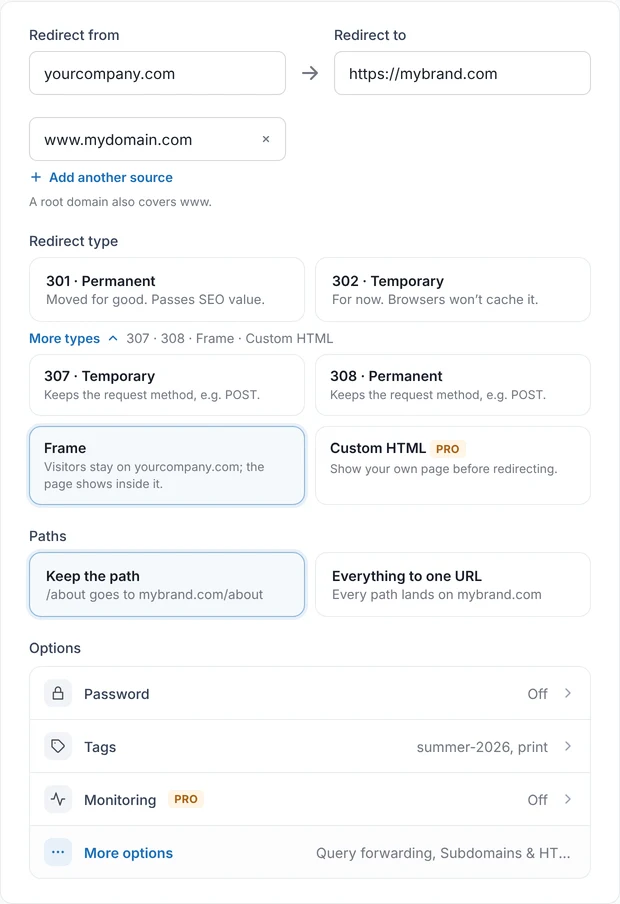
Pick the status code that fits the job and decide what happens to paths and query strings. Turn on all subdomains and a single rule becomes a wildcard redirect for *.yourcompany.com.
- 301 or 302 by default, with 307 and 308 under More types when the request method has to be kept.
- Keep the path so /about lands on mybrand.com/about, or send everything to one URL.
- Query forwarding keeps ?ref=ig and your UTM tags on the destination, so analytics stay intact.
- Include all subdomains adds *.yourcompany.com as a source with the same settings. PRO
- Custom HTML shows your own “We’ve moved” page before sending visitors on. PRO
- HTTPS included. A free certificate is issued once DNS points to RedirHub.
Website migrations
Redirect a domain without losing SEO
Moving to a new domain or restructuring a site means hundreds of URLs, not one. The migration form covers both cases without a script.
- Same paths, new domain. One rule sends every old URL to the same path on the new base URL, with a permanent 301 so ranking signals follow.
- Paths changed too? Map old to new one by one: paste two columns from a spreadsheet, add rows by hand or upload a CSV.
- Mix both. Keep the same-path rule for the site and map only the pages that moved.
- No chains. Each old URL points straight at its final destination, and the migration shows up in Links as one item you can pause, edit or export.

Bulk upload redirects
Upload a CSV and see exactly what it will change
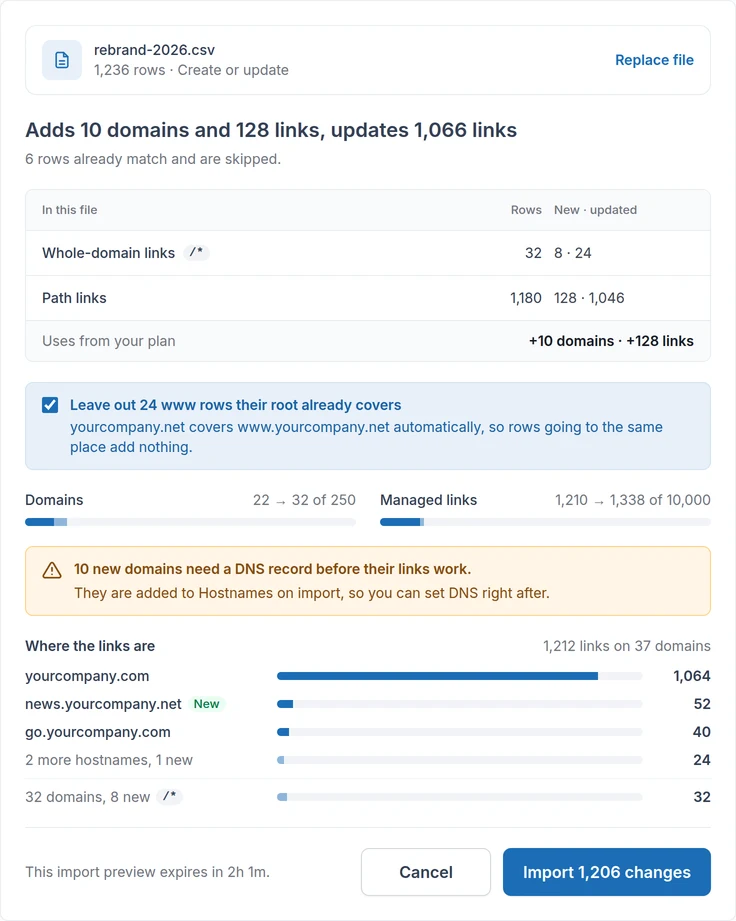
Every import is review-first. RedirHub validates the file, shows what it adds, updates and leaves alone, and writes nothing until you confirm.
- A one-line summary in plain words, then the rows broken down by kind. Rows that already match your links are skipped.
- Capacity before and after. See the domains and managed links you use today and what the import brings them to. Updates don’t use capacity.
- Errors grouped by cause, with row numbers that match your spreadsheet and one-click fixes such as adding a missing https://.
- Exports import as they are. Download your links to CSV or Excel, edit in a spreadsheet and upload the file back.
Point your domain
Connect DNS without copying records by hand
A redirect is saved the moment you create it and goes live once the domain points to RedirHub. Every hostname that doesn’t yet has a Connect DNS button that shows where your DNS is hosted, what is missing and the quickest fix.
- Automatic with Cloudflare. Approve the records once at Cloudflare. Email and every other record stay as they are, and www comes along unless you untick it.
- Manual for any provider. CNAME by default, or switch to an A record if your provider won’t accept it, with a guide for the most common providers.
- Checked as you go. RedirHub checks every few seconds, tells you which record is still missing and issues the HTTPS certificate itself.

Not only in the dashboard
Create redirects from a form, a file, the API or your AI agent
The same create-redirect flow is available wherever your team works, with the same plan limits and the same review before bulk changes.
Dashboard
One form per job, a What happens preview beside it, and a Connect DNS button when the domain isn’t pointed yet.
CSV import
Source, destination and type columns. Validate, preview, confirm. Exports from Links open straight in Import.
API and MCP
The REST API and the RedirHub MCP server expose create-redirect and bulk-import. Bulk changes return a preview first and apply only with its confirmation token.
create-redirect · bulk-import · get-linkWhy online, not in a config file
Create a 301 redirect online without server access
The same jobs, done the old way and done in RedirHub.
Why Our Customers Love RedirHub
5-star reviews on G2
Redirecting domain names with SSL is a huge pain, and I have to do it frequently, often at mass. Now it is a few clicks. It just works.
- domains in their catalog
- ~23M

Zsolt Bikadi
CSO · Domain Science
it was very easy to setup and use and provides valuable reporting on how effective the redirects are.

Debra S.
Programmer, Marketing and Advertising · EZMarketing
The redirect tool is particularly useful, especially for mass URL redirection and capturing old traffic from an unused subdomain to our main site.
- URL rules managed
- 10,000+
- visits redirected each month
- 150k+
- workspace for the whole team
- One

Mithru Vigneshwara
Formlabs
FAQ