



Create Redirects
Stop waiting on developers. Set up any redirect — from a single page forward to an entire wildcard domain — in seconds, live worldwide the moment you save.
Live in Seconds, Not Deployment Cycles#
Create a redirect and it goes live across our global edge network instantly — no config files, no server restarts, no tickets to IT.
- Any redirect type: 301 permanent, 302 temporary, 307, 308 — choose the right type for your use case without guessing.
- Real-time validation: Broken or malformed destination URLs are flagged before you save.
- Instant propagation: Changes go live globally the moment you hit save — no DNS wait, no deployment pipeline.
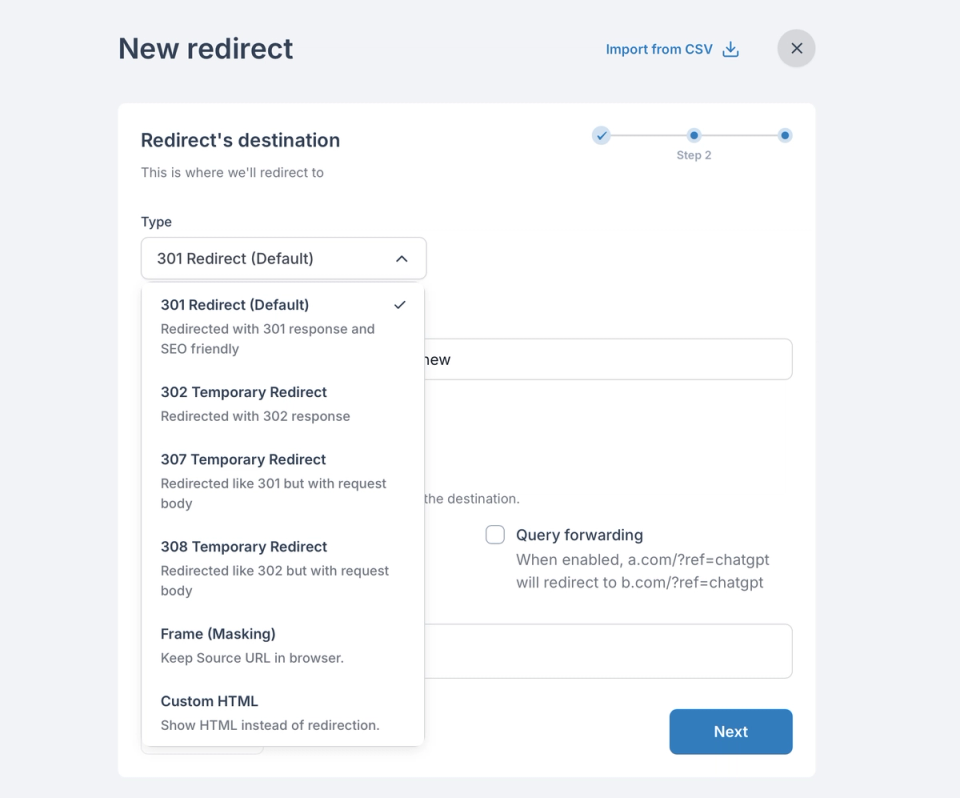
Flexible Rules for Any URL Structure#
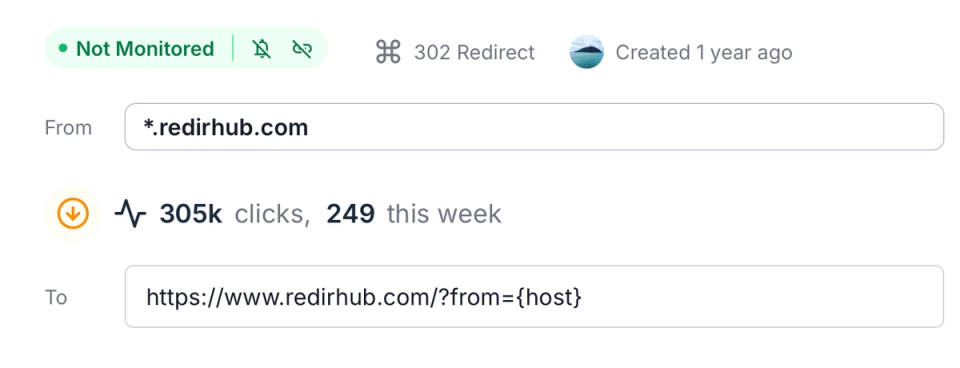
From a single page redirect to an entire domain — configure rules that match exactly how your URLs work.
- Wildcard domains: Point an entire domain or subdomain to a new destination with one rule — *.brand.com covered in seconds.
- Page-to-page redirects: Map specific source URLs to exact destinations, with full control over path and query string behavior.
- Path forwarding: Preserve the full URL path automatically — so a.com/page lands at b.com/page without extra configuration.
- Query string forwarding: Forward query parameters to the destination — so a.com/?ref=x carries through to b.com/?ref=x intact.
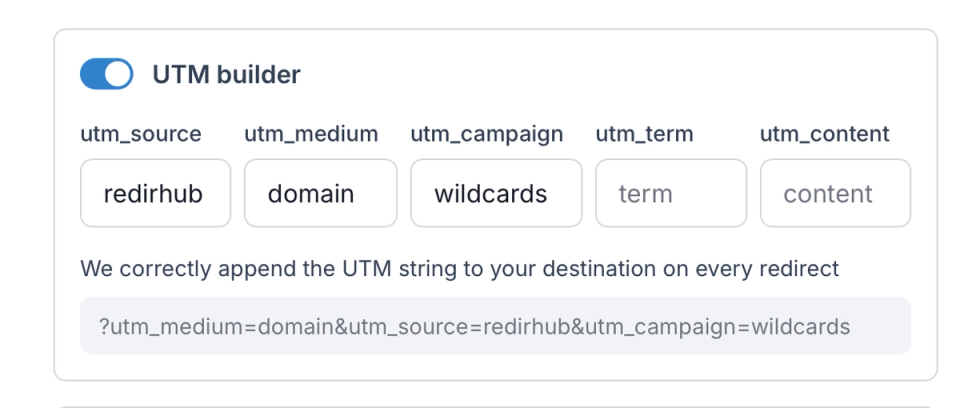
Stop Losing Campaign Attribution#
UTM parameters stripped in a redirect chain cost you attribution data. RedirHub appends them at the infrastructure level — they cannot be dropped.
- UTM builder: Set source, medium, campaign, term, and content once — applied to every hit through that redirect automatically.
- No manual string-building: UTMs are configured in the dashboard, not pasted into URLs by hand — no human error, no missing parameters.
- Tagging: Tag redirects by campaign, channel, or team for easy filtering and reporting.
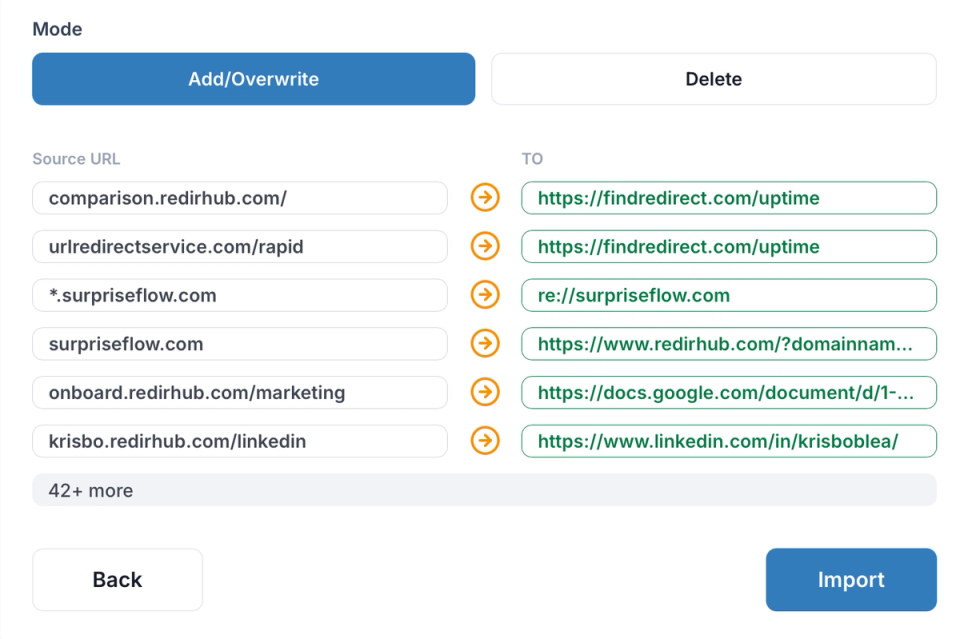
Hundreds of Redirects in One Upload#
When a migration or rebranding means setting up hundreds of routes at once, CSV import eliminates the manual work entirely.
- CSV import: Upload source URL, destination, redirect type, and tags in a single file — live in one click.
- Preview before publishing: Review every redirect before it goes live to catch mapping errors before users hit them.
- Export anytime: Download your full redirect list for audits, migrations, or backups.
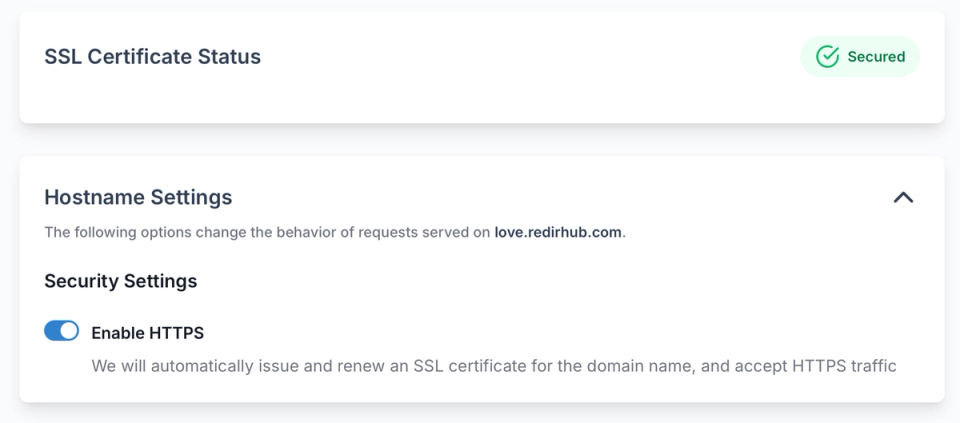
Full HTTPS on Every Redirect You Create#
Every redirect — whether for one domain or a thousand — is served over HTTPS automatically. No certificate purchase, no renewal reminder.
- Wildcard SSL: Auto-provisioned certificates cover all subdomains of a domain from day one.
- HTTP to HTTPS upgrade: Visitors arriving over HTTP are silently upgraded — no mixed content warnings, no browser security errors.
- Custom certificates: Upload your own SSL certificate for compliance or enterprise requirements.
Turn Any Redirect into a QR Code#
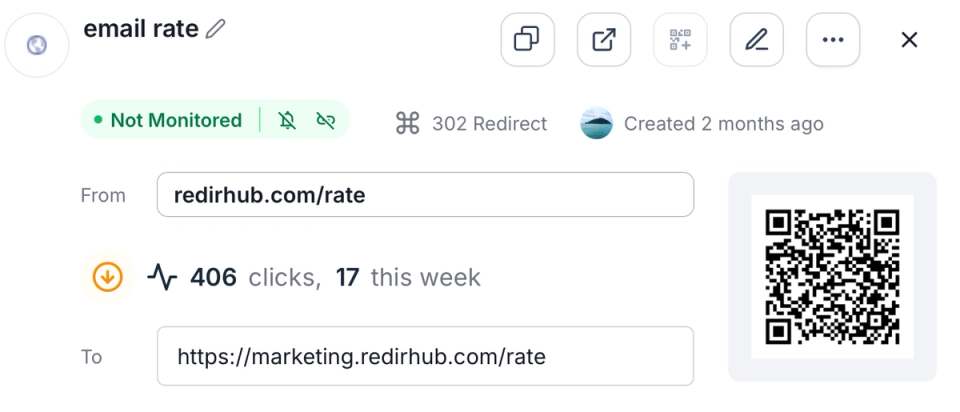
Every redirect you create can generate a branded QR code — change the destination anytime without reprinting, and track scans alongside your URL analytics.
- Dynamic QR codes: The printed code never changes — update the destination URL behind it at any time from the dashboard.
- Custom branding: Add your logo and brand colours to every QR code — consistent identity across print and digital assets.
- Scan tracking: Monitor scan count, location, and device breakdown separately from URL click-throughs — useful for offline campaigns and print assets.
Create a 301 Redirect Online Without Server Access#
If you need to update a URL, fix a broken link, or migrate a page, the fastest solution is to create a 301 redirect directly online - without editing .htaccess files, touching Nginx configs, or restarting servers. Redirect rules can be configured through a web interface and activated instantly across a global edge network.
The same workflow supports 302, 307, and 308 status codes, allowing you to choose the correct redirect behavior for SEO migrations, temporary campaigns, maintenance pages, or structural updates. Redirect creation becomes immediate and controlled, without deployment cycles or engineering dependency.
Creating a 301 Redirect and Managing All Redirect Types in One Tool#
Creating a 301 redirect is often just the starting point. Modern websites require flexible routing for permanent migrations, temporary traffic flows, domain-level changes, and campaign-specific URLs. A reliable redirect tool must handle both simple page-level rules and complex structures without increasing technical overhead.
With this platform, you can configure:
- Permanent redirects for SEO migrations and canonical URL updates
- Temporary redirects for campaigns, testing, and short-term routing
- Wildcard rules that cover entire domains or subdomains automatically
- Page-to-page mappings with full path preservation
- Query string forwarding to maintain analytics and tracking parameters
By centralizing redirect management in one interface, teams eliminate manual server updates and reduce configuration errors. Redirect logic remains scalable, transparent, and instantly deployable - whether you are updating a single URL or restructuring an entire site.
Creating a 301 Redirect and Managing All Redirect Types in One Tool#
Creating a 301 redirect is often just the starting point. Modern websites require flexible routing for permanent migrations, temporary traffic flows, domain-level changes, and campaign-specific URLs. A reliable redirect tool must handle both simple page-level rules and complex structures without increasing technical overhead.
With this platform, you can configure:
- Permanent redirects for SEO migrations and canonical URL updates
- Temporary redirects for campaigns, testing, and short-term routing
- Wildcard rules that cover entire domains or subdomains automatically
- Page-to-page mappings with full path preservation
- Query string forwarding to maintain analytics and tracking parameters
By centralizing redirect management in one interface, teams eliminate manual server updates and reduce configuration errors. Redirect logic remains scalable, transparent, and instantly deployable - whether you are updating a single URL or restructuring an entire site.
Why Our Customers Love RedirHub

Very useful website for redirects and creating short URLs. Highly recommend RedirHub.

Our project has been using their 301 redirect service for six months, and it has remained consistently stable.
bgz Wh
Frequently asked questions