
Key takeaways
Personalizing a QR code means customizing its design (colors, logo, frame) and its destination (a branded link you control), not just its appearance. Keep dark modules on a light background, leave a clear margin, and test every design on real phones and on the real print material. Use a static code only for content that will never change. Use a dynamic code for anything printed, shared or measured, so you can edit the link later. Put the code behind your own domain so the link looks trustworthy and stays yours if you change tools. Give each placement its own unique code so you can see which flyer, package or poster actually gets scanned.
A personalized QR code is a code you have made your own in two ways: how it looks (colors, logo, shape, frame) and what sits behind it (a link on your own domain that you can edit and measure). Most guides stop at the first part. The second part decides whether the code still works, and still earns money, a year after it is printed.
This guide covers both: which design changes are safe, how to test a code before it goes to print, when to choose static or dynamic, and how to keep unique codes organized across campaigns and brands.
What makes a QR code “personalized”#
Every QR code is a grid of black and white modules, with three large squares in the corners called finder patterns. DENSO WAVE, the company that developed QR Code in 1994[1], notes that these patterns let a scanner read the code from any angle, and that built-in error correction can recover data when part of the code is dirty or damaged. That error correction is the reason logos and rounded shapes can work at all: the scanner can tolerate some alteration.
Personalization happens on four layers:
- Design. Foreground and background colors, module shapes, corner styles, a logo in the center, a frame with a call to action such as “Scan to order”.
- Content type. A web page, a PDF, a vCard, a Wi-Fi login, an app-store link, a menu.
- Destination ownership. Whether the code points to a link on a shared shortener’s domain or to a link on your own domain.
- Uniqueness. Whether one code is reused everywhere or each placement gets its own, so scans can be told apart.
The ranking generators focus almost entirely on layer one. For a business, layers three and four do more work. A beautiful code that sends people to a third-party domain, or that cannot be edited after printing, is a liability.
Design choices that help and hurt scanning#
The design rules are not matters of taste. Scanners need contrast and clean edges. The most useful guidance comes from GS1, the standards body behind retail barcodes. Its 2D barcode colour and quality guide[2] warns that logos, changes to the matrix and color choices can compromise quality, and it advises against them for retail point-of-sale use. For marketing materials you have more freedom, but the same physics applies.
Color and contrast#
GS1 recommends dark matrix colors on a light background and at least 30% symbol contrast, with around 50% recommended for greater reliability. In practice:
- Keep the modules dark and the background light. Inverted codes (light on dark) fail on some scanner apps.
- Avoid two mid-tones that look different to you but similar in grayscale, such as orange on light green.
- Gradients are fine only if the lightest part of the foreground is still clearly darker than the background.
- Brand colors that are pale (yellow, light blue, pastel pink) usually make poor foregrounds. Use your darkest brand color.
Logo and shape#
A small logo in the center is the most common personalization, and it works because of error correction: the logo covers modules the scanner can reconstruct. Keep it small, centered and away from the finder patterns, and use a higher error-correction level when your generator lets you choose. Heavily stylized modules (dots, stars, fluid shapes) look distinctive but reduce margin for error, so test them harder than a standard square code.
Quiet zone and material#
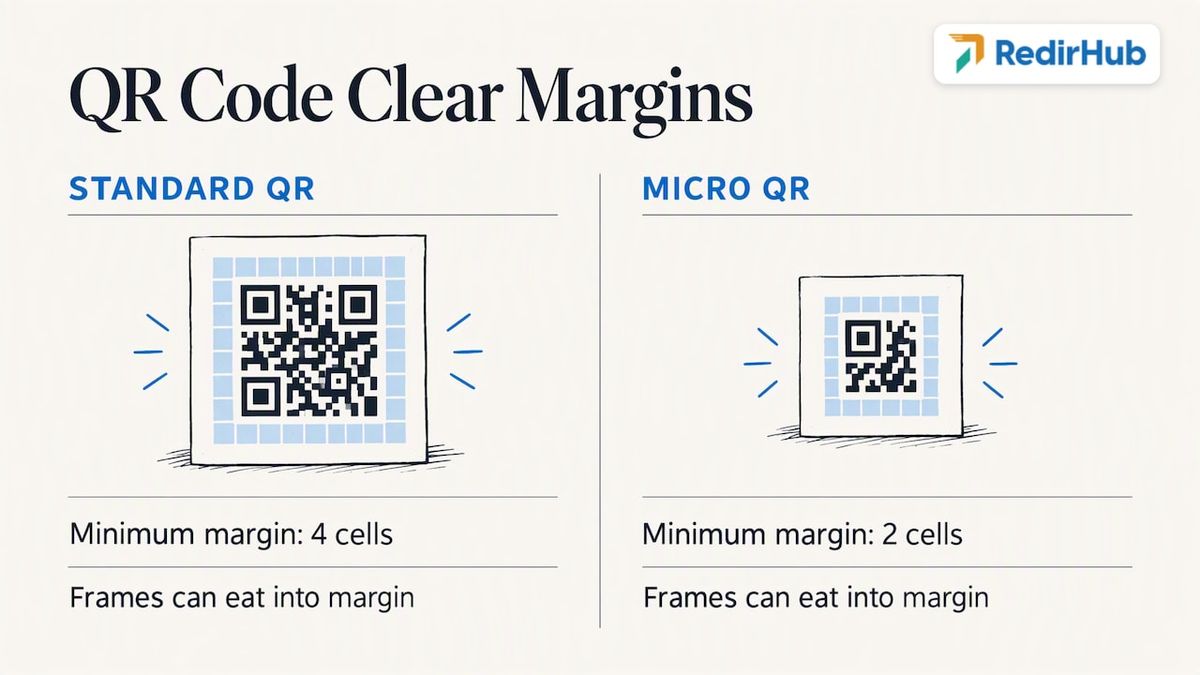
The blank margin around the code is not decoration. DENSO WAVE states that a standard QR Code needs a minimum margin of four cells around the code[3], while its Micro QR Code can work with two. Frames, borders and busy photo backgrounds that eat into that margin are among the most common reasons a pretty code fails.
Material matters too. GS1 advises avoiding direct printing on shiny or reflective materials[2], which is worth remembering for foil packaging, glossy laminates and metallic stickers. If you must use a glossy surface, print the code on a matte label or add a matte varnish area.
A quick reference table#
| Design choice | Usually safe | Risky |
|---|---|---|
| Foreground color | Black, navy, dark green, dark brand color | Pale or neon colors, red on dark backgrounds |
| Background | White or very light | Photos, patterns, dark fills |
| Logo | Small, centered, simple | Large, off-center, touching corners |
| Module shape | Squares, slightly rounded | Tiny dots, thin stylized shapes at small print sizes |
| Margin | Four modules of blank space or more | Tight frames, cropped edges |
| Surface | Matte paper, matte labels | Foil, gloss, curved or ridged surfaces |
How to test a custom QR code before it ships#
A code that scans on your monitor can fail on a cardboard box. Test in layers.
- Scan the proof, not the screen. Print the actual artwork on the actual material at the actual size, then scan it.
- Use several phones. At minimum one recent iPhone and one Android phone, using the built-in camera app rather than a dedicated scanner.
- Vary conditions. Try dim light, bright light, a slight angle, and the distance a real person will stand from it: arm’s length for a flyer, several feet for a poster.
- Stress it. Fold it, rub it, wet it if it will live outdoors. GS1’s 2D Barcode Playbook for creation and printing[4] says print quality should be evaluated across the product lifecycle, including abrasion, moisture, temperature variation and package flexing, and that scanning depends on substrate, production controls and handling, not only on artwork.
- Verify when stakes are high. For large print runs or packaging, GS1 says the printer or user can measure quality with an ISO/IEC-compliant verifier[5], which reports symbol parameters and an overall grade. Ask your printer whether they have one before a run of thousands.
- Click the destination too. Check that the page loads fast on mobile data, not only on office Wi-Fi.
A small size rule of thumb: the more modules your code has (long URLs create denser codes), the larger it must print. This is one more reason to encode a short link rather than a long URL with tracking parameters.
Static or dynamic: the decision that matters most#
A static code stores the destination directly in the pattern. It cannot be edited and cannot report scans, because the phone goes straight to the destination without passing through anything you control. A dynamic code stores a short link; that link redirects to the destination you choose, which you can change at any time and which can record each visit.
Use static when:
- The content will never change (a Wi-Fi login, a contact card on a permanent badge).
- You do not need to know who scans.
- Dependence on a third party is a worse risk than a typo.
Use dynamic when:
- The code is printed on anything expensive or hard to replace: packaging, signage, direct mail, event banners, vehicle wraps.
- A campaign, offer or landing page will change.
- You need to see scans by day, device or location.
- Several teams or agencies produce codes and you want a single place to manage them.
The cost of getting it wrong is lopsided. Reprinting a thousand brochures because a landing page moved is expensive. Switching a destination in a dashboard is not. Our deeper breakdown is in static vs dynamic QR codes, and if you already have printed codes pointing to a dead page, see how to change a QR code destination after printing.
Can you make a personalized QR code for free?#
Yes, for a one-off. Many online generators let you pick colors, add a logo and download a PNG, JPEG, PDF or vector file at no cost, and for a personal project such as a wedding invitation or a resume link, a static code from one of them is perfectly reasonable.
For business use, look closely at what “free” covers before you print:
- Is the code static or dynamic? If dynamic, does the link keep working if you stop paying?
- Does the code point to your domain or to the tool’s? If the tool’s domain sits in the middle, your printed materials depend on that company staying in business and keeping its terms.
- Can you export a vector file (SVG or EPS) for print, or only a small PNG?
- Do you get scan data, and can you export it?
A free code that stops working, or that you cannot edit, costs far more than a subscription once it is on printed stock. That is the gap between a generator and a link management platform.
Putting your own domain behind the code#
The most overlooked form of personalization is the link itself. When someone scans, many phones show a preview of the URL before opening it. A link on a generic shortener domain looks like any other link, including the ones scammers use. A link on your own domain looks like you.
That matters for trust. The FTC warns consumers[6] that scammers hide harmful links in QR codes and advises inspecting the URL before opening it, particularly for codes in unexpected places. If your code shows a short link such as go.yourbrand.com/spring, a careful customer can recognize it. If it shows a random string on a domain they have never seen, a careful customer should hesitate. The FBI has issued a similar warning about “quishing”, as reported by news outlets[7].
A branded domain also protects you operationally:
- You can move between tools without reprinting, because the domain is yours.
- SSL is handled for that domain, so browsers do not show warnings.
- Links stay consistent across email, social, print and QR.
The process, from choosing a subdomain to pointing DNS, is laid out in how to create a QR code with your own domain. If you run several brands, use a short, memorable subdomain per brand rather than one shared domain for everything.
A perspective from our side: the code is the cheapest part#
We build link and redirect infrastructure, and the failure we plan for is rarely the design. It is the destination: a product page is renamed, a campaign microsite is taken down, a domain expires or an agency’s account is closed, and a printed code that cost pennies to produce now leads to an error page.
Our position is that a QR code is a link, and a link should be an asset you own. That is why RedirHub runs on the customer’s own domain rather than a shared shortener, secures it with SSL, and lets you change the destination without touching printed material. Design is worth the effort, but we would spend the first hour on the domain, the redirect and the tracking plan, and the second on colors.
If you remember one rule from this article, make it this: never print a code you cannot edit.
Unique codes for every placement#
Searchers also ask about unique QR codes. The idea is simple: instead of one code for a whole campaign, create a separate code for each placement, so the data tells you something.
A restaurant group, for example, might run the same offer on table tents, delivery bags and street posters. With one shared code, you see a total. With three unique codes, you see that the table tents get most scans and the posters almost none, and you can act on it.
A practical way to organize them:
- Name by channel and place. Something like
spring-poster-downtownorpkg-box-v2, so reports are readable months later. - Keep one destination per goal. Several codes can point to the same landing page, or to variants of it, while still counting separately.
- Tag by campaign and brand. If you manage multiple brands or regions, group codes so reports can be filtered.
- Create in bulk when needed. Store lists, event badges or numbered mailers need hundreds of codes at once, which is a spreadsheet job, not a design job.
- Retire deliberately. When a campaign ends, redirect the code to a useful page (a current offer or the home page) rather than letting it dead-end.
For ideas on what to put behind these codes, see our roundup of QR code campaigns that earn every scan, and if you mail codes, read about direct mail QR codes.
Tracking scans without guesswork#
A dynamic code can count each visit as it passes through the redirect. The useful metrics for marketers are:
- Total and unique scans per code, so you can see reach as well as repeat use.
- Time and date, to match scans against when the mailer landed or the ad ran.
- Device and operating system, which tells you whether to design for iPhone or Android first.
- Approximate location, to compare regions, stores or events.
Two cautions. Scans are not conversions: connect your landing page to your usual analytics so you can see what happened after the scan. And scan counts measure interest, not print quality, so a low count on a poster may mean nobody saw it, or that the code would not scan. Test first, then judge.
The mechanics are covered in our guides to QR code tracking and the complete guide to QR analytics, and for a tool checklist, see QR code generators with tracking. Our redirect analytics page shows what click data we report.
What a dynamic code adds to a scan: one redirect#
A dynamic code sends every scan through a redirect before the landing page loads, so how quickly that hop answers is part of the scan experience. In the RedirHub redirect speed benchmark, 20 to 27 October 2026[8], which measures 26 providers’ median time to first byte from Washington, D.C., Frankfurt and Tokyo, RedirHub’s redirects answered in 16 ms on average across the three locations, against 45 ms for Dub, 56 ms for Short.io, 121 ms for Bitly and 265 ms for Rebrandly. The test runs on Vercel rather than on RedirHub’s network, and you can run your own short link through the redirect speed test to see where it lands.
Where RedirHub fits#
If your codes are meant to run for years, are printed in volume, or are managed by more than one person, RedirHub’s dynamic QR codes put each code behind your own domain, with SSL, editable destinations and scan analytics. The pricing page lists the plans: Core at $49 per month, Pro at $119 per month, and Enterprise, which is set by contract. Core and Pro each come with a 14-day free trial. Single sign-on ($200 per month), custom name servers ($100 per month) and a Dedicated Cluster ($300 per month) are add-ons for Pro. We are built for marketing teams, agencies and brand operations, not for one-off free code creation.
A pre-print checklist#
Before you send a personalized QR code to the printer:
- The code is dynamic, unless it is truly permanent.
- The link sits on your own domain and loads over HTTPS.
- Dark foreground, light background, contrast clearly above the minimum.
- A quiet zone of at least four modules on every side.
- A logo that is small and centered, if used.
- Vector artwork exported for print, not a screenshot.
- A short call to action next to the code, so people know why to scan.
- Tested on two or more phones, printed on the real material.
- A unique code per placement, named so reports make sense.
- The mobile landing page is fast and relevant to what the code promised.
Put your QR codes on your own domain
Create a dynamic QR code on your own domain, change its destination after it is printed, and read scan data in one place. Core and Pro start with a 14-day free trial.
Create a dynamic QR codeSources
- [1]DENSO WAVE: What is a QR Code?
- [2]GS1 2D Barcode Colour & Quality Guide
- [3]DENSO WAVE: QR Code technical information (margin)
- [4]GS1 2D Barcode Playbook for Creation and Printing
- [5]GS1: How can I measure the quality of my printed barcodes?
- [6]FTC: Scammers hide harmful links in QR codes
- [7]Yahoo News: FBI issues urgent warning over quishing scam
- [8]RedirHub redirect speed benchmark, 20 to 27 October 2026
Frequently asked questions
The FBI has warned about “quishing”, where attackers hide malicious links in QR codes, including in emails sent to targets, as reported by news outlets. The advice is to verify the source of a code through another channel and avoid scanning unsolicited ones. As a publisher, you reduce the risk for your customers by using a branded domain they can recognize.
Yes. Many generators let you set colors and add a logo for free, and that is fine for personal or permanent uses. For business materials, check whether the code is editable, whose domain it uses and whether it keeps working if you stop paying.
Choose a generator that lets you set the foreground color, upload a logo and export a vector file. Keep the foreground dark, the background light and the logo small and centered, then test the printed proof on several phones. For the link, use a branded domain so the URL on screen matches your brand.
A static code never expires because it holds the destination itself. A dynamic code works only as long as the redirect behind it is active, so the real question is who controls that redirect and whether your plan or domain stays current. Keeping the redirect on your own domain gives you the most control.

Leo Astarothman is the Brand & Content Lead at RedirHub, where he shapes the company's visual identity, educational content, product experiences, and marketing strategies. He also specializes in system design. Simplifying complex redirect infrastructure into practical resources, product experiences, and campaigns that help businesses understand and adopt modern redirect management.
Related Articles
View All Articles