Key takeaways
A QR code generator with tracking encodes a short tracking address on a domain you own, not the final page, so each scan is recorded by a redirect service and the destination can change after printing. Give every placement its own code, and define what a scan request, session, lead and purchase mean before you report. Filter automated requests first: 42.2% of 422,184 RedirHub redirect requests in a six-hour window on 22 October 2026 were bots. Treat a logged redirect as proof of a request, not of a landed page or a sale, and test the full journey on the printed asset before launch.
Your posters are up, the packaging has shipped, and the event team has started handing out badges. The QR dashboard shows activity, but someone asks which placement produced useful enquiries. Someone else wants to know whether yesterday's landing-page change broke anything. The scan total can't answer either question.
A QR code generator with tracking should help you investigate both campaign performance and delivery problems. Choosing one starts with understanding what happens between a printed symbol, a redirect request, and a meaningful customer action.
Why Tracking Changes a QR Campaign#
Consider a campaign manager reviewing scans from product inserts, shop-window posters, and an event display. If every placement uses the same undifferentiated code, the manager sees combined activity but can't reliably separate the sources. A busy dashboard can hide a weak placement or a broken destination.
The useful question isn't whether people scanned. It's what happened, where it happened, and what the team should do next. Those questions require a measurement design, not just a generated image.
Separate campaign evidence from operational evidence#
Campaign evidence helps a marketer assess the message, placement, and offer. Operational evidence helps an IT or campaign operations team check whether visitors could reach the intended page.
For a hypothetical event campaign, that distinction might look like this:
- Placement evidence: The registration-desk code receives activity while the hallway poster receives little.
- Delivery evidence: Requests reach the redirect service, but some encounter destination errors.
- Outcome evidence: Visitors reach the registration page, yet few complete the intended action.
Each observation calls for a different response. Moving a poster won't repair a destination error, and repairing a redirect won't necessarily make an offer more persuasive.
The visible QR symbol is only the entry point. The less visible infrastructure provides the records needed to distinguish audience response from delivery failure.
That makes tracking useful to more than the marketing team. A campaign owner needs performance evidence, an operations owner needs diagnostic evidence, and both need clear reporting definitions. A scan is evidence of an interaction, not automatic evidence of commercial success. Treating it that way prevents a reassuring activity total from becoming an unsupported revenue claim.
How a Dynamic QR Code Works#
Think of a dynamic QR code as a signpost to a reception desk rather than a signpost directly to a room. The reception desk can send visitors to the current room, even after the original signs have been printed.
In this analogy, the reception desk is the redirect service. The printed QR symbol contains a stable tracking address, while the service maintains the current destination.
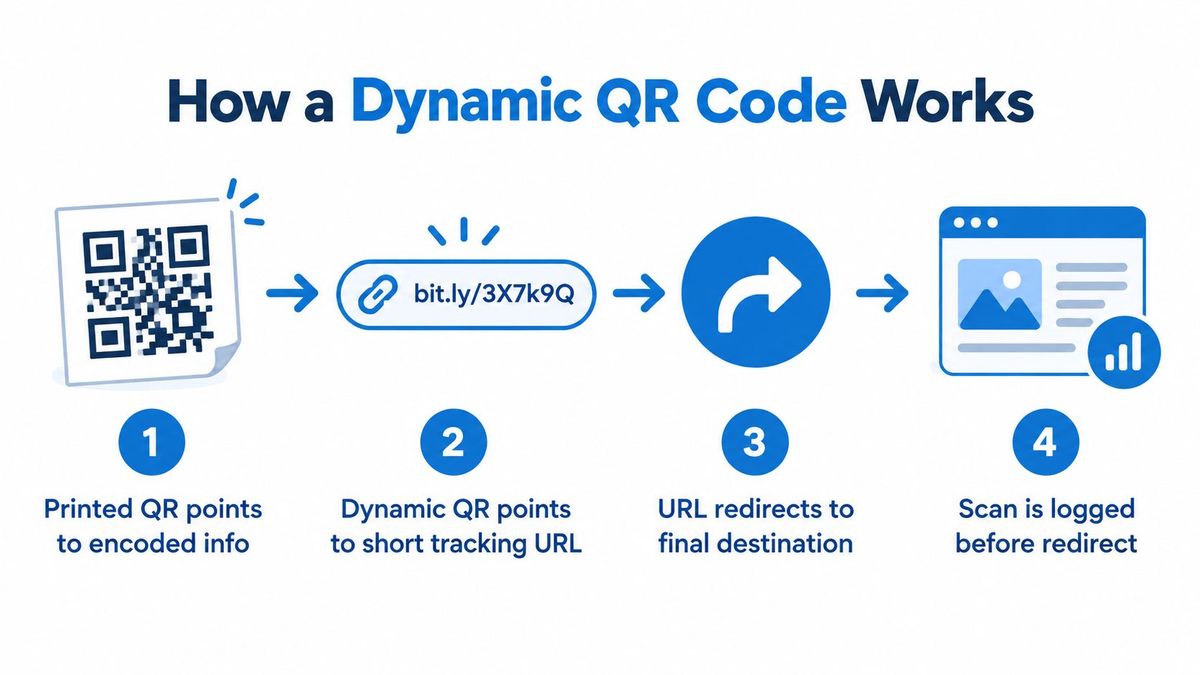
Follow the request through the system#
- The QR payload supplies the address. The payload is the information encoded in the printed pattern. In a tracked campaign, it points to the tracking URL rather than carrying the full campaign experience.
- The tracking URL receives a request. When someone opens the decoded address, the service receives information it can use for routing and permitted measurement.
- The redirect service selects the destination. It evaluates the configured destination or applicable routing conditions and forwards the visitor.
- The analytics record supports later investigation. The service records the available request details, while the destination page handles the visitor's next action.
The word dynamic describes the managed destination, not a printed pattern that somehow changes. A campaign operator edits the server-side configuration. The existing artwork still contains the same address.
For example, an event team could initially direct visitors to registration and later direct them to attendee resources. That's a proposed workflow, not a promise that every generator supports every routing option.
Keep ownership and measurement separate#
An owned domain gives the team a public address it controls. The implementation details matter, so a practical starting point is this guide to creating a QR code with your own domain.
The tracking address, analytics record, and destination page have different jobs. The address provides continuity, the record describes the request, and the destination delivers the experience.
A logged redirect doesn't establish that the page loaded successfully or that the visitor converted. Those conclusions require additional evidence from the destination and its downstream systems. Ask a provider where its visibility ends before treating its dashboard as a complete customer-journey report.
Static and Dynamic QR Codes Compared#
Choose the format according to what you need to maintain and measure. A fixed, self-contained piece of information has different requirements from a campaign whose offer, destination, or reporting needs may change.
For tracked campaigns, the recommended architecture is a short, stable URL rather than the final destination, allowing the redirect service to record requests and change the target after printing; the relevant encoding background is the ISO/IEC 18004 QR-code framework[1].
Static and dynamic QR code comparison#
| Consideration | Static QR Code | Dynamic QR Code |
|---|---|---|
| Encoded information | Fixed payload, such as a destination address | Address of a managed redirect |
| Updateability | Printed payload stays fixed | Destination configuration is editable |
| Measurement | Destination analytics may provide evidence | Redirect records provide an additional observation point |
| Routing | No separate routing layer is inherent | Managed routing sits between scan and destination |
| Print implications | A different encoded address requires different artwork | Destination edits can preserve existing artwork |
| Operational trade-offs | Depends on the encoded information or destination remaining useful | Also depends on redirect service and domain health |
Avoid the absolute claim that static codes can never be associated with tracking. A destination page can have analytics, and a fixed URL can contain campaign information. The distinction is whether you have a managed observation and routing layer before the destination.
Account for the extra dependency#
With a dynamic implementation, someone must maintain the redirect service, domain, certificate, and destination. Ask who owns those responsibilities and how the team will investigate a failure.
A useful selection exercise is to describe the change you expect to make. If the team needs to replace an expired offer while packaging remains in circulation, managed routing has a clear role. If the code contains information that won't need editing or campaign analysis, the simpler approach may be sufficient.
Neither choice fixes unreadable artwork. Routing flexibility and physical scan reliability are separate decisions, and both belong in the launch review.
Scan Metrics Worth Monitoring#
Start with diagnostic questions, then choose the fields needed to answer them. A dashboard full of charts is less useful than a modest report that helps an operator decide whether to inspect a poster, a redirect, or a landing page.
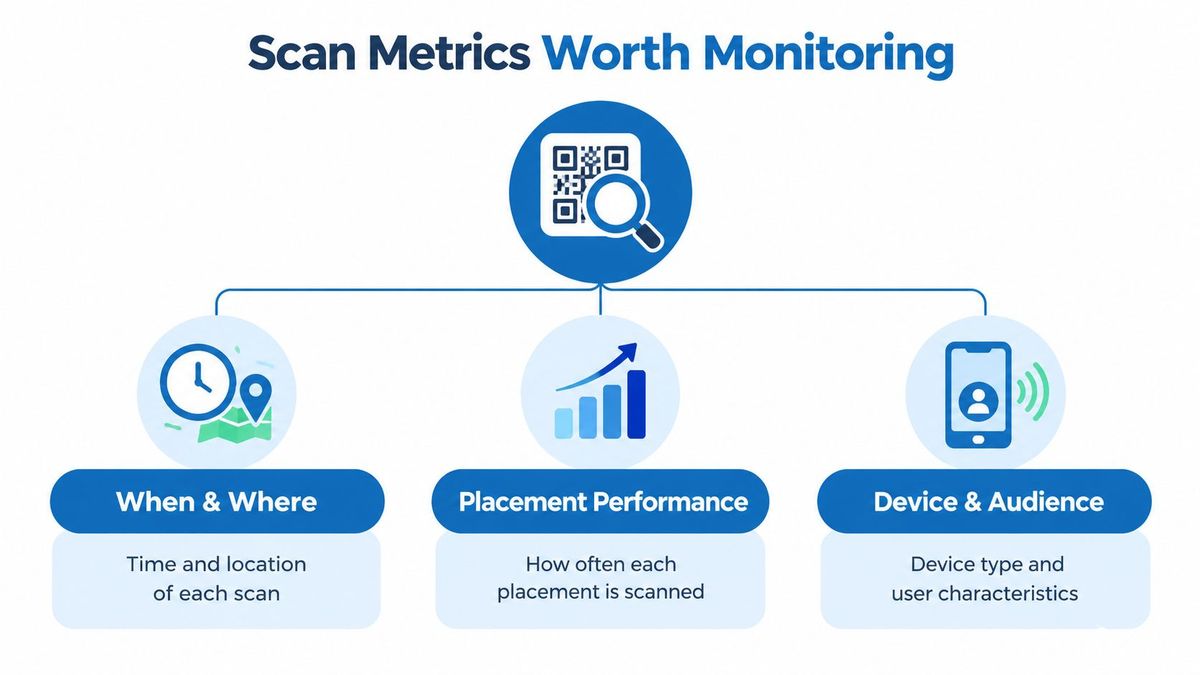
A tracked request can be associated with campaign, placement, timestamp, approximate geography, device or user-agent class, destination outcome, and HTTP error status. Availability varies by platform and integration, so don't assume every field is present or equally reliable.
Where and when does activity occur?#
Use timestamps and placement identifiers to compare activity with campaign operations. A poster installed late shouldn't be judged as though it had been visible for the full reporting period.
Record timestamps in UTC, then apply local-time views for human interpretation. Normalize country and device labels so reporting differences don't arise from inconsistent naming.
Approximate geography can help identify regional patterns, but it shouldn't replace placement identifiers. If knowing which shop generated a request matters, design that distinction into the campaign rather than trying to reconstruct it from location estimates.
Did visitors reach a usable destination?#
Monitor the journey as a set of related observations:
- Redirect status and latency: Check whether the routing layer responds successfully and without unusual delay.
- Destination outcome: Use destination-side evidence or health checks to investigate whether the intended page is available.
- Device or user-agent class: Look for patterns that may justify testing a particular mobile experience.
- Referrer information: Retain it where available and appropriate, but don't make it the sole basis for identifying physical placements.
- Downstream events: Compare landing-page activity with the action the campaign was designed to encourage.
A spike in requests alongside elevated destination errors suggests a delivery problem worth investigating. Healthy delivery with weak downstream action suggests a different line of enquiry, such as message mismatch, form friction, or an unconvincing offer. Neither pattern proves the cause by itself.
Keep raw events separate from summarized dashboards. Analysts may need to revise filters for automated requests, repeated activity, or previews without losing the underlying record.
Finally, label visibility clearly. If your system observes only the redirect response, report that response. Don't rename it “successful landing-page visit” unless you have evidence from the landing page.
What RedirHub's own redirect traffic shows#
Automated traffic is the reason to read totals carefully. Across 422,184 RedirHub redirect requests in a six-hour window ending at 16:20 UTC on 22 October 2026, 42.2% were flagged as bots; the other 244,061 came from people. Of those people's requests, 46.6% were on mobile devices and 0.026% ended in a 4xx or 5xx response. These are redirect requests, of which a QR scan is one kind, not unique visitors. We counted them in RedirHub's edge access log, per account and then summed across both clusters, leaving out five accounts that each held more than 10% of traffic.
The same split is available in the product: the Analytics page shows clicks, unique visitors, QR scans and errors, and its Humans only switch leaves bot clicks out of every figure. Scan history goes back 90 days on Core and 6 months on Pro, with Enterprise set by contract.
Latency can be measured the same way. In the RedirHub redirect speed benchmark[2] (25 providers, 15 to 22 October 2026, median time to first byte averaged over Washington, D.C., Frankfurt and Tokyo), RedirHub's redirects took a median 16 ms, against 123 ms for Bitly and 266 ms for Rebrandly.
Privacy and Attribution Boundaries#
More scans don't necessarily mean more customers. Shared phones, repeated reloads, preview services, and bots can complicate the relationship between recorded requests and people. A visitor may also scan in a shop, lose connectivity, and purchase later through another route.
The commercial measurement gap is substantial: Bitly's QR campaign research[3] reports that only 31% of marketers track the customer journey after a scan and just 16% track revenue attributed to QR code campaigns. These findings support a practical caution: collecting activity and establishing business outcomes are different tasks.
Define events before connecting them#
| Event | What your reporting should establish |
|---|---|
| Scan request | A request reached the tracked endpoint |
| Session | The analytics system recognized a visit under its stated rules |
| Lead | A defined enquiry or qualification event occurred |
| Purchase | The commerce or sales system recorded a transaction |
Don't substitute one event for another. In particular, a “unique” count depends on a system's identification and deduplication rules; it shouldn't automatically be described as a count of individual people.
Design a permitted handoff from campaign parameters to landing-page events, then to CRM or ecommerce outcomes where appropriate. Query forwarding and first-party identifiers can support that process, but they aren't universal proof that a scan caused a purchase.
Collect only what you need#
Choose measurement fields according to a stated purpose. Minimize personally identifying data, avoid unnecessary retention of full IP addresses, define retention periods, and disclose tracking where applicable.
For teams reviewing consent-aware conversion measurement, SourceLoop's GDPR tracking playbook[4] is a relevant resource to consider alongside legal and privacy advice. Don't treat any implementation guide as a substitute for assessing your own processing.
- Document deduplication rules: Explain how repeat requests and suspected automated traffic affect reporting.
- State attribution assumptions: Identify whether the report describes a last interaction, an assisted interaction, or another model.
- Preserve uncertainty: Report unmatched outcomes separately rather than forcing every purchase into a campaign.
A defensible report can acknowledge that a campaign influenced a journey without claiming exclusive credit for it. Honest boundaries make attribution more useful, not less.
Creating a Tracked QR Campaign#
Begin with the decision you want to make after launch. For a product insert, that might be whether the insert helps buyers reach setup guidance. For an event badge, it might be whether attendees complete a follow-up enquiry.
Write the objective as an observable action, then assign a campaign owner. That prevents the implementation from becoming a collection of fields nobody knows how to interpret.

Prepare the campaign records#
- Name the placements: Use descriptive identifiers for the poster, insert, display, or location you intend to compare.
- Assign the tracking address: Choose an owned-domain URL and document its initial destination.
- Define the outcome: Specify the landing-page event and any permitted CRM or ecommerce handoff.
- Select measurement fields: Record what each field is for, who can access it, and when it will be deleted.
If your design relies on campaign parameters, test their arrival at the destination. The guide to preserving UTM parameters through redirects provides a focused implementation reference.
Compare a dedicated QR platform with a redirect-management platform according to these requirements. Verify downloadable asset formats, analytics fields, destination editing, and domain ownership before committing printed materials.
Test the physical asset and digital journey#
Choose error correction for the environment. M is a practical starting point for clean, controlled media; Q or H may suit outdoor, industrial, packaging, or logo-overlay applications. Higher correction consumes capacity, so don't treat it as a substitute for sensible artwork.
Preserve strong contrast and a generous quiet zone, the clear area around the symbol. Test the actual printed asset on representative devices, under the lighting and viewing conditions people will encounter.
A useful test follows the whole journey: decode the symbol, open the tracking address, reach the intended page, and complete the defined action. Check the corresponding records rather than stopping when the phone recognizes the image.
After launch, review live activity for immediate issues and historical views for patterns. Maintain a change log for destination edits and routing changes, so analysts can distinguish a campaign response from a configuration change. For a step-by-step walk through reading scan reports, see how to track QR code scans without reprinting.
Reading Real Campaign Signals#
Suppose a packaging team notices repeated activity associated with a regional placement. Before calling it strong engagement, the analyst checks timing, device classes, filtering rules, and downstream actions. Repeated requests might reflect useful return visits, but they could also reflect retries or other non-distinct activity.
The next action depends on that distinction. If visitors repeatedly open support instructions and complete the intended task, the team may have a useful service touchpoint. If requests cluster around failed page loads, the operations owner should investigate delivery instead.
Diagnose before changing the campaign#
An event team faces a different situation. Registration has closed, but badges remain in circulation. The operator updates the destination to attendee resources and records the change; the analyst then interprets activity according to the destination visitors received.
For broader planning examples, use this guide to QR code campaigns as a starting point for discussing placement and operational requirements. Keep the diagnosis tied to your own campaign records rather than assuming another campaign's pattern applies.
An IT team investigating rising errors should compare:
- HTTP status distributions: Determine whether failures cluster at the redirect or destination.
- Historical trends: Establish whether the change coincides with a deployment, destination edit, or campaign launch.
- Request details: Inspect permitted raw logs when summaries don't explain the pattern.
- Health checks and alerts: Where available, use them to corroborate an availability problem.
Separate the likely explanations#
A quiet placement with healthy delivery deserves a physical inspection and a review of its message. It doesn't immediately justify changing the redirect system.
A busy placement with errors deserves technical investigation before the team buys more distribution. Healthy delivery with weak completion calls for closer inspection of the offer and destination experience.
These are hypothetical diagnostic scenarios, not reported customer results. Their value is the method: compare related signals, identify missing evidence, and test the most plausible explanation before making an expensive campaign change.
A Final Launch and Measurement Checklist#
A launch review should confirm that the team can deliver the experience, investigate failures, and evaluate outcomes. Treat those as separate responsibilities, even if the same person owns them.

Confirm the operational basics#
- Ownership: Name the person responsible for campaign decisions and the person responsible for routing problems.
- Address and placement records: Confirm the stable owned-domain URL, distinct placement identifiers, and documented destinations.
- Artwork: Approve contrast, quiet zone, error-correction choice, and representative-device tests.
- Delivery checks: Verify redirect behavior, destination availability, and the monitoring process.
Confirm the measurement contract#
- Event definitions: Agree on what counts as a request, session, lead, and purchase.
- Reporting dimensions: Validate timestamps, placement labels, geography, and device categories.
- Privacy controls: Confirm permitted collection, access, disclosure, consent handling, and retention.
- Attribution boundaries: Document filtering, deduplication, unmatched outcomes, and assumptions about campaign credit.
- Change management: Decide how destination edits and investigations will be recorded.
Before distribution, ask a colleague to complete the journey and explain the resulting report. If they can't distinguish a delivery failure from weak campaign response, refine the measurement plan.
A QR code generator with tracking is useful when it helps your team answer better questions than a counter can. Reliable delivery, interpretable diagnostics, and appropriately qualified outcome measurement are the standard to aim for.
Track every scan on your own domain
Create dynamic QR codes on your own domain, change each destination after printing, and read scans, errors and locations in one analytics view. Core and Pro come with a 14-day free trial.
Create a dynamic QR codeSources
Frequently asked questions
It creates a QR code that holds a short tracking address instead of the final destination. When someone scans it, the request passes through a redirect service that records it and forwards the visitor, so you can see scan counts, locations and devices and change the destination later.
A static code holds its destination directly, so no service sees the scan. You can still measure visits with analytics on the destination page or campaign parameters in the address, but you cannot edit the destination after printing. A dynamic code adds a redirect layer that records each scan.
No. A scan count is the number of requests that reached the tracking address, and it can include repeat scans, link previews and bots. In a six-hour window on 22 October 2026, 42.2% of 422,184 RedirHub redirect requests were flagged as bots, so filter automated requests before you report.
Typically a timestamp, approximate country and city, device or browser type, referrer and the response code, though the fields vary by platform. On RedirHub, the Analytics page shows clicks, unique visitors, QR scans and errors, with breakdowns by country, city, device and response code.
It depends on the plan. On RedirHub, click and scan history goes back 90 days on Core and 6 months on Pro, and on Enterprise it is set by contract.

Leo Astarothman is the Brand & Content Lead at RedirHub, where he shapes the company's visual identity, educational content, product experiences, and marketing strategies. He also specializes in system design. Simplifying complex redirect infrastructure into practical resources, product experiences, and campaigns that help businesses understand and adopt modern redirect management.
Related Articles
View All Articles