Direct Answer
To track QR code scans, the code has to point at a link that can count them. Either encode a short link (a dynamic QR code) that records each scan and then redirects, or encode a landing-page URL tagged with UTM parameters so Google Analytics can attribute the visit. A plain QR code that holds your final URL cannot be tracked on its own. The most complete setup uses both: a short link on your own domain counts every scan, and UTM tags on its destination show what visitors do next.
Can you track a QR code?#
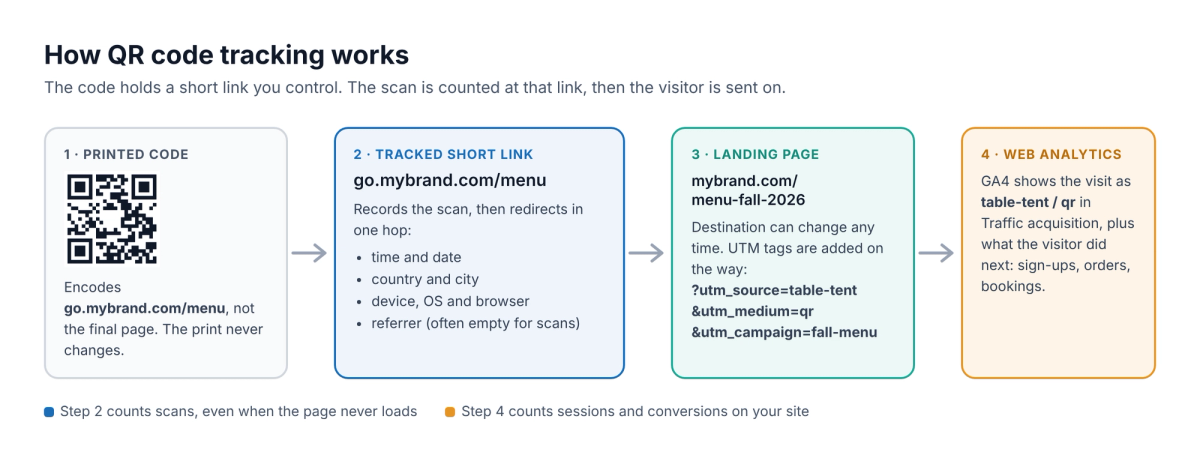
Not the code itself. A QR code is just text drawn as a pattern, usually a web address. The phone's camera reads it and opens the address in a browser; nothing is reported back to whoever printed the code. Tracking happens at the address the code points to, in one of two places:
- At the link: the code encodes a short link that logs each request and then redirects. This counts every scan, even when the visitor closes the page before it loads.
- On your website: the landing-page URL carries UTM parameters, and your analytics tool (such as Google Analytics 4) records the session and what the visitor does next.
A link layer has a second benefit: because the printed code only holds the short link, you can change where it sends people later without reprinting. For packaging, menus, posters, event badges and direct mail, that matters as much as the numbers.
3 ways to track QR code scans#
| What you see | Cost | Watch out for | |
|---|---|---|---|
| Static QR code with a UTM-tagged URL | Sessions and conversions in Google Analytics | Free | Counts visits, not scans; the destination can never change; long URLs make a denser code |
| Dynamic QR code from a QR generator | Scans over time, location and device in the vendor's dashboard | Usually a subscription | The code encodes the vendor's domain, so the code depends on that account staying active |
| Short link on your own domain (for example with RedirHub) | Every scan, plus UTM tags passed on to your analytics | Paid service; you need a domain or subdomain | One DNS record to set up before you print |
If the code goes on a single flyer that points at a page that will never move, and you only care about sign-ups on your site, the free UTM method is enough. Choose a link layer when the code will be printed in volume, stay in circulation for months, or needs a destination you might change.
Method 1: Track QR codes in Google Analytics with UTM parameters#
UTM parameters are tags at the end of a URL that tell Google Analytics where a visit came from. Google says to always use utm_source, utm_medium and utm_campaign, and notes that values are case sensitive[1], so "qr" and "QR" become two rows in your reports. A tagged URL for a table-tent menu looks like this:
texthttps://mybrand.com/restaurant/menu-fall-2026?utm_source=table-tent&utm_medium=qr&utm_campaign=fall-menu- Build one tagged URL per placement: the same utm_medium (qr) and utm_campaign everywhere, and a different utm_source for each poster, flyer, pack or sign.
- Generate a QR code from each tagged URL and label the files so you can't mix them up at the printer.
- Scan a printed proof with an iPhone and an Android phone and check that the page opens with the tags still on the URL.
- After launch, open the Traffic acquisition report in Google Analytics 4 and use the Session source / medium dimension[1]. Your codes appear as rows such as table-tent / qr.
- Filter on Session medium = qr to compare placements by conversions, not just visits.
The limits: Google Analytics counts sessions, not scans. Someone who scans and closes the page before it loads, or who blocks analytics, does not show up. And because the code holds the final URL, a page that moves or a typo in the tags means reprinting.
Method 2: Use a dynamic QR code (a tracked short link)#
A dynamic QR code encodes a short link instead of the final page. Each scan reaches the short link first, which records it and redirects the visitor to the current destination in a single hop. The QR graphic never changes; you edit the destination behind it.
"Dynamic" is not a property of the black-and-white pattern; it is the editable redirect behind it. That is also why you can change a QR code's destination after printing, and why the domain inside the code matters. If the code encodes a QR vendor's domain, it only works while that vendor and your account do. If it encodes a subdomain you own, such as go.mybrand.com, you can move it to another provider later and every printed code keeps working.
Combine both methods for the full picture: the short link counts scans, and UTM tags added to its destination carry the campaign into Google Analytics, where you see sign-ups, orders or bookings.
What QR code tracking shows (and what it can't)#
A tracked short link sees the request a phone makes when it opens the code. From that, a QR tracking dashboard can show:
- Scans over time: totals per day, week or campaign, and how they change after distribution.
- Unique visitors: an estimate of how many different people scanned, since one person often scans twice.
- Location: country and city, estimated from the IP address. Good for comparing regions or stores, not for pinpointing a person.
- Device, operating system and browser: iPhone vs Android, useful when the code promotes an app.
- Referrer: usually empty for scans, because a camera app has no web page to refer from. That is why separate links per placement matter more than the referrer.
What it can't show: who scanned. QR tracking does not reveal names, emails or phone numbers. Treat totals as link events, too: link previews, security scanners and bots also open links, so use a dashboard that filters automated traffic, and compare placements with each other rather than reading every scan as one person.
Use one code per placement#
One code on every channel tells you how many scans you got, but not where. Give each meaningful placement its own short link and code, even when they all send people to the same page:
| Placement | QR link | utm_source / utm_medium / utm_campaign |
|---|---|---|
| Table tent | go.mybrand.com/menu | table-tent / qr / fall-menu |
| Window poster | go.mybrand.com/menu-window | window-poster / qr / fall-menu |
| Receipt | go.mybrand.com/review | receipt / qr / reviews |
Keep paths readable: go.mybrand.com/menu-window is easier to audit than a random string. Record each code's placement, campaign, destination, start date and owner in a campaign sheet so nobody has to guess what a link is for months later. Don't make a new code for every small variation of the same printed piece; one stable code per placement is enough.
How to track QR code scans with RedirHub#
RedirHub creates dynamic QR codes on your own domain: the code encodes a link such as go.mybrand.com/menu, every scan is counted, and you can change the destination at any time. The screen below is where you set the destination, the QR link, the style and the UTM parameters.
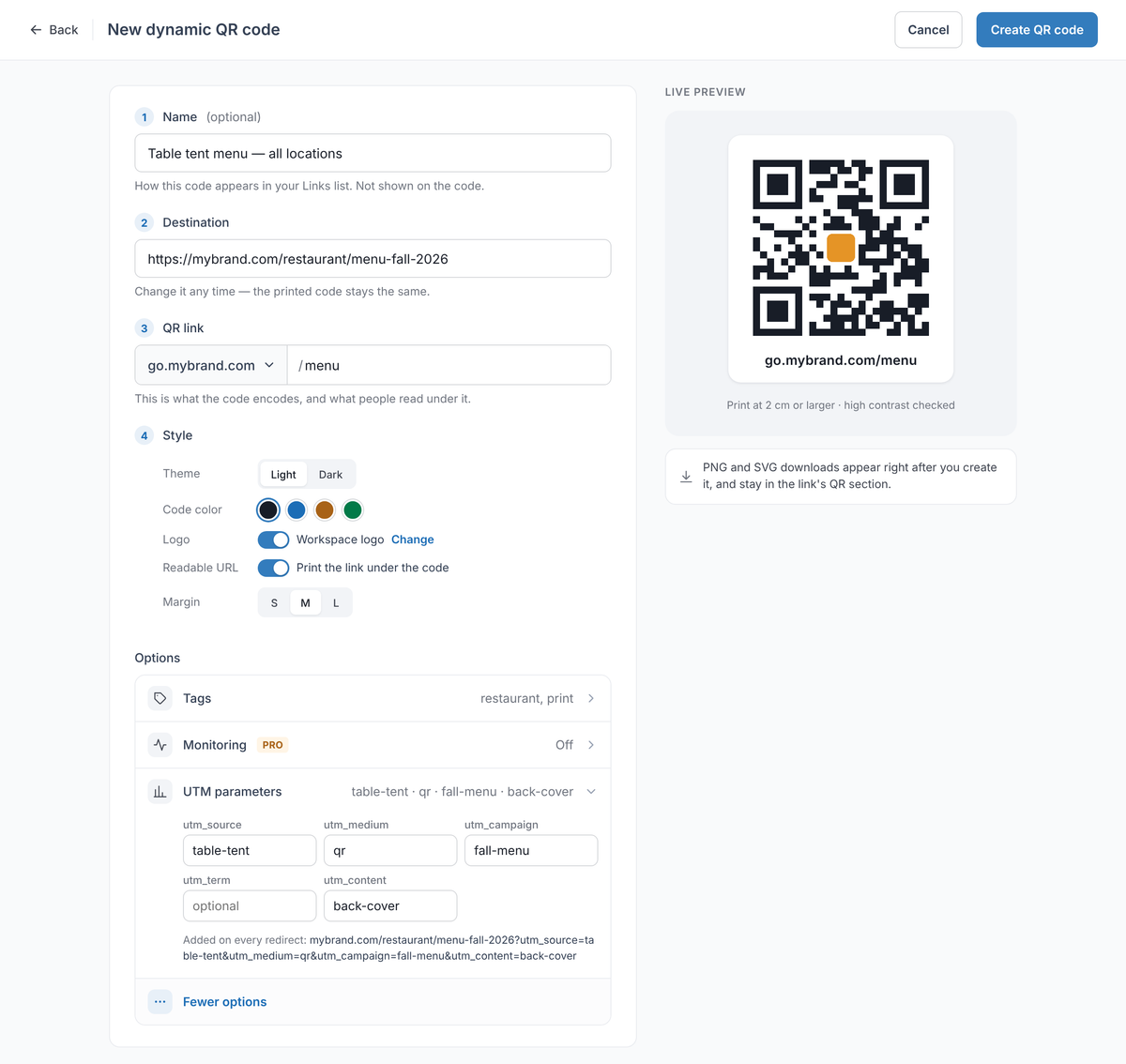
- Connect a short-link domain such as go.mybrand.com under Hostnames and add the DNS record it shows. HTTPS is issued for it automatically.
- Click Create and choose Dynamic QR Code.
- Enter a Name (optional, only you see it) and the Destination, the page people should land on.
- Under QR link, pick your domain and type a readable path, for example menu. This is what the code encodes and what is printed under it.
- Under Style, choose the theme and code color, and turn on Workspace logo and Print the link under the code if you want them.
- Open More options, then UTM parameters, and fill in utm_source, utm_medium and utm_campaign. They are added on every redirect, so Google Analytics sees each scan's campaign.
- Click Create QR code and download the PNG or SVG for your designer or printer.
- Scan a test print, then enter the QR link in our redirect speed test to check the status code, where it lands and how fast it answers.
- Open Analytics to see scans over time, unique visitors, countries, devices and referrers, with bots filtered out.
Is your redirect working? Enter your domain. You'll see the status code (301 or 302), where it lands, whether HTTPS is valid, and how fast it answers from Washington, Frankfurt and Tokyo, ranked against every redirect tested in the last 7 days.
Test my redirectStatic QR code + Google Analytics vs RedirHub#
| Static QR code + UTM tags | RedirHub dynamic QR code | |
|---|---|---|
| What the code encodes | Your final page URL | A short link on your domain, e.g. go.mybrand.com/menu |
| Change destination after printing | No, reprint | Yes, any time |
| Counts scans | No, only sessions where analytics loads | Every scan, with bots filtered out |
| What visitors do next | Yes, in Google Analytics | Yes, UTM tags are added on every redirect |
| Many codes | One at a time | CSV import, bulk repoint, API and MCP |
| HTTPS | Your website's certificate | Issued and renewed automatically for the QR domain |
| Where the redirect runs | No redirect | 130 global edge locations, close to each visitor |
| Scan history | Not applicable | 90 days on Core, 6 months on Pro |
| Price | Free | From $49/month (Core), 14-day free trial |
For a print run with hundreds of codes, RedirHub lets you create them with a bulk CSV import and repoint many at once with a preview. The QR domain gets automatic HTTPS, so phones never show a certificate warning, and your website's DNS and email stay where they are. On Pro, destination monitoring emails you when a page behind a code breaks, and the link history shows who changed each destination.
The same domain also serves branded short links for email, social and ads, so QR scans and link clicks for one campaign end up in one place. When the free method is enough (one code, a permanent page, and you only need on-site conversions), stick with a static code and UTM tags.
Test the complete path before printing#
Scan the code from the distance and angle people will use. Confirm that the camera recognizes it quickly, the link uses the intended domain, the final page loads on mobile, and the UTM tags arrive. Test the short link directly as well as through the printed code.
After changing a destination, scan again from more than one device. Check that the old printed code still resolves, that the page does not redirect in a loop, and that the scan appears in your analytics.
Common QR code tracking mistakes#
- One code everywhere. You get a total but can't tell the poster from the packaging.
- Inconsistent UTM values. "QR", "qr" and "qr-code" become three sources in Google Analytics. Agree on lowercase values before printing.
- Printing a vendor's domain. If the code encodes someone else's domain, the code stops working when that account or vendor does.
- No owner for renewals. A lapsed subscription, an expired domain or a deleted landing page is the most common reason a QR code stops working. Keep the domain and account under the business, not one campaign manager.
- Reading scans as people. Repeat scans and automated requests inflate totals; compare placements and trends instead.
Sources
Frequently asked questions
No. A QR code that encodes a final URL does not report anything. To track scans, encode a short link that records the request before forwarding the visitor, or tag the URL with UTM parameters so your website analytics records the visit.
Add utm_source, utm_medium and utm_campaign to your landing-page URL, generate the QR code from that tagged URL, and look for the visits in Google Analytics under Traffic acquisition. It is free, but it counts sessions rather than scans and the destination can't be changed after printing.
Yes, through UTM parameters on the URL the visitor lands on. Google Analytics 4 shows them in the Traffic acquisition report under Session source / medium and Session campaign. With a dynamic QR code, add the UTM tags to its destination so every scan carries them.
A trackable (or dynamic) QR code encodes a short link instead of the final page. The short link counts each scan and redirects to the destination, which you can change at any time without reprinting the code.
No. QR tracking shows when a code was scanned, the approximate country and city, and the device and browser, but not the person's name, email or phone number.
No. QR scan tracking measures requests at the short link, while website analytics measures activity after the visitor reaches the site. Use both when you need to compare scans with sessions, engagement or conversions.
Yes, if the code points to an editable short link or redirect. If it contains the final destination directly, changing it means generating and printing a new code.
A short link on a domain you control, with a readable path for the campaign or placement, such as go.mybrand.com/menu. It should forward to the current landing page and stay active for as long as the printed material is in circulation.
Not necessarily. A person can scan more than once, and link previews and bots can open the link too. Look for a dashboard that filters automated traffic and reports unique visitors separately from total scans.

Leo Astarothman is the Brand & Content Lead at RedirHub, where he shapes the company's visual identity, educational content, product experiences, and marketing strategies. He also specializes in system design. Simplifying complex redirect infrastructure into practical resources, product experiences, and campaigns that help businesses understand and adopt modern redirect management.
Related Articles
View All Articles