Key takeaways
Use a dynamic QR code for mail. The printed square stays the same while you edit the destination, fix a broken page or retire an expired offer. Put the code on your own branded domain, not a public shortener. Scam warnings have made recipients cautious, and a URL they recognize helps. Track by segment, not just total scans. Give each list, offer or mailpiece version its own link and pass parameters to the landing page. Give people a reason to scan: a clear offer, a short next step and a mobile-ready page. Test on several phones, at final print size, before the run goes to the printer.
A QR code on a mailpiece does one job: it turns a card in someone’s hand into a measurable visit on their phone. To make it work, use a dynamic code (so you can change the destination after printing), put it on a domain your brand owns (so recipients trust it), give each audience segment its own trackable link, and test it before the print run. The rest of this guide shows how, step by step.
Why QR codes belong on direct mail#
Direct mail has always been hard to measure. You know how many pieces left the building, and you eventually see sales, but the path between the two is murky. A QR code closes part of that gap.
USPS research[1] lists QR codes among the methods for tracking direct mail ROI. The scan data and website click-through tracking behind a code are what let you tie a mailpiece to a visit.
The USPS direct mail brochure[2] makes a related point: mail is highly targetable and works best inside an integrated campaign, and it names QR codes among the response mechanisms a mailpiece can carry. Mail gets you into the home.
That last part matters. The code is not the campaign. It is the bridge between a piece of paper and the next action you want.
Static or dynamic: pick dynamic for anything you mail#
A static QR code encodes the destination URL directly in the pattern. Change the URL and you have a different code, which means a reprint. A dynamic code encodes a short redirect link instead. The redirect decides where people land, and you can edit it at any time.
For mail, the difference is practical:
| Situation | Static code | Dynamic code |
|---|---|---|
| Landing page URL breaks after mailing | Reprint and re-mail | Edit the destination |
| Offer expires before the last pieces arrive | Scanners hit a dead offer | Point to a new offer or a “sorry, try this” page |
| You want scan counts, location and device | Not available by itself | Reported by the platform |
| Same design across several segments | Needs a different code per URL | Distinct links per segment, one design system |
| Print cost of a mistake | High | Low |
A USPS Office of Inspector General paper on mail innovations[3] lists QR codes under connected mail. In our experience, an editable destination is what separates a professional setup from a one-off generator. Mail is slow and cannot be recalled. Once it is in carrier bags, the only thing you can still change is where the code points.
If you want the longer comparison, we cover it in static vs dynamic QR codes for marketers. And if you have already printed and found a problem, here is how to change a QR code destination after printing.
Put the code on your own domain#
This is the decision most direct mail teams skip, and it is the one that affects response most directly.
Recipients have been told repeatedly to be careful with QR codes. The FTC has warned that scammers cover real codes with their own[4], for example on parking meters. The FBI has also warned about unsolicited packages containing QR codes[5] used to start fraud, and it advises against scanning codes from unknown or unsolicited sources.
Unsolicited mail with a QR code is exactly the thing that guidance describes. You cannot control what scammers do, but you can control how legitimate your own piece looks when someone previews the link.
Most phone cameras show the URL before opening it. If it says a generic public shortener, the reader has to take your word for it. If it says something like go.yourbrand.com/spring, the reader can see it belongs to the brand whose name is on the card.
The FBI’s El Paso field office[6] advises consumers to avoid scanning codes found at random and to treat codes that look tampered with as suspect. A branded, secured domain makes your own code easier to trust. A recognizable domain helps the reader do what the FBI tells them to do.
A few practical rules:
- Use a subdomain you control, such as
go.oroffer., so it sits visibly under your main brand. - Make sure it is served over HTTPS with a valid certificate. A browser warning kills a scan.
- Keep the path readable and short. It should look like something a person would expect from you.
- Print the short URL beneath the code, so a skeptical reader can type it in themselves.
We wrote a step-by-step guide to creating a QR code with your own domain if you are setting this up for the first time.
Tracking: go beyond the scan count#
A total number of scans is a vanity metric on its own. A mailing of 50,000 pieces with 600 scans tells you the response rate is 1.2%, and nothing else. It does not say which list, offer or creative produced those scans, or whether any of them bought.
More sophisticated campaigns use unique personalized URLs or distinct landing pages per segment, and the redirect has to pass parameters to the landing page if you want to attribute conversions to specific mailpieces. Here is how that works in practice.
Decide what you want to compare#
Before design, list the variables you actually care about:
- Audience segment (past customers, lapsed customers, prospects)
- Offer (10% off vs free shipping)
- Creative version (A vs B postcard)
- Drop date or region
Then give each combination its own link. Four segments and two creatives is eight links, and with a dynamic platform that is minutes of work, not eight print jobs.
Pass parameters through the redirect#
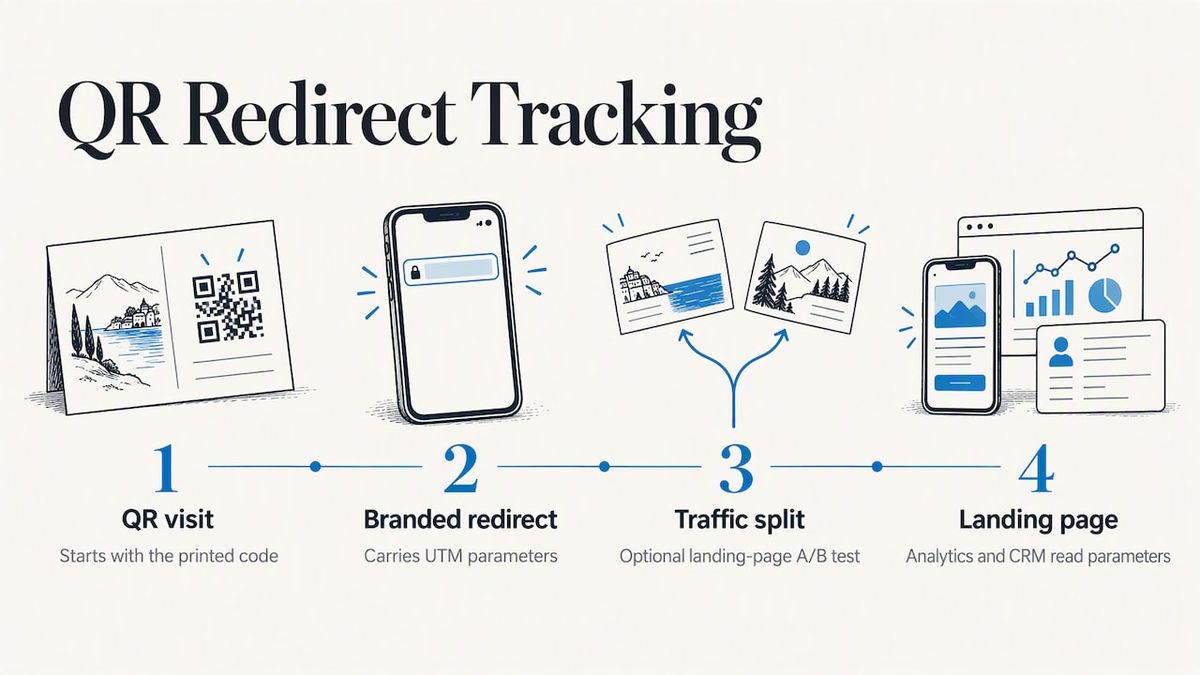
Each link should send visitors to the landing page with parameters that your analytics and CRM can read. A common approach is UTM parameters: source set to directmail, medium to postcard, campaign to the mailing name, and content to the segment or creative version. If you use A/B tests on the landing page, the redirect can split traffic as well. Our page on campaign redirect links with UTM and A/B testing covers that setup.
What to read in the reports#
A decent QR analytics view shows scans over time, location, device type and which link was scanned. Time matters more than people expect. Mail lands over several days, so a scan curve that rises and then decays tells you when it arrived and how long your offer stays alive. We go deeper in our guides to QR code tracking without reprinting and QR code scan analytics.
Scans are the middle of the funnel. Connect them to what happens next: form fills, coupon redemptions, orders. The USPS piece on tracking direct mail ROI[1] lists several other methods, and a QR code combines well with them rather than replacing them. A promo code printed beside the QR code, for instance, catches people who scan later on a desktop.
Give people a reason to scan#
The best tracking in the world cannot rescue a code with no motive behind it. TEAM LEWIS’s roundup of consumer research[7] shows that people use QR codes mostly to get something they need, like a menu, an app, product information or tickets. Give them that: immediate, clear value, not a code for its own sake.
Translate that into the card:
- Say what happens. “Scan to see your personalized offer” beats a bare square.
- Name the benefit. “Scan to book your free estimate” or “Scan to claim 15% off” tells people what they get.
- Make the next step short. The landing page should load fast, fit a phone screen and ask for one action.
- Match the page to the card. If the postcard promises a spring offer, the page should open with that offer, not your homepage.
We would also keep a non-digital path on the piece, such as a phone number or short URL. Some recipients will not scan, and a few will not be able to.
What RedirHub traffic says about phones#
Across 168,684 redirect requests from people (bots excluded) on RedirHub between 18:55 UTC on 18 October 2026 and 00:55 UTC on 19 October 2026, 28.3% came from mobile devices, 0.7% from tablets and 71.0% from desktop. We left out the accounts that each handled more than 10% of requests on their cluster, which together were 82% of all human requests, so the figure shows how typical accounts’ links are opened, not QR scans specifically. A printed code is different: it can only be scanned with a phone, so the page behind it has to be built for a small screen first.
Print and layout checklist#
The technical details are small, and they are the ones that break campaigns.
- Size. Print the code large enough to scan comfortably at arm’s length. Test the actual proof, not the screen mockup.
- Quiet zone. Leave a clear margin around the code. Do not let text, images or folds run into it.
- Contrast. Dark code on a light background. Inverted or low-contrast colors fail on some phones.
- Finish. Glossy coatings can cause glare under certain lighting. Check a proof with your coating.
- Placement. Keep it away from folds, perforations and the address block. Postcards have postal layout rules too: the USPS requires a clear zone for the barcode on the address side, so keep your code on the message side.
- Short links. A shorter redirect URL produces a simpler, less dense pattern that is more forgiving to print and scan.
- Test. Scan the proof on at least one recent iPhone and one Android phone, in daylight and indoor light.
A dynamic code helps here too, since a short redirect link means a cleaner pattern than one encoding a long tracked URL with UTM parameters.
How we think about direct mail QR codes#
We build RedirHub around one idea: the link behind a printed code should belong to the business that printed it. A shared shortener puts someone else’s domain on your mailpiece and leaves you with no say over what happens to it. A campaign that cost thousands to print should not depend on that.
Direct mail makes this sharper than almost any other channel. You cannot patch a postcard. You can only change what it points to. So we think teams should settle three things before the file goes to the printer:
- the domain the code lives on,
- who can edit the destination, and
- how each segment will be told apart in the reports.
If those three are decided, the rest is creative and offer work. If they are not, you are gambling a print budget on a link nobody owns.
We also think the trust question will keep growing. Recipients are being told to doubt QR codes, and the honest response is to make yours easy to verify: a domain they recognize, a secure connection and a landing page that matches the card.
Setting it up with RedirHub#
If you want to run this on your own domain, RedirHub’s dynamic QR codes let you create codes that point to a branded link, change the destination without reprinting, and track scans. The branded links behind them run on your domain with SSL, and you can see engagement in the redirect and click analytics. Plans are Core, Pro and Enterprise, and Core and Pro have a 14-day free trial. See the pricing page for what each tier includes.
A pre-mailing workflow#
Here is a sequence you can copy.
- Define the goal. One action per piece: book, buy, register, redeem.
- Choose the domain. Set up a branded subdomain with HTTPS.
- Build the links. One per segment or creative version, with parameters that your analytics will read.
- Build the landing pages. Mobile first, matching the card’s promise, with one clear action.
- Print a proof and test. Several phones, real lighting, final size.
- Mail a small seed batch to your own team and a few trusted contacts, and confirm the scan lands correctly and is recorded.
- Monitor during delivery. Watch the first scans. If something is wrong, fix the destination while mail is still in transit.
- Review after the window closes. Compare segments on scans and on downstream conversions, not scans alone.
Step 7 is where the dynamic code earns its price. A broken landing page found on day two costs you a quick edit. Found after the drop, with a static code, it costs the campaign.
Print once, change the destination any time
Create dynamic QR codes on your own domain, give each segment its own link and read the scans per link, without reprinting.
Create a dynamic QR codeSources
- [1]7 Methods for Tracking Direct Mail ROI, USPS Delivers
- [2]USPS direct mail brochure (PDF)
- [3]RARC-WP-14-013 Mail Innovations, USPS Office of Inspector General
- [4]Scammers hide harmful links in QR codes to steal your information, FTC
- [5]Unsolicited Packages Containing QR Codes Used to Initiate Fraud Schemes, FBI
- [6]FBI Tech Tuesday: Building a Digital Defense Against QR Code Scams
- [7]Research Roundup: Consumer Perceptions of QR Codes, TEAM LEWIS
Frequently asked questions
Yes. USPS lists QR codes among the response mechanisms a direct mail piece can carry, as in its direct mail ROI guidance. What you must respect is the postal layout, such as the clear area for the barcode on the address side. Check the final design with your printer or your local postal business center before the run.
Dynamic, in almost every case. Mail cannot be recalled, so being able to change the destination after printing protects the whole campaign. A static code only makes sense for something that will never change and does not need measuring.
Give each segment or creative version its own link, and pass parameters through to the landing page. That way your analytics and CRM can tie the visit and any conversion to the specific list or version. Total scan counts alone cannot do this.
They can be, but people are right to be cautious. The FTC advises caution with QR codes on unexpected packages, and the FBI warns against scanning codes from unknown sources. As a sender, use your own branded domain, print the visible URL and make the offer clearly yours.
With a dynamic code, change the destination to a corrected page or a fallback offer. We explain the process in our guide to editing a QR code after printing. With a static code, the only fix is a new mailing.

Linh handles the backend systems that keep RedirHub fast and reliable. Her work revolves around performance, scalability, and making sure redirects happen instantly, no matter where users are. She also writes about redirect performance and link tracking. She likes solving complex problems quietly.
Related Articles
View All Articles