Domain Migration Checklist: Protect Rankings and Links

Key takeaways
Treat a domain move as a link-infrastructure change, not only an SEO task: inventory every URL, hostname, campaign link, email service and printed QR code before cutover. Map each old URL to its closest equivalent with one permanent redirect, or return a deliberate 404 or 410. Prepare DNS, certificates and email authentication separately from the website, test redirects for status, destination, request method and query parameters before launch, and keep the old domain and its redirects working long after the move: Google recommends at least a year.
Your new domain is ready, the launch announcement is scheduled, and the homepage looks right in staging. The team is watching uptime and organic traffic. Meanwhile, an old campaign URL still points to a retired product, the order-confirmation service hasn't authenticated the new sending domain, and the QR code on your packaging depends on a hostname nobody included in the migration plan.
Most migration failures don't look like outages. Customers can browse the site while individual links, transactions, and attribution paths fail. You may not notice until a campaign report shows fewer conversions or a customer sends a screenshot of a certificate warning.
A useful domain migration checklist treats the move as a link-infrastructure change, not just an SEO task. That means giving printed codes, email authentication, ad destinations, and campaign parameters the same attention as redirects and indexing.
Before scheduling cutover, agree on three launch conditions:
- Ownership: Every domain, channel, and critical customer journey has a named owner.
- Evidence: The team has tested real source URLs through to their final destinations.
- Recovery: Someone has authority to stop the launch or restore the previous configuration.
Keep the scope controlled. Changing the domain, CMS, content structure, and checkout together makes it harder to identify what broke. Move what you need to move, preserve what already works, and use these eight steps to make the result verifiable.
1. Inventory and Map Every URL, Domain, and Dependency#
Start with the URLs people really use, not just the pages your CMS exports. A crawler can discover internal navigation, but it won't find every bookmarked landing page, partner feed, email template, or printed QR code.
Combine crawl exports with Google Search Console, analytics landing-page reports, server logs, backlink reports, and advertising-platform exports. Ask marketing, support, sales, and IT to contribute links from systems they own.

Build an inventory that supports decisions#
Your spreadsheet should explain what each address does and who can change it.
- URL mapping: Record the old URL, proposed destination, expected response, and migration status.
- Business importance: Include traffic, conversions, referring domains, and whether the URL supports a critical transaction.
- Dependencies: Identify query parameters, app deep links, API consumers, authentication callbacks, and embedded assets.
- Ownership: Name the person responsible for updating and validating each channel.
Say a retailer discovers that a discontinued product page still receives visitors from packaging inserts and editorial reviews. Deleting it because it isn't in the current catalog would ignore those visitors. The team should decide whether a replacement product or an explanatory page best serves them.
Inventory hostnames separately from pages. Include the root domain, www, campaign subdomains, image hosts, and branded short-link domains. A neglected hostname can break an entire channel even when the main website works.
For printed materials, distinguish static QR codes from dynamic QR codes. A static code can't be edited after printing, although you can keep its encoded URL working. A dynamic code has an intermediate destination you can change, provided you retain control of that service and domain.
2. Build a Precise Old-to-New URL Redirect Map#
Redirecting every old page to the new homepage is easy to deploy and difficult to defend. A visitor following a product review expects that product or a useful replacement, not a generic storefront.
Map each source URL to its closest genuine equivalent. Preserve existing paths when they still make sense, but write explicit exceptions for renamed products, consolidated articles, and retired sections.

Choose behavior deliberately#
Use 301 or 308 permanent redirects for permanent moves. The distinction matters for transactional routes: RFC 7538[1] defines 308 as a permanent redirect that preserves the request method and body, so evaluate it carefully for API and form-submission traffic.
- Equivalent content exists: Redirect directly to that destination.
- Content has been consolidated: Choose the page that genuinely addresses the original intent.
- No useful replacement exists: Deliberately return 404 or 410 rather than sending visitors somewhere unrelated.
- The path structure is unchanged: Use path-preserving rules, with explicit exceptions taking precedence.
Say a blog removes dates from its article paths during the move. Each dated URL should resolve directly to the final article, not through an intermediate version on the new domain.
Keep the map in version control or retain dated CSV exports. Record intentional removals so another developer doesn't “repair” them with a homepage redirect later.
Use these website migration planning tips[2] to coordinate dependencies, but keep your approved mapping file as the operational source of truth. Before deployment, compare it against the inventory to expose missing entries, duplicate sources, conflicting rules, and destinations that don't exist.
3. Prepare DNS, SSL/TLS, and Email Infrastructure on the New Domain#
A website can load correctly while email, authentication, or a campaign subdomain fails. Treat DNS as a shared service configuration, not a web-hosting setting you can replace wholesale.
Export the existing zone before editing it. Identify which records support the website, mail delivery, domain verification, customer-support software, and other services.

Lower TTL values ahead of cutover where appropriate, but don't mistake that for instant propagation. The BoostedHost hosting-migration checklist[3] includes DNS TTL, TLS, and pre-launch redirect checks; your plan also needs observations from different networks because caches and routing paths can behave differently.
Validate web and mail independently#
- HTTPS: Provision valid certificates for destination hostnames and legacy HTTPS hostnames that will redirect.
- DNS routing: Check A, AAAA, CNAME, and relevant delegation records. Test IPv4 and IPv6 wherever both are published.
- Email authentication: Confirm MX, SPF, DKIM, and DMARC configuration for the actual sending services.
- Recovery: Save the previous zone configuration and keep the old infrastructure available.
Use the email DNS records guide to review mail-related records without confusing them with website routing.
For example, a shop might move its storefront while retaining its existing email domain. That doesn't require renaming every mailbox, but changing DNS providers could still remove authentication records unless someone preserves them.
Test order confirmations, password resets, and support replies using real delivery paths. Don't weaken an established HSTS policy casually; verify its scope and certificate requirements before introducing new hostnames or changing routing.
4. Configure and Test Redirects in Staging Before Going Live#
A redirect rule isn't ready because a browser eventually reaches a page. You need to know which status it returned, which URL it selected, what parameters survived, and whether the destination works.
Deploy the intended production rules in a controlled environment. Use curl to inspect response headers and a crawler to exercise the full mapping file; use a hosts-file override or curl --resolve when you need to test a hostname against the future endpoint before public DNS changes.
Test inputs that expose rule conflicts#
- URL variants: Include trailing slashes, mixed case, encoded characters, www variants, and HTTP entry points.
- Query strings: Test campaign tags, click identifiers, filters, and parameters whose repeated values matter.
- Request methods: Exercise GET and relevant POST or PUT requests with safe test payloads.
- Routing layers: Check CDN, load balancer, application, and redirect-service behavior for overlapping rules.
- Final responses: Confirm the destination loads correctly rather than stopping at a valid Location header.
Use a bulk redirect checker workflow to compare actual results with expected destinations. Record failures against the mapping file so fixes can be retested systematically.
Say a campaign link contains both a UTM parameter and a product variant. A rule that preserves the path but drops the query may send visitors to the right product while losing their selected variant and attribution. That's a failed test, even if the destination returns a successful response.
Repeat priority tests from different regions and networks. Keep staging access controls in place, and separately verify that production deployment won't carry over a staging-only robots block or noindex directive.
5. Notify Search Engines and Update Search Console Properties#
Verify the old and new domains in Google Search Console before launch. Confirm that the people running the migration have the required access, rather than discovering during cutover that verification belongs to a former contractor.
Once redirects are live and validated, use the Change of Address tool for an eligible domain move and submit the new sitemap. Keep both properties accessible so the team can inspect old-domain redirect behavior alongside new-domain indexing.
Give crawlers a consistent destination#
- Robots access: Don't block the old site's redirects or the new site's indexable pages.
- Sitemaps: Publish the canonical destination URLs, not a mixture of old and new addresses.
- Indexability: Check priority pages for accidental noindex directives and incorrect canonical tags.
- Inspection: Examine representative product, category, article, and conversion pages.
- Monitoring: Assign someone to review indexing and crawl reports throughout the transition.
Google's site-move guidance[4] says medium-sized sites may need a few weeks or more for recrawling and reindexing, recommends retaining redirects generally for at least one year, and states that permanent redirects don't cause PageRank loss.
That isn't a promise that rankings will remain unchanged. Search engines still need to process the move, and incorrect destinations or inaccessible pages remain problems regardless of the redirect status.
For a publisher moving its article archive, inspect more than the homepage. Check older articles with external links, recently published pages, category archives, and pages with unusual templates.
Search Console submission is a notification, not a repair mechanism. If a sitemap points to blocked pages or a redirect lands on unrelated content, submitting the move won't correct the underlying configuration. Investigate by URL group rather than relying only on the total indexed-page count.
6. Update Internal Links, Canonicals, and Third-Party References#
Redirects are a compatibility layer for old references. Your new website shouldn't depend on them for routine navigation.
Update navigation, body links, image references, downloads, canonical tags, hreflang annotations, structured data, and social-sharing metadata. Check rendered pages as well as templates because JavaScript and plugins may generate addresses that a simple database replacement misses.
Separate changes you control from requests you must make#
Maintain different work queues for first-party changes and external updates. Your developers can replace an internal link immediately; a partner may need to approve a feed or directory change.
- Owned properties: Update email templates, signatures, social profiles, app listings, and business profiles.
- Paid channels: Review final URLs, tracking templates, sitelinks, product feeds, and destination-domain requirements.
- Partner systems: Update referral links, affiliate destinations, embedded widgets, and syndicated content.
- Technical integrations: Review webhook endpoints, OAuth callbacks, CORS rules, and domain allowlists.
Say an agency updates a client's main ad destination but leaves an account-level tracking template unchanged. The visible landing-page setting looks correct, yet clicks still pass through a retired hostname. Test the complete click journey rather than signing off from the settings screen.
QR codes need their own update status. Change editable destinations, scan representative printed assets with actual phones, and preserve legacy routing for static codes that remain in circulation.
Don't run an unrestricted find-and-replace across every stored domain reference. Some references belong to historical content, external services, or email addresses that aren't moving.
After deployment, crawl the new site again and classify remaining old-domain references. Fix active navigation and metadata first, then document legitimate exceptions so future audits don't repeatedly flag the same intentional references.
7. Launch, Monitor, and Validate Campaign Tracking#
Choose a launch window based on customer impact and team availability, not just low traffic. A quiet period is useful only if the DNS, application, marketing, and support owners can respond.
Establish a rollback decision point before cutover. Name the decision-maker, define the evidence they'll review, and distinguish failures that justify restoration from issues the team can safely fix forward.
Use operational evidence to make the decision#
- Access failures: Watch DNS resolution, certificate validity, origin availability, and destination errors.
- Customer journeys: Test purchases, lead forms, account access, and transactional email.
- Campaign continuity: Open ad links, scan printed QR codes, and inspect query parameters through the redirect journey.
- Measurement: Confirm analytics tags, consent behavior, and conversion events on the new domain.
- Performance: Compare representative pages against the recorded baseline across devices and networks.
Performance deserves a separate check. According to the HTTP Archive's Web Almanac 2025[5], 48% of mobile websites and 56% of desktop websites achieved good scores across all three Core Web Vitals; a working destination alone doesn't establish a good user experience.
Use a website migration testing workflow to connect synthetic checks with real customer journeys.
For example, paid traffic may appear to lose conversions because a redirect strips a click identifier. Check order or lead records before concluding that demand has fallen. Configure cross-domain measurement where journeys genuinely span domains, but don't use it as a substitute for preserving parameters.
Keep both environments viable during cutover. Timestamp every change, preserve transaction integrity, and decide whether restoring routing or correcting a specific rule offers the safer recovery.
What a redirect hop costs#
After cutover, every old URL answers with a redirect before the destination starts to load, so the layer that serves those redirects is part of your performance check. RedirHub's redirect speed benchmark[6] measures the median time to first byte of redirects from 27 providers and servers, from Washington, D.C., Frankfurt and Tokyo. From 27 October to 3 November 2026, the medians ranged from 9 ms (Amazon CloudFront) to 586 ms (Apache). Redirects answered by nginx took a median 143 ms and RedirHub's 15 ms.
| Provider or server | Median time to first byte |
|---|---|
| Amazon CloudFront | 9 ms |
| Fastly | 12 ms |
| RedirHub | 15 ms |
| Cloudflare | 87 ms |
| nginx | 143 ms |
| Apache | 586 ms |
The method is easy to repeat for the layer you plan to use: time the first byte of a redirect URL over a fresh connection without following it, from more than one region, and compare the median before and after cutover.
8. Maintain Redirects, Reclaim Links, and Govern Long-Term#
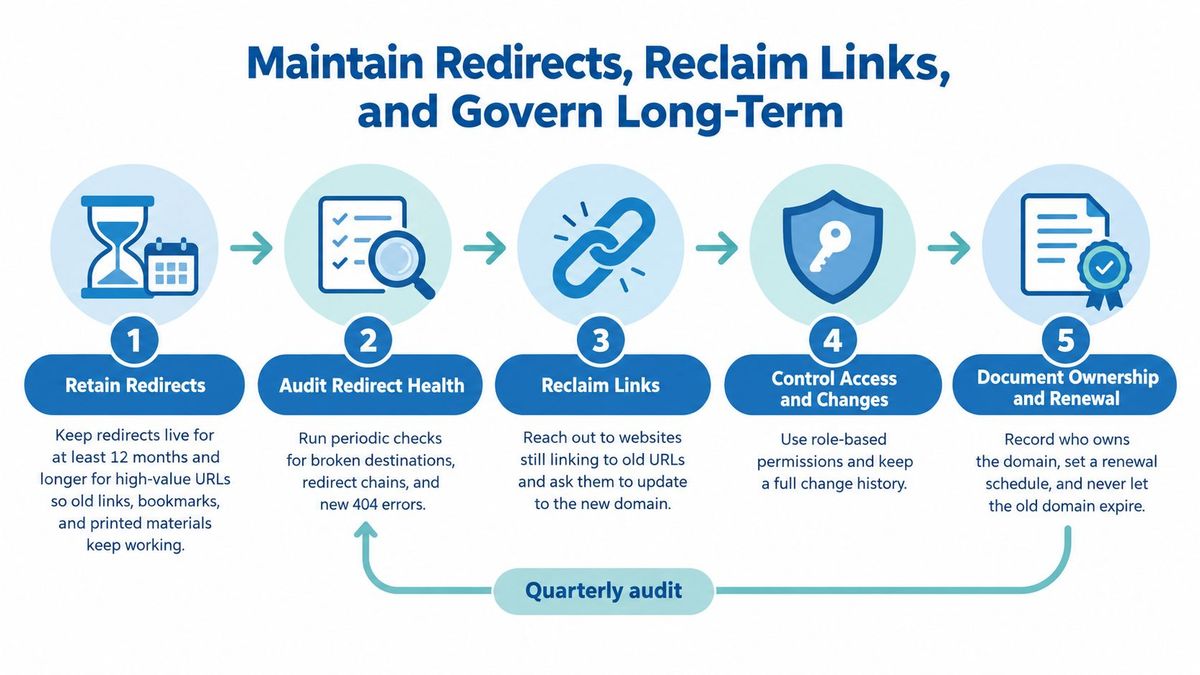
After launch, old URLs remain in bookmarks, documents, packaging, email archives, and third-party websites. Removing the redirect service because the new domain appears in search results ignores those entry points.
Keep the old domain registered and retain HTTPS for its active hostnames. Domain ownership without working DNS, certificates, and routing won't preserve a usable link.
Make maintenance someone's responsibility#
Assign an operational owner with access to the registrar, DNS, redirect configuration, and monitoring. Name a backup owner so a staffing change doesn't leave the old domain unmanaged.
- Destination health: Check whether redirects end at working, relevant pages.
- Configuration history: Retain mapping exports and record why rules changed.
- Access control: Limit production editing rights and review bulk changes before applying them.
- Link reclamation: Ask important referring websites and partners to update their destinations directly.
- Renewals: Keep domain billing, certificate renewal, and escalation contacts current.
Say a manufacturer prints a support QR code on equipment that customers retain long after purchase. That redirect has a service obligation independent of organic traffic. Retiring it because recent search referrals are low would use the wrong measure.
Review redirect destinations whenever the new site changes. A later product deletion or URL restructure can turn a clean migration rule into a chain or dead end.
Retirement requires evidence, not a calendar reminder. Consider remaining traffic, external references, printed assets, contractual dependencies, and the cost of keeping the route available. Where the destination still serves customers and maintenance is modest, preserving the legacy address is often the simpler decision.
How each migration checklist step compares on deliverables, risks, and tools#
| Item | Key Deliverable | Main Risk | Common Tools |
|---|---|---|---|
| Inventory and Map Every URL, Domain, and Dependency | Complete inventory of URLs, backlinks, campaigns, and external references | Large inventories require substantial deduplication and triage | Screaming Frog SEO Spider, Google Search Console, Ahrefs, Semrush, Majestic |
| Build a Precise Old-to-New URL Redirect Map | One-to-one redirect map to relevant final destinations | Manual mapping takes time; redirect chains can dilute signals | Google Search Central, CSV tools |
| Prepare DNS, SSL/TLS, and Email Infrastructure on the New Domain | Verified DNS, certificates, and email records for the new domain | Missing email authentication records can disrupt delivery | Let's Encrypt, ACME tools, DNS management tools |
| Configure and Test Redirects in Staging Before Going Live | Tested redirects with verified status codes, destinations, and parameters | Staging may not match production behavior; large maps take time to test | curl, Screaming Frog SEO Spider |
| Notify Search Engines and Update Search Console Properties | Verified search properties and updated sitemaps | Reindexing can take weeks or months, with normal short-term fluctuations | Google Search Console, Bing Webmaster Tools |
| Update Internal Links, Canonicals, and Third-Party References | Updated site links, metadata, listings, and campaign destinations | Third-party updates can take time; printed links may be unchangeable | Google Search Central, Schema.org, site crawlers |
| Launch, Monitor, and Validate Campaign Tracking | Launch runbook, live monitoring, and verified analytics and campaign tracking | Rollback can be complicated; metric changes may be hard to interpret | Google Analytics, Adobe Analytics, UptimeRobot, Pingdom |
| Maintain Redirects, Reclaim Links, and Govern Long-Term | Ongoing redirect audits, link reclamation, and domain governance | Redirect upkeep costs time and can lead to complex rule sets | Google Search Central, redirect management tools |
Turn the Checklist Into a Launch You Can Verify#
A domain migration succeeds when customers can complete the same journeys through the new infrastructure, whether they arrive from search, an email, a partner referral, or a printed code. A live homepage proves only that the homepage is reachable.
Turn this domain migration checklist into a shared runbook with evidence attached. Give each task an owner, a pass condition, and a recovery action. “Redirects configured” isn't a useful completion note; an approved mapping file and test output are.
Require a clear handover before cutover#
The launch lead should be able to answer these questions without assembling the team from scratch:
- Coverage: Have critical URLs, hostnames, email services, campaign links, and printed assets been inventoried?
- Behavior: Do redirects reach relevant destinations while preserving required paths, methods, and query parameters?
- Readiness: Are DNS, certificates, email authentication, analytics, and search properties prepared?
- Recovery: Can the team restore the prior configuration without losing orders, leads, or other new records?
- Ownership: Who handles alerts and maintenance after the launch team steps away?
Keep evidence close to the decision. Store the redirect map, DNS export, test results, deployment notes, and access contacts together. During an incident, the team shouldn't have to search private messages to find the last working configuration.
Resist the temptation to treat every post-launch change as a migration emergency. A certificate error, broken checkout, or missing destination needs immediate action. Search-indexing changes require URL-level investigation and continued observation, not repeated infrastructure changes made without a diagnosis.
For teams that want a shared place to manage this work, RedirHub includes automatic HTTPS, 301, 302, 307 and 308 redirects, path and query forwarding, redirect analytics and CSV import on Core, Pro and Enterprise; Pro comes with a 14-day free trial. That can support the routing portion of the migration, but it doesn't replace decisions about relevance, email configuration, or customer-journey testing.
Start with the inventory this week. Lock the redirect map before changing DNS, rehearse the rollback decision, and keep legacy routes working after the launch announcement disappears from view. The useful finish line is a documented handover to ongoing operations, not the moment someone declares the new domain live.
RedirHub brings domain redirects, website migration mappings, branded links, and dynamic QR codes together on your own domains. Visit RedirHub to import your migration mappings, preserve paths and query parameters, and manage the links customers will keep using after cutover.
Build your redirect map from real URLs
Add your old and new sitemaps and get a reviewed 301 redirect map to export as CSV, .htaccess or Nginx, or publish on RedirHub.
Open the Migration Redirect MapperSources
- [1]RFC 7538: The Hypertext Transfer Protocol Status Code 308 (Permanent Redirect)
- [2]Bruce & Eddy: Your Website Move Doesn't Have To Tank Your SEO
- [3]BoostedHost: Web Hosting Migration Checklist (2025): Zero-Downtime Template + DNS Plan
- [4]Google Search Central: Site Moves and Migrations
- [5]Performance | 2025 | The Web Almanac by HTTP Archive
- [6]RedirHub redirect speed benchmark, 27 October to 3 November 2026
Frequently asked questions
It should cover an inventory of URLs, hostnames and dependencies, an old-to-new redirect map, DNS, SSL/TLS and email preparation, redirect tests in staging, Search Console updates, internal and third-party link updates, a monitored launch with a rollback decision point, and long-term redirect maintenance. Give each task an owner, a pass condition and a recovery action.
Both are permanent redirects. RFC 7538 defines 308 as a permanent redirect that keeps the request method and body, which matters for API and form-submission traffic, so check what each route needs. Google states that permanent redirects do not cause a loss in PageRank.
Google recommends keeping redirects for as long as possible, generally at least one year. Old URLs also live on in bookmarks, documents, packaging and printed QR codes, so retire a redirect only when the evidence shows it is no longer used.
Changing DNS providers or replacing a zone wholesale can remove MX, SPF, DKIM and DMARC records even while the website works. Export the existing zone before editing it, and test order confirmations, password resets and support replies through real delivery paths.
A static QR code cannot be edited after printing, so the URL it encodes must keep working, usually through a redirect on the old domain. A dynamic QR code points to an address whose destination you can change, as long as you keep control of that service and domain.

Leo Astarothman is the Brand & Content Lead at RedirHub, where he shapes the company's visual identity, educational content, product experiences, and marketing strategies. He also specializes in system design. Simplifying complex redirect infrastructure into practical resources, product experiences, and campaigns that help businesses understand and adopt modern redirect management.
Related Articles
View All Articles