Key takeaways
Build the plan around acceptance gates, not a release date: audit, URL mapping, technical and SEO checks, experience testing, launch day and post-launch monitoring, each with a named owner who accepts its output. Map every legacy URL to its closest equivalent with a permanent redirect in one hop, and return a 404 or 410 when there is no relevant replacement. Replay the full inventory against staging before launch, keep a rehearsed rollback, and keep permanent migration redirects in place long after the 180-day minimum Google gives.
A 2025 study of 892 domain migrations found that the average site took 523 days to regain its former level of estimated organic traffic, according to Search Engine Journal, as reported in Veza Digital's website rebrand guide[1]. That's a reason to treat migration as protection for traffic you already earn, not just a successful deployment.
A website migration plan needs to cover what happens after the redirect file ships. Search engines must discover the changes, visitors must still complete their tasks, and someone must own the old URLs long after the launch team moves on.
This guide is the project plan. For the detailed test sequence, see our guide to website migration testing, and for a domain change specifically, SEO domain change.
Migration Phases, Owners and Outputs at a Glance#
Build the schedule around acceptance gates, not the design team's preferred release date. The following is an illustrative project schedule, not a universal lead-time requirement.
Migration phases, timing, outputs and owners
| Phase | Timing | Main output | Owner |
|---|---|---|---|
| Audit | 6-8 weeks before launch | Full URL inventory with traffic, backlinks and status codes | SEO lead |
| URL mapping and redirects | 4-6 weeks before launch | Approved one-to-one map and redirect rules tested on staging | SEO and engineering |
| Technical and SEO checks | 2-4 weeks before launch | Pass or fail report on the full test set | Engineering and SEO |
| Experience testing | 2-3 weeks before launch | Side-by-side task results for old and new sites | UX, QA and accessibility |
| Launch day | Agreed low-traffic window | Redirects live, new sitemap submitted, rollback ready | Engineering lead |
| Post-launch monitoring | Day 1 through month 6 | Daily and weekly reports, sunset decisions for redirects | SEO and content |
Schedule dependencies before dates#
The SEO lead approves destinations before engineering writes production rules. Redirects must pass staging validation before the sitemap switches, and experience tests must finish before the team commits to cutover.
For a small brochure site with stable content, audit and mapping can run together. That saves handoff time, but it doesn't justify skipping task testing: a broken enquiry form can make an otherwise tidy migration commercially useless.
Where the table lists shared responsibilities, nominate an accountable lead and record the supporting reviewers. Do that before the audit starts, including who can delay launch and who can authorize rollback. Otherwise, unresolved decisions tend to reach engineering just when the deployment window closes.
Audit the Legacy Site and Set a Baseline#
Start with a crawl of the live site using Screaming Frog or Sitebulb. Supplement it with CMS exports, XML sitemaps, analytics landing pages and server logs, because a crawler won't discover orphaned pages through internal links.

Don't assume the hostname configuration is obvious. In desktop samples, www usage declined from 48.64% in 2019 to 41.01% in 2022, according to HTTP Archive's technology report[2]. Your own host behavior needs explicit testing, not a decision based on convention.
Produce auditable exports#
Give each export a defined schema so another team member can reproduce the baseline.
crawl-export.csv: Include URL, status code, canonical target, indexability, title, template and internal link count. Preserve the original URL string alongside any normalized matching key.gsc-landing-pages-12m.csv: Export the available annual Search Console history with landing page, date, clicks, impressions and property. Keep filters consistent between exports.backlinks-by-url.csv: Use Ahrefs, Semrush or another backlink tool to record destination URL, referring-domain count and important linking pages.host-check.csv: Record requested URL, redirect journey, final hostname and canonical tag for secure and insecure requests, hostname variants, case differences and trailing-slash behavior.
An external review can help distinguish existing visibility problems from migration risks. Baikou's resource to review your website's search visibility[3] is useful context when deciding which legacy pages deserve closer investigation.
Freeze a usable reference#
Create baseline-metrics.csv with indexed-page counts, crawl statistics, Core Web Vitals by template and conversion events by page type. Include measurement dates and collection methods so nobody compares field performance against an unrelated laboratory test.
Attach automated accessibility results and keyboard-only task findings for important templates. Record whether visitors can open navigation, submit forms, recover from errors and complete authentication, rather than saving only an audit score.
Store the exports in a dated shared folder with read access for every owner. Once the audit closes, preserve that snapshot; corrections belong in a new dated version with a change note.
Map Every URL and Write the Redirect Rules#
Work through the inventory in a deliberate sequence:
- Classify the legacy URL. Combine response status, traffic, backlinks and content value.
- Choose its destination. Select the closest page that satisfies the same visitor intent.
- Assign the response. Distinguish permanent moves, temporary routing and genuine removals.
- Test rule behavior. Check paths, parameters, assets, hostname normalization and rule precedence.

Choose relevance before convenience#
A broken page with valuable referring domains needs investigation. A thin archive with no useful content may not deserve a replacement. Neither decision should be made from the current response code alone.
Consolidation needs editorial approval. If several articles become a topic hub, the content owner must confirm that the hub answers the questions those articles addressed. A broad category page isn't automatically an equivalent destination.
Redirect action and status code by legacy URL case
| Legacy URL case | Action | Status code |
|---|---|---|
| Page moved to an equivalent page | Redirect to the new page | 301 or 308 |
| Page merged into a broader page | Redirect to the closest merged page | 301 |
| Page removed with no replacement | Return the error, don't send to homepage | 404 or 410 |
| Temporary test or campaign URL | Keep the redirect until the written expiry date | 302 or 307 |
| Non-HTML asset moved, such as a PDF or image | Redirect to the new file location | 301 or 308 |
| Tracked URL with query parameters | Forward the required path and query string to the new page | 301 with forwarding |
| Non-canonical host, www or apex | Redirect to the canonical host | 301 |
Use permanent versus temporary redirect behavior to settle intent before implementation. Temporary routing needs an expiry decision, not merely a different response code.
A one-hop check you can repeat#
Every row in the table above should end in one hop. On 27 October 2026 (about 01:20 UTC) we requested the four variants of RedirHub’s own home page with curl from a cloud server, without following redirects. Each redirecting variant reached the canonical home page in a single hop:
| Requested URL | Status | Location | Hops to canonical page |
|---|---|---|---|
| http://redirhub.com/ | 301 | https://www.redirhub.com/ | 1 |
| http://www.redirhub.com/ | 308 | https://www.redirhub.com/ | 1 |
| https://redirhub.com/ | 301 | https://www.redirhub.com/ | 1 |
| https://www.redirhub.com/ | 200 | none | 0 |
Run curl -sS -o /dev/null -w "%{http_code} %{redirect_url}" followed by each variant of your own host, and fix any that returns a second redirect before you launch. The mix of 301 and 308 above is fine: both are permanent, and the choice only matters when the request method has to be preserved.
Write explicit exceptions#
Preserve campaign attribution and functional query parameters, but don't blindly carry obsolete session identifiers or parameters that break the destination. Test encoded characters, repeated parameters and deep paths against the actual application.
Include downloadable files and linked images. For commerce projects, Grumspot's Shopify migration redirect best practices[4] provide platform-specific context for reviewing rules alongside storefront behavior.
Patrick Stox's migration checklist[5] recommends direct permanent mappings, including assets, and keeping chains to roughly three hops or fewer. Prefer direct resolution to the final destination rather than stacking a hostname redirect, a protocol redirect and a path rewrite.
Store the approved map as a versioned file with old URL, destination, intended response, rationale, owner and reviewer. Give specific mappings precedence over broad patterns, and require review whenever someone changes either. The Migration Redirect Mapper can help organize the old-to-new URL pairs.
Set Up Search Console for Both Sites#
Prepare reporting access before cutover. The SEO lead needs to inspect the old and new properties independently; a combined dashboard can conceal a failing legacy section behind growth elsewhere.
Prepare access and reporting#
- Verify ownership: Use durable verification controlled by the organization, not a departing contractor's account. Include traffic-bearing subdomains in the monitoring scope.
- Match property scope: Domain properties include hostname and protocol variants, while URL-prefix properties have narrower boundaries. Make sure comparisons cover equivalent URL sets.
- Prepare the sitemap: Generate it from intended canonical destinations and validate it before release. Hold submission until those destinations and their redirects work in production.
- Archive reports: Save performance and indexing exports in the audit folder, with filters and property names recorded.
- Assign reviewers: Name an owner and backup for each property, with a recurring review appointment during stabilization.
Handle the domain move deliberately#
For an eligible domain move, prepare the Change of Address workflow on the old property and submit it after redirects are active and its checks pass. Don't use it as a substitute for URL mapping or for changes it doesn't support.
Keep the old property verified while legacy URLs remain relevant to monitoring. Removing access early makes it harder to investigate persistent impressions, missed URLs and unexpected crawl behavior.
Preserve analytics continuity too. Confirm event names, consent behavior and cross-domain settings so a tracking change doesn't masquerade as a traffic or conversion loss.
Pre-Launch Checks and the Go or No-Go Call#
A passing homepage doesn't establish that the site is ready. Build the test set from traffic-bearing pages, linked assets, alternate URL forms and the templates visitors use to complete valuable tasks.
Replay the inventory against staging#
Engineering should reproduce production routing in an isolated environment, including CDN rules and application redirects. Use a host override or equivalent controlled setup to exercise legacy requests without exposing staging to search engines.
The replay report needs the requested URL, expected destination, actual destination, response journey, parameter result and final indexability. Flag loops, unexplained chains, unexpected successful responses, destination mismatches, lost parameters and redirects ending on errors.
Check resources and discovery signals too:
- Application assets: JavaScript, CSS, images and downloads must load without authentication or routing failures.
- Search directives: Review robots.txt, canonical tags, hreflang references, internal links and sitemap entries.
- Release controls: Confirm that production won't inherit staging passwords, accidental crawl blocks or unintended noindex directives.
- Measurement: Verify conversion events using test submissions and completed transactions, not page views alone.
Our free Redirect Checker can support the replay, while our 301 Redirect Service supports destination mapping, required path and query forwarding, and pre-launch journey testing. Use the bulk redirect checking workflow to make the results repeatable rather than relying on browser spot checks.
Compare response-class distributions against the baseline, accounting for approved removals. Indexed-page counts, organic clicks and crawler activity become production comparisons after launch; staging can establish technical readiness, not search recovery.
Test whether people can finish#
Run equivalent tasks on the old and new experiences using keyboard-only navigation, a screen reader and mobile devices. Include checkout or lead forms, authentication, validation errors and recovery after a failed submission.
The European Accessibility Act took effect on 28 June 2025 for covered products and services serving EU users, as described in Niteco's website migration guide[6]. Treat accessibility acceptance as compliance-relevant where applicable, and have the responsible legal or accessibility specialist confirm the project's scope.
Write task acceptance criteria before testing. Require successful completion without a repeatable slowdown under comparable conditions, and investigate timing differences rather than treating normal participant variation as a defect.
Make the release decision explicit#
The migration lead should collect sign-off against concrete evidence:
- Inventory and mapping: The inventory is dated, destination decisions are approved and the release references the reviewed map version.
- Technical acceptance: No unexplained routing failures remain on high-value URLs.
- Experience acceptance: Critical tasks have no unresolved accessibility or functional regressions.
- Recovery readiness: Backups are restorable, rollback is rehearsed and transaction reconciliation has an owner.
- Operational coverage: Every phase has an accountable person and escalation contact.
A failed high-value item delays launch. Cosmetic issues can enter a documented remediation queue, but broken checkout, blocked crawling and inaccessible forms aren't cosmetic.
Launch-Day Procedure in Order#
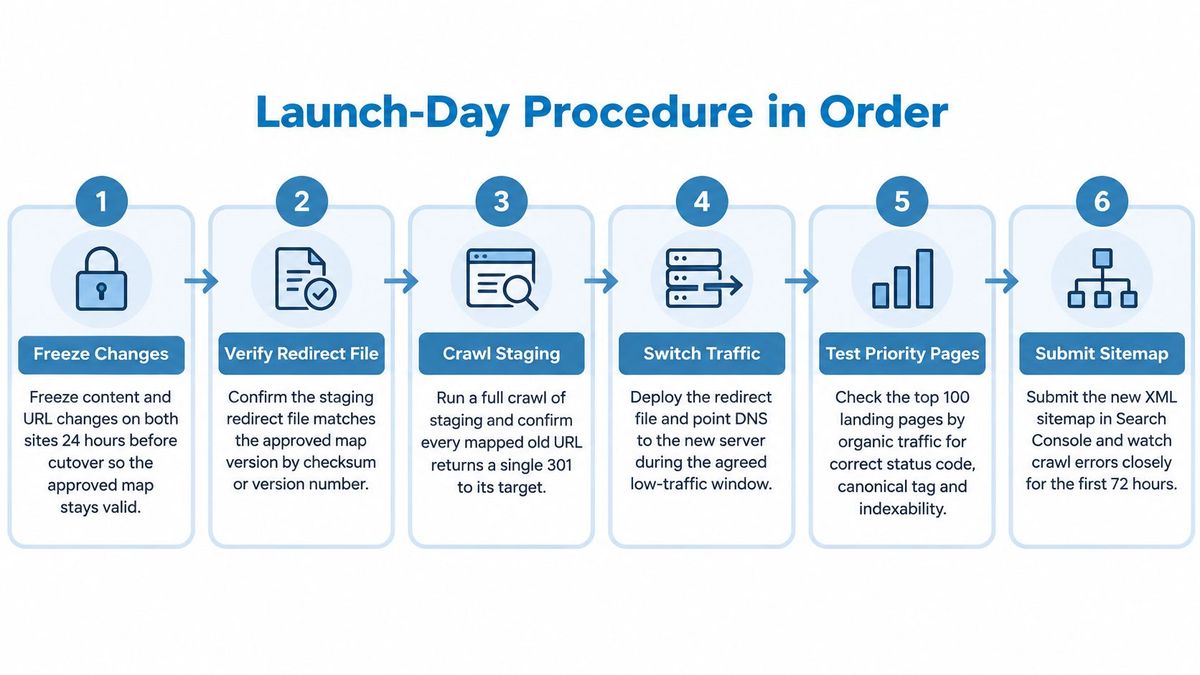
Use a runbook with an operator, verifier and recorded result for each action. Choose a low-traffic window when the people needed for diagnosis are available, not just the quietest hour on the traffic chart. A launch at 3 a.m. that nobody can troubleshoot is riskier than a launch at a moderate hour with the full team online.
Execute the cutover#
- Freeze changes. Stop content publishing and URL edits on both systems for the agreed pre-cutover interval. Document essential exceptions and regenerate affected mapping tests before proceeding.
- Verify the release artifact. Match the redirect configuration to the approved map using a checksum or version identifier. A familiar filename does not prove that engineering has the reviewed rules.
- Deploy routing and the new site together. Coordinate application, CDN and infrastructure changes so visitors do not encounter a half-switched environment. Remove production-only access restrictions and unintended indexing blocks as part of the controlled release.
- Smoke-test priority URLs. Check the highest-value legacy landing pages, backlink destinations and transaction entry points. Verify direct routing, intended responses, required parameters and an indexable canonical destination, then start the full inventory replay.
- Publish and submit the sitemap. Release the production sitemap only after its destinations resolve correctly. Keep the old Search Console property accessible and complete any applicable move notification.
- Check every hostname. Verify DNS resolution, certificate coverage and routing for old domains and active subdomains. Do not retire an old server until another endpoint can reliably serve its redirects.
- Watch live behavior. Engineering monitors server errors and redirect logs while analytics checks incoming events and UX verifies critical tasks. Record deployment time so later investigations can distinguish release effects from unrelated changes.
- Apply the agreed rollback rule. Stop or revert the affected release when critical journeys fail, redirect loops appear or server errors rise beyond the agreed baseline tolerance. Avoid improvising broad production rewrites while customers are encountering failures.
Keep the rollback usable#
Define whether rollback means restoring application files, switching routing, restoring data or some combination. For transactional sites, reverting infrastructure without reconciling new orders or submissions can create a second incident. Assign the reconciliation step a named owner before launch, and rehearse the full sequence so the team knows how long a revert takes under load.
Treat the redirect layer as part of the rollback decision, not a fixed backdrop. If the new routing rules are the source of failures, rolling back code alone leaves the same broken redirects live. Google's site-move documentation[7] recommends server-side redirects from the moment the move begins, sitemap submission after the new URLs resolve, and separate monitoring of the old and new Search Console properties. Deployment is therefore an operational milestone, not the point when migration ownership ends.
Post-Launch Monitoring and Redirect Governance#
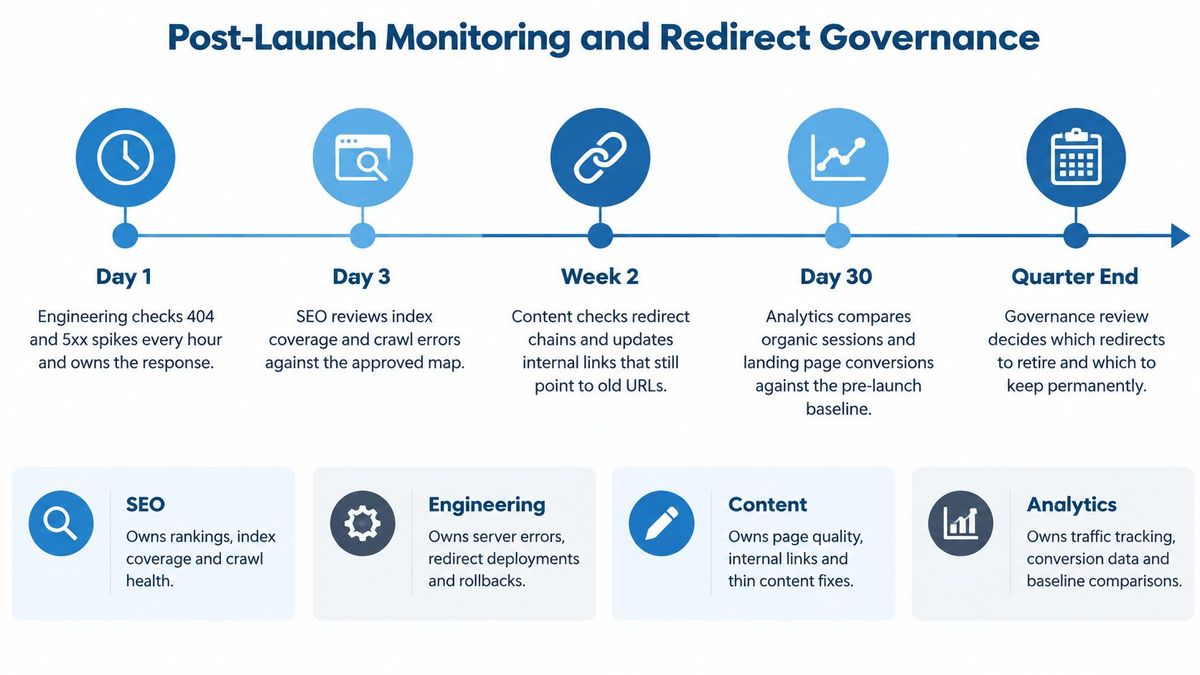
Keep a named responder attached to each monitoring window. Siteimprove's web-transformation risk guidance[8] identifies a living redirect inventory, assigned ownership, escalation thresholds and temporary-rule sunset decisions as operational gaps in migration planning.
Post-launch monitoring cadence
The following is a proposed operating schedule. Adjust staffing to risk without removing the checks.
| Window | What to check | Act when |
|---|---|---|
| Day 1, hourly | Error rate, server failures, loops, top landing pages | Any server-error spike or loop: engineering reverts affected rules |
| Days 2-14, daily | Search Console errors, new URL indexing, legacy redirect logs | Unexpected missing pages above baseline: SEO triages and engineering redeploys |
| Weeks 3-8, weekly | Legacy impressions, clicks, organic landing pages | Legacy impressions aren't declining: SEO investigates missing mappings |
| Months 3-6, monthly | Remaining legacy traffic and old-link referrals | Legacy hits persist: content retains the relevant redirect |
| Ongoing | Temporary rules, excessive chains, URL-changing content edits | Stale rules or chains appear: the owner schedules correction |
Govern changes, not just incidents#
Analytics owns tracking integrity and baseline comparisons; SEO owns search investigation; engineering owns deployment and rollback; content owns destination relevance and internal-link corrections. Use a documented redirect monitoring workflow so alerts reach the responsible person.
Keep the inventory searchable and versioned, with a reviewer for every edit. Temporary rules need an expiry date and named reviewer; expiry should trigger a decision, not automatic deletion without checking traffic.
Google's site-move documentation recommends retaining redirects for at least 180 days, and longer where old URLs continue receiving Google Search traffic. Our recommendation is to keep permanent migration redirects indefinitely because backlinks, bookmarks and indexed URLs can continue sending visitors for years.
Say a SaaS company moves its blog into a resources directory. Later, old newsletters still deliver qualified visitors to legacy article addresses, so the content owner keeps those mappings active rather than retiring them to tidy the inventory.
Judge recovery across sustained trends, with seasonal comparisons and page-level diagnosis. A quiet launch week doesn't establish success, and a traffic dip alone doesn't identify the fault.
RedirHub offers migration mappings with CSV import, path and query forwarding, and automatic HTTPS for connected hostnames. Visit RedirHub to put your approved URL map into operation and keep legacy links working after launch.
Put your URL map into production
Import your approved old-to-new URL map by CSV, keep paths and query strings, and check every chain before launch. Core and Pro start with a 14-day free trial.
See the 301 redirect serviceSources
- [1]Veza Digital's website rebrand guide
- [2]HTTP Archive's technology report
- [3]review your website's search visibility
- [4]Shopify migration redirect best practices
- [5]Patrick Stox's migration checklist
- [6]Niteco's website migration guide
- [7]Google's site-move documentation
- [8]Siteimprove's web-transformation risk guidance
Frequently asked questions
In the schedule in this guide, the audit starts 6 to 8 weeks before launch, URL mapping 4 to 6 weeks before, and technical and SEO checks 2 to 4 weeks before. It is an illustrative schedule, not a universal requirement, so adjust it to the size and risk of your site.
Use a permanent redirect, 301 or 308, for pages that moved for good, and send each old URL straight to its final destination. Use 302 or 307 only for temporary routing with a written expiry date, and return a 404 or 410 when no relevant replacement exists.
Google’s site-move guidance recommends keeping them for at least 180 days, and longer where old URLs still receive search traffic. We recommend keeping permanent migration redirects indefinitely, because backlinks, bookmarks and indexed URLs can keep sending visitors for years.
A named person must accept the output of each phase, for example the SEO lead for the audit and destinations, engineering for deployment and rollback, and content for destination relevance. Decide before the audit starts who can delay the launch and who can authorize a rollback.
Replay the full URL inventory against staging and check each redirect’s destination, status, parameters and indexability. Also confirm robots.txt, canonical tags, sitemaps and analytics events, test the critical user tasks, and rehearse the rollback.

Leo Astarothman is the Brand & Content Lead at RedirHub, where he shapes the company's visual identity, educational content, product experiences, and marketing strategies. He also specializes in system design. Simplifying complex redirect infrastructure into practical resources, product experiences, and campaigns that help businesses understand and adopt modern redirect management.
Related Articles
View All Articles