Key takeaways
A domain change is a site move: every indexed old URL needs a permanent 301 or 308 redirect to its closest new equivalent, not to the homepage. Build the URL map from a crawl, Search Console and your logs before launch, keep each rule a single hop, and file the Change of Address once both domains are verified. Keep the redirects for at least 180 days and for as long as old URLs still get traffic, links or printed references.
You've approved the new domain, legal has signed off on the name, and someone in marketing has already ordered the swag. Then launch week arrives, DNS flips, and your organic dashboard starts sliding. Pages you assumed would follow the move are dropping out of the index, old URLs are returning errors, and nobody can agree whether this is normal recovery or a broken migration. That uncertainty is the cost of a poorly planned move.
A careful move doesn't eliminate volatility, but it does make problems visible early, when you can still fix them cheaply.
What a Real SEO Domain Change Looks Like#
The call usually comes on a Tuesday morning. A marketing lead opens Search Console, sees clicks collapsing on the old domain, and asks why the new domain isn't picking them up at the same rate. Engineering says DNS is correct. The homepage loads. Someone tests three product pages and they redirect fine. Underneath that calm surface, hundreds of long tail URLs are returning 404s, a legacy subdomain was never mapped, and canonicals on the new site still point back to the old host.
That's what a failed SEO domain change looks like. It rarely breaks everywhere at once. It breaks in the corners nobody inventoried.
Search engines don't treat this as a rename. They treat it as a site move, which means every indexed URL on the old domain needs an explicit signal telling crawlers where it went. Pointing a new domain at the same server gives you a working website. It doesn't give you continuity.
What preserving rankings really means#
Preserving rankings doesn't mean freezing every position in place. It means you give crawlers a clean, consistent story they can process quickly:
- One to one redirects: Each old URL resolves to its closest equivalent, not a generic landing page.
- Consistent canonicals: New pages reference themselves, never the old domain.
- Updated sitemaps: The new domain's sitemap lists only live, indexable new URLs.
- Clean internal links: Your own navigation never routes through a redirect.
When those signals conflict, crawlers slow down, reevaluate, and sometimes choose a different canonical than the one you wanted. The drop that follows isn't a penalty. It's confusion you created.
There's also an asymmetry you should respect. The upside of a new domain is capped. A stronger name helps, but it won't double your traffic on its own. The downside of a careless move has no tidy cap. You can lose visibility you'd built over years, and some of it never returns because backlinks, bookmarks, and references rot unattended.
The migrations that hold up share a pattern. One person owns the project end to end, preparation takes far longer than launch day, and redirects are treated as permanent infrastructure rather than a launch week task. Most of what follows is unglamorous. That's the point. Boring, verified, and documented beats clever every time in a domain move.
Auditing the Old Domain Before You Touch Anything#
Don't approve a DNS change until you can answer a simple question: what exactly are you moving? Many teams underestimate the answer because they look at their sitemap and stop. Your sitemap shows what you want indexed. Your audit needs to show what gets traffic, links, and crawls.
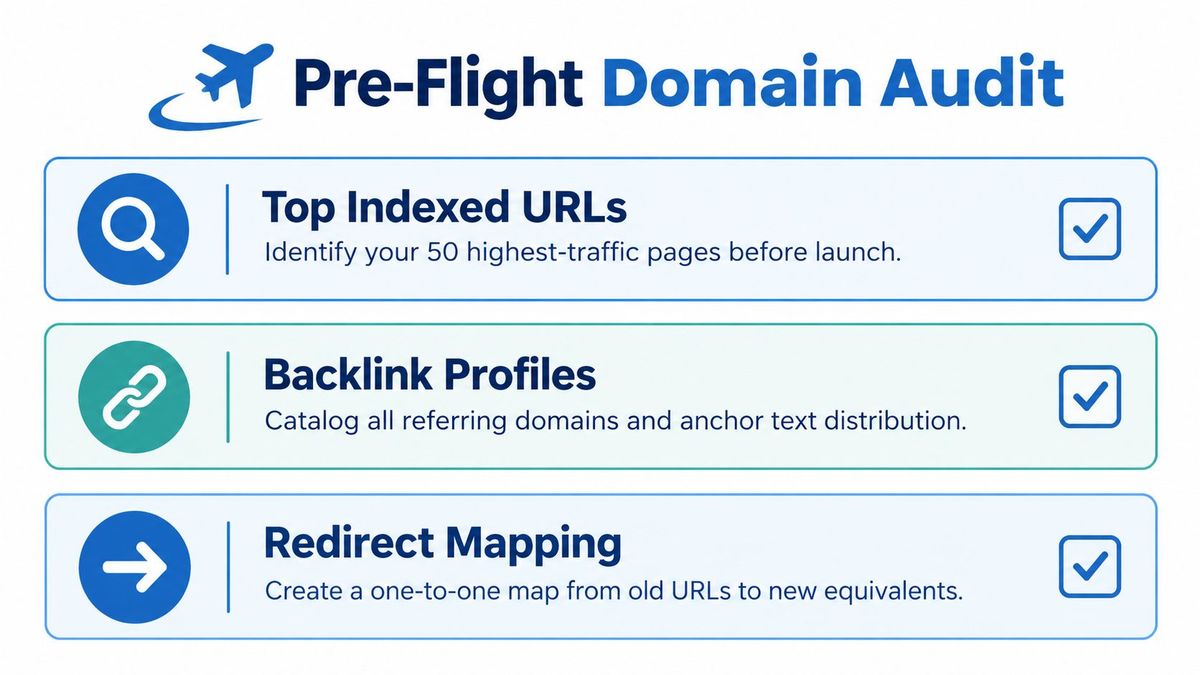
Start with three independent sources and merge them. Crawl the site with a tool like Screaming Frog or Sitebulb to capture status codes, titles, canonicals, and internal links. Export Search Console data for indexed pages and the queries driving clicks and impressions. Pull server or edge logs to see which URLs crawlers and real users request, including orphan PDFs and forgotten landing pages that never made it into a sitemap.
Our free migration redirect mapper does that merge in your browser: it combines your sitemap, Search Console and analytics exports, finds the old URLs that still bring traffic, and builds a redirect map you review row by row.
Google's site move guidance[1] frames a domain change as a move requiring a complete URL mapping and redirect plan, with old URLs mapped to corresponding new URLs using permanent 301 or 308 redirects where possible. You can't build that map from an incomplete inventory.
Assets teams routinely miss#
- Subdomains: Docs, support, blog, status, and staging hosts often live outside the main crawl. Pull them from DNS records, not memory.
- Backlink targets: Export referring domains and their target pages. A page with modest traffic but strong links deserves a careful mapping, not deletion.
- Existing redirects: Capture every legacy rule already in place. If you don't, you'll break chains that were already working.
- Offline references: Printed QR codes, partner directories, email templates, invoices, and app store listings all embed old URLs that Search Console will never show you.
- Machine readable surfaces: APIs, feeds, and structured data that reference the old domain need rows in your plan too.
Next, take a baseline snapshot. Record organic sessions, top landing pages, indexed page counts, and rankings for your priority queries on both Google and Bing. Without a baseline, you can't prove what changed after launch, and every stakeholder conversation becomes an opinion contest.
Finally, audit the new domain itself. If it had a previous owner, check Search Console for manual actions, leftover URL removals, or a disavow file you didn't create. Launching onto a domain with hidden baggage turns a recoverable dip into a mystery.
Clean up before you move, not during. Fix internal links to errors, resolve chains, and decide which thin or duplicate pages shouldn't make the trip. Migrating junk just gives you junk on a new domain, plus a bigger redirect file to maintain.
Building the URL Map That Holds Everything Together#
Your URL map is the single artifact that determines whether this migration works. Build it as a spreadsheet or CSV with one row per old URL: source URL, current status, target URL, action, and a named owner who verified the row. If a URL returns a live page today, it gets a deliberate decision. Redirect, merge, or drop. Nothing gets left to chance.
Most rows should be one to one. The old pricing page goes to the new pricing page, same path where possible. Preserving paths keeps deep links, bookmarks, and backlinks landing on equivalent content, and it makes bulk testing far simpler.
When one to one isn't the answer#
Some URLs need consolidation. Two near duplicate guides covering the same topic can merge into one stronger page on the new domain. Category hubs that existed only for navigation can point to their surviving equivalent. What you shouldn't do is dump unrelated pages onto the homepage. Crawlers treat that pattern as a soft error, and the equity you thought you saved disappears anyway.
If a page has no real equivalent and no meaningful links or traffic, let it return a clean 404 or 410. An honest error is a clearer signal than a misleading redirect.
For large repetitive sections, pattern based rules save enormous time. A blog archive with identical structure on both domains can move with a single rule that preserves the path and query string. But every pattern needs sampled tests against real URLs, including ugly edge cases with parameters, trailing slashes, and encoded characters. Patterns fail at the edges.
Tools that support CSV import and bulk editing, including RedirHub as one option among server and CDN level approaches, reduce manual error when you're managing thousands of rows. Whichever layer you choose, run redirects at the edge where possible so your origin doesn't absorb crawler traffic during the busiest recrawl period.
Choosing the right status code#
| Status code | When to use | SEO behavior | Best fit scenario |
|---|---|---|---|
| 301 | Permanent move, method may change to GET | Consolidates signals to the new URL | Standard page and domain moves |
| 308 | Permanent move, method and body preserved | Consolidates signals like a 301 | Form endpoints and strict method handling |
| 302 or 307 | Temporary move only | Keeps the old URL as the canonical candidate | Short tests, never a domain migration |
| 404 or 410 | No equivalent exists | Removes the URL from the index over time | Retired content with no successor |
If you're weighing temporary against permanent behavior in more depth, the breakdown of 301 and 302 redirect differences covers how crawlers interpret each choice.
Temporary redirects are rare in practice, but not gone. In a 12-hour window on October 18, 2026, 279 RedirHub accounts served at least 100 redirects each (leaving out the five largest), and 12 of them answered mostly with 302 or 307. If a move is meant to last, check that your rules are not among them: a temporary code tells search engines to keep the old URL.
Keep chains short. Map every old URL directly to its final destination, and collapse any legacy hops before launch so you don't stack old chains on top of new ones. Test the full file, not a sample, before launch day.
Launch Day and the First Week After Switching DNS#
If preparation went well, launch day should feel dull. You're executing a sequence, not improvising. Lower your DNS TTL well in advance so changes propagate quickly and a rollback, if you need one, takes minutes rather than hours.
The order that matters#
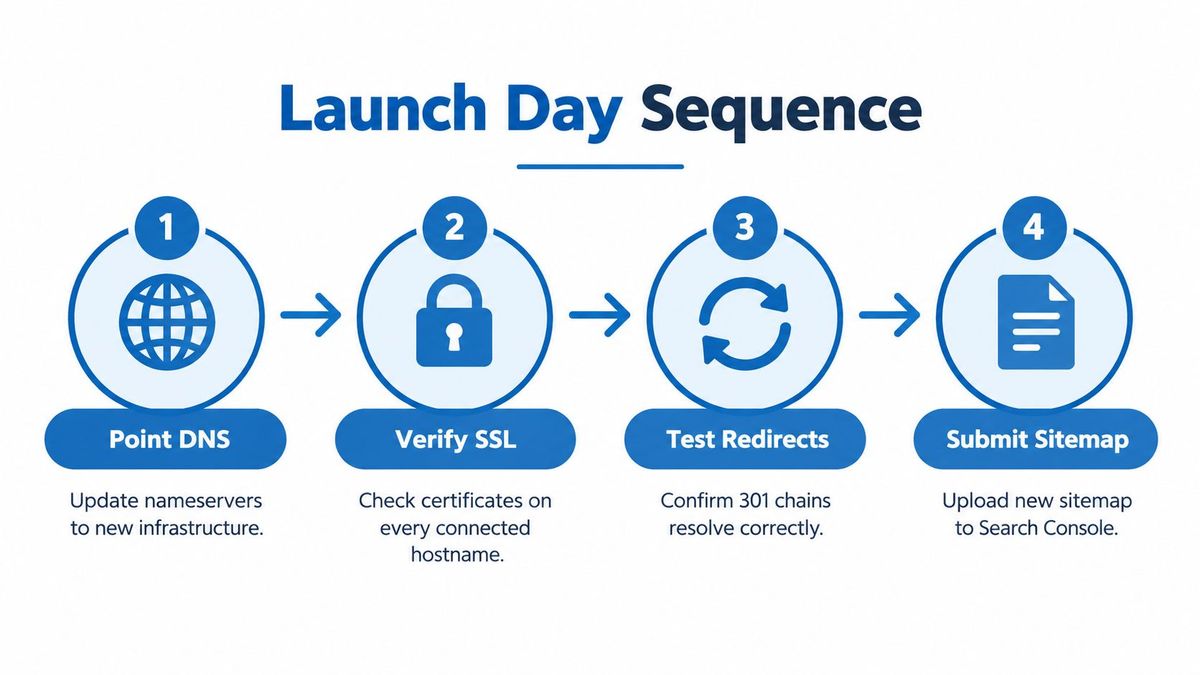
- Point DNS: Send the new domain to production infrastructure and confirm it resolves from multiple regions.
- Verify SSL: Check valid certificates on the apex and every subdomain, including the old domain, which still needs HTTPS to serve redirects without warnings.
- Activate redirects: Turn on the full mapping file on every old host and test a broad sample of real URLs, not just the homepage.
- Fix the old robots.txt: Leave it empty and allow all. If crawlers can't fetch old URLs, they can't see your redirects.
- Submit signals: Upload the new sitemap, confirm canonicals and hreflang reference the new domain, and file the Change of Address in Search Console with both properties verified.
Watch for traps that look fine in a browser. Mixed content warnings, internal links still using absolute old domain URLs, and campaign links losing their tracking parameters all survive casual testing. If paid and email traffic matter to you, verify parameter handling explicitly, since losing attribution during a migration muddies every performance conversation. The practical details on preserving UTM parameters through redirects are worth checking before you flip anything.
During the first days, live in your logs. You're watching for spikes in 4xx and 5xx responses, crawlers hitting unexpected paths, and redirect loops on specific patterns. Spot check priority pages by hand every day. Automated tests catch volume problems, human checks catch wrong page problems.
Communicate plainly with stakeholders. Tell them rankings will move around while crawlers process the change, that you're monitoring against a documented baseline, and what specific threshold would trigger a rollback conversation. Decide that threshold before launch, while everyone is calm. A rollback decided at 2am without criteria becomes a second, messier migration.
Keep a named owner on call for the first stretch after cutover, with authority to reach whoever controls DNS, the redirect layer, and the CMS. Speed of escalation matters more than depth of hierarchy this week.
Monitoring Migration Health Without Flying Blind#
A migration isn't finished when DNS flips. It's finished when your data confirms the new domain has absorbed the old one. Build one dashboard that compares everything against your pre launch baseline, and review it on a fixed cadence instead of refreshing reports anxiously all day.
The signals worth tracking#
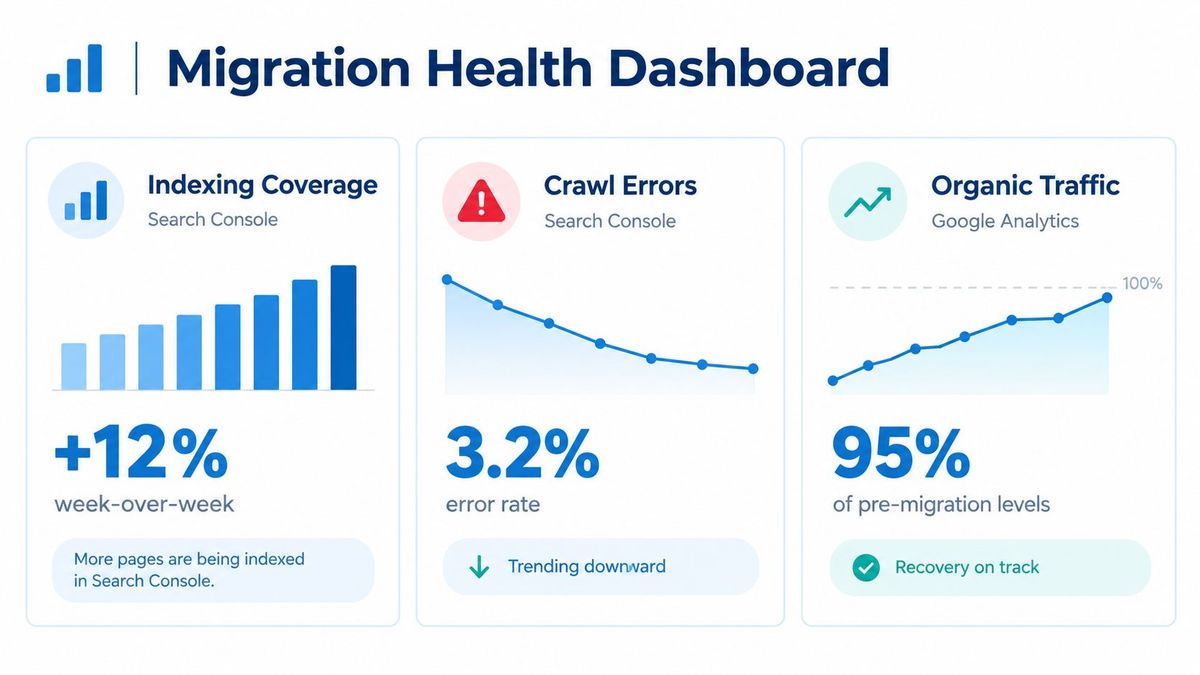
- Indexing coverage: Watch indexed pages on the new domain rise as the old domain's count falls. Investigate pages stuck in discovered or crawled but not indexed states.
- Crawl behavior: Track how often crawlers request old URLs, follow redirects, and land on final pages without errors.
- Traffic parity: Compare organic landing page sessions against baseline, page by page for your priority set, not just sitewide totals.
- Redirect integrity: Re crawl the old domain regularly and confirm every URL still returns one clean permanent redirect to the right target.
- Backlink pickup: Confirm referring domains still resolve through to live pages, and prioritize outreach to your most valuable linking sites asking them to update to the new URL directly.
Distinguish normal movement from real problems. Rank shuffling on individual queries while indexing transfers is expected. Sustained drops concentrated on one section, one subdomain, or one template point to a specific mapping or canonical failure. That's your investigation trigger, not a single bad day.
Check both Google and Bing. They process moves on different timelines, and B2B sites especially can see meaningful Bing traffic lag or recover separately. A quick way to validate individual chains during triage is a redirect checker tool, which shows each hop and status code without digging through logs.
Watch for silent failures too. Conditional rules that behave differently for crawlers than browsers, destinations that start returning errors weeks later, and CMS updates that overwrite redirect logic all slip past launch day testing. Destination monitoring on your highest value rules catches these before organic traffic tells you the hard way.
When Can You Actually Remove the Old Redirects#
Here's the advice you'll hear most often: keep redirects for six months, then clean them up. It's tidy, it's quotable, and it's wrong as a universal rule. A calendar doesn't know which of your old URLs are printed on packaging in a warehouse.

The published guidance itself points longer. Google's Change of Address guidance[2] says migration redirects should stay for at least 180 days, and longer when old URLs still receive Google Search traffic, while separate guidance advises keeping them generally at least one year and as long as possible. Treat those numbers as floors, not retirement dates.
Search recovery isn't the only asset#
Search impressions disappearing from the old domain tells you crawlers have processed the move. It tells you nothing about the QR code in a product manual, the PDF a partner hosts, the email thread a customer searches two years later, or the conference deck still circulating with your old pricing URL. Those references never appear in Search Console, and they break the day you delete the rule.
Platform migrations carry the same risk in miniature. Teams moving storefronts, for example, run into identical mapping questions, and a walkthrough of a 301 redirect Shopify setup[3] shows how much long tail product and collection traffic depends on rules nobody revisits after launch. The domain scale version just multiplies the stakes.
A risk based retirement policy#
Retire rules individually, based on evidence across several signals:
- Search referrals: No meaningful clicks or impressions from Google or Bing over a sustained quiet period.
- Direct requests: Edge and server logs show the URL isn't being hit anymore by anyone, human or bot.
- Backlink activity: No live referring domains point at the URL, or those that did have updated their links.
- Offline exposure: The URL never appeared in print, packaging, QR codes, or partner material.
- Business importance: The destination isn't tied to contracts, compliance, support documentation, or revenue paths.
If a rule fails any one of those checks, keep it. High value mappings, especially anything with strong backlinks or offline circulation, should stay indefinitely. Consolidate only the dead long tail, and even then, keep the old domain registered and serving those redirects. Domain renewal costs almost nothing against the risk.
There's a real trade off on the other side. Thousands of stale rules add testing and governance burden, and chains creep in as destinations move again. Manage that with ownership, change history, and periodic bulk audits that collapse chains back to direct mappings, ideally with a single hop from each old URL to its final page. Observability is the answer to bloat, not deletion.
Your Reusable Domain Migration Checklist#
Keep this sequence somewhere where your future self, or whoever inherits the next move, will find it. Migrations punish forgotten steps, and documentation is how the second migration goes better than the first.
For what to do on the old site itself during the move, see our site migration best practices.
The ordered checklist#
- Audit first: Merge crawl, Search Console, Bing, log, backlink, and subdomain data into one inventory, then snapshot your baseline.
- Map everything: One row per old URL with a target, an action, and an owner. Collapse chains before launch.
- Prepare the new domain: Verify both properties, validate SSL everywhere, fix canonicals, hreflang, sitemaps, and structured data.
- Launch in order: DNS, certificates, redirect activation, empty old robots.txt, sitemap submission, Change of Address filing.
- Monitor against baseline: Indexing transfer, crawl errors, traffic parity, and redirect integrity on a daily then weekly cadence.
- Retire by evidence: Apply the multi signal policy per rule, keep high value mappings indefinitely, and renew the old domain.
The failure modes that recur across migrations are consistent: partial sitemaps missing whole sections, canonicals drifting back to the old host after a template update, hreflang pairs left pointing at dead URLs, chains stacking across successive moves, and the Change of Address filing postponed until someone remembers it weeks later. Each one is preventable with a test that runs on every deploy, not just launch week.
If you want a second structured reference to compare against your own plan, Silva Marketing's SEO migration checklist[4] lays out a complementary sequencing you can cross check before committing to a cutover date.
Assign one owner, keep the change history, and record why each non obvious mapping decision was made. Eighteen months from now, that context is the difference between a confident cleanup and someone afraid to touch anything. Success at thirty days looks like clean indexing transfer. At ninety days, traffic parity on priority pages. At a year, a redirect file you still understand.
If you're planning a domain move and want the redirect layer handled without babysitting server configs or certificates, RedirHub lets you import your full URL map by CSV, serve permanent redirects with path and query preservation on your own domains, and monitor every rule from one dashboard. Set up your migration mappings before launch day and keep them observable for as long as your old URLs still matter.
Moving to a new domain?
Redirect the whole domain with 301s, or import your URL map as a CSV and review every change before it goes live. Query parameter forwarding is included on Core, Pro and Enterprise.
Plan my migrationSources
Frequently asked questions
Google's Change of Address guidance says at least 180 days, and longer while old URLs still get search traffic. Treat that as a floor: keep a redirect as long as its old URL still gets visits, has backlinks or appears in print, QR codes or partner material, and keep the most valuable ones indefinitely.
Use a permanent redirect: 301, or 308 when the request method must be kept. A 302 or 307 tells search engines the move is temporary, so they keep the old URL as the canonical one and the new domain does not take over its rankings.
Expect some movement while search engines recrawl and move the index to the new domain. Compare against a baseline taken before launch: rankings that shuffle on individual queries are normal, while a sustained drop in one section, subdomain or template usually points to a missing mapping or a canonical that still names the old domain.
Redirect every old URL that still gets traffic, has backlinks or is printed somewhere, each to its closest equivalent on the new domain. A page with no equivalent and no value can return 404 or 410. Avoid sending many unrelated pages to the homepage: search engines treat that as a soft error.
No. Point the old domain's DNS at a hosted redirect service such as RedirHub, which serves the redirects over HTTPS on your own domain, path by path from a CSV of your URL map. Keep the old domain registered for as long as the redirects matter.

Aarav works on SEO and growth at RedirHub, focusing on how people actually discover and use redirect tools. He's spent years experimenting with content, migrations, and ranking systems, and writes about domain moves and SEO-safe redirects. Currently, he is obsessed with testing what actually works in SEO today, especially with AI and LLMs changing the game. Outside work, he enjoys breaking down marketing trends, and over-optimizing his own side projects. Big fan of simple ideas that scale.
Related Articles
View All Articles