Key takeaways
A branded QR code customizes color, shape, logo and frame, but the underlying symbol must still follow the QR standard to scan reliably. Keep a clear margin of four modules on every side, high contrast between dark and light, and a logo small enough for error correction to absorb. Use a dynamic code for anything printed or long-lived, so you can change the destination and read scan data without reprinting. Put the code on your own domain: it looks more trustworthy and the link stays under your control. Test on several phones, at final print size and in real lighting, before you approve a print run.
A branded QR code is a QR code that looks like it belongs to your company: your colors, your logo, a frame with a call to action, and ideally a link that resolves on your own domain instead of a generic shortener. Getting the look right takes ten minutes. Keeping the code scannable, editable and trustworthy for years is the harder part, and it is where most campaigns quietly fail.
This guide covers both. You will see which design choices are safe, what the QR standard says about error correction and margins, how to test before anything goes to print, and why the link behind the code matters more than the pattern on the surface.
What makes a QR code “branded”#
Every QR code is a standardized symbol. ISO/IEC 18004 defines the QR Code symbology[1], including data encoding, symbol formats and dimensions, error-correction rules, decoding and production quality. A phone camera reads the code because it follows those rules, not because it looks a certain way.
Branding sits on top of that structure. In practice it has two layers:
- Visual branding. Colors, dot and corner shapes, a center logo, a frame, and a short call to action such as “Scan to order”.
- Link branding. The address the code opens. A code that points to your own domain (for example, a short path on a domain you own) reads as yours when the browser opens, and you keep control of where it goes.
Most generator pages focus only on the first layer. The second layer is what decides whether the code is still working, and still yours, two years after printing.
Design rules that keep a branded code scannable#
The temptation with a branded code is to push the design until it barely resembles a QR code. Scanners tolerate some of that, but only inside limits that come from how the symbol is built.
Respect the quiet zone#
The ISO/IEC 18004:2015 specification calls for a four-module quiet zone[2] around the symbol. A module is one of the small squares that make up the pattern, so the empty margin should be at least four of them wide on every side. DENSO WAVE, the inventor of the format, also states the quiet zone must stay clear on all sides[3] and includes a worked print-sizing calculation that counts the four-module margin.
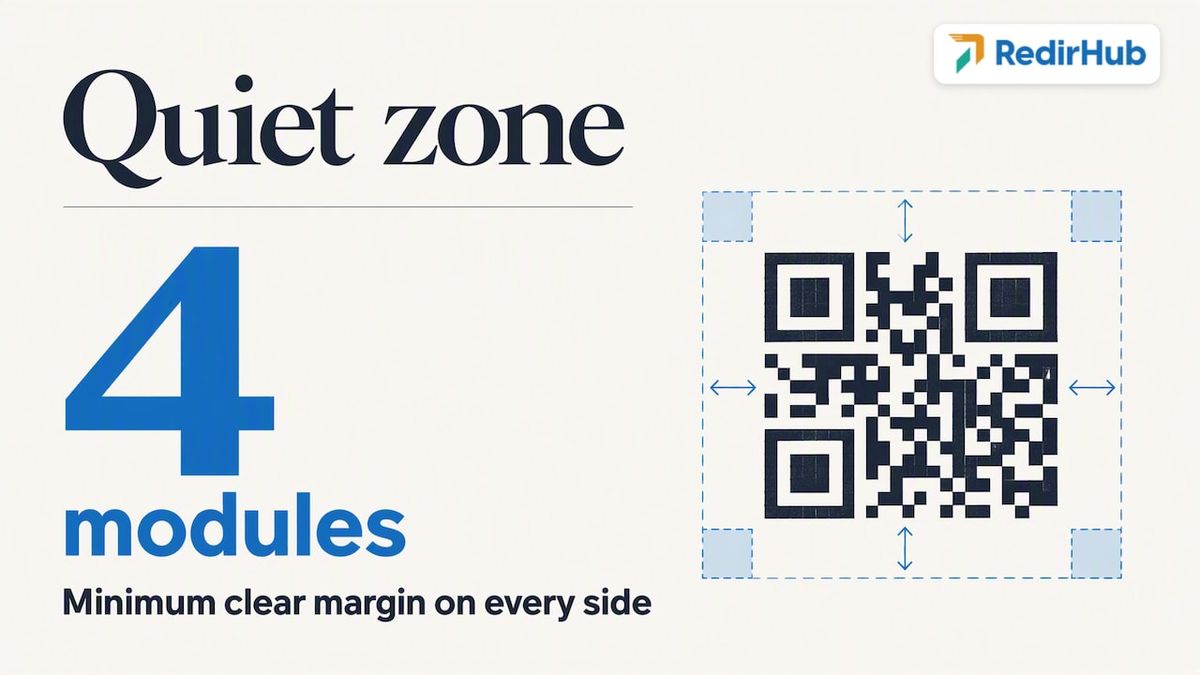
This is the rule designers break most often. A frame, a photo background, a die-cut edge or a neighboring headline that crowds the code can make it unreadable even when the pattern itself is perfect.
Let error correction absorb your logo#
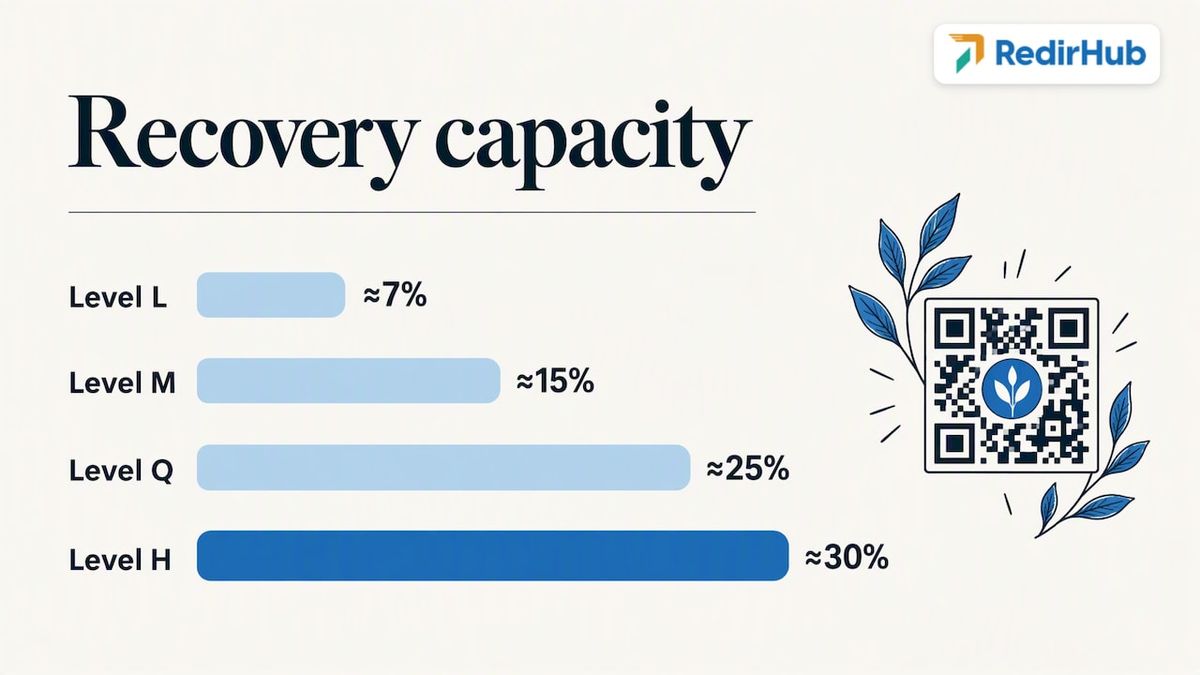
QR codes carry redundancy. The specification defines four Reed-Solomon error-correction levels: L, M, Q and H. The approximate recovery capacities are 7% for L, 15% for M, 25% for Q and 30% for H[2].
A center logo covers modules, so it consumes some of that redundancy. The practical consequences:
- If you place a logo, choose a higher correction level (Q or H) so the covered area can be recovered.
- Higher correction means more modules for the same content, so the pattern gets denser. Short URLs help a lot here.
- Keep the logo well below the recovery limit. Treat the percentages as a ceiling for damage, not as a design budget, because a smudge, a fold or a low-resolution print also uses the same redundancy.
This is one reason a short link beats a long one. A short path produces a sparse, chunky symbol that tolerates a logo, a curved surface or a mediocre print far better than a 150-character tracking URL.
Keep strong contrast#
Scanners look for dark modules on a light background. Brand colors are fine when the dark color is genuinely dark and the light color is genuinely light. A few habits that avoid trouble:
- Use your darkest brand color for the modules and white or a very pale tint for the background.
- Avoid placing pale brand colors, such as yellow or light green, on a white background.
- Be careful with inverted codes (light modules on a dark background). Some scanners handle them, others do not, so test before you commit.
- Do not use a gradient that fades toward the background color at one corner.
Be conservative with shapes#
Rounded dots, custom corner eyes and shaped modules are popular and mostly work. The three large corner squares are how a scanner locates and orients the code, so keep them recognizable and high contrast. If a design looks striking but one phone out of five hesitates, simplify it.
Size for the scanning distance#
Size depends on how far away people will stand. A code on a business card can be small. A code on a poster, a shelf talker or a trade-show banner must be much larger, and the quiet zone grows with it. DENSO WAVE’s print-sizing guidance is a good reference for working out the symbol area from the module size.
A useful habit: print the code at its final size on the actual material before you finalize the layout around it.
Static or dynamic: the decision that outlasts the design#
A static QR code stores the destination inside the pattern. Change the URL and you have a different code. A dynamic code stores a short link that you control, and that link redirects to the final destination. You can change the destination at any time, and the printed code stays the same.
For anything physical, dynamic is almost always the right call:
| Situation | Static | Dynamic |
|---|---|---|
| One-off code on a digital screen you can swap | Works | Works |
| Packaging, labels, signage, brochures | Risky: a typo or a dead page is permanent | Fix the destination without reprinting |
| Seasonal or rotating campaigns | Needs a new code each time | Same code, new destination |
| Scan counts, device and location data | Not available from the code itself | Available through the link |
| Long-lived assets (product manuals, equipment tags) | Breaks when the page moves | Redirect to the new page |
For a deeper comparison, see our guide on static vs dynamic QR codes, and if you need to repoint a code that is already in the wild, changing a QR code destination after printing walks through it.
What a dynamic code adds to a scan: one redirect#
A dynamic code sends every scan through a redirect before the landing page loads, so how quickly that hop answers is part of the scan experience. In the RedirHub redirect speed benchmark, 19 to 26 October 2026[4], which measures 26 providers' median time to first byte from Washington, D.C., Frankfurt and Tokyo, RedirHub's redirects answered in 17 ms on average across the three locations, against 38 ms for Dub, 56 ms for Short.io, 117 ms for Bitly and 269 ms for Rebrandly. The test runs from Vercel functions rather than from RedirHub's network, and you can run your own short link through the redirect speed test to see where it lands.
How to create a branded QR code, step by step#
The order matters. Most mistakes come from designing first and deciding on the link later.
- Decide the destination and the owner of the link. Pick the landing page, then decide which domain the code will resolve through. If you want the code to open on your own domain, set that up first. Our walkthrough on creating a QR code with your own domain covers the setup.
- Create a short, dynamic link. Use a short path that you can read aloud. Add campaign parameters to the destination, not to the link in the code, so the pattern stays simple.
- Generate the code with a high correction level. Choose Q or H if a logo will sit in the center.
- Apply your brand. Set the module color, the background, the corner style and the logo. Keep the logo compact and centered.
- Add a frame and a call to action. A plain instruction such as “Scan to see the menu” tells people why they should bother, and it can matter more to scan rates than any color choice.
- Export in a print-ready format. Vector formats such as SVG or PDF scale cleanly for large prints. Use a high-resolution PNG only for screens and small items.
- Test, then test again. The next section covers how.
If your goal is to track results, plan the measurement before you print. Our QR code generator with tracking guide explains what to capture.
Test before you print#
A branded code that scans on your monitor can fail on a glossy flyer. Run a short test routine every time:
- Scan on at least three phones. Include an older model and both iOS and Android, using the default camera app, not only a dedicated scanner.
- Scan at the final size. Print a proof on the real stock at 100% scale.
- Scan from the real distance and angle. Stand where a customer would stand, not where the designer sits.
- Try poor light. Test under a dim room, in direct sun and under glare on glossy paper.
- Check the landing page on mobile. The scan is only half of the job. If the page loads slowly or is not mobile friendly, the code has failed in practice.
- Confirm the tracking. Scan the proof, then check that the scan appears in your analytics.
- Check the margin. Measure the empty space around the code against the four-module rule.
If a test code scans slowly, the fixes in order of effect are: shorten the link, raise the contrast, shrink the logo, enlarge the printed code.
Where branded codes earn their place#
Branded codes work best where there is a natural reason to scan and a physical object that cannot be edited afterward. Packaging inserts, retail displays, event signage, direct mail, product manuals and business cards are the usual spots. We have collected examples in 8 QR code campaigns that earn every scan, and a separate guide on direct mail QR codes covers printing and trust for mailed pieces.
Operational uses count too. Hospitality is a good example: guests can complete QR-based check-in[5] before they arrive, which shows how a code can replace a paper step when the destination behind it is reliable.
Whatever the use, ask one question before choosing the placement: if this code stopped working next year, how hard would it be to fix? If the answer is “we would have to reprint everything”, use a dynamic code on your own domain.
Security and trust#
People are increasingly cautious about scanning codes, and with reason: a QR code hides its destination, so a sticker placed over a legitimate code can send people somewhere else. Branding helps in two ways.
First, a consistent visual identity, with a frame and a call to action, makes your codes recognizable and harder to imitate casually. Second, when the link opens on your own domain, users see a name they recognize in the address bar, rather than an unfamiliar shortener domain.
A few habits for your team:
- Print codes on materials that are hard to peel and cover, or place them where staff can see tampering.
- Show a short readable URL near the code when space allows, so people can verify the destination.
- Keep all codes in one managed inventory, so you know which ones are live and where they point.
- Use HTTPS everywhere. A branded domain with managed SSL avoids browser warnings that scare people away.
- Audit the destinations regularly. A link that points to an expired page or a parked domain is both a lost customer and a trust problem.
Perspective: the code is the easy part#
We see the same pattern repeatedly. A team spends weeks on the look of a QR code, a color, a logo, a rounded corner, and almost no time on what happens when the code is scanned eighteen months later. The campaign ends, the landing page is retired, the agency that created the code uses a generic shortener, and the printed material is still in circulation.
Our view is simple: a branded QR code is a link first and a graphic second. If the link lives on someone else’s shared domain, you are renting your own marketing. If it lives on your domain, with SSL managed for you, you can repoint it, measure it and keep it alive as long as the printed piece exists. That is why we built RedirHub around your own domain rather than a shared shortener, and why we treat the destination as something you must always be able to change.
The design rules in this article are worth following. But if you only remember one thing, make it this: never print a code whose destination you cannot edit.
Managing branded codes with RedirHub#
RedirHub lets you create dynamic QR codes that resolve on your own domain, change the destination after printing, and read engagement data in one place. The same account handles branded links and domain redirects, so your QR codes, short links and migration rules share one set of domains and one dashboard. For scan reporting, see how our redirect and click analytics work.
Branded links and dynamic QR codes are included on Core, Pro and Enterprise. Core costs $49/month and Pro $119/month, both with a 14-day free trial; Enterprise is set by contract. See the full pricing page.
Measuring what your codes do#
A branded code gives you a measurable offline channel, but only if you set it up that way. Give each placement its own code or its own tracked link, so you can tell the poster from the flyer and the flyer from the package insert. Then look at scan volume over time, device type and location, and compare against the conversion on the landing page.
Our guides on tracking QR code scans and on QR code tracking without reprinting go into the metrics and the setup. A good habit is to review scan data after the first week and adjust the call to action or the placement if the numbers disappoint, rather than waiting for the end of the campaign.
Choosing a generator: what to check#
Many tools can add a logo and a color. The differences that matter are elsewhere. Ask these questions before you commit to a tool:
- Does it follow the standard? The QR format is defined by ISO/IEC 18004, with rules for encoding, error correction and production quality. A tool that lets you pick the error-correction level, and keeps the quiet zone intact in exports, is respecting those rules.
- Can you use your own domain? This decides who controls the link.
- Is the code dynamic? Check that you can edit the destination without changing the image.
- What happens if you stop paying? Find out whether codes keep redirecting. For printed material this is the most important question, so read the terms.
- Do you get analytics? Scan counts, devices and locations, exportable.
- Does it export vector files? SVG or PDF for print.
- Can a team manage it? Roles, shared domains and bulk operations matter once you have more than a handful of codes.
Free generators are fine for a one-off code on a screen. They are a poor fit for packaging or signage, where a broken redirect costs real money.
Put your QR codes on your own domain
Create a dynamic QR code on your own domain, change its destination after it is printed, and read scan data in one place. Core and Pro start with a 14-day free trial.
Create a dynamic QR codeSources
Frequently asked questions
Yes, within limits. The QR standard builds in error correction, with recovery of roughly 7% to 30% depending on the level, so a small centered logo can be absorbed if you use a higher level such as Q or H. Keep the logo small, keep the link short, and test on several phones.
A regular QR code is a plain black-and-white pattern. A branded one uses your colors, logo and frame, and ideally opens a link on your own domain. The visual part helps people recognize it, while the domain part gives you control and builds trust.
Use dynamic for anything printed or long-lived. A dynamic code points to a short link you can edit, so you can fix errors, rotate campaigns and see scan data without reprinting. Static codes are acceptable only when you can replace the code at no cost.
Look at the address that appears after scanning and check that it uses HTTPS and a domain you recognize. For codes you publish, use your own domain, add a readable URL near the code and place codes where tampering would be visible. Be wary of stickers placed over other codes.

Leo Astarothman is the Brand & Content Lead at RedirHub, where he shapes the company's visual identity, educational content, product experiences, and marketing strategies. He also specializes in system design. Simplifying complex redirect infrastructure into practical resources, product experiences, and campaigns that help businesses understand and adopt modern redirect management.
Related Articles
View All Articles