What Is a Domain in Business and Why It Matters

Key takeaways
A business domain is the stable public name behind your website, email, branded links, QR codes and redirects, and it can outlive every tool pointed at it. Keep the registrar, DNS and hosting separate in your head and in your records, give each domain one accountable owner, and restrict who can change DNS. When the business changes, map every old URL to its new page with a permanent 301 or 308 redirect, keep path and query details, and leave the redirects in place for at least a year.
A domain in business is the human-readable internet name, such as company.com, that identifies the organization so people don't have to remember a numerical IP address. That simple sentence explains more than most first purchases do, because that name often outlives the website it first pointed to, the campaign it first carried, and the person who first registered it.
Think of it as the address on the letterhead, not the building behind it. Buildings get renovated, tenants move floors, and staff change offices, but customers still need one stable place to send a letter, type into a browser, or scan from packaging. If you understand what is a domain in business at that level, you'll stop asking only whether a word sounds memorable and start asking who controls it, what jobs it does, and what breaks when the company changes.
What a Domain Does for a Business#
Say you run a small consultancy and you've just registered northfieldadvisors.com. You now control a unique, human-readable address that clients type instead of a numerical Internet Protocol address, and it can stay printed on proposals for years even if you rebuild the site twice in that time.
New owners often confuse the address with everything attached to it. The website files, the inbox software, and the seasonal landing page your designer built last month all sit behind the name. The domain is the stable public identity that can point to each of those things, and can point somewhere else later without asking customers to learn a new name.
The Four Jobs One Name Usually Does#
A single owned name usually carries four jobs at once. The table names each job, what the domain provides, and the nearby product people commonly mistake it for.
What a business domain does and what it is not
| Job | What the domain provides | What it is not |
|---|---|---|
| Website | The address customers type, such as company.com | The hosting account or the site design |
| The name after the @ in staff addresses | The inbox software or a specific mailbox | |
| Branded links and QR codes | A stable public URL on a name you own | The campaign page or the print file |
| Redirects | A path from an old, spare, or misspelled name to the current destination | A second website that must be rebuilt |
Read the table as a separation test. If Northfield moves its website to a new host, the address customers type stays the same. If the firm switches email providers, the part after the @ can stay identical while the mailboxes behind it move. If a QR code on a brochure points to a branded link such as go.northfieldadvisors.com, the destination page can change next quarter without reprinting the brochure.
Redirects follow the same logic. An old practice name, a common misspelling, or a spare ending needs no website and no hosting of its own. Control of the name's DNS is enough to send visitors to the current site, so a typo becomes a recovered visit instead of an empty page. For a closer look at making your website work harder[1] once that traffic arrives, separate the job of getting people to the right address from the job of persuading them after they land.
Why This Is Real Estate, Not a Label#
Hundreds of millions of domain names are already registered worldwide, so a good name that customers already know cannot be duplicated by anyone else. There is exactly one northfieldadvisors.com, and whoever holds it controls every visit, email, and printed link built on top of it. That scarcity is what turns a name into an asset rather than a line item.
That framing changes what you do next. The question shifts from whether the name sounds memorable to what depends on it today, and what customers would lose if it stopped resolving tomorrow.
Before buying anything new, run a quick inventory. List every public name already printed on packaging, vehicles, invoices, email signatures, and ads. Mark each one against the four jobs in the table: website, email, branded links and QR codes, or redirects. You will often find a name doing no job at all, or a job being done on a name nobody in the company controls.
How a Domain Name Is Put Together#
Take one address and read it from right to left, shop.example.com. Reading in that direction turns a confusing string into three clear layers, each with a different owner and a different job.
The visual below breaks that same address into its parts so you can see where the business owned piece sits.
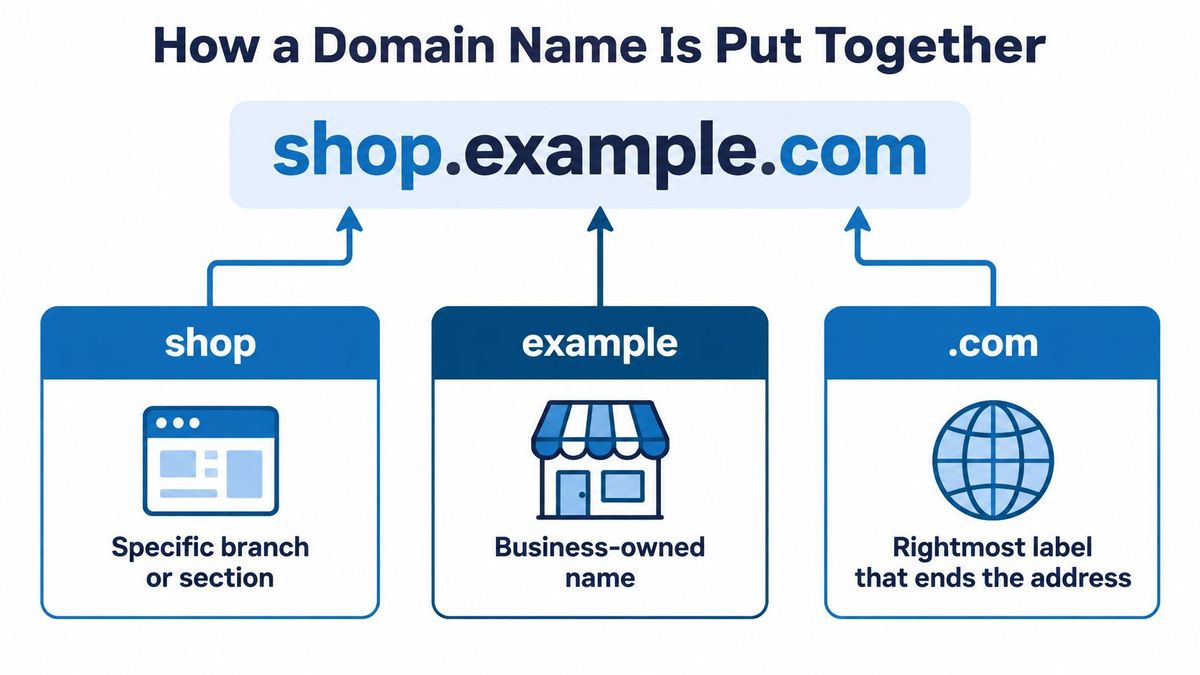
Reading shop.example.com From Right to Left#
The rightmost label, .com, is the top-level domain, or TLD. It's the ending that places the address in a public namespace. To its left, example is the registered second-level name the business has claimed. That's the piece you register, renew, and protect, because it's the part customers associate with your brand.
To the left of that, shop is a subdomain. You don't buy it separately. You create it when you need a distinct branch, such as a store, a regional site, or a link host like go.example.com. Owners exploring website structure options for growing businesses[2] usually discover that a subdomain lets them expand without fragmenting the brand into a pile of unrelated new names.
Behind those labels sits the Domain Name System, or DNS. DNS acts like a phone book that turns a name a person can remember into the internet address of a server, an email service, or a redirect. You type words, DNS finds numbers, and the browser goes to the right place.
What the Ending Signals#
The ending you choose tells visitors something before they read a word. The Verisign report for September 30, 2025[3] counted 378.5 million registered domain names across all TLDs, including 159.4 million .com names and 12.5 million .net names, while country-code TLDs accounted for 144.8 million.
Domain namespaces and what they signal
| Namespace | Registrations | What it usually signals |
|---|---|---|
| All top-level domains | 378.5 million | The full global market |
| .com | 159.4 million | The default global commercial name |
| .net | 12.5 million | An older generic namespace, less dominant than .com |
| .com and .net together | 171.9 million | The two largest classic commercial generics |
| Country-code endings | 144.8 million | A local market, language, or regulatory home |
Choose .com when you want the broadest global recognition and the least explanation. Choose a country-code ending when you want to signal a local market, a local language, or alignment with local rules. Many companies hold both, using one as the main address and redirecting the other so visitors aren't stranded.
Three Controls That Are Easy to Blur#
Confusion usually comes from mixing up three separate controls.
- The registrar: This company holds your registration and your renewal. Losing access here means losing control of the name itself.
- DNS records: These decide where traffic for each name or subdomain goes. Changing a record changes the destination, not the ownership.
- Hosting: This is only one possible destination that DNS can point to. It's where site files live, not where the name lives.
That separation is practical. We don't require moving the domain or nameservers when you connect a hostname to RedirHub, the domain stays with your registrar and your DNS stays where it is. Connecting a name to a service isn't the same as transferring the name away.
Use a one-line test to check your own setup. If you can name your registrar, your DNS host, and the person allowed to change records, you understand your structure. If you can't name all three, that's the first gap to close.
Domains in Ordinary Company Situations#
Abstract definitions get clearer when you watch a name work through an ordinary week. The situations below aren't edge cases. They're the moments when a business either reuses one owned namespace well or discovers it only bought a word.
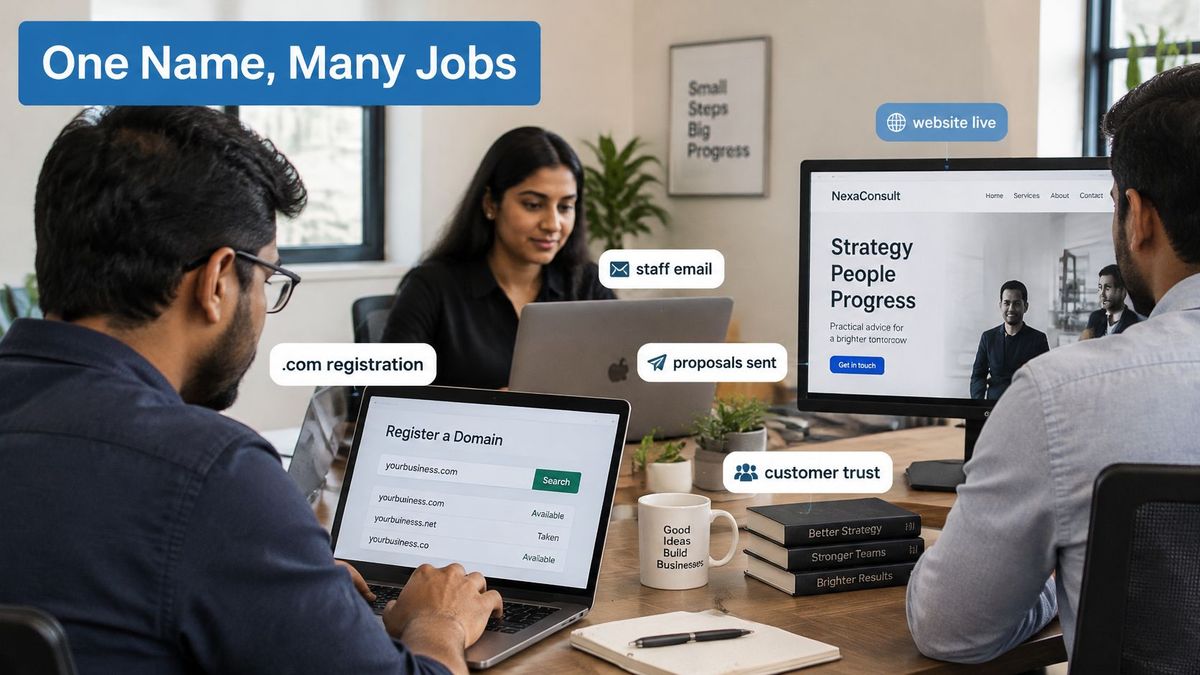
The registration moment itself is often a team decision, not a solo technical task, as the photo below suggests.
Five Scenes Where the Name Earns Its Keep#
Say a new consultancy registers a .com, puts its website on that name, and issues staff email on the same name. A proposal arrives from an address that matches the site the client can check in one click. If the firm had bought the word but left staff on personal inboxes, that simple trust check would fail.
A retailer takes a different path. It prints go.brand.com on packaging and store posters for a seasonal offer, then points that same URL at a new page next season. The printed code stays valid because the public address didn't change, only the destination behind it did. Without an owned link name, every new campaign would mean new print.
Growth adds a third pattern. A company entering Germany adds a country-code name or a de subdomain for the local store while the global brand stays on .com. German customers see a local home, and the company doesn't rebuild its whole identity for one market. If it had launched an unrelated new brand name instead, it would split recognition and support.
Acquisitions test continuity more intensely. An acquired brand keeps its old name visible in ads and email signatures for a while and forwards visitors to the parent site. Customers who click an old bookmark aren't stranded on day one of the merger. If the old name had been switched off immediately, those customers would assume the business had closed.
Defensive names cover the quiet fifth scene. A firm that bought a common misspelling and a spare ending sends both to the main site. A customer who mistypes still arrives, and a competitor can't easily use the confusing variant. If those names were bought but never pointed anywhere, they'd be paid for and useless.
One term causes avoidable confusion here. In software, domain-driven design uses the word domain for a slice of a business problem inside code, such as orders or billing, and it isn't an internet address at all. When an engineer and a marketer both say domain in the same meeting, check which meaning each person intends before you agree on a plan.
The valuable pattern across all five scenes is the same. It's one owned namespace reused across channels, not a new name invented for every campaign, market, or product launch.
Governing One Owned Name Across Channels#
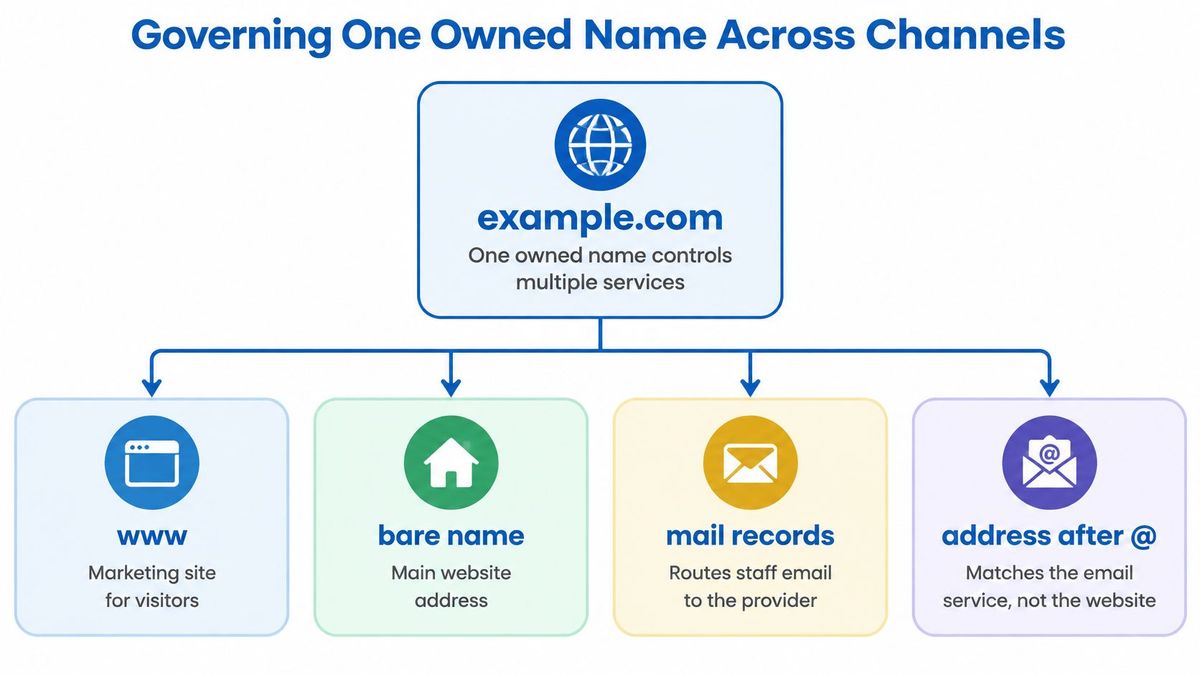
A single name can run a whole company's public life if you split it deliberately by hostname. Take example.com. Customers see one organization, while behind that name different teams run different services and change them on independent schedules.
The diagram below shows how one owned name can control several services at once without those services living in the same place.
Splitting One Name by Hostname#
Start with the public front door. The bare name, example.com, and www.example.com[4] serve the marketing site that visitors and search engines expect to find. That's the brochure, the pricing page, and the contact route, all under the name people already know.
Mail works differently on the same name. Mail exchanger records route staff email to an email provider, so the address after the @ matches the brand while the inbox itself lives elsewhere. You can change email providers without changing a single printed address, as long as the records are updated correctly and tested.
Campaign traffic gets its own branch. A hostname such as go.example.com or links.example.com hosts campaign links and QR destinations that need to stay printable for months. A code printed on packaging or a conference banner can't be reprinted, so the hostname behind it has to outlast every individual promotion. Marketers can change the page behind that code without touching the main site, the mail setup, or the product.
Geography and product get separate branches too. A country subdomain or a country-code name can serve a local store in its own language and currency. An api or app hostname can point at a product or a service for other software, keeping technical traffic off the brochure site.
That split works because DNS acts as a control plane between the owned namespace and the infrastructure underneath it. As ICANN explains in its DNS overview[5], domains identify entities and DNS maps names to internet addresses. Whoever controls those mappings decides where customers, mail, and applications go.
For companies running several brands under one group, that control question gets bigger. Our guide to a multi-brand domain strategy covers how to keep each brand's namespace distinct without losing central oversight.
Governance Is a Security Job, Not a Branding Task#
Because DNS decides where people are sent, domain administration belongs with infrastructure security as much as with marketing. Treat it as garage-door access for your whole online presence. You wouldn't hand that opener to every contractor who ever painted a room, and you shouldn't hand DNS editing rights to every campaign editor either.
Build governance around named accountability.
- Assign an accountable owner: One named person owns each domain, its renewal date, and its payment method. A shared inbox with no owner means nobody notices an expiry warning until the site goes dark.
- Require approval for DNS changes: A second person checks changes that affect mail, the main site, or apps before they go live, and every change is logged.
- Separate campaign permissions: Staff who edit campaign destinations shouldn't be able to change mail records or product hostnames. Least privilege keeps a marketing mistake from becoming a company outage.
- Calendar certificate renewal: Every public hostname needs a valid certificate, and someone owns checking expiry before visitors meet a browser warning.
Neglect Is the Usual Risk#
The common failure is plain neglect. An ex-employee still has the registrar login. An old subdomain still points to a forgotten host that nobody updates. A redirect nobody manages sends people to a retired page, and a lookalike name registers unnoticed while nobody watches.
The wider abuse picture shows why monitoring can't be an afterthought. ICANN reported[6] that, from April 2024 through August 5, 2025, enforcement actions led directly to nearly 20,000 malicious domains being mitigated. At that scale, lookalike registrations are routine rather than rare, which is why the response has to be routine too.
Keep a live inventory of every domain and subdomain you own. Name an escalation path for phishing and brand impersonation before you need it. Remove abandoned DNS records promptly, and renew important names well before expiry so they never lapse into someone else's hands. Write the registrant of record into partnership, client, and sale contracts before a split, because deciding who keeps the name during a dispute is slower and more expensive than deciding while everyone still agrees.
Continuity and trust are the essential asset here. The word itself matters less than the fact that customers, partners, and staff can keep using it safely while everything behind it changes. Neglected records put that trust at risk far more often than dramatic hacking does.
Keeping Visitors When the Business Changes#
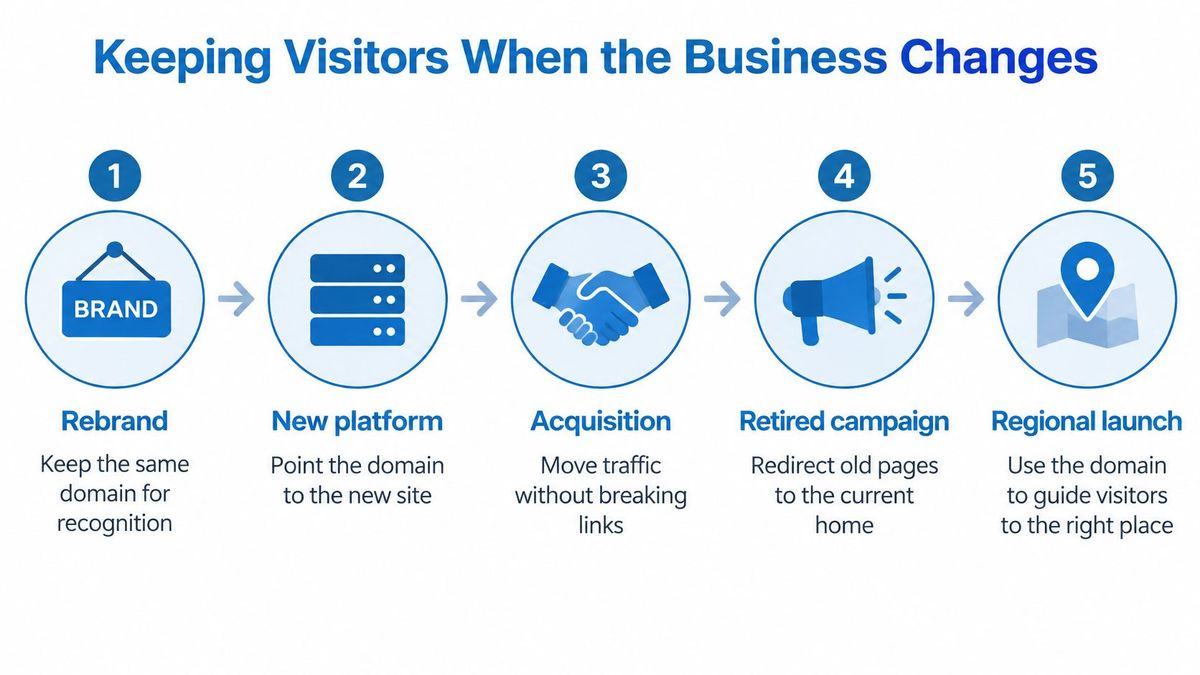
Change is the moment your domain either protects years of recognition or throws it away. A rebrand, a new platform, an acquisition, a retired campaign, or a regional launch all ask the same question. Can people who know the old address still reach the right new place without thinking about it.
The process below outlines the kinds of change that trigger that question, from a rebrand through to a regional launch.
A Five-Step Move That Preserves Traffic#
Work in a fixed order, and don't skip the mapping step because it feels slow.
- Build a complete old-to-new map: List every old URL and its new destination, including deep product pages, help articles, and campaign URLs, not only the homepage.
- Install permanent server-side redirects: When the move is permanent, prefer HTTP 301 or 308 so browsers and search engines understand the new address is the lasting one.
- Forward path and query details: A bookmarked product link or a printed QR code should land on the matching new page, with its path and query string preserved where they carry meaning.
- Watch both addresses: Monitor traffic on the old and new names so you can spot missing mappings, error spikes, and pages that still draw visits.
- Keep redirects long enough: Retain them long enough for crawlers, bookmarks, print, and old partner links to catch up, and longer while the old name still receives real traffic.
That order follows the Google site move guidance[7], which recommends retaining redirects for at least one year, while its Change of Address guidance specifies maintaining them for at least 180 days and longer when old-domain traffic persists. Teams planning the search side of a move in detail can pair this with our notes on an SEO domain change so rankings and redirects are planned together, not patched afterward.
Choosing the Right Redirect Code#
Step two hides a decision that changes how search engines treat your move. Permanent codes announce a lasting canonical address clearly. Temporary codes don't, which is correct only when you expect the old address to return.
Which redirect to use when a destination changes
| Code | Use when | What it tells browsers and search |
|---|---|---|
| 301 | The old address has moved for good | Permanent; the usual choice for a site or URL move |
| 302 | The detour is temporary and the old address will return | Temporary; weaker signal that the new URL is canonical |
| 308 | A permanent move must keep the original request method | Permanent, method preserved; grouped with 301 for lasting moves |
What Breaks When Teams Rush#
Each shortcut produces a predictable failure. A missing row in the map becomes a broken link for whoever saved that page. Pulling redirects down early strands crawlers, customer bookmarks, QR codes on packaging, and links in partner emails that you can't edit. A leftover name with no monitoring can keep pointing at a dead host or an unsafe destination long after the project team disbands.
Treat every redirect as a managed rule, not a one-time edit. Give it an owner, a status code, a destination, a path and query forwarding policy, a test result, and a retirement date. For large sets, an imported map with validation is safer than hand-editing server files one line at a time, because one typo in a server file can take down more than the rule you meant to change.
Two practical points calm teams who fear this work. You don't need a website or hosting to redirect a domain, you only need control of the domain's DNS, so a spare or acquired name can forward visitors without a site built on it. Certificates should cover every public hostname involved, including the old name, so visitors following an old link don't meet a browser warning before the redirect even happens.
Whichever route you take, the redirect itself should be quick. Over 2026-10-27 to 2026-11-03, the median time to first byte of RedirHub redirects was 15 ms, measured from Washington, D.C., Frankfurt and Tokyo; across the 27 providers in the same test it ranged from 9 ms to 586 ms (RedirHub redirect speed benchmark[8]).
Put the Names You Already Own to Work#
If your company already owns a name, your next move isn't another purchase. It's an inventory. Confirm the registrar login, confirm the DNS host, and point each hostname at the job it should do, site, mail, a campaign link, or a redirect. If a name only needs to send people somewhere else, you can do that from DNS without building a site on it.
Start with the names already on your letterhead, vehicles, and ads, because those are the ones customers already trust. Connect the DNS, test where each name lands, and fix the orphans that point nowhere. Our walkthrough on how to create a QR code with your own domain shows one concrete way to put an owned name to work on print you can't easily reissue.
When one-off DNS edits stop scaling, we built RedirHub to serve redirects and branded links on domains you already own. To create a branded link, you pick any of your domains or add a new one with a DNS record. Core is $49 per month and includes 25 domains and 2,500 managed links. Pro is $119 per month and includes 250 domains and 10,000 managed links, plus advanced analytics, monitoring and alerts, and advanced routing and controls.
That scale matters when the work stops being occasional. As Zsolt Bikadi, CSO at Domain Science, put it, "Redirecting domain names with SSL is a huge pain, and I have to do it frequently, often at mass. Now it is a few clicks. It just works." Decide whether a paid tier is warranted by how many names and links you run, not by how many you might run someday.
Put your existing names to work before you register another one, by running your redirects, branded links, and QR destinations on domains you already own with automatic HTTPS and clear ownership. Visit RedirHub to connect a domain through DNS, map your old addresses to their new destinations, and keep every printed and bookmarked link working through your next change.
Put your existing domains to work
Connect a domain you already own through DNS, map old addresses to new destinations with 301, 302, 307 or 308 redirects, and keep paths and query strings. Pro comes with a 14-day free trial; Core starts right away.
See the URL redirect serviceSources
Frequently asked questions
A domain is the human-readable internet name, such as company.com, that identifies an organization online. It stays the stable public address for the website, email and links even when the hosting or tools behind it change.
No. The domain is the name, hosting is where the site files live, and DNS records decide where the name points. You can change hosting or email providers without changing the domain customers know.
No. You only need control of the domain's DNS to redirect it, so a spare, misspelled or acquired name can send visitors to your main site without a website of its own.
Use a 301 or 308 for a permanent move and a 302 only when the old address will return. Forward the path and query string so bookmarks and printed QR codes land on the matching new page.
No. When you connect a hostname to RedirHub, the domain stays with your registrar and your DNS stays where it is. Domain redirects with 301, 302, 307 and 308 are included on Core, Pro and Enterprise.

Leo Astarothman is the Brand & Content Lead at RedirHub, where he shapes the company's visual identity, educational content, product experiences, and marketing strategies. He also specializes in system design. Simplifying complex redirect infrastructure into practical resources, product experiences, and campaigns that help businesses understand and adopt modern redirect management.
Related Articles
View All Articles