What Is Domain Parking? How It Works, Types and Alternatives

Direct Answer
Domain parking means a domain you own is registered but has no website of its own. Instead it shows a placeholder page from your registrar, a page of ads from a parking service that shares the click revenue with you, or (in the looser sense) it forwards visitors to another site. You park a domain by pointing its DNS at the service that answers for it. Ad parking pays only when the domain gets real type-in traffic, and it earns less in 2026 since Google stopped showing ads on parked domains. If the domain belongs to your brand, forwarding it to your main site is usually the better use.
Most people who buy domains end up with a few that have no website: a name saved for a future project, a typo of your brand, an old company name, a domain bought to resell. What those domains show in the meantime is what “domain parking” is about. This guide explains what a parked domain is, how parking works, what changed in 2026, and when forwarding the domain is the better choice.
What is domain parking?#
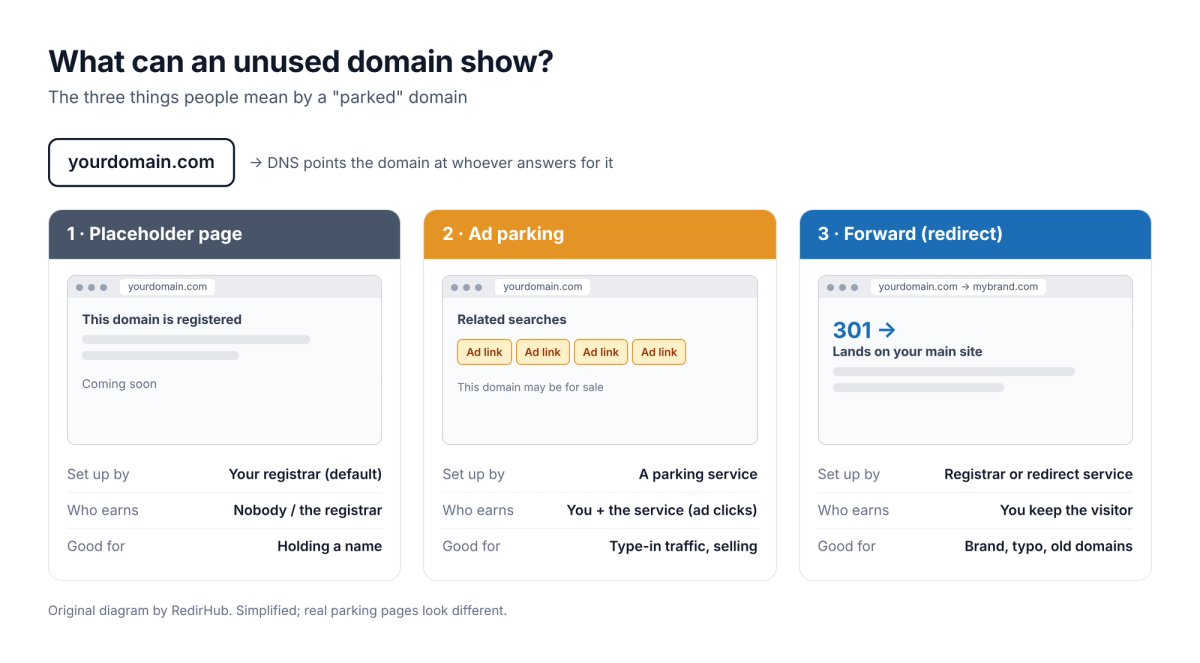
Domain parking is registering a domain without building a website on it. The domain still resolves, so anyone who types it in sees something, and who decides what they see depends on where the domain's DNS points. People use “parked” for three different setups:
- Placeholder page. The page your registrar shows by default on a new domain (“This domain is registered”, “Coming soon”). You don't set anything up, and you don't earn from it.
- Ad parking (monetized parking). You point the domain at a parking service, which shows a page of ad links that match the domain name. When a visitor clicks an ad, the advertiser pays and you get a share. Most parking pages also say the domain may be for sale.
- Forwarding. The domain has no page at all and redirects visitors to another site, usually with a 301. Registrars and domain investors often call this “parking” too, because the domain itself still has no website.
One more meaning shows up in web hosting: in cPanel, a “parked domain” was an extra domain that shows the same website as your main domain. cPanel now calls these aliases.[1] If your host talks about parked domains, that's usually what it means.
How domain parking works#
Every visit to a domain starts with a DNS lookup. Whoever the domain's DNS points to answers the request. On a fresh domain that's your registrar, so you see its placeholder. To park the domain with a parking service, you change its nameservers (or its root and www records) to the ones the service gives you. From then on the service answers every visit and decides what to show.
With ad parking, the service builds a page of “related searches” or ad links based on the domain name and the visitor's language. A click on an ad is paid by the advertiser, the ad network and the parking service take their part, and the rest is credited to you. With forwarding, the service (or your registrar) answers with a redirect instead, and the visitor lands on the site you chose.
How does a parked domain make money?#
Only through visitors. A parked page earns when people arrive by typing the domain, following an old link or guessing a brand name, and then click an ad. Two things decide how much that is worth: how many real visitors the domain gets, and how commercial the name is. A name like bestinsurance.com attracts visitors that advertisers pay well for; purpleballoons.net gets few visitors and cheap clicks.
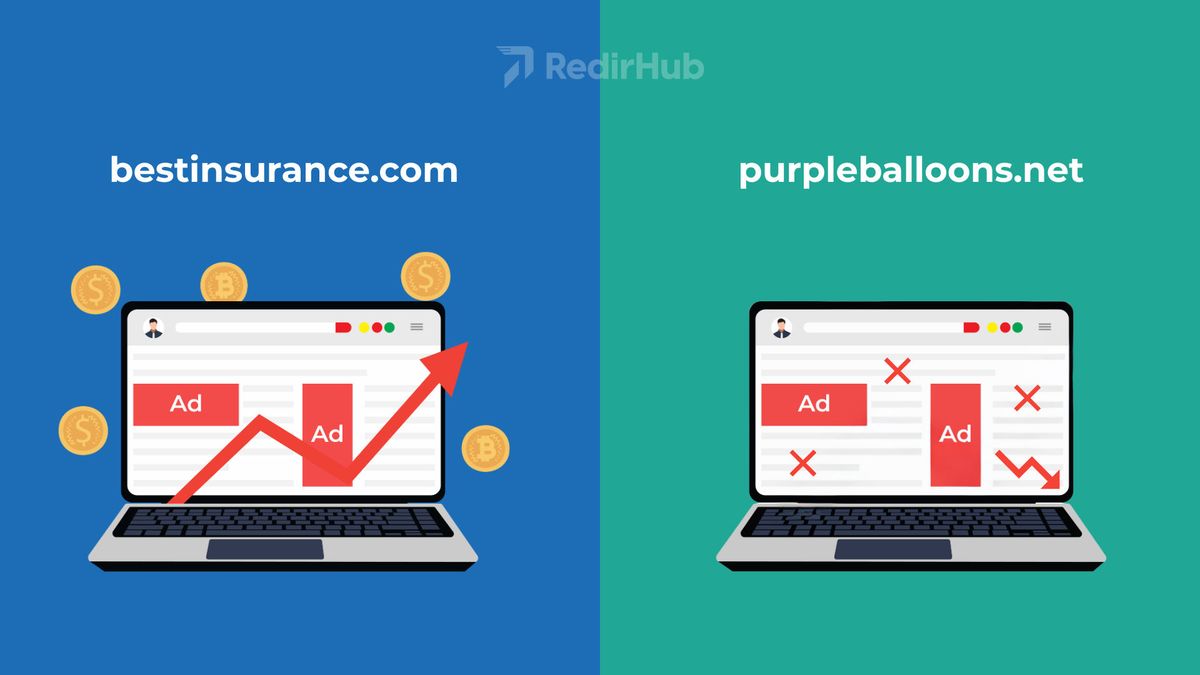
Be realistic about what a hand-registered domain will earn. Most names nobody types in earn nothing parked, however long they sit there. Parking pays for domains with existing type-in traffic (an expired domain that used to be a real site, a generic keyword name) and for domains you want to sell, because the page doubles as a for-sale sign.
What changed for domain parking in 2026#
Google stopped showing ads on parked domains. Parked domain pages used to be part of Google's Search Partner Network, so a lot of parking revenue came from Google ads. After moving advertisers to opt-out during 2025, Google removed parked domains as an ad surface on February 10, 2026, together with the setting that let advertisers opt back in.[2]
Some parking services closed. Bodis, one of the best-known parking platforms, told customers it would cease operating on January 31, 2026 and asked them to move their domains.[3] Older guides that recommend it are out of date.
Parking still exists. Services such as Sedo still offer free domain parking with ad links and a for-sale option.[4] Expect lower and less predictable earnings than older articles describe, and read your provider's current payout terms before you count on parking income.
The three types of parked domain compared#
| Placeholder page | Ad parking | Forward (redirect) | |
|---|---|---|---|
| What visitors see | “This domain is registered” or “Coming soon” | Ad links matching the name, often a for-sale note | Your chosen site, reached through a 301 or 302 |
| Who earns | Nobody (some registrars show their own ads) | You and the parking service share ad clicks | No ad income; you keep the visitor |
| Setup | None, it's the default | Point the DNS at the parking service | Registrar forwarding or a redirect service |
| Cost | Free | Usually free; the service keeps part of the revenue | Free at many registrars; redirect services charge for HTTPS, analytics and bulk tools |
| Best for | Holding a name you'll use soon | Domains with type-in traffic, or for sale | Brand, typo, country and old domains |
Pros and cons of domain parking#
Pros
- You keep the name while you decide what to do with it, and visitors see a page instead of an error.
- Ad parking can cover renewal costs for domains with real type-in traffic.
- A for-sale note on the page lets buyers find you.
Cons
- Most domains earn little or nothing, and less since Google's 2026 change.
- You don't control the ads, so a domain tied to your brand can end up showing a competitor's ad to your own customers.
- A page of ads has no content of its own, so it won't rank in search, and buyer inquiries usually go through the platform's form rather than to you.
- Switching nameservers to a parking service moves all of the domain's DNS, including email records you may still need.
When to forward a domain instead of parking it#
If people who type the domain are really looking for you, an ad page wastes them. Forward the domain to the right page of your site instead (here's how to redirect a domain to another URL). That fits:
- Typo and defensive registrations of your brand (mybrnad.com, mybrand.net).
- An old company or product name after a rebrand, which still has links and bookmarks pointing at it.
- Country domains (mybrand.de, mybrand.co.uk) that should land on the matching regional page.
- Campaign or product domains you bought for a launch and want to keep working.
Domain investors are moving the same way: rather than an ad page, they send each domain to a for-sale page of their own, so the buyer contacts them directly. We cover that setup in domain parking without ads.
How to park or forward a domain#
- Decide what the domain should do: hold the name, earn from ads, be sold, or send visitors to a site.
- Pick the service: your registrar's placeholder (already there), a parking service such as Sedo, or a redirect (your registrar's forwarding or a redirect service).
- Update the DNS as that service asks: either switch the nameservers, or change only the root (@) and www records. If you switch nameservers and the domain handles email, copy its MX records to the new DNS first. For registrar forwarding, see for example GoDaddy domain forwarding.
- Wait for DNS to update. Changes often show within an hour, but can take up to 48 hours.
- Check the result: open the domain with https:// in a private window. If it forwards, run it through the redirect speed test to see the status code, where it lands and whether HTTPS is valid.
Is your redirect working? Enter your domain. You'll see the status code (301 or 302), where it lands, whether HTTPS is valid, and how fast it answers from Washington, Frankfurt and Tokyo, ranked against every redirect tested in the last 7 days.
Test my redirectHow to tell if a domain is parked#
- Visit it. A page of “related searches”, a registrar's “this domain is registered” notice or a “may be for sale” banner means it's parked.
- Look up its nameservers with a WHOIS or DNS lookup. Nameservers that belong to a registrar's parking system or a parking company point the same way.
- If it jumps straight to another website, it's forwarded rather than parked; a redirect check shows where it goes and with which status code.
Forwarding many domains with RedirHub#
RedirHub doesn't show ads. It's for domains that should send visitors somewhere you control: your main site, a regional page, a product page or your own for-sale page. If you look after a whole domain portfolio (brand, typo, country and acquired domains at different registrars), you manage all of them in one dashboard instead of one registrar login each.
| Ad parking service | RedirHub | |
|---|---|---|
| What visitors see | Ad links, often with a for-sale note | The destination you chose, with a 301, 302, 307, 308 or frame redirect |
| Who earns | You get a share of ad clicks | No ad income; you keep the visitor and any buyer contact |
| DNS | Usually you switch nameservers to the service | DNS and email stay where they are; only the root and www records change |
| HTTPS | Depends on the service | Issued and renewed automatically for the root and www, which count as one domain |
| Where it's served | The service's servers | 130 global edge locations (PoPs), close to each visitor |
| Many domains | Depends on the service | CSV import on every plan; several source domains per redirect; keep the path or map each old URL to its own page |
| What you can see | Impressions, clicks and earnings | Clicks and unique visitors with bots filtered out, top links per domain, DNS re-checked every 10 minutes |
| Price | Free (revenue share) | From $49/month (Core, 25 domains); 14-day free trial on Pro |
What that means for a set of unused domains:
- Add dozens or thousands of domains with a bulk CSV import, or point several source domains at one destination in a single redirect.
- Every domain gets automatic HTTPS on the root and www, so typing https://mybrnad.com never ends in a certificate warning.
- For an old brand domain that still has deep links, keep the path or map each old URL to its new page, the same way a website migration works.
- See which domains still get visits (clicks and unique visitors, bots filtered out) before you renew or drop them, and spot a domain whose DNS stopped pointing at RedirHub.
When parking is still the better choice: if a generic domain gets real type-in traffic, earns ad income you're happy with and isn't connected to your brand, parking it costs nothing and RedirHub won't beat that. RedirHub starts at $49/month (Core, 25 domains); Pro comes with a 14-day free trial.
Put your domain to work.
Manage branded links, QR destinations, and redirects from one reliable control layer.
Get StartedSources
Frequently asked questions
Domain parking is owning a registered domain without a website on it. The domain shows a placeholder page from the registrar, a page of ads from a parking service, or forwards visitors to another site, depending on where its DNS points.
A parked domain name is a domain that resolves but has no site of its own. On a hosting account (cPanel), a parked domain means something else: an extra domain that shows the same website as your main domain, now called an alias.
A parking service shows ad links on the domain. When a visitor clicks one, the advertiser pays, and the parking service passes part of that revenue to the domain owner. Since February 10, 2026, Google no longer shows its ads on parked domains, so earnings come from other ad sources and are usually lower.
No. A parked domain only earns when people actually visit it. Generic keyword names and expired domains that used to be real sites can earn; most hand-registered or brand-only names earn nothing.
For a small number of domains with real type-in traffic, yes. For most domains it earns less than before: Google removed parked domains as an ad surface on February 10, 2026, and Bodis stopped operating on January 31, 2026. Check your provider's current payout terms.
Usually. Registrar placeholder pages are free, and parking services such as Sedo don't charge a fee; they keep part of the ad revenue instead. Forwarding is free at many registrars, while redirect services charge for features like automatic HTTPS, bulk management and analytics.
It can. If you switch the domain's nameservers to a parking service, all DNS moves there, including the MX records email needs, so copy them over first. If the service only asks you to change the root and www records, email keeps working.
Point its DNS back to your host or to a redirect service: restore your own nameservers, or change the root and www records to the values your host gives you. Then remove the domain from the parking service's account. The change can take up to 48 hours to show everywhere.
Redirect it if visitors who type it are looking for you, such as brand typos, old company names and country domains. Park it only if it's a generic name with its own type-in traffic, or one you want to sell and don't need for your brand.

TC is the Operations Manager at RedirHub, leading the company’s operational strategy and execution to ensure reliable, scalable redirect infrastructure. He oversees internal processes, cross-team coordination, and platform readiness while supporting customers through complex redirect implementations. With a strong understanding of large-scale domain operations and real-world edge cases, TC plays a key role in aligning product and customer success to deliver stable, high-performance redirection solutions.
Related Articles
View All Articles