Vercel Bulk Redirects: How to Set Up and Validate Them

Key takeaways
next.config.js and vercel.json hold up to 2,048 redirects each, and every change ships with a deploy. Vercel Bulk Redirects, on Pro and Enterprise, holds up to 1,000,000 one-to-one mappings per project but has no wildcard, header or query matching, and its file also changes only with a deploy. Rules that depend on the request, or destinations editors change often, belong in Middleware or an external layer read at runtime. Give every rule one owning layer, and validate status codes, Location headers, query strings and untouched pages before and after launch.
“Put every redirect in next.config.js” is good advice for a small site and a poor migration strategy. It mixes URL inventory with application releases, and it stops being useful when your mappings exceed the configuration limit or need request-dependent logic.
Vercel Bulk Redirects solves the inventory problem, not every routing problem. A larger file holds more mappings of the same narrow type. The practical decision is which layer should own each rule, who can change it, and how that change reaches production.
Pick the Right Vercel Redirect Option for Your URL Count#
Vercel redirect options compared
| Method | Capacity | Redeploy for Changes | Operational Requirement |
|---|---|---|---|
| next.config.js redirects | Up to 2,048 entries | Yes | Rules ship with application code |
| vercel.json redirects | Up to 2,048 entries | Yes | Rules ship with application code |
| Middleware reading Global Config | Sized by the stored config data it reads | No, for stored-value changes | Requires Global Config entitlement |
| Bulk Redirects via bulkRedirectsPath | Up to 1,000,000 per project | Yes, for a changed deployment file | Pro, with 1,000 included, or Enterprise |
| RedirHub Integration Mode | Up to 50,000 rules per domain | No, edits live within about a minute | Every RedirHub plan |
The Next.js redirecting guide[1] separates ordinary configuration from dedicated bulk storage, which is why the two configuration rows stop at 2,048 entries while bulkRedirectsPath is sized for a much larger inventory. That jump in capacity changes how many rows you can store. It does not widen the rule type: each row still maps a source to a destination, and a bigger file mainly gives you more of the same object.
A few dozen redirects belong comfortably in framework configuration. A migration inventory needs a more deliberate choice: a deployment-time file, runtime data read by Middleware, or an externally managed layer that your application executes.
Ask about inventory and editing frequency#
Start with how many source URLs you hold. Count explicit mappings separately from patterns. A rule that moves an entire blog directory isn't the same operational object as an exported list of individually renamed articles.
Then ask how often destinations change, and who changes them. A migration map approved by developers can fit a release-based workflow. Campaign destinations maintained by marketers usually need a workflow that doesn't require an application release.
Those questions also expose ownership problems. If an agency maintains the application but the client owns campaign links, neither team should have to edit the other's routing rules just to publish a destination change.
For a broader inventory workflow, use this guide to managing thousands of 301 redirects to organize sources, destinations, and approval responsibilities before choosing the implementation.
How Next.js Config Redirects Work and Where They Stop#
javascriptconst nextConfig = {
  async redirects() {
    return [
      {
        source: '/old-blog/:slug',
        destination: '/news/:slug',
        permanent: true
      }
    ]
  }
};

module.exports = nextConfig;
The redirects() function returns an array of routing rules. source matches the incoming path, including a captured segment such as :slug, while destination reuses that captured value.
Every entry expresses the same narrow rule shape: match a path, send it somewhere, mark it permanent or temporary. A file with two thousand entries holds more mappings, not more kinds of matching. Adding rows grows capacity, never capability.
The permanent flag expresses whether the move is permanent or temporary. Don't assume that this framework flag produces the same exact response code as a bulk rule configured with an explicit status code. Check the actual response when your migration requirements specify a particular status.
Vercel's current configuration-redirect documentation[2] sets the maximum at 2,048 redirects in the configuration array and recommends framework-native configuration for Next.js. vercel.json provides the same array-based approach for projects where framework configuration isn't the natural home.
Reject an oversized array before deployment#
Add a guard to the native configuration so CI fails before anyone promotes an invalid release:
javascriptconst rules = [
  {
    source: '/old-blog/:slug',
    destination: '/news/:slug',
    permanent: true
  }
];

const nextConfig = {
  async redirects() {
    if (rules.length > 2048) {
      throw new Error('Redirect configuration exceeds its limit');
    }
    return rules;
  }
};

module.exports = nextConfig;
That check only counts entries. It doesn't detect overlapping patterns, incorrect captures, or destinations that redirect again. Keep those checks in a separate validation step and have reviewers inspect the resulting mapping, not just the JavaScript diff.
Older Vercel and Next.js tutorials cite lower redirect limits that described earlier platform versions. Don't size a new implementation around those thresholds; the current documentation is the only figure that matters.
The ceiling counts rows. It says nothing about what a row can express, so the deciding question is which layer owns each kind of rule. Static path mappings fit this array comfortably. Rules that depend on the request itself, or destinations that must change without a release, belong in a layer that reads them at runtime instead of a file compiled at build time.
When an outsourced team writes the migration tooling, assign an internal owner to approve the validation rules and release evidence. devPulse's guidance on technical oversight for successful outsourcing[3] is useful context for keeping that responsibility with the technical lead.
An array at the documented ceiling fits; the next entry doesn't. Every later configuration edit still needs a new release.
What Each Redirect Change Costs in Deploys#
Say a marketing team changes forty campaign destinations on Monday. With a static array, those edits enter the application's commit, review, build, and deployment workflow, even though nobody changed a page or component.
That doesn't mean forty edits require forty deployments. A developer can batch them. The operational cost is the dependency: marketing must wait for the release pipeline, and engineering must review routing changes alongside unrelated application work.

Vercel's redirect overview[4] describes an alternative: store redirect values in Global Config and read them from Middleware, allowing stored destinations to change without rebuilding or redeploying the site. The Middleware implementation itself still needs a deployment when its code changes.
Separate data changes from code changes#
Middleware gives developers control over request-time decisions. It also makes them responsible for the lookup implementation.
- Missing keys: Continue to the application when no redirect matches. A lookup miss isn't evidence that the requested page doesn't exist.
- Caching: Decide how updates become visible and how stale data behaves. Don't fetch an entire remote dataset independently for every request.
- Failure handling: Define what happens when storage is unavailable or returns malformed content. An unavailable redirect service shouldn't automatically make working pages unavailable.
- Release evidence: Test changed Middleware in a preview deployment before promoting its code to production.
Keep a stable, developer-owned list in configuration when its edits naturally coincide with application releases. Move frequently edited destinations into runtime data when editors otherwise have to queue routine changes behind engineering work.
For the static case, batch approved edits and record the deployment's commit hash alongside the exported redirect inventory. That gives operators a concrete answer to which mappings were live during a campaign, rather than an assumption based on the current branch.
Where Bulk Redirects Stop and Rule Layers Start#
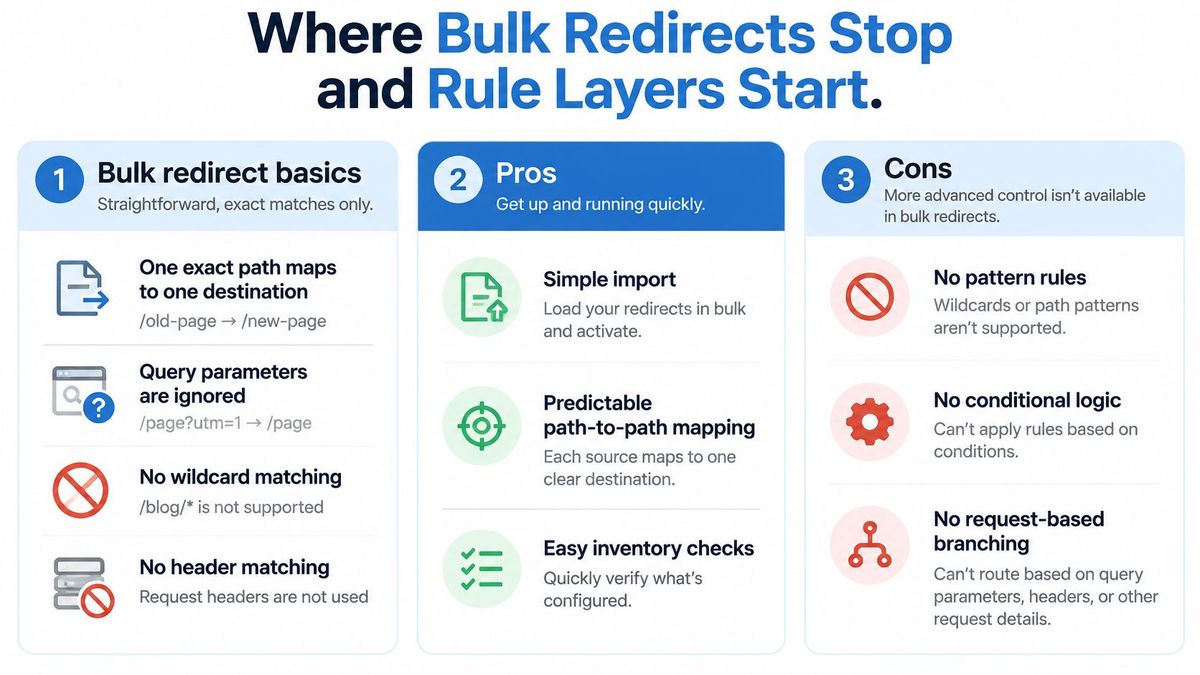
A bigger redirect file doesn't create a more expressive router. It gives you more entries, not more kinds of conditions.
Vercel's configuration reference[5] describes bulk mappings without wildcard or header matching, and source query parameters are ignored. Query preservation is separate from query matching: carrying a parameter to the destination doesn't mean that parameter selected the rule.
Rule types and the layer that can hold them
| Rule Type | Bulk File | Config Array | Middleware or External Layer |
|---|---|---|---|
| One old URL to one new URL | Yes | Yes | Yes |
| Wildcard path pattern | No | Yes | Yes |
| Header-based rule | No | Yes | Yes |
| Geolocation or device rule | No | Use supported request conditions; verify the required signal | Yes, when that request signal is available |
| Query parameter matching | Source ignores query | Verify the framework's conditional-matching syntax | Yes, with explicit query matching |
The final column describes an architectural option, not a promise that every external product supports every condition. For device or geographic routing, establish which trustworthy signal the platform exposes before choosing a rule format.
Give each rule an explicit owner#
Use bulk files for approved path-to-destination mappings. Use configuration for directory patterns that can be expressed clearly without expanding them into a generated inventory.
Use Middleware or a suitable external layer when the result requires inspecting the request. For example, campaign URLs distinguished by query parameters need a query-aware decision, while domains sharing a project may need host-aware logic.
Don't maintain the same source in several layers and rely on someone remembering which one wins. Document precedence, then reject conflicting ownership during validation.
For infrastructure-managed workflows, redirects as code with Terraform provides a useful management model. Keeping desired state in code can improve reviewability, but it doesn't expand the matching capabilities of the layer executing those rules.
Bulk files work well for straightforward imports, inventory comparisons, and explicit migration mappings. They need another layer for patterns, conditional branching, and decisions based on request attributes. Keep that distinction visible in the migration spreadsheet, not buried in an implementation comment.
How to Build and Deploy a Bulk Redirect File#
Every row in a bulk redirect file does the same narrow job: match a source path, return a status, forward the request to a destination. A larger file holds more rows of that one rule type, not more routing power. Treat the build as two jobs: deciding which rows belong in the file, and moving the file into production through one controlled path.
Vercel's Bulk Redirects documentation[6] accepts CSV, JSON, and JSONL uploads and deploys them through the bulkRedirectsPath setting. The same page lists the plan limits: the feature requires Pro or Enterprise, not Hobby; Pro includes 1,000 bulk redirects, additional capacity costs $50 per month per 25,000 redirects, and Enterprise pricing is customized.
Prepare the inventory#
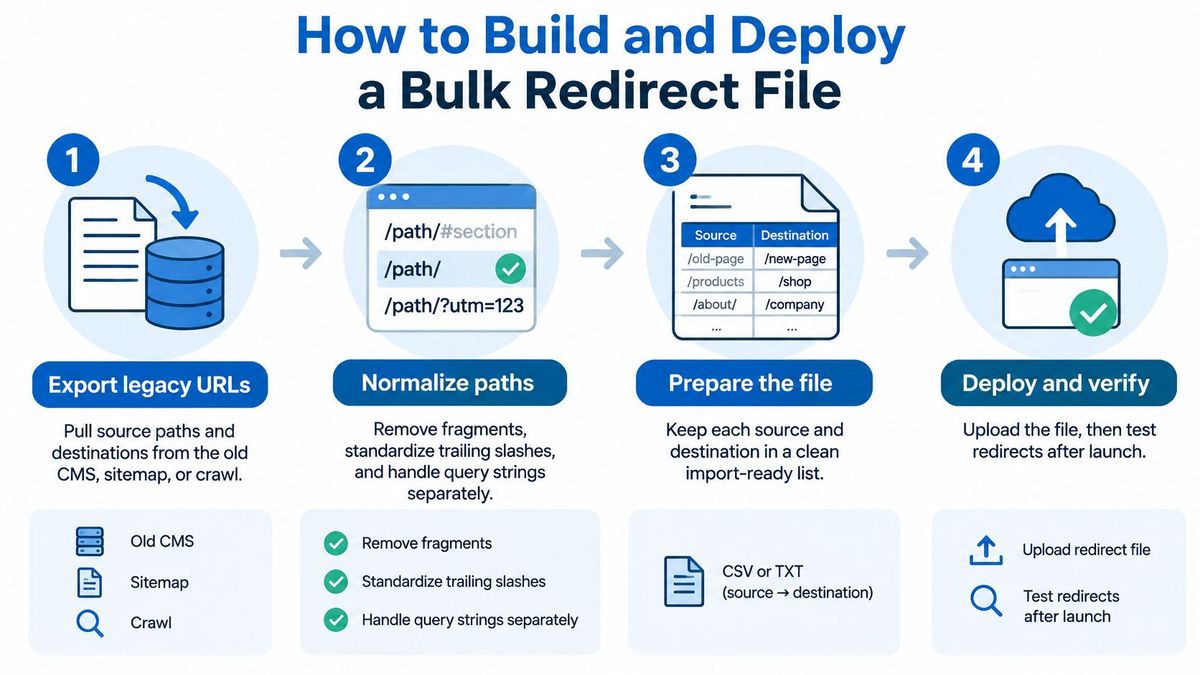
Most migration failures begin with ambiguous sources or unsuitable destinations, not with the file format. Prepare the mapping before preparing the upload.
- Export the old URLs and intended destinations. Combine the legacy CMS export, sitemap, and crawl results. Keep the origin of each mapping so reviewers can resolve disagreements.
- Normalize deliberately. Remove fragments from source inventory, establish a trailing-slash policy, and separate query requirements. Don't lowercase every path unless the site's routing policy makes that safe.
- Deduplicate by source. Reject conflicting destinations instead of letting import order decide the result. Validate malformed paths and field lengths against the chosen import schema.
- Check the destination graph. Follow destinations that also appear as sources. Resolve loops and replace unnecessary chains with the intended final destination before generating the file.
Publish through one controlled path#
- Generate the import file. Choose a supported format your team can reliably validate and review. Include only documented fields, with explicit redirect behavior where the migration requires it.
- Configure
bulkRedirectsPathinvercel.json. Point it at the generated deployment artifact, and have CI create that artifact before each deployment rather than relying on a file left on a developer's machine. Because the file is deployment-time configuration, every change ships with a deploy. Mappings that must change faster than that cadence belong in a layer designed for runtime updates, not in a bigger file. - Distinguish deployment files from runtime imports. For CLI imports, confirm whether you're appending or replacing existing rules. The large-scale redirect management guide[7] describes append behavior, replacement with the force option, and staged release operations.
- Exercise the result locally and after deployment. Run
vercel devand request representative legacy paths, then repeat the same checks against the deployed hostname.
Keep the source mapping, generator, and generated artifact reviewable in source control. A reviewer should be able to identify intentional deletions, inspect changed destinations, and recover the previously approved state without reconstructing it from shell history.
Validate Bulk Redirects Before and After Launch#
Validation checks before and after launch
| Check | Sample Input | Expected Result |
|---|---|---|
| Live page that must not redirect | /pricing | 200, no redirect |
| Permanent move | /old-blog/launch | 301 to the new path when explicitly configured |
| Temporary campaign | /spring-offer | 302 to the target when explicitly configured |
| Removed page | /discontinued-item | 404 when no replacement exists |
| Query string | /pricing?utm_source=x | On a matched redirect, parameter kept only if configured |
| Trailing slash | /guide/ | Matches the source as defined |
| Percent-encoded path | /old%20guide | Resolves consistently with the intended /old guide source |
These are test fixtures, not automatic platform defaults. The Bulk Redirects operational guidance[8] supports checking successful pages, permanent and temporary redirects, missing pages, query strings, trailing slashes, and encoded paths, and states that bulk redirects run before other deployment routes.
Compare the source inventory with the imported records before testing individual requests. Every intended source should be present once, and unexpected records deserve investigation even when the total count matches.

Check the response, not just the destination#
Capture the initial status and Location header before following the redirect. Then check the final destination separately for success, another redirect, or an error.
- Query behavior: Use a source that redirects to test forwarding. Testing parameters on an untouched live page doesn't prove redirect preservation.
- Encoded paths: Test both the encoded request and the intended source representation. Don't decode reserved characters indiscriminately during inventory normalization.
- Unchanged pages: Include valuable live routes in the negative test set. Correct redirects don't compensate for accidentally redirecting working pages.
A bulk redirect checker can help structure repeatable HTTP checks rather than relying on browser spot checks. For the surrounding migration review, the seopaslaugos SEO audit guide[9] provides a broader checklist beyond routing alone.
Prove rollback and monitor production#
Keep the previous file and deployment reference together. For deployment-managed rules, restore that artifact through a deployment; for runtime-managed rules, use the appropriate staged-version restoration workflow. Don't assume an application rollback reverses independently managed redirect data.
After launch, inspect server logs and search-console coverage for new missing pages and redirect errors. Compare migrated-path traffic with a comparable pre-migration period, accounting for campaign changes and seasonality rather than attributing every fluctuation to routing.
The release isn't finished until the production checks pass. Preview success is necessary, but production hostnames, active data, and routing precedence still need verification.
Choose the Redirect Layer Before Your Next Migration#
Choose the simplest layer that expresses the rule and gives its owner a workable publishing process.
- Keep stable framework rules in configuration. This suits developer-owned patterns and modest inventories that change with application releases.
- Use native bulk storage for explicit migration inventories. Choose deployment files for release-controlled mappings or runtime management when updates must be independent.
- Use request-time logic for conditional rules. Keep the matching behavior explicit and test the failure path.
- Use an external management layer when editors need independence. The website can remain on its existing hosting while the application executes centrally managed rules.
Keep the website on Vercel#
RedirHub Integration Mode, launched in November 2026, provides that external management layer without moving DNS or hosting. RedirHub supplies a tested prompt, and an AI coding agent writes the Vercel / Next.js integration for review.
The middleware fetches one plain-text rules file every 60 seconds. Specific redirects run before the site's own routes, while a domain-wide catch-all applies only to real 404s, so it doesn't take over working pages.
The integration fails open and reports visits back so RedirHub analytics work. Edits become live within about a minute without a redeploy, with support for up to 50,000 rules per domain, and Integration Mode is included on every RedirHub plan. The Integration Mode changelog documents the integration model and its boundaries.
That doesn't remove the need for code review. Test the generated middleware's route exclusions, fallback behavior, and interaction with authentication before releasing it.
How fast a Vercel redirect answers#
Whichever Vercel layer holds the rule, Vercel's network answers the request: config arrays, bulk files, Middleware and Integration Mode all run there. The RedirHub redirect speed benchmark[10] measured 28 providers' redirect URLs from Washington, D.C., Frankfurt and Tokyo between 3 and 10 November 2026, timing the first byte over a fresh connection without following the redirect. Redirects served by Vercel had a median of 65 ms, averaged over the three locations:
| Provider | Median time to first byte (ms) |
|---|---|
| Amazon CloudFront (fastest in the set) | 12 |
| RedirHub | 17 |
| Cloudflare | 36 |
| Vercel | 65 |
The figure covers the redirect response only, not the page behind it, and it is a median across the Vercel-served redirect URLs in the set, not a particular redirect type. Check your own URLs from the same three locations on the Vercel redirect speed page before and after a migration.
In RedirHub, a CSV import shows what will be added, updated or removed before anything is written, and bulk updates and deletes through the MCP server return a dry run first and apply only after it is confirmed.
Count your source URLs, label each rule by matching type, and assign its owner. Then choose the execution layer and run the production validation set before approving the migration.
RedirHub lets your team manage migration mappings and changing destinations while your website stays on Vercel. Visit RedirHub to evaluate Integration Mode with a representative set of rules, preview their destinations, and test the integration before publishing your full inventory.
Manage Vercel redirects without a redeploy
Integration Mode lets your Vercel / Next.js site serve redirects you edit in RedirHub, live within about a minute, with no DNS change.
See website migrationsSources
- [1]How to handle redirects in Next.js
- [2]Configuration Redirects (Vercel docs)
- [3]How tech leads drive outsourcing success: risks & best practices
- [4]Redirects (Vercel docs)
- [5]Programmatic Configuration with vercel.ts (Vercel docs)
- [6]Bulk Redirects (Vercel docs)
- [7]Managing redirects at scale (Vercel docs)
- [8]Bulk Redirects (Vercel docs, domains.vercel.com)
- [9]SEO Audit Checklist (Free Template), seopaslaugos.io
- [10]RedirHub redirect speed benchmark, 3–10 November 2026
Frequently asked questions
Vercel's documentation sets the limit at 2,048 redirects in the configuration array, and the same limit applies to redirects in vercel.json. Every change to that array ships with a new deployment.
Bulk Redirects let a project load one-to-one redirects from a CSV, JSON or JSONL file set with bulkRedirectsPath. They are on the Pro and Enterprise plans, not Hobby; Pro includes 1,000, more capacity costs $50 a month per 25,000, and a project can hold up to 1,000,000.
No. Bulk redirects map one source path to one destination, without wildcard or header matching, and query parameters in the source are ignored. Patterns go in the configuration array, and rules that depend on the request go in Middleware or an external layer.
Read the rules at request time instead of building them in: Middleware can read redirect values from Global Config, or an external layer such as RedirHub Integration Mode can serve rules your site fetches every 60 seconds. With Integration Mode, edits go live within about a minute and the site keeps its DNS and hosting.
Request a sample of old URLs and check the first status code and Location header before following the redirect, then check the final page separately. Include live pages that must not redirect, query strings, trailing slashes and encoded paths, and repeat the checks on the production hostname.

Leo Astarothman is the Brand & Content Lead at RedirHub, where he shapes the company's visual identity, educational content, product experiences, and marketing strategies. He also specializes in system design. Simplifying complex redirect infrastructure into practical resources, product experiences, and campaigns that help businesses understand and adopt modern redirect management.
Related Articles
View All Articles