
REST API Commands: Create, Update, List and Monitor Links

Key takeaways
A 200 response only means the API accepted the request: read the link back with GET /links/{id} and check the live redirect with curl -I before you call a change done. In RedirHub's API, links are created with POST /links, changed with PUT /links/{id} and removed with DELETE /links/{id}; there is no PATCH, and sending one returns 405. Send an Idempotency-Key with every create so a retried request returns the first response instead of a duplicate link. Preview bulk changes with POST /bulk/summary before PUT /bulk applies them, and export before any delete, because the API has no undelete.
Most guides to REST API commands treat a 200 OK or 201 Created response as the finish line. You send a POST, copy the status code into a tutorial screenshot, and move on. In production redirect management, that habit breaks campaigns, creates duplicate link records, and wipes out working destinations without throwing a single error.
Fast API adoption has made that blind spot much more expensive. In the 2024 State of the API Report[1], which surveyed more than 5,600 developers and API professionals worldwide, 74% described their organizations as API-first, up from 66% in 2023, and 63% said their teams now ship an API in under a week. Speed isn't the bottleneck anymore. Reliability is.
That gap matters even more as APIs carry the bulk of modern web traffic. According to the Cloudflare 2024 API Security and Management Report[2], APIs accounted for 57% of the dynamic internet traffic processed by Cloudflare globally in 2024. When your scripts, CI/CD jobs, or AI coding agents manage live domain redirects and short links, a green status code only confirms the server accepted your HTTP syntax. It doesn't prove the stored destination matches what you meant to write, and it doesn't tell you whether retrying a timed-out request is safe.
Every write command in this guide is paired with two guardrails: the GET command that proves the server stored the right state, and the exact retry rule that prevents duplicate links or accidental data loss.
How REST Commands Map to Links and Redirects#
GET /links/42 and DELETE /links/42 point to the same resource. One reads it. The other asks the server to remove it. The path names the record, and the HTTP method names the intended change. That mapping is the practical value of REST: operations stay predictable because verbs do not change from one resource to the next.
REST, short for Representational State Transfer, was formally introduced by Roy Fielding in his 2000 University of California, Irvine doctoral dissertation, Architectural Styles and the Design of Network-based Software Architectures[3]. Fielding defined REST as an architectural style for distributed systems rather than a standalone protocol or command language, applying it to HTTP/1.0 and HTTP/1.1, URI standards, and several dozen independently developed commercial-grade Web systems.
The architecture rests on six constraints: client-server separation, stateless interactions, cacheability, a uniform interface, layered systems, and optional code-on-demand. For API work, the uniform interface matters most. REST API commands do not invoke procedure names like getLink() or deleteLink(). The URL path identifies a resource, and the HTTP method states what you want to do with its representation.
That discipline pays off in redirect operations, where the same link record can represent a short link, a QR code, a redirect, or a website migration. Treat the address as stable, then control the outcome through the method and JSON body. A GET should answer what is stored now. A POST, PUT, or DELETE should be followed by a read that proves the stored state matches the request. A 200 response only says the server accepted the request.
The same habit helps when different tools sit around the API. A guide to integrations for volunteer coordinators[4] describes how APIs connect separate operational platforms without manual copy-paste work. The broader point still applies here: resource boundaries let each tool work from the same contract instead of trading screenshots or spreadsheets.
Why One Resource Model Simplifies Redirect Operations#
In a redirect-management API, the /links path acts as a single resource collection for short links, dynamic QR codes, domain redirects, and website migration mappings. RedirHub uses that model across its API, with the base URL at https://api.redirhub.com/v1. Rather than maintaining four separate scripts for four separate tools, your automation sends the same resource-oriented requests to /links and varies the JSON payload fields, starting with handler: short-url, qr, redirect or migration.
That uniform structure lets servers, Terraform, CI/CD runners, and AI agents operate on the same predictable contract. It also makes retry rules easier to reason about. Reads such as GET /links and GET /links/{id} can be repeated safely. Writes need a rule before the first call, not after a timeout. POST /links creates a new record every time it is retried blindly, unless the request carries an Idempotency-Key. PUT /links/{id} sets the fields you send, so resending the same body leaves the same stored state. DELETE /links/{id} is also repeatable in effect: once the record is gone, a repeat has nothing left to remove.
Quick Reference for Every Link Command#
Keep this lookup table open beside your terminal or test suite before writing a single line of integration code. Every write operation here maps directly to a retry rule so your scripts don't guess when a network timeout hits.
| Command | Method and path | Purpose | Safe to retry | Success response |
|---|---|---|---|---|
| List links | GET /links | Page through every link | Yes | 200 OK |
| Read one link | GET /links/{id} | Check destination and settings | Yes | 200 OK |
| Create link | POST /links | Create a short link, QR code, redirect or migration mapping | Only with an Idempotency-Key | 200 OK, the record inside a data array |
| Update link | PUT /links/{id} | Change destination, redirect type, status and other settings | Yes, with the same body | 200 OK |
| Delete link | DELETE /links/{id} | Remove the link and its change history | Yes, once it is confirmed gone | 204 No Content |
| Verify token | GET /test | Confirm the API token works | Yes | 200 OK |
How to Read Each Column#
- Command and Method and path: Pair the HTTP verb with the exact resource URI appended to the base URL. Collection endpoints like
/linksact on the whole set or create new items, while parameterized paths like/links/{id}address one specific record. - Purpose: Describes the server state transition. Read commands (
GET) never mutate stored data, whereas write commands (POST,PUT,DELETE) create, modify or remove records. - Safe to retry: Tells your automation whether a blind replay after a dropped connection leaves the server in the intended state.
GET,PUT, andDELETEconverge on the same outcome when repeated;POST /linkscreates another record on every replay unless anIdempotency-Keyheader protects it. - Success response: Lists the exact HTTP status code you should assert in code.
POST /linksanswers200 OKwith the new record inside adataarray, while204 No Contentconfirms deletion without returning a body to parse.
Base Setup Rules for Every Request#
All requests target the RedirHub API base URL at https://api.redirhub.com/v1. Every call authenticates with a bearer token passed inside the Authorization header (Authorization: Bearer $REDIRHUB_TOKEN), and every request that carries a payload sends JSON with Content-Type: application/json.
Pay close attention to the response body returned by POST /links. It is always a collection, even for one record, so the new link and its server-assigned id sit inside a data array. Save that id immediately in your script variables or deployment log, because every later GET /links/{id}, PUT /links/{id}, and DELETE /links/{id} command requires it.
Use the table above as a pre-flight checklist before coding any workflow. When a request returns an error instead of the expected success code, match the Safe to retry column against the status-code rules before triggering a replay.
Authenticate Requests Before You Send a Command#
A working token does not prove a command targets the right workspace. Authentication establishes who is calling; authorization determines what that caller may change. Before writing a redirect, confirm both the credential and the intended resource.
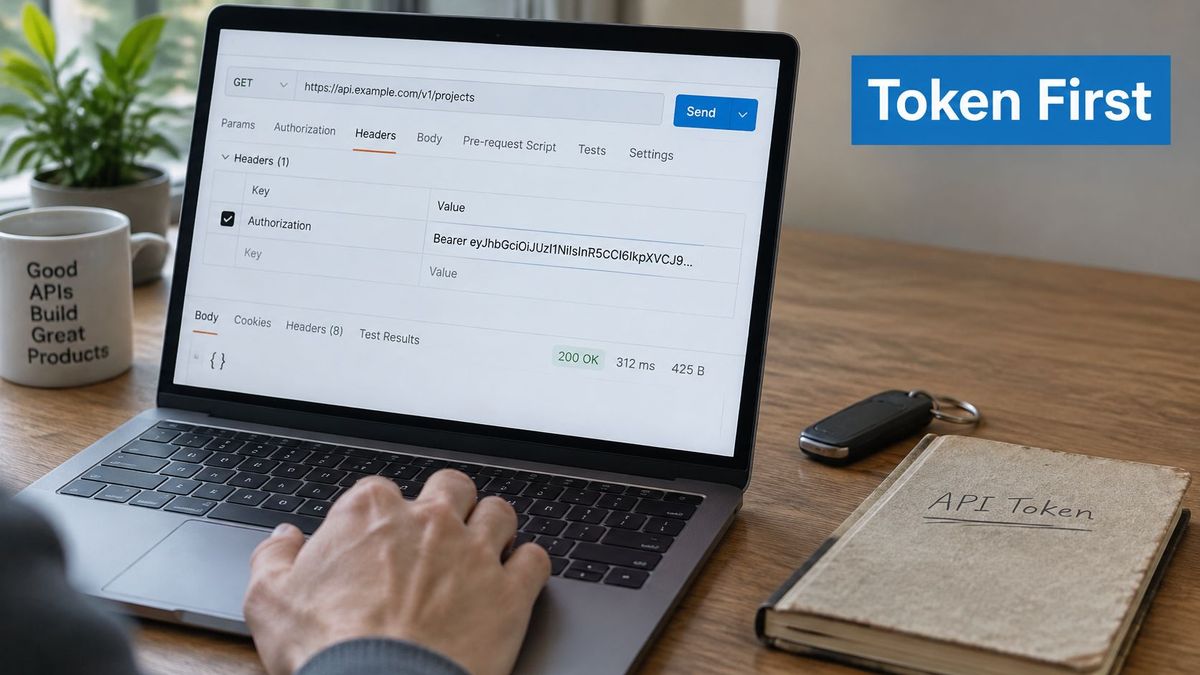
In the Traceable 2025 State of API Security report[5], 57% of surveyed organizations reported experiencing an API-related data breach during the preceding two years. An active token still needs careful handling: a script using the wrong workspace credential can modify links you did not intend to touch.
How Workspace Tokens Work and Where to Store Them#
RedirHub workspace API tokens are created in the dashboard and scoped to a single workspace, as described in the RedirHub authentication documentation. Each has a name you choose and an expiry of 30, 60, 90 or 180 days, 1 year, or none; a token that never expires is flagged in the token list, and it is shown in full only once, right after you create it.
Two properties govern token handling:
- Role inheritance: A token acts with the role of the person who created it in that workspace, so it can do what they can do there. Check that role before handing the credential to an automation job.
- Server-side isolation: A token can do anything its workspace role allows, including deleting records in bulk, so keep it server-side. Never include it in a browser bundle or commit it to a repository. Avoid typing the literal secret into terminal commands that may enter shell history.
Load REDIRHUB_TOKEN through a secret manager or CI secret store, then reference the variable in commands. Keep credentials separate from resource IDs so changing an environment does not pair a production token with an unintended input list.
Three Checks Before Any Write#
Use read-only authentication checks first. Reserve permission-boundary writes for controlled test resources, where an unexpectedly successful request cannot damage a live redirect.
- Valid token check: Run
curl -i -H "Authorization: Bearer $REDIRHUB_TOKEN" https://api.redirhub.com/v1/testand assert200 OK. This confirms the token works, not that a particular link is the intended target. - Invalid token negative check: Run
curl -i -H "Authorization: Bearer invalid_token_check" https://api.redirhub.com/v1/testand assert401 Unauthorized. Stop if the deliberately invalid credential succeeds. - Out-of-scope write check: In a controlled test, attempt a write outside the token's workspace or role permissions and confirm denial. Do not rely on a specific denial status or probe another workspace's live resources.
The authentication GET checks are safe to repeat. A failed write needs a different decision: inspect the target with GET /links/{id} before replaying an uncertain request. After an authorized change, use that same GET to compare the stored fields with your intended values. A successful response alone does not establish that the change was correct.
Redirect Status Codes and What Each One Sets#
Picking the wrong HTTP redirect status code is one of the easiest mistakes to make through an API because every valid code (301, 302, 307, 308) returns a clean 200 OK from the management endpoint. The server won't stop you from putting a 301 on a weekend flash sale or a 302 on a webhook endpoint that expects POST payloads. In RedirHub's API, the code is the link's type field (for example "301"), separate from status, which says whether the link is active or paused.
| Code | Type | Keeps request method | Use when |
|---|---|---|---|
| 301 | Permanent | No | A page has moved for good and should keep its search signals |
| 302 | Temporary | No | A short campaign, test or temporary move |
| 307 | Temporary | Yes | A temporary move where POST or PUT must stay as sent |
| 308 | Permanent | Yes | A permanent move for forms or API endpoints |
One-Sentence Decision Rule for Each Code#
Choose 301 when a URL has moved permanently and search engines should transfer ranking signals to the new page. Pick 302 for short-lived promotional links, A/B tests, or temporary maintenance pages where the original URL will return. Use 307 for a temporary move when browsers or API clients must preserve their original POST or PUT method instead of converting it to GET. Select 308 when a form submission handler or API endpoint has moved permanently and must keep receiving the exact same HTTP method.
In short, 307 and 308 behave like 302 and 301 on permanence, but they strictly preserve the request method. That single difference prevents broken checkouts and silent payload drops whenever a client submits data through a redirected URL.
Caching Risk and Real Migration Examples#
Changing a redirect's code later is technically a simple PUT /links/{id} call, but browsers don't forget permanent redirects quickly. Both 301 and 308 responses are aggressively cached by browsers. If you accidentally ship a 301 to the wrong destination, fixing the record via the API won't immediately fix visitors whose browsers already cached the old target.
302 or 307 on staging, verify the live headers, and switch to 301 or 308 only once the destination is locked.Consider a site migration where an e-commerce store moves legacy product pages from /shop/winter-coat to /catalog/outerwear/winter-coat while simultaneously relocating its lead-capture endpoint from /submit-quote to /v2/quotes. The product pages should use 301 so browsers follow them with GET and search engines consolidate link equity. The lead-capture endpoint needs 308 so incoming POST form submissions aren't rewritten into empty GET requests that drop the customer's payload.
Create, Read and List Links Step by Step#
The /links endpoint handles every link type through one consistent JSON contract: short links, dynamic QR codes, domain redirects, and website migration mappings. The exact same setup flow works whether you trigger it from the dashboard, the REST API, or the MCP server, which means you can inspect any link you create via curl directly inside the dashboard UI to double-check your work.
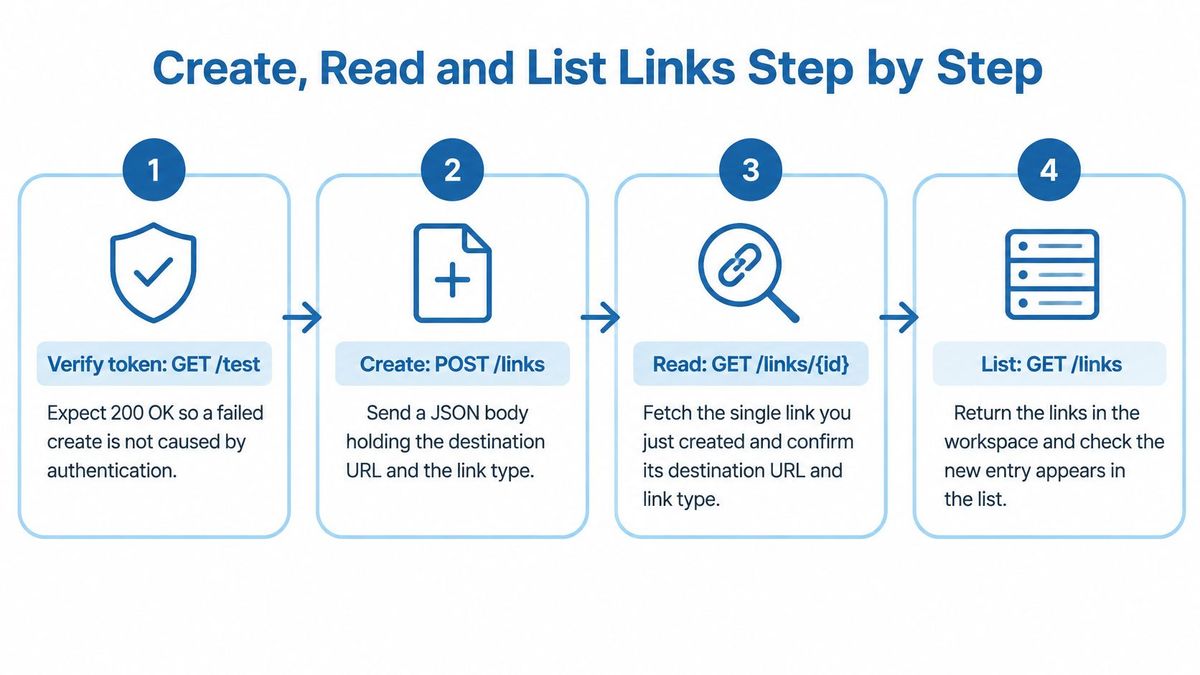
Follow these six steps in order so every created record is verified before you share the URL or automate further runs.
Six-Step Creation and Verification Sequence#
- Confirm your token before creating anything. Run
curl -sS -w "\nHTTP %{http_code}\n" -H "Authorization: Bearer $REDIRHUB_TOKEN" https://api.redirhub.com/v1/testand look forHTTP 200. Checking authentication first prevents you from debugging a JSON payload when the actual culprit is an expired token. Common slip: pasting the token without theBearerprefix (including the trailing space), which returns401. - Send the creation request with explicit headers. Execute
curl -sS -i -X POST https://api.redirhub.com/v1/links -H "Authorization: Bearer $REDIRHUB_TOKEN" -H "Content-Type: application/json" -H "Idempotency-Key: old.example.com/launch" -d '{"handler":"redirect","url":"old.example.com/launch","destination":"https://example.com/launch","type":"301"}'. For a redirect,urlis the source withouthttps://anddestinationis the full target; a field that fails validation comes back as422with anerrorsobject that names it. Common slip: wrapping the-dJSON payload in double quotes inside bash or zsh without escaping inner quotes, which strips the JSON keys and breaks the command before it leaves your terminal. - Capture the server-assigned
idfrom the response. The new record comes back inside adataarray, so parse it withjq -r '.data[0].id'and store it in a variable such asLINK_ID. You need this exact ID for every read, update, and delete command that follows. Common slip: guessing the ID from the source URL instead of storing the canonicalidreturned by the API. - Prove the stored state with a direct
GET. Runcurl -sS -H "Authorization: Bearer $REDIRHUB_TOKEN" "https://api.redirhub.com/v1/links/$LINK_ID"and inspect both thedestinationURL and the redirecttype. A successful create confirms the record exists, not that it is right; typos in query parameters or an unintended redirect type only show up when you compare theGETrepresentation against your intended spec. Common slip: skipping this read check in CI scripts and discovering a malformed destination URL only after emails go out. - Confirm visibility in the workspace list. Call
curl -sS -g -H "Authorization: Bearer $REDIRHUB_TOKEN" "https://api.redirhub.com/v1/links?filter[file]=old.example.com/launch"and verify your newidappears in the returned collection. Lists are cursor-paginated: followmeta.cursor.nextuntil it is empty rather than hardcoding page numbers, since concurrent writes can shift offset positions. Common slip: assuming the first page contains the entire workspace and reporting a missing link when it landed on page two. - Append the
idand destination to a local change log. Write a single timestamped line (timestamp, id, destination, status) to a CSV or JSONL log file immediately after theGETcheck passes. That log gives you an auditable trail and the exact baseline required if you ever need to revert a change.
What Healthy Responses Look Like#
Across a clean run, your terminal output should follow a tight pattern: GET /test returns 200 OK, POST /links returns 200 OK with the new record and its id inside a data array, GET /links/{id} returns 200 OK matching every field you submitted, and GET /links returns 200 OK with a data array alongside meta.cursor. If any single link in that chain differs from expectations, pause before creating more records.
Update, Replace and Delete Links Safely#
Choosing the wrong write verb is where subtle production incidents begin. Under RFC 9110, GET, HEAD, and OPTIONS are safe methods (they don't alter server state), while GET, HEAD, PUT, and DELETE are idempotent, meaning repeating the exact same request leaves the server in the same state as sending it once. As outlined in the OWASP REST Security Cheat Sheet[6], POST is neither safe nor idempotent by default, servers should maintain an allowlist of permitted HTTP methods (returning 405 Method Not Allowed for disallowed verbs), authorization must be evaluated per method and resource, and all authenticated or mutating traffic must travel over TLS.
| Operation | Method and path | Payload sent | Idempotent by spec | Timeout retry rule | Rollback path |
|---|---|---|---|---|---|
| Update link | PUT /links/{id} | The fields to change (a redirect also sends its source url) | Yes | Safe to resend the same body | PUT the logged previous values |
| Remove link | DELETE /links/{id} | None | Yes | Safe to resend; confirm with a filtered list | Recreate via POST /links from the backup log |
The Trade-Offs That Matter Most#
PUT changes a link, never its source. PUT /links/{id} updates an existing link's destination, redirect type, status, UTM parameters, note and other settings, and each such change is added to the link's history. Its handler and source URL never change, so moving a source means creating a new link and deleting the old one. Build the body from a fresh GET /links/{id} with only your change applied, so nothing you did not mean to touch is sent differently. Because the same body always produces the same stored state, retrying an identical PUT after a dropped connection is safe.
There is no PATCH on links. Many REST guides reach for PATCH for partial updates, and RFC 9110 does not guarantee it is idempotent. RedirHub's link API does not offer it: send the change with PUT instead.
What the API answered, method by method#
We sent each method to https://api.redirhub.com/v1/links/{id} without a token on 28 November 2026 at 20:57 UTC, with curl from a cloud server in the US. Anyone can repeat it with curl -sS -o /dev/null -w '%{http_code} %{content_type}' -X PATCH https://api.redirhub.com/v1/links/link_test.
| Method | Status | Body |
|---|---|---|
| GET | 401 | JSON: {"message":"Unauthenticated."} |
| PUT | 401 | JSON: {"message":"Unauthenticated."} |
| DELETE | 401 | JSON: {"message":"Unauthenticated."} |
| PATCH | 405 | HTML page: Method Not Allowed |
The method is checked before the token, so a client that sends PATCH gets a 405 whatever its credentials, and an error handler that only parses JSON fails on the HTML page. Treat a 405 as a bug in the request, never as something to retry.
DELETE cannot be undone through the API. Running curl -sS -i -X DELETE "https://api.redirhub.com/v1/links/$LINK_ID" -H "Authorization: Bearer $REDIRHUB_TOKEN" removes the link, and its change history with it, and returns 204 No Content. If a job worker retries that DELETE after a network hiccup, the record is already gone: confirm it with a list filtered by the source URL (filter[file]) and treat an empty result as done, not as an unhandled crash. Because the API doesn't offer an "undelete" command, always export or record the full link representation before deleting it.
The Rollback and Verification Habit#
Whenever you change a destination with PUT, reversing a mistake takes one command: send another PUT containing the previous destination you saved in your change log. After every PUT, run GET /links/{id} immediately and verify the returned fields match your intent before closing the ticket or moving to the next record.
Verify Live Redirects and Monitor Changes#
Confirming a record through GET /links/{id} proves only what the management API stored in its database. It says nothing about what a visitor's browser receives at the edge, whether TLS resolves cleanly, or whether an upstream rule hijacked the path. A 200 OK on your PUT tells you the write was accepted. It does not tell you the write was correct, which is why every mutation needs an independent readback and a live header check before you call it done.
Manual spot-checks break down quickly at production scale. According to the Salt Security 2024 State of API Security Report[7], 67% of surveyed organizations reported sending more than 10 million requests to application APIs each month in 2024. Teams running hundreds or thousands of active redirects at that volume need automated verification to catch drift before customers report broken links.
Five Checks That Prove Live Visitor Behavior#
- Cross-check the API state against your log: Query
GET /links/{id}and diff the stored destination and redirect code against the values recorded during deployment. Any field that diverges from the change log is a failed write, regardless of what status code the update returned. - Inspect live edge headers with
curl: Runcurl -I https://yourdomain.com/old-pathwithout-L, socurldoes not follow the redirect automatically. Confirm the very first status line prints the exact redirect code you configured (301,302,307, or308) and that theLocation:header matches your target URL character for character. If you expected a307for a form POST and see a302, the request method will not survive the hop, so treat that mismatch as a broken redirect even though the destination looks right. - Test with a fresh, uncached request: Run the header check from a clean terminal session or append a cache-busting query string on test domains when evaluating permanent redirects, because a browser's local cache for
301and308responses can hide a recent fix and mislead your troubleshooting. - Schedule full paginated sweeps: Run a recurring job that pages through
GET /linksfollowing the API's pagination metadata, comparing every live destination against your version-controlled expected state and archiving each snapshot. - Configure alerts on three concrete anomalies: Trigger a notification whenever a destination differs from the change log, an expected link starts returning
404, or a redirect's HTTP status code changes between runs.
When curl -I or GET /links/{id} reveals a wrong destination right after a 200 OK update, resist the urge to blame the API server and retry blindly. Almost every time, the mismatch traces back to a typo or stale variable inside your PUT body. Re-sending the same flawed payload just writes the same wrong value twice, and on a create without an idempotency key a blind retry can create duplicates instead. Inspect the request payload first, fix the input, confirm the correction with a fresh GET /links/{id}, then run the edge header check again. The archived snapshots from step 4 give you a timestamped audit trail for every divergence, so you can see exactly when a redirect drifted and what the correct state was before it did.
How fast a live redirect should answer#
Add %{time_starttransfer} to the header check (curl -sS -o /dev/null -w '%{http_code} %{redirect_url} %{time_starttransfer}' https://yourdomain.com/old-path) and you also see how long the redirect took to start answering. For a baseline, the RedirHub redirect speed benchmark, 21–28 November 2026[8] measured 29 providers' redirects from Washington, D.C., Frankfurt and Tokyo, each over a fresh connection and without following the redirect. Median time to first byte, averaged over the three locations:
| Provider | Median time to first byte |
|---|---|
| Fastly | 13 ms |
| Amazon CloudFront | 13 ms |
| RedirHub | 15 ms |
| Cloudflare | 47 ms |
| Bitly | 110 ms |
A single curl from your laptop includes your own network, so compare runs from the same place over time rather than against these medians directly.
Run Bulk Commands with a Dry Run First#
Single-link errors break one URL; bulk command errors can wipe out an entire marketing launch or site migration in one API call. Operational guardrails matter more than ever as API threat surfaces expand. In the first half of 2025, the Imperva 2025 API Security Threat Report[9] recorded more than 40,000 API incidents across 4,000-plus monitored environments, averaging about 220 incidents per day. Running unverified bulk mutations without previews or rollback files compounds that risk from the inside.
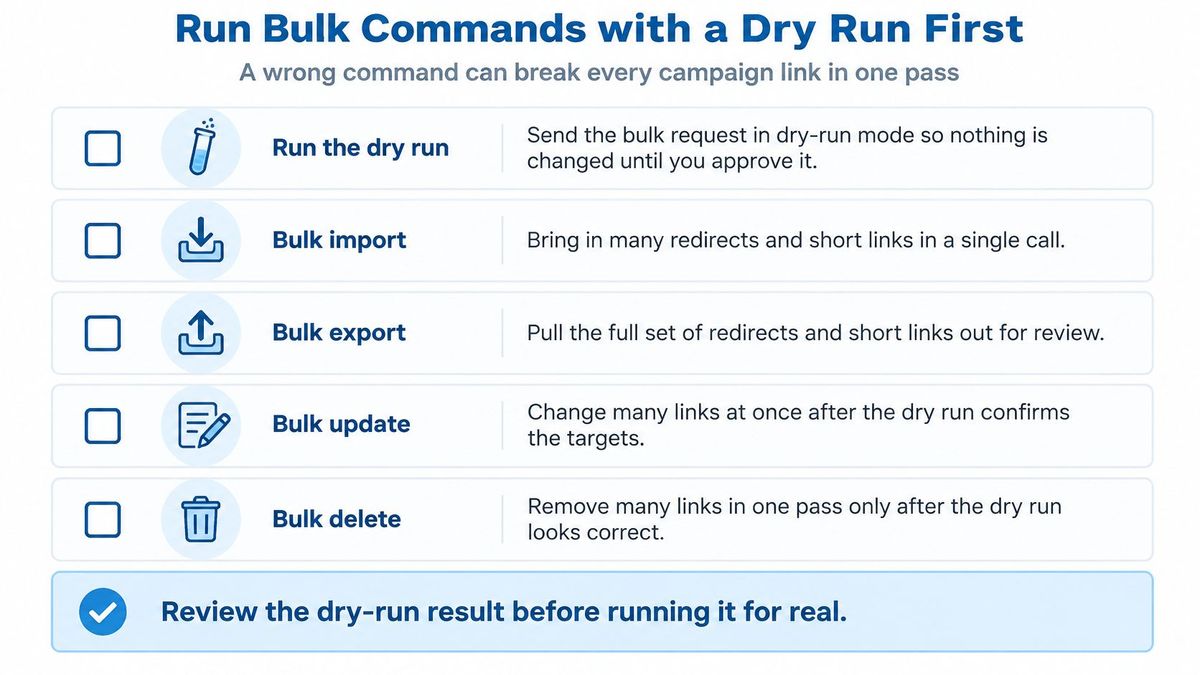
RedirHub's API changes links in bulk by filter: POST /bulk/summary previews what a change would touch (how many links match, of each kind, how many are paused, how many had visits in the last four weeks, and the first five changes), and PUT /bulk with the same body applies it. DELETE /bulk needs at least one filter, so a request cannot match the whole workspace by accident. The bulk redirects API guide shows each body before you assemble your change.
Bulk Execution Checklist with Built-In Recovery#
- Export the current workspace state first: Pull a complete snapshot of existing links before touching a single row. Save that export with a timestamp; it is your rollback file if a migration mapping contains swapped columns.
- Validate your change file against the export: Check column headers, URL schemes (
https://), and redirect types against the exported baseline. Catching a missinghttps://prefix locally prevents422rejections mid-batch. - Run the preview and audit the counts: Send the change to
POST /bulk/summaryfirst, so nothing changes on live domains. Check how many links it matches, how many of them had visits in the last four weeks, and the first five changes it shows. If a change meant for 50 links matches 500, stop and narrow the filter. - Apply in inspectable batches, never one giant payload: Break large migrations into chunks small enough to audit quickly. When you create links from a file, send one
POST /linksper row with its ownIdempotency-Key(the source URL works), so resending the file creates nothing twice. Failure recovery: if a batch times out mid-flight, do not resend the entire file blindly. Part of the batch may have already committed. Page throughGET /links, diff the live records against your target file, and submit only the rows that still don't match. - Sample-check every completed batch: Pick at least three IDs from the batch log (first, middle, and last row) and verify them with
GET /links/{id}before triggering the next chunk. Record the returned IDs so an interrupted pipeline can resume from the exact stopping point.
The same safety rail applies when AI assistants manage links on your behalf: bulk updates and deletes executed through our MCP server always return a dry run first and apply changes only after explicit confirmation.
Read Error Responses and Retry Safely#
When an automated script hits an error, the worst response is a generic retry loop that hammers the API five times in a row. Retrying a 422 wastes quota; retrying a timed-out POST without an idempotency key creates duplicate links. Understanding both the HTTP status code and the error payload lets your code make the right decision automatically.

| Status | Meaning | Retry? | First fix |
|---|---|---|---|
| 401 Unauthorized | Missing, malformed or revoked token | No | Check the token with GET /test |
| 405 Method Not Allowed | Method not offered on this path (an HTML page) | No | Use the method in the quick reference |
| 409 Conflict | A request with the same Idempotency-Key is still running | Yes, in a moment, same key | Wait for the first request |
| 422 Unprocessable | A field failed validation, or a key was reused for a different request | No | Read the errors object and fix each field |
| 429 Too Many Requests | Rate limit reached | Yes, after Retry-After | Back off and resend |
| 482 | The change would exceed a plan limit | No | Free capacity or change the plan |
| 484 | Your workspace role is too low for this action | No | Use a token from a member with the right role |
| 500 to 503 | Server error | Yes, if safe or idempotent | Retry with exponential backoff |
Parsing Machine-Readable Problem Details#
Production REST APIs communicate failures using machine-readable payloads rather than unstructured HTML error pages. Under RFC 9457[10], the standard application/problem+json format exposes five consistent fields (type, title, status, detail, and instance) and allows extension members such as field-level validation maps or request correlation IDs.
RedirHub's API keeps a simpler shape: an error returns JSON with a message you can log, and a 422 adds an errors object keyed by field name, with the reasons each was rejected, so a client can show every problem next to its field.
Well-behaved APIs validate input length, range, format, and type, enforce request-size ceilings, restrict disallowed methods, and send an accurate Content-Type header without ever echoing back secrets, access tokens, or stack traces inside validation messages. Check the RedirHub API error reference for each status code before you wire them into your client logging.
The Duplicate-Creation Trap on Timed-Out POST Calls#
Every engineer eventually hits the same retry bug: a script sends POST /links, the network drops before the response returns, and the HTTP client automatically retries the POST. Because the first request often reached the server and committed before the connection broke, the retry creates a second link record with a brand-new id.
Avoid that trap with an Idempotency-Key header. POST /links accepts any unique value, such as a UUID or the source URL: the same key sent again within 24 hours returns the first response, marked Idempotent-Replayed: true, instead of creating another record. Only a successful response is kept, so a failed request can be sent again with the same key; reusing a key for a different request returns 422, and a retry while the first request is still running returns 409. Without a key, treat a timed-out POST as an unknown outcome: list the links filtered by the source URL before sending it again.
Retry Rules to Keep Beside Your Code#
- Never auto-retry
401,405,422,482or484: Fix the token, method, payload, plan limit or role first. - Wait on
409 Conflict: The first request with the sameIdempotency-Keyis still running. Retry in a moment with the same key, and you get its response instead of a second record. - Honor
Retry-Afteron429: Pause for the number of seconds theRetry-Afterheader gives before re-sending;X-RateLimit-Remainingtells you how close you are before you hit it. - Use bounded exponential backoff on
500to503: Wait progressively longer between attempts (for example, 1s, 2s, 4s with jitter and a hard cap on attempts), and only auto-retry safe or idempotent requests (GET,PUT,DELETE, andPOSTwith anIdempotency-Key).
Prove the Update and Delete Cycle on Staging#
Run the full lifecycle end to end on a staging or test domain you control before pointing a CI/CD pipeline or bulk migration script at live customer domains. Never run integration smoke tests against an active campaign link. A staging link costs nothing to break, and a broken production redirect costs real traffic.
The Management API is included on Core, Pro and Enterprise, with one bearer token per workspace, JSON payloads and an OpenAPI 3.1.0 specification. Once GET /test passes and you have the LINK_ID saved from your staging create, execute these five steps in exact order:
- Apply a single-field update: Send
curl -sS -i -X PUT "https://api.redirhub.com/v1/links/$LINK_ID" -H "Authorization: Bearer $REDIRHUB_TOKEN" -H "Content-Type: application/json" -d '{"url":"staging.example.com/launch","destination":"https://example.com/staging-v2"}'and confirm200 OK. A redirect's body carries its sourceurl, which stays as it is. - Prove the update persisted: Run
curl -sS -H "Authorization: Bearer $REDIRHUB_TOKEN" "https://api.redirhub.com/v1/links/$LINK_ID"and verify that thedestinationfield equalshttps://example.com/staging-v2. The200 OKfrom step one tells you the server accepted the request, not that the stored value matches your payload. Only the read-back proves the write. - Prove rollback works: Send a second
PUT /links/{id}restoring the original staging destination, then confirm the reverted value withGET /links/{id}. You now know your change process can cleanly undo a bad edit, which is the exact move you will need the day a wrong destination reaches production. - Remove the test link: Send
curl -sS -i -X DELETE "https://api.redirhub.com/v1/links/$LINK_ID" -H "Authorization: Bearer $REDIRHUB_TOKEN"and assert204 No Content. - Confirm repeated delete handling: Repeat the exact same
DELETE /links/{id}command and check that your automation treats the error for a missing record as done, then list the links filtered by the staging source URL and confirm nothing comes back. That matters when a cleanup script runs twice after a partial failure.
Log every id, HTTP status, and verified destination from the run. Those logs become your baseline: when a production change later behaves unexpectedly, you compare against a known-good sequence instead of guessing what correct output looks like. Hold off on running any bulk import, bulk update, or bulk delete against production until this staging cycle passes cleanly from step one through step five.
Script your redirects against one API
Create, update and delete redirects, website migration mappings, branded short links and QR codes through one JSON API with a token per workspace. Preview bulk changes before they apply, and send an Idempotency-Key so a retried create never makes a second link.
Read the API docsSources
- [1]2024 State of the API Report (Postman)
- [2]Cloudflare 2024 API security and management data report
- [3]Fielding Dissertation, Chapter 5: Representational State Transfer (REST)
- [4]API Integrations Meaning Explained for Nonprofits (VolunteerBadge)
- [5]2025 State of API Security Report (Traceable)
- [6]REST Security - OWASP Cheat Sheet Series
- [7]2024 State of API Security Report (Salt Security)
- [8]RedirHub redirect speed benchmark, 21–28 November 2026
- [9]Imperva API Threat Report: The API Battleground (H1 2025)
- [10]RFC 9457: Problem Details for HTTP APIs
Frequently asked questions
GET reads a resource, POST creates one, PUT updates or replaces it, PATCH changes part of it and DELETE removes it, with the URL path naming the resource. In RedirHub's API, links use GET, POST, PUT and DELETE on /links and /links/{id}; there is no PATCH.
Not by default, because the first request may have reached the server before the connection dropped, and a retry creates a second record. RedirHub's POST /links accepts an Idempotency-Key header: the same key sent again within 24 hours returns the first response instead of creating another link.
PUT sends the state a resource should have, so repeating the same request leaves the same result. PATCH sends a set of changes, and RFC 9110 does not guarantee it is idempotent. RedirHub's link API only offers PUT, which changes a link's settings but never its source URL; a PATCH returns 405.
Usually 204 No Content, with no response body. In RedirHub's API, deleting a link also deletes its change history and cannot be undone, so export or log the link before you delete it.
First read the link back with GET /links/{id} and compare its destination and redirect type with what you meant to set. Then run curl -I on the source URL without -L, from a fresh connection, and check the status line and the Location header.

Leo Astarothman is the Brand & Content Lead at RedirHub, where he shapes the company's visual identity, educational content, product experiences, and marketing strategies. He also specializes in system design. Simplifying complex redirect infrastructure into practical resources, product experiences, and campaigns that help businesses understand and adopt modern redirect management.
Related Articles
View All Articles