
Next.js Guide: How to Redirect Nextjs Pages in 2026

Key takeaways
Pick the redirect method by where the decision is made: next.config.js for known paths, Proxy for cookie or hostname logic, and redirect() or permanentRedirect() where a lookup happens. Server Actions answer 303, other contexts 307 or 308, and 307 and 308 keep the request method. Test with curl for status, Location, POST and query strings before launch. Vercel's documented ceiling is 1,024 redirects in config, so large or frequently edited mappings belong outside the codebase.
The pull request looked harmless. Four lines in next.config.js, two redirect() calls in a Server Component, and a form that submits to a Server Action. Then QA noticed the confirmation page kept reloading with stale data, and a crawl of the site found 2,000 old blog URLs still returning 404. Nothing in the build failed. That's how redirect bugs in Next.js usually surface: a week later, in analytics.
Redirects in Next.js are several mechanisms wearing one name, and the HTTP status code changes depending on where you call them. A response of 307, 308 or 303 decides how browsers cache it, whether search engines treat the move as permanent, and whether a POST survives the trip. Pick the wrong context and you get a form that resubmits, or a permanent redirect you can't unwind.
Here's how to map each function to its status code and execution context, then set up static rules, handle Proxy, test the wire properly, deal with the rule ceiling, and recognize the mappings that shouldn't live in the codebase at all.
Which Redirect Method Fits Your Case#
The method follows from where the decision gets made, not from how permanent the move feels. A path you already know about belongs in config. A decision that depends on a cookie, a hostname or a database lookup belongs in Proxy. A decision that only becomes knowable after a database write belongs in the component or action performing that write. Sort by context first and the status code falls out.
| Situation | Method | Status code | Notes |
|---|---|---|---|
| Permanent static mapping in next.config.js | redirects with permanent: true | 308 | Clients and search engines cache it, so verify the destination first |
| Temporary static mapping in next.config.js | redirects with permanent: false | 307 | Keeps the request method |
| Permanent move from a Server Component or Route Handler | permanentRedirect() | 308 | Use after the destination is verified |
| Temporary move from a Server Component or Route Handler | redirect() | 307 | Default for redirect() |
| Redirect after a form submit or mutation in a Server Action | redirect() | 303 | Sends the browser to a GET success page |
| Permanent move from a Server Action | permanentRedirect() | 303 | Not 308 inside Server Actions |
| Conditional logic on hostname, cookie or device | NextResponse.redirect in Proxy | You set it | Runs on each request |
| Pages Router getServerSideProps redirect object | permanent: true or false | 308 or 307 | Pages Router only |
| Missing resource, not a moved one | notFound() | 404 | Renders the not-found UI instead of redirecting |
Two rows catch experienced developers. redirect() inside a Server Action returns 303 See Other, not 307, and permanentRedirect() inside a Server Action also returns 303 rather than 308. The Next.js redirecting guide[1] documents both behaviors. The 303 tells the browser to fetch the success page with GET, which is what stops a refresh from re-posting the form.
Older codes don't guarantee that. The same guide notes that clients historically handled 301 and 302 in a way that converted POST requests into GET. 307 and 308 work like 302 and 301 but keep the request method, and that's the difference between a clean API handoff and a form that arrives empty at its destination.
If the move is permanent and you're weighing 301 against 308, the 301 vs 302 comparison covers what each code promises a search engine before you commit to it.
How to Set Up Static Redirects in next.config.js#
The whole procedure comes down to defining the rules array, then mapping each old path to its replacement in a way you can verify with one request.
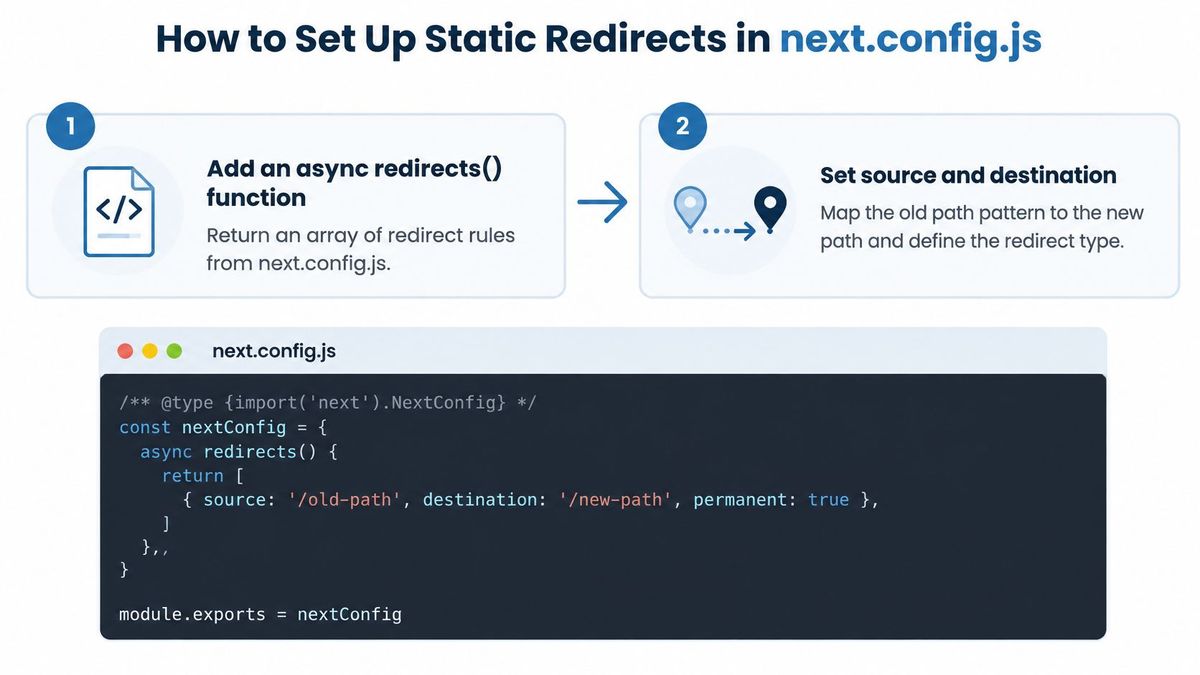
- Add the async
redirects()function to the config object. It returns an array of rule objects and resolves at build time, so it costs nothing per request. The common error is exporting a plain array or a non-function property; the build succeeds and the rules never run. - Map
sourcetodestinationwith matched patterns./blog/:slugto/articles/:slugcarries the value across. A named parameter that appears in the source but not the destination drops the value, which is the mistake behind most "the redirect works but lands on the index" reports. - Set
permanenton purpose.trueproduces a 308 andfalseproduces a 307. Shippingpermanent: trueon day one is the single most expensive mistake in this file, because browsers and search engines cache 308 responses and won't recheck the old URL when you fix it. - Order rules from most specific to least specific. A broad pattern placed above a narrow one swallows URLs meant for the narrower rule, and if its destination also matches its source you've built a loop. Read the file top to bottom the way the router does.
- Decide trailing-slash behavior once. Choose a
trailingSlashsetting and apply it consistently, so/pricingand/pricing/don't each cost an extra hop. Mixed rules here are why a single page sometimes takes three redirects to land. - Rebuild, then check with
curl. Restart the dev server or rebuild, then request one URL from each rule group withcurl -Iand read the status line and theLocationheader. Testing in a browser proves nothing, because the browser follows the chain and hides every hop.
Skip 301 and 302 entirely in this file. The framework chose 307 and 308 deliberately so that non-GET requests keep their method, and mixing in the legacy codes reintroduces the behavior it was avoiding.
A rule that works reads as one source, one destination, one status code and one hop. If you can't trace a given rule back to the step that produced it, it's the rule that will page you at midnight.
Redirects in Server Components, Actions and Proxy#
A worked example makes the contexts concrete. Say a blog post moved from /blog/old-slug to /articles/old-slug, and the lookup only happens once the page renders.
tsx// app/blog/[slug]/page.tsx
import { redirect, permanentRedirect, notFound } from 'next/navigation'
export default async function Post({ params }: { params: { slug: string } }) {
  const post = await getPost(params.slug)
  if (!post) notFound() // a dead resource, not a moved one
  if (post.movedTo) redirect(`/articles/${post.movedTo}`) // 307
  return <Article post={post} />
}

When the destination is settled and you want the move treated as permanent, swap in permanentRedirect(), which returns 308 outside Server Actions and works in Server Components, Route Handlers and Server Functions. One mechanical detail bites people: redirect() works by throwing, so call it outside a try/catch or the catch block will swallow the navigation.
Server Actions are the case to read twice. A form that creates a record and then calls redirect() returns 303, so the browser issues a GET to the success page rather than replaying the POST. The redirect API reference[2] is explicit that permanentRedirect() inside a Server Action becomes 303 as well, not 308.
Client-side navigation is not a redirect. Calling router.push() inside an event handler moves the user without ever emitting a status code, so crawlers, curl and your CDN logs see nothing. Use it for UI transitions, never for a move you need search engines to record.
ts// proxy.ts (Next.js 16+) or middleware.ts (15 and earlier)
import { NextResponse, NextRequest } from 'next/server'
export function proxy(request: NextRequest) {
  const locale = request.cookies.get('locale')?.value
  if (locale && !request.nextUrl.pathname.startsWith(`/${locale}`)) {
    return NextResponse.redirect(new URL(`/${locale}${request.nextUrl.pathname}`, request.url), 307)
  }
}
Proxy is where you handle hostname, cookie, device or authorization logic, because you construct the response yourself and choose the status. Keep declarative path mappings in config instead, which is easier to audit and test.
Pages Router code has its own shape: getServerSideProps can return a redirect object where permanent: true gives 308 and false gives 307. And when a product or article no longer exists and never moved, call notFound(). Pointing every missing URL at the homepage hides dead links from users and from crawlers, which is a soft redirect in all but name.
Testing Redirect Status Codes Before You Launch#
A browser hides the evidence. It follows the chain and renders whatever it finds, so a redirect pointing at a 404 still looks like a page loaded. Start with curl -I <old-url> and read two things: the status line and the Location header. That pair is what search engines, API clients and your own analytics consume.
POST needs its own request. Send curl -X POST -I at the old path and confirm the method survives the hop; a chain that downgrades the method will drop the request body and produce a confusing 200 on the other end. Repeat every request with a cache-busting query parameter, because a client that cached a permanent response will keep serving it after you've changed the rule.
Speed belongs in the same conversation. The 2024 Web Almanac[3], published by HTTP Archive, sets 800 milliseconds as the threshold for a good Time to First Byte, a metric that includes redirect time. A two-hop chain spends part of that budget before the first byte of the page exists.
For a sense of scale, RedirHub's redirect speed benchmark[4] measured a median time to first byte of 63 ms for redirects served from Vercel, averaged over Washington, D.C., Frankfurt and Tokyo between 8 and 15 November 2026 (as of 15 November, CC BY 4.0). One clean hop uses a small slice of the 800 ms budget; the cost comes from chains and from rules that resolve slowly.
| Test | Request | Pass when |
|---|---|---|
| Basic GET to an old path | curl -I on the old URL | Returns 308 or 307 with the correct Location |
| POST to an old path | curl -X POST -I on the old URL | Keeps POST after the redirect |
| Query string | Old URL with ?utm_source=test | Query is kept in the Location header |
| Trailing slash | Old URL with and without a slash | Both resolve in one hop to the same destination |
| Encoded path | curl -I on the percent-encoded old URL | Matches the rule and lands on the new page |
| Redirect chain | Follow the full chain with curl -L | Ends on the final page in one hop where possible |
| Cache check | Same URL with a cache-busting parameter | Returns the same status and Location as the bare URL |
For each request, record the final status code, the number of hops, the Location value and whether the method survived. When a migration runs to thousands of URLs, scripting that check across the full inventory, the way a bulk redirect check does, beats spot-checking five pages by hand.
Large Redirect Sets and the 1,024-Rule Ceiling#
The first hard number to design around is 1,024 redirect rules, the documented limit on Vercel for the redirects option, per the Next.js redirecting guide[5]. The same documentation warns that capacity varies by platform and recommends a custom solution using Proxy for collections of 1,000 or more mappings. A project can therefore have perfectly valid redirect syntax and still fail at deploy time, which is a miserable way to discover an architecture problem.
For a migration with roughly 4,000 old blog and product URLs mapped one to one, static config stops being an option long before the count is reached. The work becomes operational: importing a CSV, reviewing conflicts where two old paths claim the same destination, publishing without a rebuild, and watching for missed URLs after launch.
| Option | Who edits mappings | Rollback | Loop and chain checks | Best fit |
|---|---|---|---|---|
| Split rules in next.config.js by section | Developers through code review | Git revert and redeploy | Build-time tests | Under about 1,000 rules with infrequent edits |
| Proxy lookup of a mapping file or database, with caching | Developers or a content tool writing the file | Restore the previous file version | Test script run on each import | Over 1,000 rules, edits without a full rebuild |
| External rules source fetched at runtime | Marketing or SEO team in a dedicated tool | Revert the rule in the tool | Conflict review and analytics in the tool | Frequent edits by non-developers |
The middle option is the one many teams build. It works, and it comes with a maintenance bill: storage, caching, validation, publishing, rollback and permissions all become your application's problem. The lookup also runs on requests you don't care about unless you scope the matcher tightly.
Set acceptance targets before you sample. In that 4,000-URL migration, pull 200 URLs and require zero loops, zero unexpected 404s and one hop wherever possible. When you need more detail on running this on a specific host, this guide to bulk redirects on Vercel covers the platform constraints.
Three signals say it's time to move mappings out of static config: the rule count approaching 1,000, non-developers who need to change a destination, and edits frequent enough that each one would otherwise trigger a redeploy.
Decide Whether Redirects Belong in Your Code#
Friday afternoon, 4:40 PM. A printed QR code points at a campaign page that marketing now wants to send somewhere else, and your next deploy window is Tuesday. Or an agency running SEO for four clients needs to correct a batch of migration mappings three times a week. Neither of those is a reason to cut a release.
Some redirects belong outside the repository:
- Printed and shared links: short links and QR codes whose destination must change after the material is in the world.
- Campaign routing: marketing-owned paths where the owner of the path changes monthly.
- Migration maps under active revision: SEO or agency teams correcting hundreds of old-to-new pairs during and after launch.
- Anything that must change without a deploy: rules whose value is freshness over code review.
The order of operations matters as much as the storage. The Next.js redirect API reference[6] distinguishes redirect() from notFound(), which renders the not-found UI for a resource that doesn't exist. Good integrations evaluate specific rules before the app's own routes and reserve a domain-wide catch-all for requests the app answers with a 404. Otherwise the fallback consumes working pages.
That's the model RedirHub's Integration Mode follows. Announced on 5 November 2026, it ships a tested prompt so an AI coding agent can add the integration to an existing Next.js app, which then fetches one plain-text rules file every 60 seconds. Changes go live in about a minute with no redeploy. Specific rules run ahead of the app's routes, the domain-wide catch-all only fires on a real 404, the integration fails open, and visits are reported back so analytics keep working. No DNS change is required, and every RedirHub plan includes it. The Integration Mode changelog entry has the details.
Before you wire anything up, split your inventory. Keep canonical, rarely-changed path mappings in next.config.js where code review protects them. Move campaign links, printed destinations and fast-moving migration pairs to the rules file. After the first sync, check one short link and one migrated URL and confirm the status code on each: a 301 where the move is permanent, a 302 while it's still being tested.
Change Next.js redirects without a redeploy
Integration Mode lets your Next.js site serve redirects you edit in RedirHub, live within about a minute, with no DNS change.
See website migrationsSources
Frequently asked questions
In a Server Component or Route Handler, redirect() returns 307, and permanentRedirect() returns 308. Inside a Server Action both return 303, so the browser follows up with a GET.
Add an async redirects() function that returns rules with permanent: true, which produces a 308. Browsers and search engines cache 308 responses, so test with permanent: false (307) first.
Next.js uses 308 for permanent redirects because it keeps the request method, while 301 may turn a POST into a GET. Search engines treat both as permanent moves.
On Vercel the documented limit is 1,024 redirects for the redirects option. Past roughly 1,000 mappings, use Proxy with a lookup or manage the rules outside the codebase.
Request the old URL with curl -I and read the status line and the Location header. Also test a POST, a URL with a query string, and a trailing-slash variant, because a browser hides each hop.

Leo Astarothman is the Brand & Content Lead at RedirHub, where he shapes the company's visual identity, educational content, product experiences, and marketing strategies. He also specializes in system design. Simplifying complex redirect infrastructure into practical resources, product experiences, and campaigns that help businesses understand and adopt modern redirect management.
Related Articles
View All Articles