Redirect vs Forward: Which One Keeps Your URLs Working

Key takeaways
Forward can mean two different things: some providers use it for an ordinary HTTP redirect, others for a masked page that shows another site in a frame. Check the setting, not the label. A redirect changes the address bar and, with 301 or 308, tells search engines the destination is the canonical URL; a masked forward keeps the original address and does not tell search engines the page has moved. Use 307 or 308 when the request method and body must survive, as with a form or API endpoint. Email forwarding is a separate mechanism that can break SPF and DKIM. Before launch, confirm each rule's status code, path and query handling, and destination in a browser.
The usual advice, use a redirect for SEO and a forward to keep your domain visible, skips the most important question: what does your provider mean by forward? Some control panels use forwarding as another name for an HTTP redirect. Others mean a masked page that displays another site inside a frame. Those aren't equivalent, and choosing by the label alone can leave visitors on the wrong page, lose campaign parameters, or send search engines the wrong migration signal.
The practical redirect vs forward decision starts with what must survive the handoff: the visible URL, path, query string, request method, and search signals. A destination loading successfully proves only that someone reached a page. It doesn't prove you preserved the rest.
Redirect vs Forward at a Glance#
| Factor | Redirect | Forward (masked or frame) |
|---|---|---|
| Address bar | Changes to the destination URL | Keeps the original URL |
| Mechanism | HTTP 3xx response with a Location header | Destination page loaded inside a frame |
| Status codes | 301, 302, 307 or 308 | No redirect code required; the wrapper page is served on the source URL |
| Path and query | Kept when forwarding is enabled | Kept when forwarding is enabled and supported by the frame implementation |
| Search signal | 301 and 308 mark the new URL as canonical; 302 and 307 don't provide that same signal | Source URL can stay indexed alongside the destination |
| Best fit | Moved pages, domain changes, short links | Keeping a familiar address on a campaign or vanity domain |
A redirect moves the visitor to a new URL; a masked forward keeps the original URL visible while displaying content from elsewhere. A service called domain forwarding may implement either behavior, so inspect its settings rather than trusting its name.
Email forwarding means resending messages between mail servers, a separate mechanism with different delivery and authentication concerns.
Separate the label from the implementation#
A registrar's forwarding menu isn't a technical specification. Look for explicit options such as permanent, temporary, masked, or frame, then verify the result in a browser. Audisto's redirect guide[1] helps distinguish HTTP routing from other mechanisms that people group under forwarding.
An internal server forward is another distinct implementation. A web application can handle a request internally, or a reverse proxy can retrieve content without sending the browser to a different visible address. Neither operation is automatically the same as loading a destination inside an iframe.
A familiar address can be useful for a vanity domain, but masking isn't a substitute for hosting a properly configured site on that domain. It also doesn't establish that the source address has inherited the destination's content or search authority.
The question that settles most cases is straightforward: does the visitor need to land on a different address, or only see content that lives somewhere else? For a genuine website move, the destination address should normally become visible.
Email Forwarding Works Differently#
A mail server accepts an email and forwards it to another mailbox by resending it along a new delivery path. That process can change message headers and authentication evidence. It has nothing to do with the address in a browser's location bar.
The key distinction is between delivery success and authentication success. A recipient can receive a forwarded message even though the receiving system no longer sees the authentication results you expected.
Authentication risks and mitigations#
DMARCeye's forwarding guidance[2] explains that SPF often fails on forwarded mail and that DKIM signatures can break when the message is modified, and points to ARC as a way to carry authentication results across forwarding hops.
- SPF checks the sending infrastructure. Forwarding commonly causes failure because the forwarding server isn't authorized to send for the original envelope domain.
- DKIM checks the signed message. Changes to signed headers or the message body can invalidate the signature.
- DMARC evaluates authentication and alignment. Forwarding can disrupt the evidence a receiver needs to evaluate the original sender correctly.
SRS, the Sender Rewriting Scheme, rewrites the envelope sender so SPF can pass for the forwarding hop. It doesn't, by itself, guarantee that the original sender passes DMARC.
ARC, the Authenticated Received Chain, records authentication results across intermediaries so the final receiver can consider that history. A receiver still decides whether to trust it.
If your actual problem is making a mailbox address reach another inbox, review SPF, DKIM, DMARC, SRS, and ARC behavior before choosing a forwarding setup. Send test messages through the complete route and inspect the received headers, not just the inbox.
The remaining decisions concern web URLs only. Mailbox delivery needs a separate test plan.
What Happens in the Browser on Each Option#
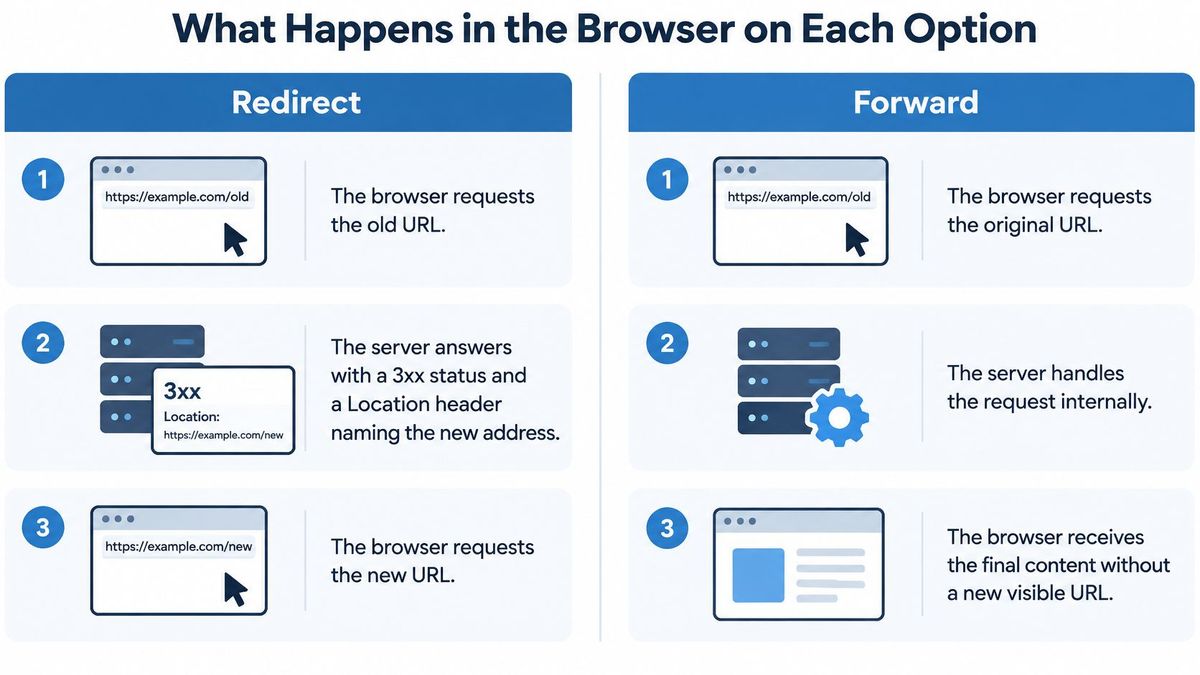
An HTTP redirect requires the browser to make a follow-up request. MDN's redirection guide[3] describes this client-visible exchange and the additional network round trip it introduces.
That extra round trip has a measurable cost. In the RedirHub redirect speed benchmark[4], the median time to first byte of a single redirect ranged from 9 ms (Amazon CloudFront) to 586 ms (Apache servers) across 27 providers between 27 October and 3 November 2026, measured from Washington, D.C., Frankfurt and Tokyo. RedirHub's median was 15 ms. A frame forward skips that hop, but the browser loads the wrapper page first and the framed page after it.
| Step | Redirect | Masked or frame forward |
|---|---|---|
| 1 | The browser requests the old URL. | The browser requests the original URL. |
| 2 | The server returns a redirect response naming the destination. | The server returns a wrapper page containing a frame. |
| 3 | The browser requests the destination and updates the address bar. | The browser loads the framed destination without changing the top-level address. |
| 4 | Network tools can expose the redirect and destination requests. | Network tools show the wrapper and the frame's separate requests. |
The diagram illustrates the visible difference, although internal server forwarding and frame forwarding are different implementations.
What visitors and operators notice#
With a redirect, visitors bookmark and share the destination after landing. With masking, they may share the wrapper address rather than the specific page they're viewing. Navigation inside the frame can make that distinction particularly confusing.
Framing can also fail when the destination blocks embedding through its response headers. A normal redirect can still work because it opens the destination as the top-level page.
Long redirect chains introduce unnecessary request overhead. DNS lookups, connection establishment, and TLS negotiation may add further delays when the browser encounters new hosts. Point migration rules at the final destination rather than retaining a trail of earlier moves.
For deployment decisions, distinguish DNS redirects from server redirects. Routing a hostname to infrastructure doesn't, by itself, describe the HTTP response visitors receive.
Open Developer Tools → Network, enable preserved logging, and load the old address. A redirect response and Location header confirm an HTTP redirect; a successful page response with an unchanged address doesn't prove forwarding on its own. Inspect the document for a frame and the request log for its destination, because an ordinary page or reverse proxy can look similar from the address bar.
Status Codes That Decide Permanence#
| Code | Permanence | Method preserved | Typical use |
|---|---|---|---|
| 301 | Permanent | Not guaranteed, POST can become GET | Retired pages and moved domains |
| 302 | Temporary | Not guaranteed, POST can become GET | A/B tests and short campaigns |
| 307 | Temporary | Preserved | Temporary moves of forms and APIs |
| 308 | Permanent | Preserved | Permanent moves of forms and APIs |
The HTTP standard, RFC 9110[5], defines 301 Moved Permanently, 302 Found, 307 Temporary Redirect, and 308 Permanent Redirect, including their permanence and method-handling semantics.
The critical trap isn't whether the destination opens. It's whether the client sends the same kind of request when it gets there.
The POST trap#
Say a customer submits a checkout form. The original request contains a POST body with the order details, but the old endpoint responds with a redirect that permits the client to follow using GET. The destination may load successfully while receiving none of the submitted body.
A method-preserving redirect avoids that particular transformation. It doesn't guarantee that the destination accepts the payload, recognizes the session, or authorizes the request. Those remain application-level checks, especially when changing hosts.
Test the complete transaction, not just the response header. When planning browser and device coverage, 99tests' guidance on test scenarios for real device coverage[6] is a useful resource for turning expected behavior into reproducible checks.
Worked choices#
- Retired product page: If a replacement genuinely takes over the old page's purpose, use a permanent redirect to that replacement rather than sending everyone to the catalog homepage.
- Seasonal promotion: Say a landing page points to a sale for a limited campaign, then returns to its usual purpose. Use a temporary redirect because the source remains part of the ongoing site.
- Moved checkout API: Use a permanent, method-preserving redirect when clients must submit the same request body to the new endpoint, and verify that those clients support following it.
RedirHub's domain redirects offer 301, 302, 307 and 308 codes and Frame redirects on every plan. These choices aren't interchangeable presets: the HTTP codes communicate movement, while a Frame redirect shows the destination in an iframe and keeps the source URL in the address bar.
Caches and clients can retain redirect decisions, so don't use a permanent response just because it's the default. Select the code deliberately before exposing the rule to real traffic.
Choosing Between Them by Situation#
| Situation | Best fit | Reason |
|---|---|---|
| Site or domain migration with new URLs | 301 or 308 redirect | The old URL should stop being the canonical address |
| Retired brand domain, visitors should keep the old name | Frame forward | The address bar stays on the original name |
| Short campaign or A/B test | 302 or 307 redirect | The old URL remains the intended ongoing address |
| Printed QR code or vanity link with a changing destination | Redirect with an editable destination | The destination changes without reprinting |
| Form or API endpoint moved permanently | 308 redirect | The method and body survive the move |
| Parked domain with no end date | 302 redirect | It can be reversed while the destination remains provisional |
The frame-forward row is a narrow exception, not a recommendation for rebranding an entire website. If keeping the original name visible is an explicit requirement, masking can satisfy it. If the business has moved permanently, visitors generally benefit from seeing and learning the new address.
This comparison is especially useful when marketing and infrastructure teams are asking for different outcomes.

Choose for the lifecycle, not the launch#
A printed QR code needs a stable public entry point, but its landing page might change with each campaign. An editable temporary redirect fits that arrangement better than teaching browsers that today's destination is a permanent replacement.
An unknown end date doesn't automatically make a move temporary. For a parked domain, ask whether you expect to reuse the source. If the destination is provisional, a temporary response is sensible; if you've permanently consolidated the brand, uncertainty about a calendar date shouldn't override that decision.
Frame redirects are included on every RedirHub plan: they display the destination page in an iframe while keeping the source URL in the browser address bar. Use them when that visible-address requirement outweighs the limitations of embedding, not as a shortcut around a proper domain migration.
Reserve masked forwarding for content you own or are authorized to embed. Framing an uncontrolled destination creates avoidable risks: its owner can block embedding, change navigation, or publish content that no longer matches the address visitors trust.
How Each Option Affects SEO and Link Equity#
A redirect that works in a browser doesn't automatically preserve the intended search signals. Successful navigation and correct canonicalization are different tests.
Google's redirect guidance[7] explains that 301 and 308 are a signal that the redirect target should be canonical, while for 302 and 307 the indexing pipeline doesn't use the redirect as that signal and the source page can stay in search results.
Check the consequences, not just the code#
- Permanent move: Search engines receive a signal to treat the destination as the preferred URL. Replacement of the old listing isn't necessarily immediate, so monitor indexing rather than expecting an instant switch.
- Temporary move: The source remains relevant to the intended arrangement. Don't assume the destination will replace it in search just because users arrive there.
- Masked forward: A wrapper doesn't establish the same migration relationship. The source may remain indexed without consolidating its signals into the embedded destination.
- Redirect chain: Extra hops make crawling and diagnosis less direct. Don't assume each hop applies a fixed link-equity penalty, but remove unnecessary intermediaries.
Say a company moves its entire site but leaves a temporary redirect running long after the migration. Its configuration continues to describe a reversible arrangement, even though the business wants search engines to adopt the new domain. The mistake is the mismatch between the intended move and the published signal, not a guaranteed ranking loss on a fixed schedule.
The reverse mistake matters too. A permanent code on a short promotion can encourage clients and search engines to retain a destination the team intended to withdraw.
Make the mapping useful#
For an ecommerce replatform, CIQRA's SEO checklist for ecommerce migration[8] is a useful companion when coordinating URL mappings with the wider launch. Redirects need to fit the destination site's internal links and canonical choices, not contradict them.
RedirHub's MCP server can trace any URL's redirect chain hop by hop, which helps you catch multi-hop routing before it ships. Treat the trace as a maintenance aid, not a replacement for reviewing whether each destination satisfies the old page's purpose.
A technically correct permanent redirect to an irrelevant homepage is still a poor migration decision.
Keeping Paths, Queries and Methods Intact#
A domain-level rule can match every request while still sending visitors to the wrong place. Matching a URL isn't the same as preserving it. Check the destination that the rule constructs, including its path and parameters.
Use this checklist to confirm the rule preserves what matters.
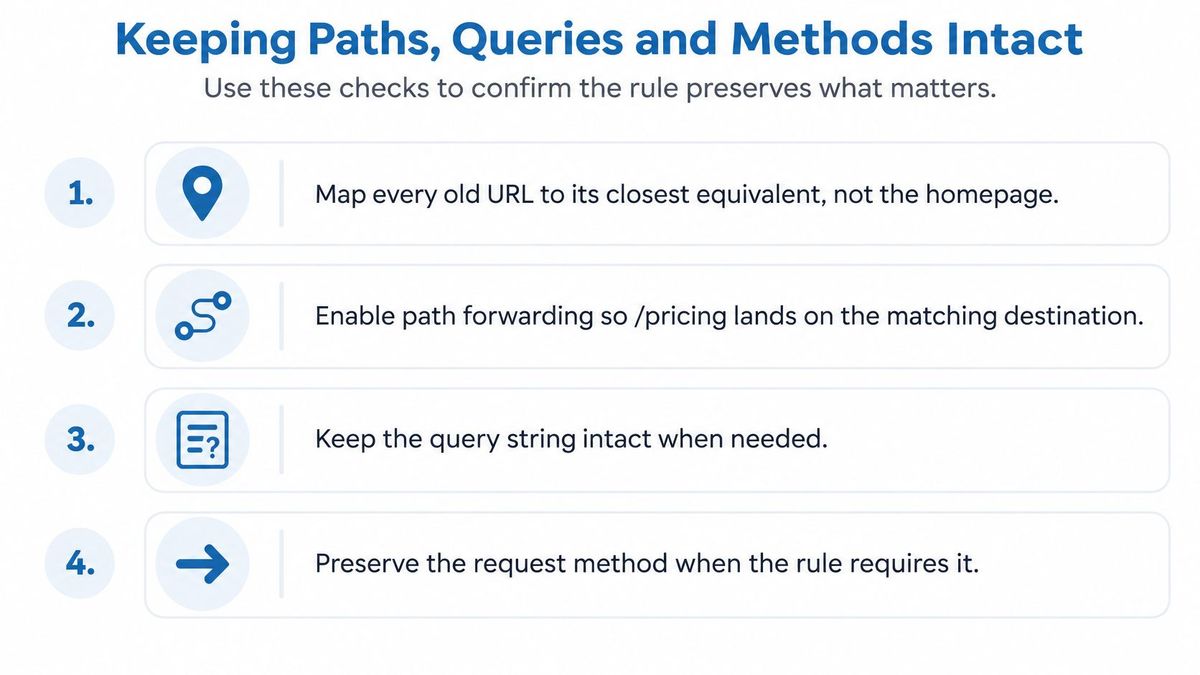
- Map by meaning. Send each old URL to its closest equivalent, not automatically to the homepage.
- Preserve matching paths. Enable path forwarding when the destination retains the same page structure.
- Retain required queries. Forward campaign tags and application parameters that the destination still needs.
- Protect request behavior. Select a method-preserving code for traffic whose body must reach the destination unchanged.
- Remove intermediate destinations. Update old rules to point directly to the final page.
- Handle exceptions explicitly. Give renamed or reorganized pages individual mappings instead of forcing them through a catch-all.
A worked path and query check#
Path forwarding copies the requested path and appends it to the target. With matching site structures, a request for /pricing should reach /pricing on the new domain rather than the destination root.
Path forwarding and query parameter forwarding are included on every RedirHub plan to preserve deep links during migrations. For example, old-brand.com/pricing?utm_source=x lands on newbrand.com/pricing?utm_source=x when those forwarding options are enabled.
That example contains separate requirements: the pricing path identifies the content, while the query parameter supplies attribution context. Preserving one doesn't prove the other survived.
For campaign-specific testing, use our guide to preserving UTM parameters through redirects. Confirm the actual destination request, then check that the destination's analytics accepts the retained parameters.
Where catch-all rules fail#
If path forwarding is disabled and the destination is the homepage, every matched legacy page can collapse into that homepage. Visitors lose the context of the link they clicked, and search engines receive little useful information about where the individual content moved.
Blindly enabling path forwarding isn't the answer when the new structure differs. An old /plans page won't become a valid /pricing page merely because you copied its path. Use an explicit mapping for that change.
Also inspect destination URLs that already contain a path or query. Confirm that the final result doesn't duplicate a directory, replace a required parameter, or append an obsolete value. Preserve what the destination needs, not every historical parameter indiscriminately.
Confirm the Redirect Journey Before You Launch#
A migration spreadsheet is a statement of intent. The browser request is the evidence. Test the published behavior before changing public links, and keep checking after traffic starts arriving.
Use a short release checklist with a named owner for each failure:
- Inventory important sources. Export high-traffic and valuable linked URLs from analytics and Search Console, then add business-critical pages that traffic reports might miss.
- Record each rule. Assign the destination, status code, path behavior, and query behavior before publishing.
- Inspect the journey. Use a bulk redirect checker to confirm a direct hop to the intended final page with the intended response.
- Exercise real inputs. Test a parameter-bearing URL and a form submission, checking the received query, method, body, and application outcome.
- Monitor destinations. Configure alerts so a broken landing page becomes an actionable incident rather than a customer complaint.
- Retain permanent rules. Keep them indefinitely because external links, bookmarks, and indexed URLs may continue sending visitors for years.
Define a passing result#
A healthy result is a direct redirect, the intended code, intact required parameters, and a working destination. For transactional traffic, add successful processing of the original request. A page that merely renders isn't enough.
RedirHub's free redirect checker shows a URL's full redirect chain, and on Pro and Enterprise, redirect monitoring checks the health of the destination behind each redirect. Use those checks alongside browser testing, because server responses alone can't confirm that a checkout, login, or embedded page works as intended.
After launch, review alerts and investigate unexpected traffic patterns rather than treating silence as proof of success. Keep a rollback owner and the approved mapping available to whoever handles incidents.
Before the migration starts, write down the decision for every rule: which status code and which forwarding options implement the intended outcome? That record gives marketing, SEO, and infrastructure teams the same definition of a working URL.
Pick the Redirect Type, Keep the Details
Set up 301, 302, 307, 308 or Frame redirects on your own domain, with path and query forwarding included on every plan.
Explore domain redirectsSources
- [1]Redirects & SEO: The Complete Guide (Audisto)
- [2]What Is Forwarding (Email)? (DMARCeye)
- [3]Redirections in HTTP (MDN)
- [4]RedirHub redirect speed benchmark, 27 October to 3 November 2026
- [5]RFC 9110: HTTP Semantics (IETF)
- [6]Software Testing Scenario: What It Is and How to Write One (99tests)
- [7]Redirects and Google Search (Google Search Central)
- [8]Replatforming SEO Checklist: Keep Rankings (CIQRA)
Frequently asked questions
Not always. Many registrars use forwarding for an HTTP 301 or 302 redirect, while others mean masking, which shows the destination inside a frame on the original address. Look for options such as permanent, temporary, masked or frame, and check the result in the browser's network tools.
Masking doesn't send the redirect signal search engines use to move a page to a new address. The source URL can stay indexed without consolidating its signals into the framed destination, so use a 301 or 308 redirect for a real site move.
307 and 308 keep the request method and body, so a form submission or API call reaches the new endpoint as the same request. With 301 and 302, a client may switch POST to GET and drop the body.
Only if the rule forwards them. Path forwarding appends the requested path to the target and query forwarding keeps parameters such as utm_source; in RedirHub both are included on every plan. Test a parameter-bearing URL before launch.
The forwarding server resends the message, so SPF often fails because that server isn't authorized for the original domain, and any change to the message can break the DKIM signature. ARC and SRS exist to reduce those failures.

Leo Astarothman is the Brand & Content Lead at RedirHub, where he shapes the company's visual identity, educational content, product experiences, and marketing strategies. He also specializes in system design. Simplifying complex redirect infrastructure into practical resources, product experiences, and campaigns that help businesses understand and adopt modern redirect management.
Related Articles
View All Articles