
Direct Answer
URL masking (also called forwarding with masking, or a Frame redirect) shows another site's page while the address bar keeps your domain. It works by loading the destination inside a full-screen frame, not by redirecting. Use it only to put your domain on a page you can't host yourself, and only if that page allows framing. For anything that should rank in search, use a 301 redirect instead; use 302 for temporary moves and 307 or 308 when forms or APIs must keep their data.
When you create or edit a redirect in RedirHub, the Redirect type decides how visitors and search engines reach the destination. 301, 302, 307 and 308 are HTTP redirects: they send the browser to the new URL. Frame (masking) and Custom HTML keep the visitor on your domain. This guide explains what URL masking is, how it compares with a normal redirect, and which type to pick.
What is URL masking?#
URL masking means visitors type or click your domain, see content that lives somewhere else, and the address bar never changes. Registrars sell it as "forwarding with masking" (GoDaddy) or a "Masked (URL Frame)" redirect (Namecheap). Under the hood it is the same trick everywhere: your domain answers with a small page of its own that loads the destination in a full-screen frame.
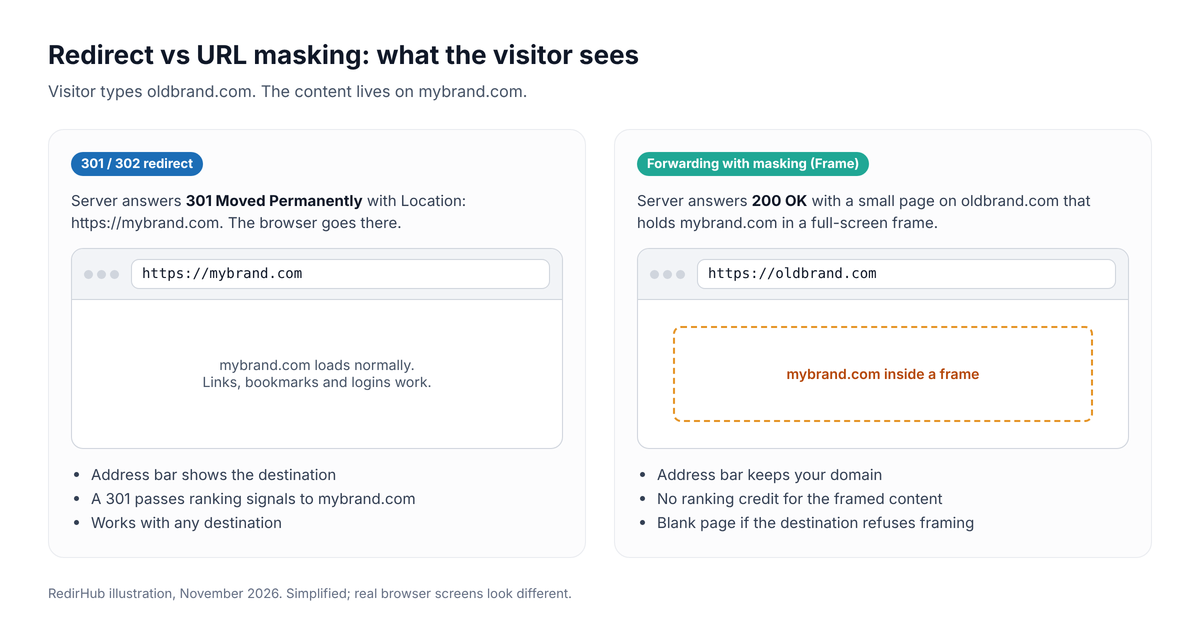
With a redirect the browser moves to the destination; with masking it stays on your domain and frames the destination.
GoDaddy describes the difference plainly: forwarding only redirects visitors to a destination URL of your choosing[↗], while forwarding with masking keeps your domain name in the browser address bar. A normal redirect is a status code (301, 302, 307 or 308) plus a Location header, and the browser goes to the new address. Masking answers with a 200 and a page, so the browser never leaves your domain.
URL masking vs redirects: quick comparison#
| Redirect type | Address bar shows | SEO | Keeps form/API data | Best for |
|---|---|---|---|---|
| 301 · Permanent | Destination | Passes ranking signals to the destination | No | Domain changes, site migrations, permanent moves |
| 302 · Temporary | Destination | Keeps the original URL indexed | No | Testing, maintenance, short-term campaigns |
| 307 · Temporary | Destination | Same as 302 | Yes | Temporary moves of forms, APIs and webhooks |
| 308 · Permanent | Destination | Same as 301 | Yes | Permanent moves of forms, APIs and webhooks |
| Frame (masking) | Your URL | No ranking credit for the framed content | — | Showing a site hosted elsewhere under your domain |
| Custom HTML (Pro) | Your URL | Indexed as your own page | — | Notices, holding pages, simple landing pages |
Is URL masking bad for SEO?#
Masking is not a penalty in itself, but it gives you nothing to rank. Search engines see a page on your domain that contains only a frame, while the real content stays on the destination's own URL. Your masked domain doesn't build rankings, and the destination doesn't receive the signals a 301 would pass. If you want a domain's visitors and its search value to end up on another site, use a 301.
That is why almost every real-world redirect is a plain 301. About 96 in 100 redirects set up in RedirHub are 301s, and around one account in seven has set up a 302 at least once (RedirHub platform data, October 2026).
301 · Permanent (SEO friendly)#
A 301 tells browsers and search engines that the page has moved for good. Search engines move the old URL's ranking signals to the destination and eventually show the new URL in results. This is the right choice for domain changes, rebrands, site migrations and any URL that will not come back. If you are unsure, 301 is the default for permanent redirects.
Browsers remember permanent redirects
After a visitor follows a 301 or 308, their browser can keep sending them to the old destination even after you change it in RedirHub, until they clear their cache.
While testing, or if the destination might still change, start with 302 and switch to 301 once the destination is final.
302 · Temporary#
A 302 says the move is temporary. Search engines keep the original URL indexed and do not treat the destination as its replacement. Use it for maintenance pages, seasonal promotions, A/B tests, and redirects whose destination changes regularly. Browsers do not keep a 302 in cache the way they keep a 301, so changes take effect right away. For a deeper comparison, read 301 vs 302 redirects.
307 · Temporary and 308 · Permanent#
307 and 308 mean the same as 302 and 301, with one difference: the browser must repeat the request exactly as it was sent. With 301 and 302, most browsers turn a form submission (a POST request) into a normal page load at the new address, so the submitted data is lost. 307 and 308 keep the method and the data.
- 308: an API endpoint, webhook URL or form handler has moved permanently.
- 307: the same kind of endpoint is moving only for a while, for example during a migration window.
For ordinary web pages that people open in a browser, 301 and 302 are the better-known choice and work just as well.
Frame (masking): limits to check first#
Frame is RedirHub's URL masking option. It loads the destination inside a full-screen frame on your domain, so the address bar keeps showing your URL. It is useful when a site is hosted elsewhere, for example on a page builder or portfolio platform, and you want visitors to see only your domain. Before you choose it, check these limitations:
- Many sites refuse to be framed. If the destination sends an X-Frame-Options header (DENY or SAMEORIGIN) or a Content-Security-Policy with frame-ancestors[↗] that does not list your domain, the browser shows a blank or error page inside the frame. Most large platforms and almost all login pages do this.
- The destination must use HTTPS. Browsers block http:// pages inside an https:// page.
- The address bar never changes. Visitors cannot bookmark or share a specific inner page, and refreshing takes them back to the page they first opened.
- Logins may not work. Browsers restrict cookies inside frames from another domain, so sign-in and checkout flows can break.
- No SEO benefit. The destination's content does not rank for your domain. If search traffic matters, use 301.
To check a destination, open it in your browser, open the developer tools, and look at the response headers of the page in the Network tab. If you see X-Frame-Options, or a frame-ancestors rule that does not include your domain, Frame will not work for that destination; use a 301 or 302 instead.
How to set up URL masking in RedirHub#
- In the RedirHub dashboard, choose Domain Redirect.
- In Redirect from, enter your domain, for example oldbrand.com. A root domain also covers www.
- In Redirect to, enter the https:// address of the page you want to show.
- Under Redirect type, open More types.
- Select Frame.
- Under Paths, choose Keep the path so oldbrand.com/about opens mybrand.com/about, or Everything to one URL.
- Check the What happens panel: each sample URL should show a Frame label, then click Create redirect.
- Point your domain's DNS to RedirHub when asked (Connect DNS). Only the root and www records change.
- Open your domain in a private window to confirm the page loads inside the frame. A redirect speed test shows the 200 answer, HTTPS status and response time.
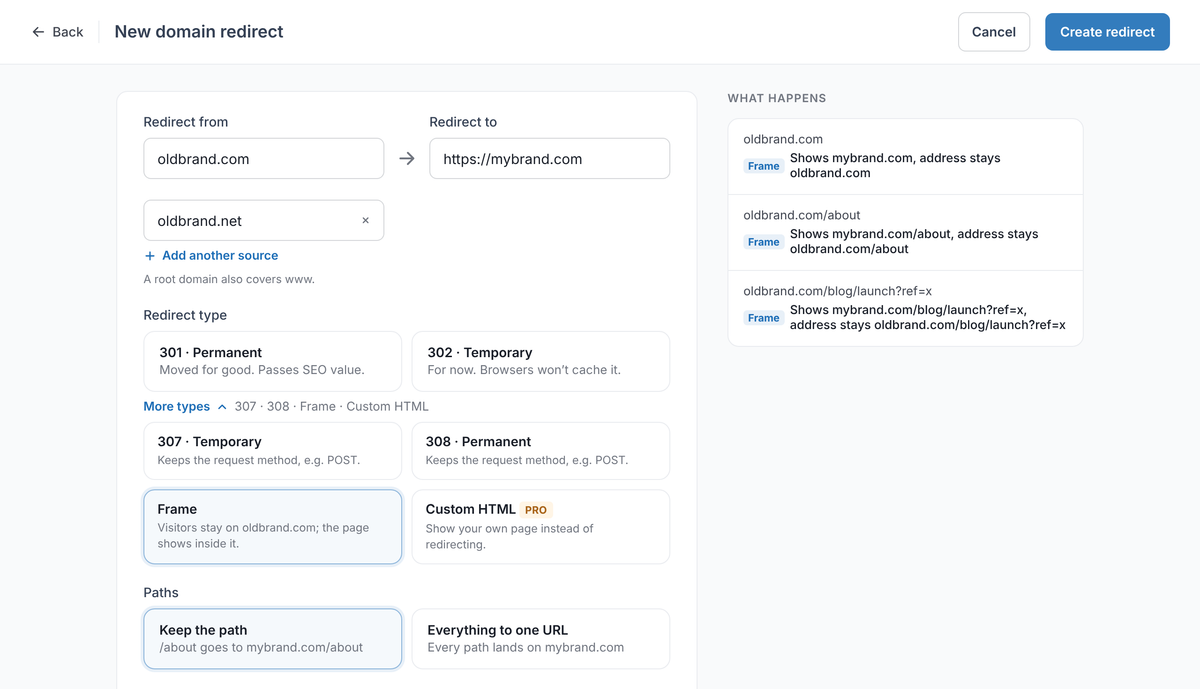
Frame is under More types. The What happens panel shows that the address stays on oldbrand.com.
Is your redirect working? Enter your domain. You'll see the status code (301 or 302), where it lands, whether HTTPS is valid, and how fast it answers from Washington, Frankfurt and Tokyo, ranked against every redirect tested in the last 7 days.
Test my redirectRegistrar masking vs RedirHub#
If your domain is at GoDaddy or Namecheap, you can turn on masking there for free: GoDaddy's forwarding with masking needs the domain on GoDaddy nameservers, and Namecheap offers a Masked (URL Frame)[↗] redirect type next to 301 and 302 Unmasked. Our GoDaddy forwarding guide and Namecheap redirect guide walk through both. For one domain and a destination that allows framing, that is often enough.
| Registrar forwarding | RedirHub | |
|---|---|---|
| Redirect types | 301, 302 and masking | 301, 302, 307, 308, Frame (masking) and Custom HTML |
| DNS and email | GoDaddy needs its own nameservers | DNS and email stay where they are; only root and www records change |
| HTTPS | Depends on the registrar (Namecheap: only to a different destination domain) | Issued and renewed automatically for root and www |
| Where it answers | The registrar's forwarding servers | 130 global edge locations, close to each visitor |
| Many domains | Set up per domain | Several source domains per redirect; CSV import on every plan |
| Price | Free with the domain | From $49/month (Core); 14-day free trial on Pro |
RedirHub is worth it when you need more than one masked domain or want to see who arrives. Each redirect is served from 130 global edge locations, root and www count as one domain, and automatic HTTPS covers both. You can keep the path or turn a domain change into a full website migration with each old URL mapped to its own page, add several source domains to one redirect, and load hundreds of rules with bulk CSV import. If you manage a portfolio of forwarded domains, DNS is re-checked every 10 minutes. You also see clicks and unique visitors with bots filtered out, and the top links for each domain.
Plans start at $49/month (Core); Pro comes with a 14-day free trial. If you only need one domain masked and your registrar's option works, keep using it.
Custom HTML (Pro)#
Custom HTML does not redirect at all. Instead, RedirHub serves the HTML you enter as the page for that source URL. Use it for a maintenance or "coming soon" notice, a holding page for a parked or for-sale domain, or a simple landing page that does not need its own hosting. A second option, Custom HTML, Not found (404), shows the same HTML but answers with a 404 status, which suits retired pages. Custom HTML is available on the Pro plan and above.
Path, query and destination variables#
The four HTTP redirect types and Frame all work with Keep the path, Query forwarding (under More options) and destination URL variables. For example, Frame with Keep the path opens the matching inner page of the destination on the first visit. See Destination URL Variables for details.
Which redirect type should I choose?#
- Moving a site or domain for good: 301
- Testing, a short-term campaign, or the destination is not final yet: 302 (switch to 301 later)
- Moving an API, webhook or form endpoint: 308 (permanent) or 307 (temporary)
- Keeping your domain in the address bar: Frame (masking), after checking that the destination allows framing
- Showing a page instead of redirecting: Custom HTML
You can change the redirect type at any time. If a redirect does not behave as expected after a change, see Troubleshooting new redirects.
Frequently asked questions
It is a registrar's name for URL masking. Visitors who open your domain see the destination site, but the address bar keeps showing your domain, because the destination is loaded inside a full-screen frame instead of being reached by a redirect.
For a permanent move, use 301 (or 308 for endpoints that receive form or API data). It tells search engines to transfer the old URL's ranking signals to the destination. Use 302 only while the move is temporary. Masking (Frame) passes no ranking signals.
No. Masking keeps your domain in the address bar but shows everyone the same page. Google defines cloaking as presenting different content to users and search engines to manipulate rankings, which breaks its spam policies. Some link tools call hiding a destination address "link cloaking", but that is a different thing.
Yes, as long as both sides use HTTPS. RedirHub issues and renews the certificate for your domain (root and www) automatically. The destination must also be https://, because browsers block an http:// page inside an https:// page.
No. Starting with 302 while you test and switching to 301 once the destination is final is a common and safe approach. Search engines treat the redirect as permanent from the moment they see the 301.
Browsers cache 301 and 308 redirects. Your browser remembers the old destination until its cache is cleared. Test in a private window or another browser. Visitors who have not followed the old redirect see the new destination right away.
The destination most likely blocks being shown inside a frame with an X-Frame-Options or Content-Security-Policy frame-ancestors header, or it uses http:// instead of https://. Only the destination's owner can change this. Otherwise, use a 301 or 302 redirect.
Not for your domain. Your page is only a frame with almost no content of its own, so the destination's content stays associated with its own URL. If you want search engines to credit the destination, use a 301 redirect.