What Is Custom URL? Domains, Slugs and Vanity Links

Key takeaways
A custom URL is an address whose domain or path your organization controls, so the public link can stay fixed while its destination changes. Choose a vanity path on your main domain for print and QR codes, a custom slug for seasonal pages and a custom domain for a separate campaign identity. Pick 301 or 308 for permanent moves and 302 or 307 for temporary ones, keep the query string when attribution matters, and prove ownership and an audit trail before you print anything.
A custom URL is a web address whose domain or path is chosen and controlled by your organization rather than generated by a platform. If a link can look neat and still send people somewhere else, who controls it, you or the tool that created it? That's the question most definitions skip, and it's the one that decides whether a printed, shared, or migrated link still works years later.
What a Custom URL Means in Plain Terms#
A custom URL is a web address whose domain, subdomain, or path is chosen and controlled by your organization rather than generated by a platform. Say a retailer shares a random code on a provider's domain. The link works, but it doesn't tell anyone who sent it or what they'll find.
Now compare yourbrand.com/go/offer. The brand is visible, the purpose is readable, and the team can reuse that exact address next season. Behind it, the destination can change without the public address changing, so an offer page can move while the shared link stays put.
That's where people mix up three ideas. A short link is mainly about compactness. A custom URL is about identity and control, and the two often overlap when a branded link is also short. A redirect is the mechanism that can send that stable address to a new destination.
Why teams ask for one#
- Print has to last: Packaging and signage can't be edited after publication.
- Shared links get judged: A recognizable domain looks more credible than an opaque code.
- Campaigns need continuity: One stable address is easier to track than a new link for every destination change.
That ownership point is what makes understanding what a custom URL is more useful than memorizing a definition. You're not just making an address prettier. You're choosing a public identifier your audience can recognize and your team can keep.
Custom Domain, Custom Slug or Vanity URL#
What changes when you use yourbrand.com/go/spring-sale instead of a provider's random short link? The answer depends on which part of the address you control.
| Type | Example | What the brand controls | Typical use |
|---|---|---|---|
| Custom domain | go.yourbrand.com | The host name and its DNS | Separate campaign sites and product identities |
| Custom slug | yourbrand.com/spring-sale | The path after the main domain | Seasonal pages that stay on the main site |
| Vanity URL | yourbrand.com/go/offer | A memorable path built for promotion | QR codes, print, packaging and social posts |
| Generic short link | A random code on the provider's domain | The destination associated with the link | Quick sharing with no branding |
A custom domain uses a branded host, such as go.yourbrand.com. A custom slug is the chosen path after a domain, such as /spring-sale. A vanity URL is a memorable address selected for promotion. These terms can overlap: yourbrand.com/go/offer uses the brand's domain and a deliberate path.
A custom domain gives a campaign or product its own host. It requires connecting that domain, while a slug can use a path on a domain your organization already operates. If you are comparing hosting options, learning how to connect your domain to free hosting[1] can help separate the domain choice from the hosting choice.
A vanity URL puts the memorable address where people will see or scan it. RedirHub's Integration Mode announcement explains how branded paths such as yourbrand.com/go/spring-sale and yourbrand.com/qr/menu can run on a main website domain without a separate short domain.
The generic short link is different: its visible host belongs to the provider, not the brand. The key choice is where the public address lives and which parts your team can manage.
Which Parts of a URL You Can Control#
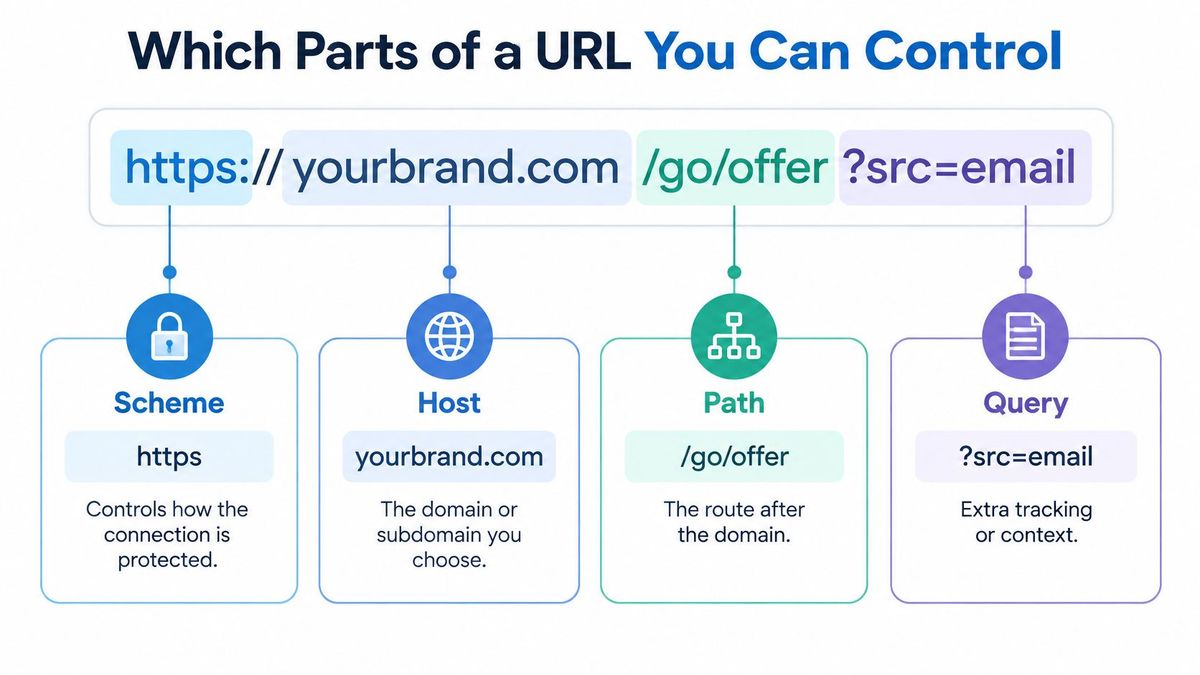
A custom URL is built from parts, and each part has a different job. Take https://yourbrand.com/go/offer?src=email. RFC 3986, the URI specification, defines the structure: scheme, authority, path, optional query, and optional fragment. Here, https is the scheme, yourbrand.com is the authority, /go/offer is the path, and src=email is the query.
The parts that matter most#
- Scheme:
httpsspecifies how the connection is protected. Use it for addresses you publish. - Host:
yourbrand.comidentifies the domain. To use it as a custom domain, your organization needs to own or control it. - Path:
/go/offeridentifies a location on that domain. A custom slug changes this part. - Query:
?src=emailcarries extra information, such as campaign attribution. Redirect rules can preserve it so the source remains attached to the destination. - Fragment: Anything after
#is handled by the browser and is not sent to the server. As a result, server-side redirect rules cannot use it to match a request.
The path and query help determine what happens after someone visits an address. For example, a rule can match /go/offer and preserve src=email when sending visitors to a landing page. The host identifies which domain receives the request; the path and query provide more detail about it.
The scheme and host define the domain connection your organization must control. Customizing a URL often starts with its path.
Before setting up the address, decide which part needs to carry your brand and whether tracking parameters should reach the destination. Those choices determine whether you need a different host, a memorable path, or both. Keep URL encoding consistent, too: routing systems may treat encoded characters differently from their unencoded forms.
How a Custom URL Sends People Elsewhere#
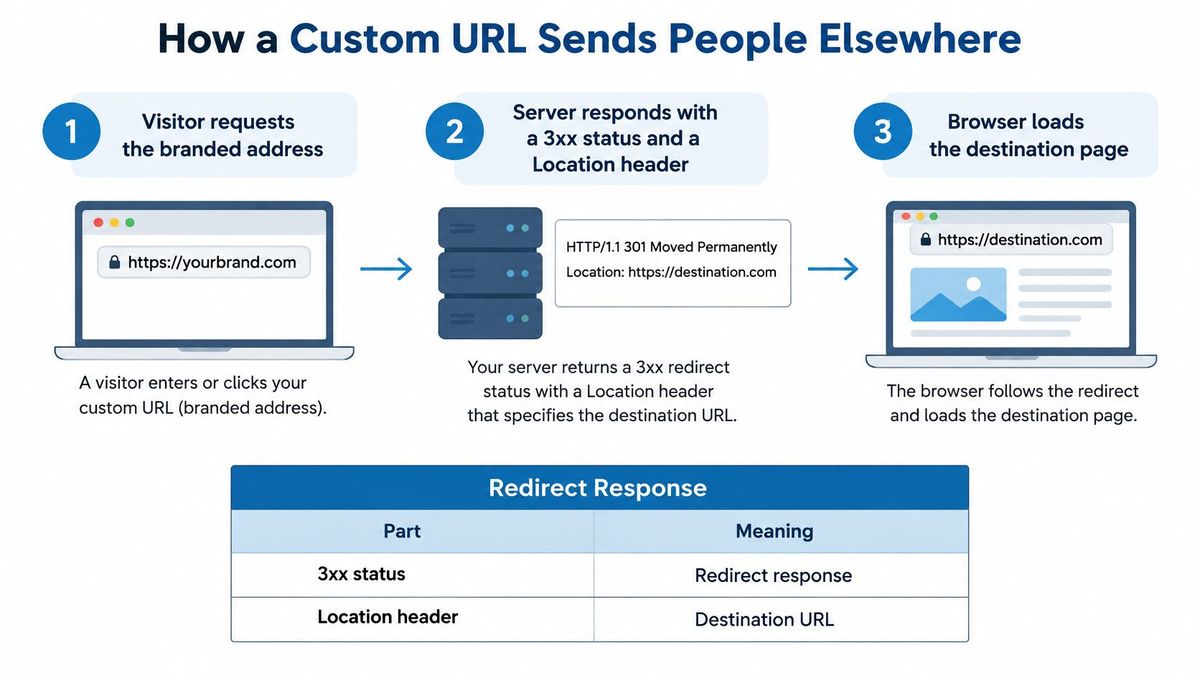
A custom URL doesn't have to redirect. It can be the final page address. When it does send people elsewhere, the flow has three steps: the visitor requests the branded address, the server answers with a 3xx status and a Location header, and the browser loads the destination in that header. The MDN guide to HTTP redirections[2] describes a 3xx response with a Location header as the point where a URL becomes an actionable redirect endpoint.
Redirect status codes for custom URLs
| Code | Permanent or temporary | Keeps non-GET method | Use when |
|---|---|---|---|
| 301 | Permanent | No, may change to GET | Ordinary page moves in a site migration |
| 302 | Temporary | No, may change to GET | Testing a destination while the original stays canonical |
| 307 | Temporary | Yes | Temporary move where POST or PUT must survive |
| 308 | Permanent | Yes | Permanent move for requests that must keep their method |
The code is not a cosmetic setting. 301 and 308 signal permanent movement, while 302 and 307 signal temporary movement. The 307 and 308 codes preserve the original method and body, whereas 301 and 302 may turn a non-GET request into GET. For ordinary page requests in an SEO oriented migration, 301 is commonly suitable. If a form submission or application request must remain POST or PUT, 307 or 308 is safer. This guide to choosing between 301 and 302 redirects goes deeper on the temporary versus permanent choice.
Say old-brand.com/pricing moves to newbrand.com/pricing. Use a permanent code and keep the path. If someone arrives at old-brand.com/pricing?utm_source=x, path and query forwarding should land them on newbrand.com/pricing?utm_source=x, so the campaign tag survives. Teams that also review channel results may find this overview of social reporting for creators and small businesses[3] useful when deciding which source data must remain attached to each visit.
Set up the mapping#
- Choose the public address: It has to stay fixed wherever it's printed or shared.
- Enter the destination: Keep it editable, because campaigns and pages change.
- Pick the status code: Match permanence and method behavior to the job.
- Keep path and query when needed: Attribution and application routing may depend on them.
- Test the response: Confirm the expected code and final page, then open the link and watch the address bar.
Validate destinations before publishing, too. Tight validation reduces open redirect abuse, and HTTPS protects both the branded endpoint and its redirect response in transit. RedirHub supports per mapping choices across these four codes with path and query forwarding, so one policy doesn't have to govern every link.
How fast is a custom redirect?#
A branded address adds one redirect hop, so the first response matters. In RedirHub's redirect speed benchmark[4], which measured 27 providers from Washington, D.C., Frankfurt and Tokyo between 1 and 8 November 2026, RedirHub's median time to first byte was 15 ms, averaged over the three locations, against 36 ms for Cloudflare and 20 ms for redirect.pizza. The test times the first response only and does not follow the redirect to the destination page.
Where Custom URLs Run and Who Controls Them#
Two setups can serve the same public address. In a DNS-served redirect, the domain's DNS points to the redirect provider, which serves the redirect and issues the HTTPS certificate. That fits a domain or subdomain you can repoint. This comparison of DNS redirects and server redirects is useful if your team is weighing that boundary.
In an application-served setup, the domain keeps its DNS and hosting. Your own platform answers the redirect from managed rules. That fits a live site whose DNS or hosting can't move, and it's where the idea becomes infrastructure rather than decoration.
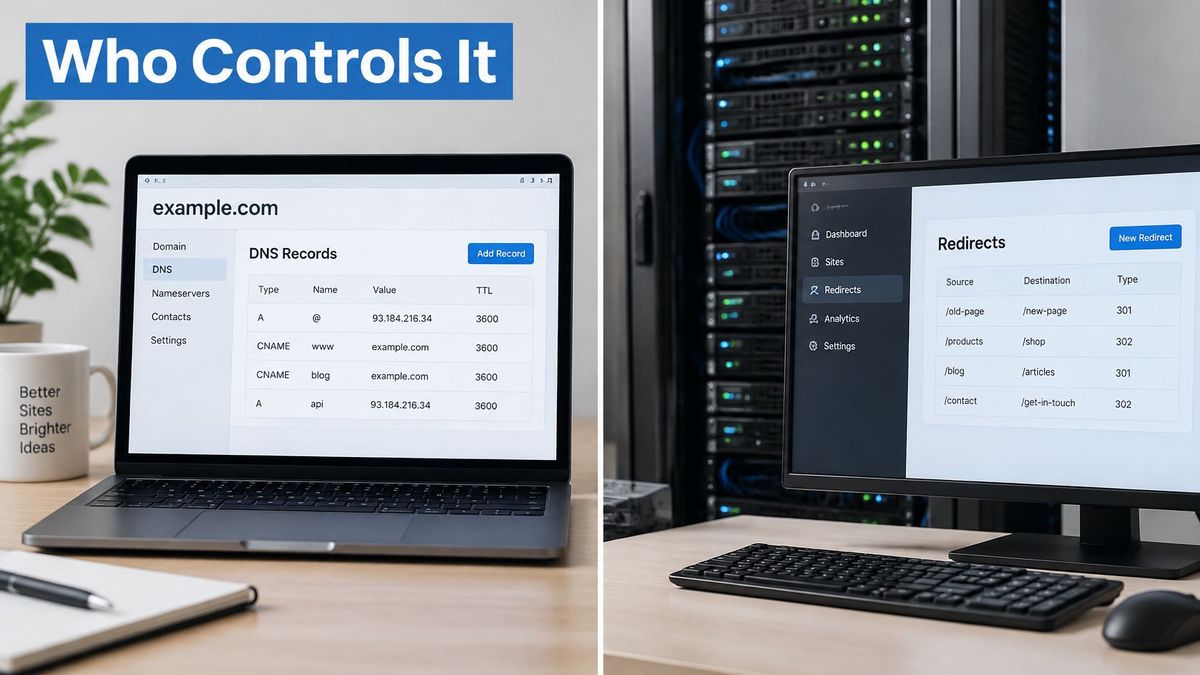
RedirHub Integration Mode, launched in November 2026, follows the second pattern. Your platform serves links managed in RedirHub, fetching one plain text rules file every 60 seconds and reporting visits back for analytics. Ready made prompts cover Cloudflare Workers, Vercel / Next.js, and WordPress, and any CDN, framework, or server that can read a text file and send a redirect can use it. Specific rules run before your site's own pages, while a domain wide catch-all should answer only when the site returns a 404, so it never replaces a working page. It's included in every RedirHub plan.
The governance questions matter as much as the connection method. The APWG trends report for Q3 2025[5] notes that editable QR destinations are useful but can also be abused by criminals to change destinations after generation and evade security controls. A changeable URL therefore needs verified ownership, an audit trail, analytics, a rollback process, and a safe response when its destination disappears.
Say a QR code stays on packaging for two years. The destination product page can be replaced, the public URL stays the same, and nobody reprints the package. But only named owners should be able to make that edit, and the change should be logged. That ownership model is summed up by the brand line, "Your links are yours."
Benefits, Risks and Trust Signals#
A branded URL can make a link easier to recognize, but it does not prove that the destination is safe. Redirects can also conceal where a link ultimately leads, so a polished address should not replace checking its destination.
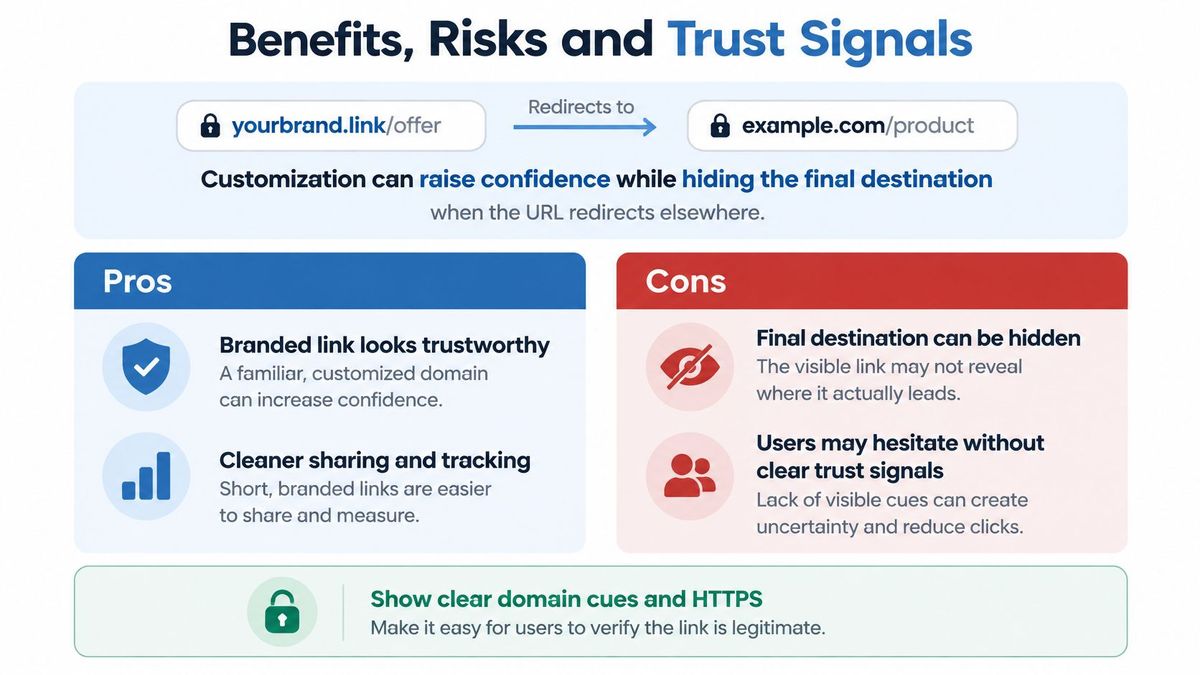
A 2025 study of 25 million short URLs[6] identified 622 shortening services and found that 70% of observed phishing short URLs involved abused shortening services. The APWG has also reported that criminals use customized URLs, shorteners, and changeable QR destinations to obscure malicious destinations.
A brand-owned custom URL differs from an opaque third-party link, but the appearance of a URL alone is not a trust signal. Ownership, transparency, monitoring, and controlled governance matter. The impersonation and security advisory explains why lookalike domains deserve particular care.
Check before you click or publish#
- Read the registrable domain: Ignore reassuring words placed before it in a subdomain. The registrable domain, the name just before the public suffix such as
.com, identifies the site operator. Inlogin.bank.example.com, for example,example.comis the registrable domain. - Confirm HTTPS: It secures the connection, but does not establish that the business behind the page is legitimate.
- Inspect the destination: Preview or test a redirect rather than relying on the visible path.
- Limit edit access: Monitor destinations, keep an audit trail, and prepare a rollback for unexpected changes.
For readers, a familiar domain reached over HTTPS, with a destination that fits the context, is a stronger signal than a polished slug. For teams, trust also depends on being able to inspect who manages a link, its history, and its current target. A custom URL earns trust through control, not typography.
Pick the Custom URL Setup for Your Next Campaign#
Choose by lifespan first. Use a vanity URL on your main domain for printed QR codes and packaging, a custom slug for seasonal pages, a custom domain for a separate campaign identity, and an application-served setup when the site's DNS can't move. With Integration Mode, a path such as yourbrand.com/qr/menu stays public and stable while its destination changes. If you want the foundational terminology first, this explainer on what branded short links are is the right companion. Your links are yours.
- List each link in use: Record where it appears and who owns it.
- Pick the type: Domain, slug, or vanity path.
- Choose routing: DNS served or application served.
- Set each status code: Match permanence and method behavior to the mapping.
- Test every link: Confirm the destination and check that tracking parameters survive.
Answer one question first: will this address need to outlive its destination? If yes, treat it as infrastructure from day one.
Put your next campaign link on a domain you already own, keep its destination editable, and manage its redirects, QR codes, and analytics in one workspace with RedirHub. Start with one address that has to outlast its first destination, test its status code and tracking, and you'll have a custom URL your team can safely reuse.
Put your links on a domain you own
Manage domain redirects, branded short links, QR codes and migration mappings in one workspace on your own domains, with a DNS connection or Integration Mode.
See the URL Redirect ServiceSources
Frequently asked questions
A custom URL is a web address whose domain, subdomain or path your organization chooses and controls, instead of a code generated on a platform's domain. It can be a final page or a stable address that redirects to a destination you can change later.
A short link is mainly about being compact, while a custom URL is about identity and control of the address. The two overlap when a branded link is also short, but a generic short link uses the provider's domain, not yours.
Use 301 for ordinary permanent page moves and 302 for temporary ones. Choose 308 or 307 instead when a POST or PUT request must keep its method.
Not always. A DNS-served redirect points the domain to the redirect provider, while in an application-served setup such as RedirHub Integration Mode your own platform answers the redirect and the domain keeps its DNS and hosting.
No. A familiar domain over HTTPS is a stronger signal than a polished slug, but HTTPS does not prove the business behind a page is legitimate. Check the registrable domain and the destination, and for your own links limit edit access and keep an audit trail.

Leo Astarothman is the Brand & Content Lead at RedirHub, where he shapes the company's visual identity, educational content, product experiences, and marketing strategies. He also specializes in system design. Simplifying complex redirect infrastructure into practical resources, product experiences, and campaigns that help businesses understand and adopt modern redirect management.
Related Articles
View All Articles