
Direct Answer
To redirect a website to another domain, set up a permanent 301 redirect from the old address to the new one. With no hosting, use your registrar's domain forwarding or a redirect service. With hosting, add a rule to .htaccess (Apache) or a return 301 line (Nginx), or use a redirect plugin on WordPress. Redirect both the root and www, keep the path so each old page lands on its matching new page, make sure https:// works on the old domain, and keep the old domain registered.
Whether you're moving a whole site to a new domain or sending one old URL to a new page, the job is the same: answer the old address with a redirect to the new one. The right tool depends on where the old domain lives and whether it still has hosting. This guide covers every common option, with the exact lines to paste, and how to check the result.
Pick the right method#
| Your situation | Best method |
|---|---|
| The old domain has no hosting, one destination | Domain forwarding at your registrar or DNS provider |
| The site runs on Apache (most shared hosting) | .htaccess rules |
| The site runs on Nginx | A return 301 line in the server block |
| The site runs on WordPress | A redirect plugin |
| No server access at all, and nothing else works | PHP header or JavaScript, as a last resort |
| Several domains, page-by-page mappings, HTTPS on the old domain or click data | A redirect service such as RedirHub |
Before you start#
- Use a 301 for a permanent move. It tells Google to index the new address and move ranking signals there. Use a 302 only if the old address is coming back. Our guide to redirect types and their SEO impact explains the difference.
- Decide: whole domain or one URL. A domain move should keep the path, so olddomain.com/pricing goes to newdomain.com/pricing. A single URL redirect sends one address to one page.
- Cover root and www. Visitors type both olddomain.com and www.olddomain.com. Both need to redirect.
- Keep the old domain registered. If it expires, every redirect and every old link stops working.
Method 1: Forward the domain at your registrar (no hosting)#
Most registrars and DNS providers can forward a domain without any hosting. The menu names differ, but the steps are similar:
- Sign in to the registrar or DNS provider where the old domain is managed.
- Open the domain's settings and find Forwarding, Redirect or URL redirect.
- Enter the full destination address, including https://.
- Choose a permanent (301) redirect if the move is permanent.
- Save, then wait for the change to apply. DNS updates can take from minutes to a few hours.
We have step-by-step guides for GoDaddy domain forwarding, Namecheap redirects and Cloudflare redirects. Registrar forwarding is free and fine for one domain to one address. Check two things afterwards: that https://olddomain.com redirects without a certificate warning, since support for HTTPS varies by provider, and whether paths are kept or everything lands on the home page.
Method 2: Apache (.htaccess)#
If the old site still runs on Apache, open the .htaccess file in the site's root folder (create it if it doesn't exist). To send one URL to another:
apacheRedirect 301 /old-page https://newdomain.com/new-pageTo move a whole domain and keep every path, with both root and www covered:
apacheRewriteEngine On
RewriteCond %{HTTP_HOST} ^(www\.)?olddomain\.com$ [NC]
RewriteRule ^(.*)$ https://newdomain.com/$1 [R=301,L]
Method 3: Nginx#
On Nginx, add a server block for the old domain that returns a 301 and keeps the requested path. For HTTPS, add your certificate lines to the same block:
nginxserver {
    listen 80;
    server_name olddomain.com www.olddomain.com;
    return 301 https://newdomain.com$request_uri;
}
For a single page, put return 301 https://newdomain.com/new-page; inside a location block for the old path. Reload Nginx after the change.
Method 4: WordPress#
On WordPress you don't need to touch server files: a redirect plugin lets you add old and new URLs from the admin screen. Our WordPress redirect guide walks through the options. To move a whole WordPress site to a new domain, redirect at the server or DNS level instead, so every old URL is covered.
Method 5: PHP or JavaScript (last resort)#
If you can only edit page files, a PHP header works as a real server-side redirect. Set the 301 yourself, because PHP sends a 302 by default:
php<?php
header("Location: https://newdomain.com/new-page", true, 301);
exit;
JavaScript runs only after the page loads, and Google can follow it only if it renders the page, so use it only when nothing else is possible:
javascriptwindow.location.replace("https://newdomain.com/new-page");Check that the redirect works#
Open the old address in a private window, with and without www and with https://. To see the status code, run curl -I https://olddomain.com and look for 301 and the new address in the Location line, or enter the old domain in our redirect speed test.
Is your redirect working? Enter your domain. You'll see the status code (301 or 302), where it lands, whether HTTPS is valid, and how fast it answers from Washington, Frankfurt and Tokyo, ranked against every redirect tested in the last 7 days.
Test my redirectMethod 6: Redirect a domain without hosting using RedirHub#
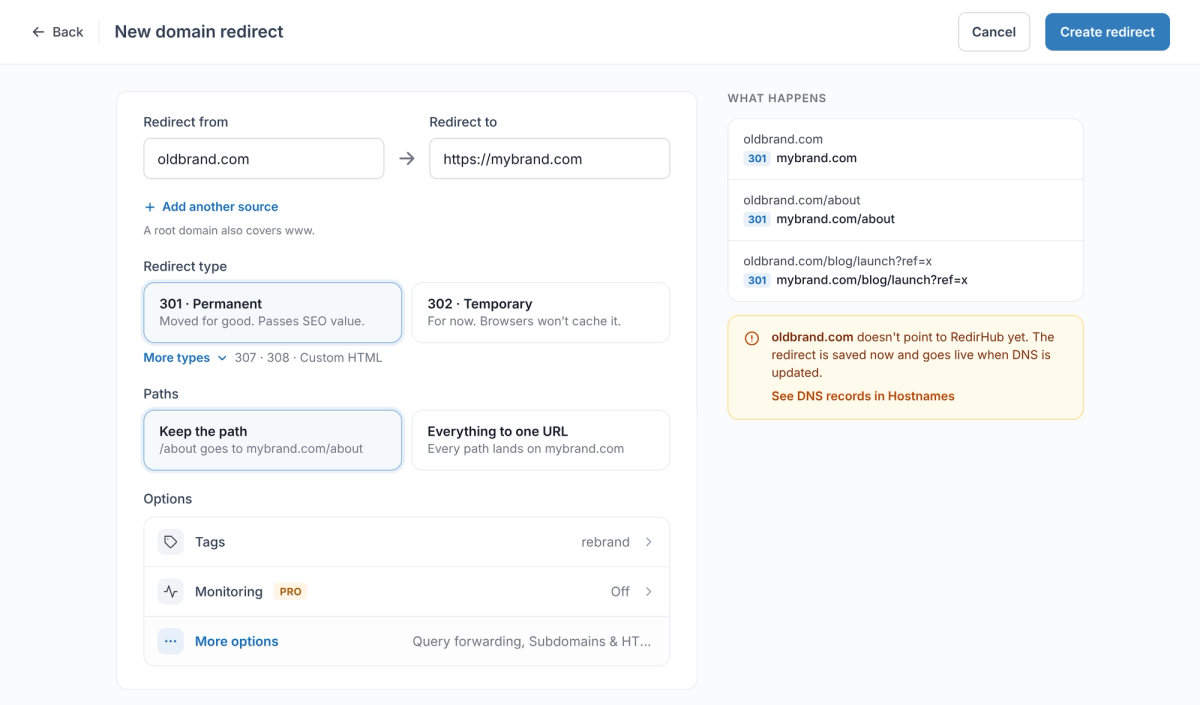
RedirHub answers for the old domain so you don't need a server. Your DNS and email stay where they are; you only change the root and www records.
- In the dashboard, start a new Domain Redirect.
- In Redirect from, enter the old domain, for example oldbrand.com. A root domain also covers www.
- In Redirect to, enter the new address, for example https://mybrand.com.
- Under Redirect type, choose 301 · Permanent.
- Under Paths, choose Keep the path for a domain move, or Everything to one URL to send every page to one address.
- Click Create redirect.
- Connect the domain: in Hostnames, open Connect DNS, add the records shown at your DNS provider, then click I've made the changes.
| Registrar forwarding | RedirHub | |
|---|---|---|
| Cost | Usually free with the domain | From $49/month (Core), 14-day free trial |
| HTTPS on the old domain | Varies by provider | Issued and renewed automatically for root and www |
| Paths | Varies; often everything goes to one address | Keep the path, or map each old URL to its own new page |
| Redirect types | Usually 301 and 302 | 301, 302, 307, 308 and frame redirects |
| Where it answers | The registrar's forwarding servers | 130 global edge locations (PoPs), close to each visitor |
| Many domains | One at a time | Several source domains per redirect; CSV import on every plan |
| Seeing if it is used | Usually no data | Clicks and unique visitors with bots filtered out |
For one domain pointing at one address, registrar forwarding is free and does the job. RedirHub is worth it when you move a site with many pages, run several domains, or want to know whether the old domain still brings visitors.
If you're moving a whole site, a site migration mapping sends each old URL to its matching new page. If you own a forwarded domain portfolio, such as typo and country domains, you can manage them all in one place, and each one gets automatic SSL certificates for root and www.
Common mistakes#
- Forgetting www or https. Test all four versions of the old address: with and without www, http and https.
- Sending every page to the home page. Visitors lose the page they wanted. Keep the path or map pages one by one.
- Using a 302 for a permanent move. Google may keep showing the old domain in search results.
- Chaining redirects. Old domain to old site to new site adds a hop each time. Point straight at the final address.
- Letting the old domain expire. Keep renewing it for as long as old links bring visitors.
Frequently asked questions
Set up a 301 redirect from the old domain to the new one: with your registrar's domain forwarding if there is no hosting, with .htaccess or an Nginx server block if there is, or with a redirect service. Redirect both root and www and keep the path so each page lands on its match.
Yes. Most registrars include domain forwarding, and .htaccess, Nginx and WordPress plugins cost nothing if you already have hosting. Check that HTTPS works on the old domain and whether paths are kept, as both vary by provider.
Yes. Use your registrar's domain forwarding, or point the domain's DNS at a redirect service. Neither needs a web server.
Use a 301 for a permanent move so Google indexes the new domain and moves ranking signals to it. Use a 302 only if the old domain will show its own site again.
Not if you use 301 redirects to matching pages. Rankings move to the new domain over time. Losses usually come from 302s, redirecting everything to the home page, or chains.
A server rule works as soon as you save it. Registrar forwarding and DNS changes can take from minutes to a few hours to apply.
RedirHub answers for the old domain without hosting: you point the root and www records at it, choose 301 or 302, and keep the path or send everything to one URL. HTTPS is issued automatically and you can see clicks per redirect.

TC is the Operations Manager at RedirHub, leading the company’s operational strategy and execution to ensure reliable, scalable redirect infrastructure. He oversees internal processes, cross-team coordination, and platform readiness while supporting customers through complex redirect implementations. With a strong understanding of large-scale domain operations and real-world edge cases, TC plays a key role in aligning product and customer success to deliver stable, high-performance redirection solutions.
Related Articles
View All Articles