
Key takeaways
Match the fix to the failure: DNS, TLS, timeouts and 5xx errors are outages to restore, malformed URLs are source edits, and only a page that moved for good gets a 301 or 308. If you control the public URL, such as a branded short link or QR code, keep it and change where it points. Send each old URL to its closest real replacement in one hop, never to the homepage by default, and return an honest 404 or 410 when nothing replaces it. Keep permanent redirects in place indefinitely and recheck status codes, chain length and referral traffic every quarter. A page that answers 200 can still be broken if it no longer supports the claim that links to it.
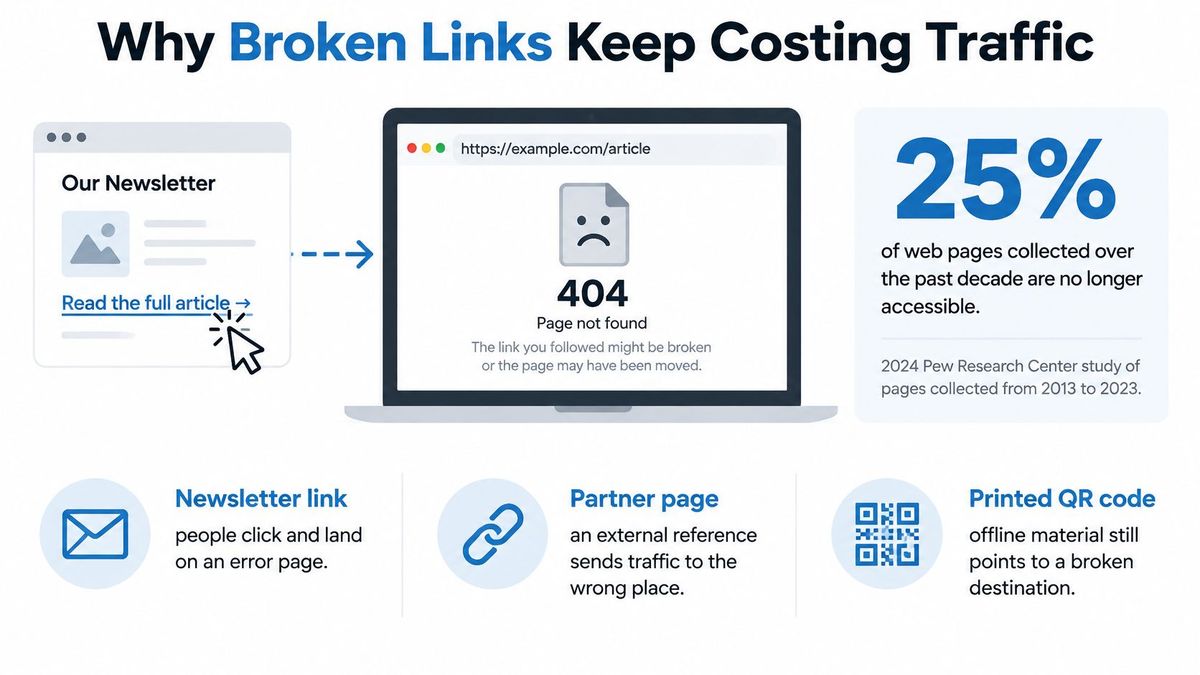
25% of all pages in a 2024 Pew Research Center study of webpages collected between 2013 and 2023[1] were no longer accessible when measured in October 2023, including 38% of webpages that existed in 2013, compared with 8% of pages that existed in 2023. This highlights the challenge of knowing how to fix a broken link. Links do not fail once and remain fixed. They degrade over time, destinations change, and a repair only counts when the person who clicks reaches the closest genuine replacement, not just any page that returns 200.
Why Broken Links Keep Costing Traffic#
Say a retailer sends a newsletter for a seasonal range, prints the same campaign URL on packaging, and gets a partner site to feature the offer. Two months later the category is restructured and that public URL returns an error. The email can't be recalled, the packaging is already in homes, and the partner has no reason to know anything changed.
That's not three separate problems. It's one broken address cutting off three sources of demand at once. Campaign clicks die before they reach a product. QR codes and printed materials point to a dead end. Customer journeys stop at the exact moment someone showed intent. Old media coverage, social posts, and partner mentions keep sending people to a page that no longer answers.
The usual reflex makes it worse. Someone notices the error, panics about lost traffic, and redirects the old URL to the homepage. The click now lands somewhere that loads, so the dashboard looks calmer. The visitor, though, asked for a specific product or article and got a generic front door. Most won't search your site to reconstruct what they wanted. You've replaced a visible failure with a quieter one.
That rule matters most for anything already outside your CMS. A branded short link in a presentation, a QR code on a manual, or a URL quoted by a journalist can't be edited at the source. Keeping the public address stable and moving the destination behind it preserves every copy of that link at once.
What a Redirect Can and Cannot Do#
When the address itself has to move, the job changes. You need a complete old-to-new map, with each old URL paired to the closest matching new page. You test every destination before launch, preserve the path and query parameters where they carry meaning, and watch response codes after the change goes live.
A redirect restores access. It doesn't repair a wrong target, and it doesn't compensate for a migration nobody monitored afterward. Sending a discontinued running shoe to your homepage, a clothing sale, or an unrelated bestseller is still a failed answer, even if the status chain ends in 200.
Don't start by choosing a tool or writing rules. Start by identifying what failed. The diagnosis table later in this guide is your first action for each URL, because a certificate outage, a mistyped slug, and a permanently deleted page all look broken to a visitor while needing completely different treatment.
Find Every Broken Link Before You Fix It#
You can't repair what you haven't inventoried. Build one list of every URL that can break, then crawl that list instead of clicking around your own site and hoping you notice the important failures.
Pull together your sitemap, your CMS page list, and every outbound link your site publishes. Add analytics referrers from the past 90 days, the not-found and coverage reports in Google Search Console, backlink exports from tools such as Ahrefs or Semrush, and every QR code and printed URL your team has issued. Storefront owners can use a platform-specific route to find broken links on Shopify[2] rather than adapting a generic crawl to product and collection URLs.
Build the Inventory in Five Passes#
- Export internal URLs: Take sitemap entries and internal links from a crawl with a tool such as Screaming Frog.
- Add outbound and inbound links: Include external links you publish and backlinks that point at your domain.
- Add offline destinations: List referrers, QR targets, packaging URLs, and links used in presentations or PDFs.
- Crawl and classify: Record the URL, source page, anchor text, status code, final URL, and number of redirect hops, then sort results into 4xx, 5xx, redirects, and soft 404s.
- Rank before repairing: Order broken URLs by traffic, citations, and campaign value so the top rows get fixed first.
For a large set, a bulk redirect checker for testing URL lists in one pass helps you verify final status and hop count without testing addresses one at a time.
Mark Who Controls Each Link#
Add a column for ownership. A link in your own navigation is a source edit. A partner's article, a printed manual, or an indexed URL is a public address you may need to keep alive because you can't change every copy. That distinction decides the repair before you touch a redirect rule.
Save the spreadsheet as your baseline. It becomes the checklist for diagnosis, the record of which fixes shipped, and the starting point for a quarterly recheck. Without that baseline, teams fix whatever someone complained about most recently and miss high-value URLs that fail without warning.
Match the Failure Before You Change Anything#
| What you see | What it means | First repair |
|---|---|---|
| DNS, TLS, or certificate error | Host, protocol, or certificate is failing | Fix DNS, HTTPS, or port; do not redirect |
| Connection timeout | Server or network never answers | Restore the host; treat as an outage, not a missing page |
| 5xx | Server fault on a real resource | Fix the application; rescan after recovery |
| Bad encoding, case, or slash | URL is malformed though the page exists | Correct the source link |
| 404 | No matching resource; may be temporary or permanent | Repair source, or 301/308 only if a close page exists |
| 410 | Publisher confirms permanent removal | Keep 410 with search and navigation; no fake redirect |
| 200 on an error page | Soft 404 hiding the defect | Return a real 404 or 410 |
| Two or more redirect hops | Each hop adds a request and another rule to maintain | Collapse to one 301 or 308 |
Reproduce each URL with the browser cache bypassed, then read the complete redirect chain and the final status. Don't diagnose from the first response alone. A URL can begin with a valid redirect, pass through an obsolete intermediate address, and end on an error page that's incorrectly returning 200.
Read Infrastructure Failures First#
A DNS or TLS failure means the browser can't resolve the hostname or trust the connection. A timeout means the server or network never answers. Neither tells you the page is gone. Redirecting around either one hides an outage and can send visitors away from a resource that would work once the host, certificate, protocol, or port is repaired.
401 and 403 responses need similar restraint. The resource may exist, but the caller isn't authorized or is blocked. Check whether the link requires a login, whether a firewall is refusing the crawler, and whether ordinary visitors see the same result. A 5xx response is a server fault on a real resource, so the application team owns the fix. Rescan after recovery instead of deleting links during an incident.
Separate a Bad URL From a Missing Page#
Malformed addresses are common and cheap to repair. Check encoding, stray spaces, doubled slashes, letter case, trailing-slash behavior, and query-string handling. If /Guides/Returns fails while /guides/returns works, the destination isn't broken. Correct the source link and don't create a redirect to excuse the typo.
The distinction between the two main not-found codes matters. The IANA HTTP Status Code Registry[3] lists both codes with their definitions in RFC 9110: HTTP 404 means the server cannot find a matching resource and does not say whether the absence is temporary or permanent, while HTTP 410 is more precise when the publisher knows the resource has been permanently removed and has no forwarding address.
Treat two or more hops as a failure in its own right. Each extra step adds latency, creates another rule that can break, and makes the final destination harder to audit. Collapse the chain so the original URL reaches the current page in one permanent hop.
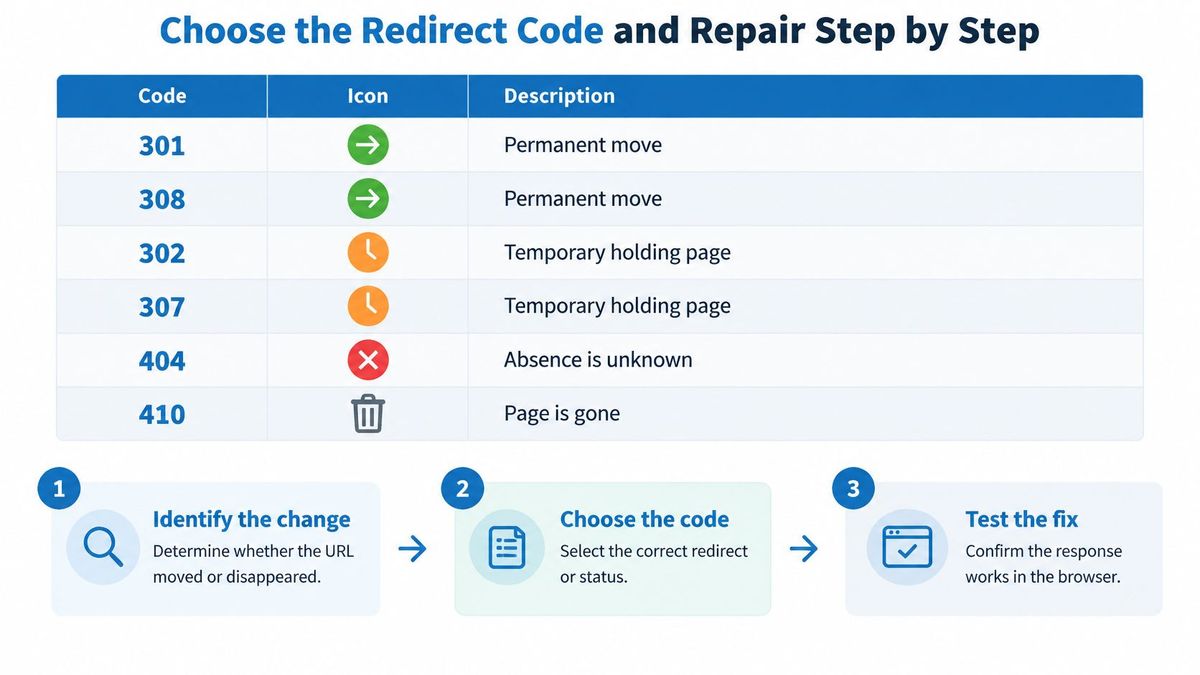
The table forces one of three decisions. Repair the source when the target is valid. Use 301 or 308 only when a close, lasting replacement exists. Otherwise return a real 404 or 410 with useful navigation and search. Don't force every row into a redirect, and don't start the click-by-click repair until the failure type is settled.
Choose the Redirect Code and Repair Step by Step#
| Code | Use it when | What it signals |
|---|---|---|
| 301 | The page or site has moved for good | Permanent; target can become canonical |
| 308 | Same permanent move, and the request method must stay unchanged | Permanent, like 301 |
| 302 | The change is temporary, such as a holding page | Temporary; source URL can keep its search presence |
| 307 | Temporary move, and the request method must be preserved | Temporary, like 302 |
| 404 | No matching resource, and it is not certain the page is gone for good | Not found; not a move |
| 410 | The resource is known to be gone with no replacement | Gone; do not invent a target |
Pick the code once, based on two questions. Has the resource moved permanently, and does a genuine replacement exist? If both answers are yes, use a permanent redirect. If the move is temporary, don't borrow a permanent code because it feels stronger. If no replacement exists, an honest error response beats an invented destination.
Google Search documentation on site moves with URL changes[4] defines HTTP 301 and 308 as permanent-move responses, says Google uses the redirect target as a signal for canonical indexing, and recommends permanent redirects such as 301 or 308 when a site or page has permanently changed location.
Worked Example With a Moved Product#
Say /shoes/runner-2024 now lives at /shoes/runner. The old address appears in reviews, emails, and search results. The product is the same, the move is permanent, and the replacement is exact. That's a clean case for one 301 or 308, not a homepage redirect and not a temporary code you'll forget to revisit.
- Reproduce the failure: Open
/shoes/runner-2024in a private window and with a redirect checker. Record every hop and the final code so you know whether you're seeing a clean 404, a chain, or a soft error page. - Rule out an outage: Confirm the hostname resolves, the certificate is valid, HTTPS answers, and the expected port responds. If the whole host is failing, stop and restore service.
- Check the address itself: Test encoding, case, trailing slash, and query handling. If a small correction makes the page answer, edit the source links you control and don't add a redirect for a typo.
- Protect public copies: If the shared address is a branded short link or a QR code already in circulation, keep that public URL and change only its destination to
/shoes/runner. - Build the URL map: Pair
/shoes/runner-2024with/shoes/runner. For a larger move, map every old URL to its most relevant new page individually. Never send a whole retired section to the homepage because mapping takes longer. - Publish one permanent hop: Create a single 301 or 308 from the old URL to the new one. Forward the path and query string where they identify variants, sizes, campaign tags, or deep-link destinations.
- Crawl the old set: Confirm each old URL reaches a final 2xx response in one hop. Test representative deep links with query strings, then rescan after CDN and browser caches expire.
Choose Between the Permanent and Temporary Pairs#
For ordinary page moves, 301 is the familiar choice and works well. 308 carries the same permanent meaning while requiring the request method to stay unchanged, which matters when a form submission or API-style request must not be converted during redirection. The same distinction separates 302 from 307 for temporary moves.
If you're unsure whether a change is permanent, read a detailed comparison of 301 and 302 redirects before publishing the rule. Delaying a permanent redirect by a day is better than flipping codes repeatedly while a team decides whether the old page is coming back.
Habits That Keep the Repair Repaired#
We recommend keeping permanent redirects in place indefinitely after a website migration, because external backlinks, bookmarks, and indexed URLs may continue sending traffic for years. Removing a rule because the launch project closed recreates the broken link for every copy you don't control.
Don't flip a finished 301 to 302. That changes the signal from a lasting move to a temporary one. Don't stack a new rule in front of an old rule when a page moves again. Point the original URL directly at the current destination and remove the intermediate hop.
Review four measures each quarter:
- 4xx volume: Confirm repaired URLs have stopped producing client errors.
- Final 2xx share: Check that old addresses end on successful responses, not error templates.
- Chain length: Count how many repaired URLs now resolve in one hop.
- Referral recovery: Watch whether traffic from partners, campaigns, and old citations returns.
Those measures tell you whether a fix became an operational repair or merely a new rule in a config file. A redirect that nobody crawls after launch is an assumption, not a fix.
When the Page Loads but the Claim Is Gone#
A 200 response confirms that a page loaded, not that it still supports the claim linked to it. The destination may have been rewritten, paywalled, narrowed to a category page, or replaced with unrelated content. The server check passes while the reference fails.
This is reference rot. It affects citations, compliance references, product specifications, pricing evidence, and support documentation. Readers follow a link expecting evidence for a specific claim; they may find that the evidence has moved or disappeared.
A 2025 longitudinal study of medical-journal references[5] found that the share of cited web resources no longer accessible rose from 27.2% three years after publication to 41.9% five years after publication, across 992 articles published in 2018.
We checked this guide's own sources#
On 3 November 2026 we requested each of the five sources cited in this guide once with curl from a server in Columbus, Ohio, and recorded the status code and the number of redirects. Four answered 200 directly, with no redirect. The journal article answered 403 to the scripted request, although the article itself is still published: a block on automated clients, not a missing page, which is exactly why a 403 needs a human look before anyone calls a link broken.
| Source | Status | Redirects |
|---|---|---|
| Pew Research Center report (PDF) | 200 | 0 |
| RankEngine Shopify guide | 200 | 0 |
| IANA status code registry | 200 | 0 |
| Google Search Central site-move guide | 200 | 0 |
| Taylor & Francis journal article | 403 | 0 |

Run a Separate Integrity Pass#
A status-code check asks whether the server answers. An integrity check asks whether the destination still supports the sentence that links to it. Check important citations and factual claims, not just URLs returning errors.
- Read the surrounding sentence: Record the precise claim the link should support, including any date, product, method, or population.
- Inspect the destination: Search the page for the claim. A title or opening paragraph may look relevant even if the supporting detail has moved or vanished.
- Classify the change: Determine whether the page is temporarily unavailable, the relevant section moved, the content narrowed, or the destination now covers something else.
- Keep precise pointers: If the evidence remains on the page, preserve its anchor and necessary query parameters so readers can reach it directly.
- Replace or remove carefully: If the claim is gone, find a closer source or an archived copy. If neither supports it, revise the sentence or remove the citation.
A generic redirect does not repair a missing source. Sending readers to a publisher's homepage may produce a successful response, but it does not restore the evidence behind the claim.
Use two checks: automated monitoring for status changes and redirect chains, plus periodic human review for relevance. Prioritize destinations supporting citations, regulated claims, or important customer decisions. Reviewing every outbound link monthly may not be practical.
Record the integrity result alongside the status code: supported, moved within page, replacement needed, or claim removed. That distinction keeps a 200 from being treated as proof that a link still does its job.
Decide What to Keep Under Your Own Domain#
End with a decision for each broken URL, not a pile of undifferentiated fixes. Three outcomes cover most inventories.
If the broken address sits on a page you edit and the target still exists, change the href and stop. That's the cheapest and cleanest repair. If the URL is already printed, shared, bookmarked, or indexed, keep the public address and change only where it points. If a whole path moved, keep one permanent 301 or 308 per old URL, with path and query forwarding, for as long as outside links may arrive.
When Scattered Rules Start Failing#
A handful of redirects in one server config is manageable. Trouble starts when campaign links sit in one shortener, QR destinations in another tool, migration rules in server files, and nobody owns the combined list. Teams then duplicate rules, create chains, or remove redirects they no longer recognize.
That's the point where consolidating branded links, QR codes, and migration redirects on domains you own becomes practical. RedirHub's domain redirects support permanent 301 and 308 moves with path and query forwarding on every plan, its MCP server can trace any URL's redirect chain hop by hop, and on Pro and Enterprise, redirect monitoring checks the health of the destination behind each redirect.
For a planned address change, work through the implications in a guide to changing a domain without losing SEO before you publish new public URLs. Prevention is cheaper than reconstructing an old-to-new map after partners have copied the wrong address.
Take the inventory you built and mark every row as source edit, destination change, permanent redirect, or 410. Move the permanent set onto a domain you control, assign an owner, and schedule the next scan. The next site move then becomes a destination update, not a reprint, a partner outreach project, or another round of dead campaign traffic.
Find the Broken Hop Before Your Visitors Do
Paste any URL into the free redirect checker to see every hop, its status code and where the chain ends.
Open the Redirect CheckerSources
- [1]When Online Content Disappears (Pew Research Center, 2024)
- [2]Shopify Broken Link Checker: Fix 404s Fast (RankEngine)
- [3]Hypertext Transfer Protocol (HTTP) Status Code Registry (IANA)
- [4]Site Moves and Migrations (Google Search Central)
- [5]Web references are not eternal (Current Medical Research and Opinion, 2025)
Frequently asked questions
Start by finding out why it fails. If the link sits on a page you edit and the target still exists, correct the link itself. If the address is already printed, shared or indexed, keep it and add one permanent 301 or 308 redirect to the closest matching page.
No. A homepage redirect makes the click load, but a visitor who wanted a specific page lands somewhere generic and usually leaves. Redirect to the closest genuine replacement, or return a 404 or 410 when none exists.
Use 410 when you know the page was removed for good and nothing replaces it. A 404 only says that nothing matches the URL, without saying whether the absence is temporary or permanent.
Keep permanent redirects indefinitely. Backlinks, bookmarks, printed QR codes and indexed URLs can keep sending visitors for years, and removing the rule breaks every copy you don't control.
Yes. A page can return 200 and still fail the reader, either as a soft 404 error template or because its content no longer supports the claim that linked to it. Check important citations by reading the destination, not just its status code.

Leo Astarothman is the Brand & Content Lead at RedirHub, where he shapes the company's visual identity, educational content, product experiences, and marketing strategies. He also specializes in system design. Simplifying complex redirect infrastructure into practical resources, product experiences, and campaigns that help businesses understand and adopt modern redirect management.
Related Articles
View All Articles