
Direct Answer
A wildcard subdomain redirect sends every subdomain of a domain (*.oldbrand.com) to a new address with one rule, instead of one redirect per subdomain. It needs two layers: a wildcard DNS record (host *) that sends all subdomains to a server that can redirect, and a redirect rule on that server, usually a 301 that keeps the path. You can set it up at Namecheap, in a Cloudflare Redirect Rule, on your own NGINX or Apache server, or in RedirHub on the Pro and Enterprise plans.
Wildcard subdomains are useful when a domain has many subdomains you can't list one by one: subdomains created by users, an old brand with shop., blog. and help. hosts, or typos people still type. This guide explains what a wildcard redirect is, then shows four ways to set one up. For pattern rules on paths (for example everything under /old-blog/), see our guide to wildcard redirects for paths and servers.
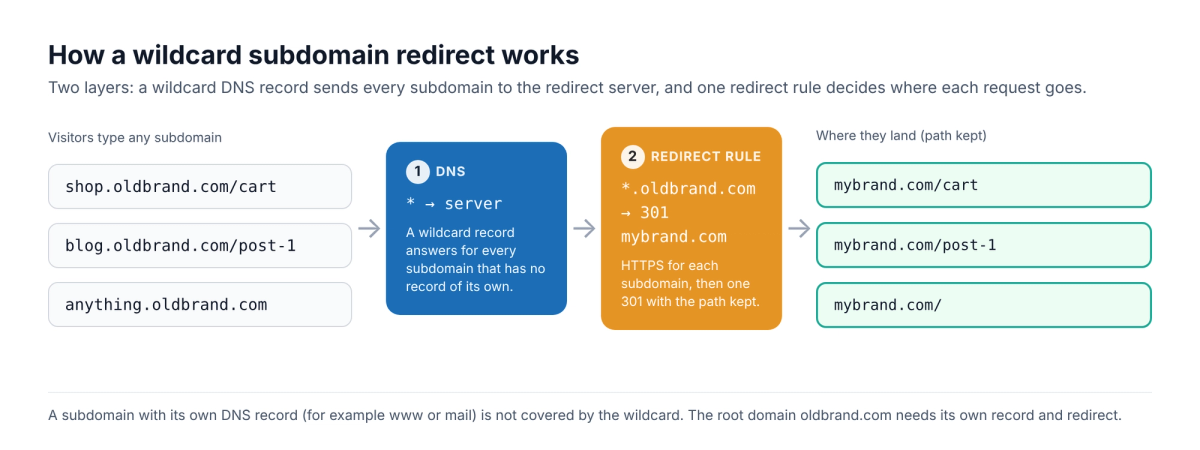
What is a wildcard redirect?#
A wildcard redirect is one rule that matches a pattern instead of a single exact address. For subdomains, the pattern is *.oldbrand.com: it matches shop.oldbrand.com, blog.oldbrand.com and any other name in front of the domain, and sends each request to the destination you choose with a 301 (permanent) or 302 (temporary) status.
A wildcard DNS record on its own does not redirect anything. DNS only decides which server answers for a name; the redirect is an HTTP response from that server. That is why every method below has a DNS part and a rule part. Keep these rules in mind:
- The root is separate. A wildcard record does not cover oldbrand.com itself. Add the root as its own record and redirect.
- Existing subdomains win. A subdomain that has its own DNS record (for example mail or www) is answered by that record, not by the wildcard.
- Deeper names can match. On NGINX, for example, *.example.org also matches www.sub.example.org.
- HTTPS needs a certificate for each name. Visitors who type https:// see a warning unless the redirect server has a certificate covering that subdomain. A wildcard certificate from Let's Encrypt can only be issued with the DNS-01 challenge.
Option 1: Namecheap wildcard redirect#
Namecheap supports a wildcard URL Redirect record when the domain uses Namecheap BasicDNS, PremiumDNS or FreeDNS:
- Sign in to Namecheap, open Domain List and click Manage next to the domain.
- In the Redirect Domain section, click Add Wildcard Redirect.
- Enter the Destination URL and click Save Changes.
- Open the Advanced DNS tab, find the URL Redirect record with host
*, and set its type to Permanent (301) if the move is permanent. Namecheap's Unmasked option is a 302.
Namecheap says new records normally take about 30 minutes to work. For HTTPS, Namecheap's guide says a redirect between two domains over HTTPS needs SSL certificates installed on both, so test an https:// subdomain before you rely on it. Our Namecheap redirect guide covers the HTTPS side in more detail.
Option 2: Cloudflare Redirect Rule with a wildcard pattern#
If the domain's DNS is on Cloudflare, a Single Redirect rule can match every subdomain. Cloudflare only applies the rule to traffic it proxies, so the subdomains need a proxied DNS record (for example a * record with the proxy turned on).
- In the Cloudflare dashboard, open Rules > Overview.
- Click Create rule and choose Redirect Rule.
- Under When incoming requests match, select Wildcard pattern and set Request URL to
https://*.oldbrand.com/*. - Under Then, set Target URL to
https://mybrand.com/${2}(${2}is the path matched by the second asterisk), choose status code 301 and decide whether to preserve the query string. - Click Deploy.
Use ${1} in the target to reuse the subdomain itself, for example https://mybrand.com/team/${1}. Our Cloudflare redirect guide walks through a single-domain redirect step by step.
Option 3: NGINX or Apache on your own server#
Point a wildcard DNS record (*, type A) at your server, install a certificate that covers *.oldbrand.com, then add one rule. NGINX:
nginxserver {
    listen 443 ssl;
    server_name *.oldbrand.com;
    ssl_certificate     /etc/ssl/oldbrand-wildcard.pem;
    ssl_certificate_key /etc/ssl/oldbrand-wildcard.key;
    return 301 https://mybrand.com$request_uri;
}
Apache (with ServerAlias *.oldbrand.com on the virtual host and mod_rewrite on):
apacheRewriteEngine On
RewriteCond %{HTTP_HOST} ^(.+)\.oldbrand\.com$ [NC]
RewriteRule ^ https://mybrand.com%{REQUEST_URI} [R=301,L]
$request_uri and %{REQUEST_URI} keep the path, so shop.oldbrand.com/cart lands on mybrand.com/cart. Test with a 302 first if you are unsure, because browsers cache 301s.
Is your redirect working? Enter your domain. You'll see the status code (301 or 302), where it lands, whether HTTPS is valid, and how fast it answers from Washington, Frankfurt and Tokyo, ranked against every redirect tested in the last 7 days.
Test my redirectOption 4: Wildcard subdomain redirect with RedirHub#
RedirHub runs the redirect for you, so you don't need a server, a wildcard certificate or a proxy. Wildcard subdomain redirects are included on the Pro and Enterprise plans.
- In the RedirHub dashboard, create a new Domain Redirect.
- In Redirect from, enter
*.oldbrand.com. To include the root as well, add oldbrand.com as another source in the same redirect. - In Redirect to, enter
https://mybrand.com. - Under Redirect type, choose 301 · Permanent (or 302 · Temporary for a short-term change).
- Under Paths, choose Keep the path so each old URL lands on the same path, or Everything to one URL.
- Click Create redirect.
- Open Hostnames, select the hostname, click Connect DNS and add the records shown at your DNS provider (Manual), then click I've made the changes.
- Test a few subdomains with the redirect speed test: you should see a 301 and the right destination for each.
RedirHub issues a certificate for each subdomain automatically the first time it is requested, which is the automatic HTTPS you get on every connected domain. On Enterprise, a single wildcard certificate covers *.oldbrand.com instead.
Send each subdomain to its own page#
A wildcard source is often combined with destination variables, so one rule can send every subdomain to a different place. {host.sub} inserts the subdomain that was requested:
textRedirect from: *.example.com
Redirect to:   https://www.example.com/team/{host.sub}

alice.example.com  →  https://www.example.com/team/alice
bob.example.com    →  https://www.example.com/team/bob
You can also keep the subdomain on a new domain with https://{host.sub}.new-brand.com and Keep the path, which is the usual setup for a website migration to a new brand. See Destination URL Variables for the full list of variables.
Namecheap, Cloudflare, your server or RedirHub?#
| Namecheap | Cloudflare | Own server | RedirHub | |
|---|---|---|---|---|
| DNS | Must use Namecheap DNS | Must use Cloudflare DNS, proxied | Wildcard A record to your server | DNS stays where it is; only the records shown in Connect DNS change, and email (MX) keeps working |
| HTTPS on subdomains | Needs SSL installed on both sides | Handled by Cloudflare for proxied hostnames | You install and renew a wildcard certificate (DNS-01) | Issued and renewed automatically for each subdomain |
| Paths | One destination | Pattern with ${1}, ${2} | Rewrite rule | Keep the path, or variables like {host.sub} |
| Network | Not published | Cloudflare's network | Your server's location | Served from 130 global edge locations (PoPs), close to each visitor |
| Redirect types | 301, 302, masked | Permanent or temporary | Any | 301, 302, 307, 308 and frame |
| Clicks | Not shown | Not on the rule | Your server logs | Clicks and unique visitors with bots filtered out, top links per domain |
| Price | Free with the domain | Rule quota depends on your Cloudflare plan | Your server costs and time | Wildcard on Pro ($119/month, 14-day free trial) and Enterprise |
If your domain is already on Cloudflare's proxy or Namecheap DNS and you only need one rule, the free option there is enough. RedirHub is the better fit when you manage many domains in one place, want HTTPS handled for every subdomain without a proxy, or need each subdomain to land on its own page. With bulk CSV import you can add the rest of your domains' redirects in one go.
Before you switch it on#
- Use a 301 for a permanent move and point straight at the final URL, so there is no chain of hops.
- Keep the path where the new site has the same pages; sending everything to the home page loses relevance.
- Redirect the root domain and www too, since the wildcard doesn't cover the root.
- Test real subdomains, including one you never created, over both http:// and https://.
Frequently asked questions
A wildcard redirect is one rule that matches a pattern, such as *.oldbrand.com, instead of one exact address. Every matching subdomain or URL is sent to the destination you choose, usually with a 301 for a permanent move.
No. A wildcard record matches names in front of the domain, like shop.oldbrand.com, but not oldbrand.com itself. Add the root as its own record and redirect; in RedirHub you can add it as a second source in the same redirect.
No. A wildcard DNS record (host *) only decides which server answers for every subdomain. The redirect is an HTTP response from that server, so you also need a redirect rule at Namecheap, Cloudflare, your own server or a redirect service.
Yes. Cloudflare can reuse the matched subdomain with ${1} in the target URL, and RedirHub can insert it with the {host.sub} variable, for example https://mybrand.com/team/{host.sub}.
The redirect server needs a certificate covering that subdomain before it can answer over HTTPS. Use a wildcard certificate on your own server, a proxied record on Cloudflare, or a redirect service that issues certificates for each subdomain automatically.
Pro and Enterprise. Core doesn't include them. Pro has a 14-day free trial.