


QR Codes for Print Campaigns: How to Avoid Dead Links After Printing

To avoid dead links after printing, encode a stable redirect or short link in the QR code instead of the final destination. You can update the redirect when the campaign URL changes, while the printed QR graphic stays the same. Test the code on real devices, keep the redirect active, and monitor the full path throughout the campaign.
The dead-link risk in print campaigns#
QR codes for print campaigns create a promise that can last longer than the web page behind them. A poster, package, menu, or direct-mail piece may remain in circulation for months, while a campaign URL can move, a redirect can be deleted, or a hosted service can stop resolving.
The printed pattern is not the part that usually changes. The risk sits in the destination infrastructure. If a QR code contains a final URL directly, fixing a broken destination may mean replacing every printed asset. If it contains an editable redirect, you have a control point to update and test.
Use a redirect-backed QR code#
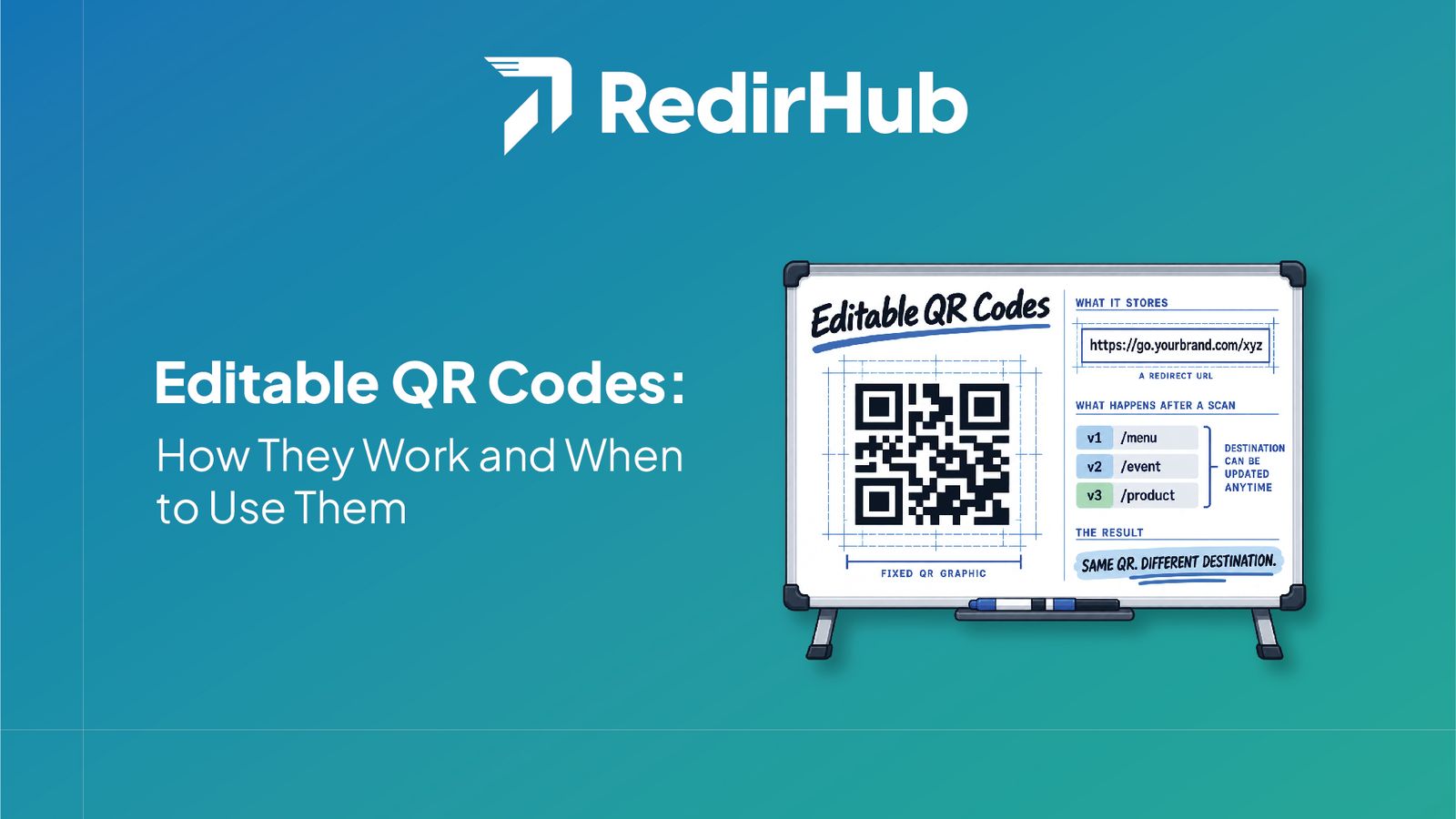
A redirect-backed QR code stores a stable redirect or short-link URL in the QR pattern. When someone scans it, the redirect sends them to the current destination. You can update that destination later while the code printed on the asset stays the same.
This is the practical meaning of an editable or dynamic QR workflow: the QR graphic remains fixed, while the redirect rule can change. RedirHub supports per-link QR generation for an editable redirect; the redirect provides the editable behavior, not a separate standalone dynamic-QR product. See the dynamic QR code workflow for the setup context.
What this changes operationally#
A redirect gives the campaign one address to manage. You can send a product package to setup instructions first, then switch it to a support page. You can update a poster when an event schedule changes, or point a menu to the current ordering page without creating a new code.
It also creates an explicit dependency: the redirect domain, rule, and destination must remain available. An editable QR code does not make a dead redirect healthy by itself.
Monitor link health before customers find the problem#
The first safeguard is a pre-print test: scan the code from more than one phone, confirm the visible domain, follow the redirect, and check the final page on mobile. Repeat the test after changing the destination and whenever the campaign moves to a new phase.
For campaigns where a failure is costly, link health monitoring can provide an additional check on redirect and destination availability. In RedirHub, link health monitoring is available on Pro and higher plans; it should complement, not replace, real-device testing. Review the applicable link monitoring plan requirement before promising alert coverage.
A pre-print checklist for QR codes#
- Encode a redirect or short link that your team controls.
- Use a stable domain and a readable path that identifies the campaign or placement.
- Scan an actual printed sample, not only the digital preview.
- Check the redirect, HTTPS connection, final URL, and mobile layout.
- Record the owner, destination, and change process for the redirect.
Recovering from a broken printed link#
When a printed QR stops working, start by identifying what the phone actually requests. If the code points to a redirect you control, restore or edit that rule, then test the complete path. If it points directly to a deleted page, the QR pattern cannot be edited; you may need to restore the page, add a redirect at the original URL, or replace the printed material.
Also check physical causes. A damaged code, insufficient contrast, small print size, or missing quiet zone can prevent scanning even when the URL works. Test the code in its real lighting and placement, and do not treat a successful desktop test as proof that a package or poster works in the field.
Measure scans as campaign signals#
A scan requests the redirect URL, so redirect analytics may record it as a link click. Use separate redirects for materially different placements—such as a package insert, storefront sign, and conference handout—when you need to compare those sources.
Treat the numbers as directional. Repeat scans, link previews, browser privacy settings, and device behavior mean a click count is not guaranteed to equal the number of unique people. Compare scan activity with the business outcome that matters, such as registrations, orders, or support requests.
The takeaway#
The safest QR code for a long-running print campaign is not simply a code that scans today. It is a code backed by a stable redirect, an owned process for changing the destination, and regular checks that the full path still works. Build that control layer before printing, and a campaign change becomes a redirect update instead of a reprint.
Protect Your Printed Campaigns
Create an editable redirect, generate its QR code, and test the scan before you print.
Create a QR RedirectFrequently asked questions
Encode a redirect or short link that your team controls instead of encoding a destination you cannot update. Test the printed code before launch, keep the redirect active, and monitor the redirect and destination where the campaign warrants it.
Yes, if the QR code encodes an editable redirect or short link. Change the destination behind that redirect and future scans can reach the new page without reprinting the QR graphic.
It is a QR code whose encoded URL points to a redirect rather than directly to the final page. The redirect acts as a control point for updating the destination and, when supported, measuring link clicks.
The redirect, domain, or destination may have been deleted, changed, or allowed to expire. Physical issues such as damage, low contrast, insufficient size, or a missing quiet zone can also prevent scanning.
When a QR code requests a trackable redirect, the platform may record the request as a link click. Treat scan counts as directional campaign data because repeat scans, previews, and privacy settings affect measurement.
RedirHub supports generating a QR code for an editable redirect or short link. The editable redirect provides the dynamic behavior; this should not be described as a separate standalone dynamic-QR product.

Leo Astarothman is the Brand & Content Lead at RedirHub, where he shapes the company's visual identity, educational content, product experiences, and marketing strategies. He also specializes in system design. Simplifying complex redirect infrastructure into practical resources, product experiences, and campaigns that help businesses understand and adopt modern redirect management.