The Right Way to Handle 301 HTML Redirects for Better SEO

Key takeaways
To redirect an HTML page permanently, send an HTTP 301 from your server, CDN or host: Redirect 301 on Apache, return 301 on Nginx, or a rule in a _redirects file or netlify.toml on Netlify. A meta refresh is not an HTTP redirect. The server answers 200 OK and the browser must load the old page before it moves. Google reads an instant (0-second) meta refresh as permanent, so it works as a fallback when you cannot touch the server. Check that each old URL returns a 301 status and a Location header before you rely on it.
To permanently redirect an HTML page, set up an HTTP 301 redirect on your server or host. On Apache, add Redirect 301 /old.html /new.html to your site's .htaccess file. Nginx and Netlify have their own redirect rules. In each case, check that the old URL returns a 301 status and a Location header pointing to the new URL.
An HTML meta refresh is not an HTTP 301. It makes the browser load the old page before moving on, which can slow visitors down. Google treats an instant (0-second) meta refresh as a permanent redirect. A server-side rule is still the better choice: it is faster, it works for every client, and it is easier to test. For a site move, use server-side rules and test every important old URL.
Why Server-Side Rules Beat HTML Redirects#
When managing website migrations or URL updates, many developers look for a way to configure a 301 redirect inside an HTML document. HTTP status codes work at the protocol layer, above the markup: a 301 comes from the server, not from the page. If you are new to the status code itself, start with what a 301 redirect is.
With a server-side redirect, the server replies to the request with 301 Moved Permanently and a Location header that names the new URL. The browser does not render the old page. It requests the new URL straight away. The status code and the Location header are defined in RFC 9110[1].
An HTML redirect works differently. The server first returns 200 OK with the old page. The browser has to download and parse that HTML before the meta tag triggers navigation. That adds a step for every visitor, and the redirect only works for clients that read the markup.
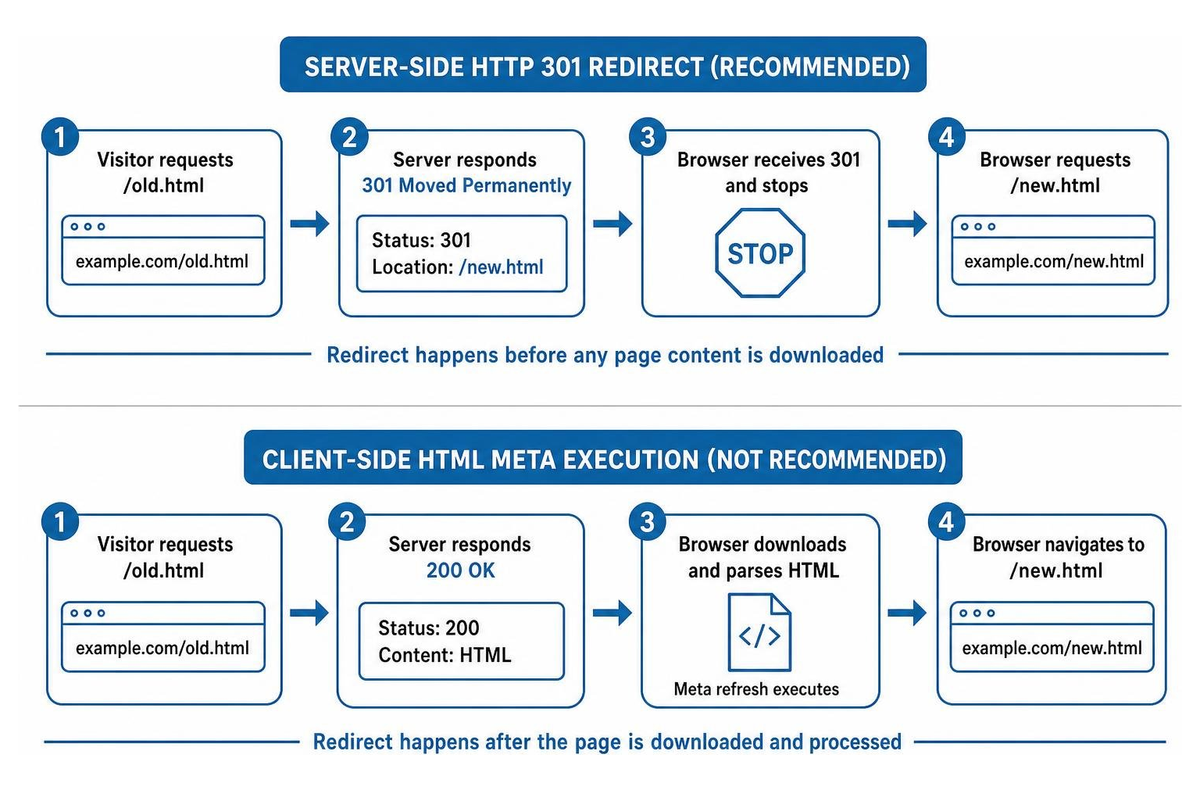
How a Meta Refresh Redirect Works#
A meta refresh tag sits in the head of an HTML document and tells the browser to navigate after an interval. The standard syntax looks like this:
html<meta http-equiv="refresh" content="0; url=https://example.com/target-page">With a zero-second delay, the browser navigates as soon as it parses the tag. Google reads an instant meta refresh as a permanent redirect and a delayed one, with any value above 0 seconds, as a temporary redirect (see Google's redirect documentation[2]). The old page still has to be fetched and parsed first. For the full list of redirect methods RedirHub supports, see redirect methods explained.
Server 301 vs Meta Refresh vs JavaScript#
| Feature | Server-side HTTP 301 | HTML meta refresh | JavaScript (window.location) |
|---|---|---|---|
| HTTP status code | 301 Moved Permanently | 200 OK | 200 OK |
| Where it runs | Server, CDN or proxy | Browser HTML parser | Browser JavaScript engine |
| How Google reads it | Permanent redirect | Permanent if instant (0 seconds), temporary if delayed | Followed after rendering; can be missed if rendering fails |
| What the visitor loads first | Only the redirect response | The old HTML page | The old page and its script |
| What the client needs | Any HTTP client | An HTML parser | A JavaScript engine |
301 vs 302 and What Google Does With Each#
A 301 tells search engines the move is permanent and that the new URL should be treated as the canonical one. A 302 signals a temporary move, so the original URL generally stays canonical. Google applies the same permanent-or-temporary split to meta refresh: instant is permanent, delayed is temporary. For a full comparison, read 301 vs 302 redirects.
SEO and Performance Risks of HTML Redirection#
HTML-level redirects add steps that a server redirect avoids.
When a crawler meets a meta refresh, it has to fetch the old page and parse it before it finds the destination. On a large site migration that is an extra page fetch for every old URL. A JavaScript redirect adds a rendering step on top, and Google notes that rendering can fail, so the redirect may never be seen. Google advises using JavaScript redirects only when server-side or meta refresh redirects are not possible.
Visitors feel it too. The browser has to load the old page before it moves on, and on a slow mobile connection that delay is noticeable. A server-side redirect answers with the redirect itself and no page to load. In RedirHub's own redirect speed benchmark, which times only the redirect response, RedirHub's median time to first byte was 17 ms, averaged over Washington D.C., Frankfurt and Tokyo in the week to 21 October 2026. The test is run by RedirHub and most providers in it have only a few URLs measured, so read it as a guide to relative speed.
Crawlers That Do Not Run Your Page#
Not every client that fetches your URLs is a full browser. Some crawlers and scrapers read the raw HTTP response and do not render the page. A server-side 301 works for all of them, because the redirect is in the HTTP response itself. A meta refresh only works for clients that parse HTML, and a script only for clients that run JavaScript.
Public documentation on which AI crawlers follow a meta refresh is thin, so do not rely on it for pages you want those systems to find. A server-side 301 removes the question.
How to Set Up a 301 Redirect on Common Servers#
Server configuration lets you set permanent redirects without leaving legacy HTML files in your web root. The examples below move a single page.
Apache (.htaccess)#
On Apache with mod_alias, use the Redirect directive. The status can be written as 301 or as the keyword permanent (Apache mod_alias documentation[3]). If you manage many rules, see how RedirHub compares with .htaccess redirects. The single-page form looks like this:
apacheconfRedirect 301 /old-page.html https://example.com/new-pageFor pattern-based changes, such as moving a whole folder, use mod_rewrite. The R=301 flag sets the status, L stops further rules and NC makes the match case-insensitive:
apacheconfRewriteEngine On
RewriteRule ^old-folder/(.*)\.html$ /new-folder/$1 [R=301,L,NC]Nginx#
In Nginx, the return directive inside a server or location block is the simplest way to send a permanent redirect. If you would rather not edit server config for every change, see RedirHub vs Nginx redirects. An exact-match location, written with =, limits the rule to that one URL:
nginxlocation = /old-page.html {
    return 301 https://example.com/new-page;
}
Netlify and other static hosts#
Static hosts often do not give you access to server configuration. Netlify reads redirect rules from a _redirects file or from netlify.toml. Rules in _redirects are processed first, and the first match wins (Netlify redirects documentation[4]). If your rule files grow hard to manage, see RedirHub vs Netlify redirects. In a _redirects file, the ! after the status forces the redirect even if a file exists at the old path:
text/legacy-page.html /modern-page 301!The same rule in netlify.toml:
toml[[redirects]]
  from = "/old-path.html"
  to = "/new-path"
  status = 301
  force = true
If a host gives you no server-side option at all, an instant meta refresh is the fallback, because Google reads it as permanent. Treat it as a last resort and move to a server or edge rule when you can.
Test Your Permanent Redirects#
After you configure a redirect, check that the server sends the right headers. From a terminal, run:
bashcurl -I https://example.com/old-page.htmlThe output should show HTTP/1.1 301 Moved Permanently (or HTTP/2 301) and a Location header with your new URL. Then check for the usual problems:
- Redirect chains: send URL A straight to URL C, not through URL B.
- Redirect loops: make sure the destination does not point back to the source.
- Browser caching: browsers cache 301 responses, so test in a private window or with curl.
To check a whole list of migrated URLs at once, use the redirect checker. If a redirect is not behaving as expected, see why a 301 redirect is not working.
Redirect old pages at the edge
Set up 301 redirects for your old URLs without editing server files, and check each one before you launch. Core and Pro come with a 14-day free trial.
Set up 301 redirectsHandle Redirects at the Server or Edge#
A meta refresh can move a browser, but it is not a substitute for an HTTP 301 response. Google does read an instant meta refresh as permanent, so it is a workable fallback when you cannot change the server. For website migrations, domain changes and individual page moves, set the redirect at the server, proxy or edge layer, then test every important URL.
RedirHub handles redirects at the edge, so you do not maintain configuration files for each URL. Domain redirects on Core, Pro and Enterprise support 301, 302, 307 and 308 redirect types and come with automatic HTTPS. For a step-by-step walkthrough, see setting up URL redirects, or read how to redirect a website to another domain or URL.
Sources
Frequently asked questions
Google treats an instant meta refresh (0 seconds) as a permanent redirect and a delayed one as temporary, so an instant refresh can signal a permanent move. It is still a second-best option: the visitor has to load the old page first, and a server-side 301 works for clients that do not parse HTML. Use a meta refresh only when you cannot set a server-side rule.
Google renders pages and can follow JavaScript location redirects, but rendering can fail, so a JavaScript redirect may never be seen. Google advises using them only when server-side or meta refresh redirects are not possible.
There is little reliable public documentation either way, and crawlers differ. A server-side 301 is the safe choice, because any client that reads HTTP responses follows it without parsing HTML or running JavaScript.
Browsers cache 301 responses, so a changed rule can seem to have no effect. Test in a private window, tick Disable cache in your browser's developer tools, or use curl -I, which does not cache. While you are still settling the final destination, a short Cache-Control max-age on the redirect response limits how long a mistake sticks.
Use a 301 when the page has moved for good and the new URL should be the one search engines show. Use a 302 when the move is temporary and the original URL should stay. The 301 vs 302 guide on this blog covers the differences in detail.

Leo Astarothman is the Brand & Content Lead at RedirHub, where he shapes the company's visual identity, educational content, product experiences, and marketing strategies. He also specializes in system design. Simplifying complex redirect infrastructure into practical resources, product experiences, and campaigns that help businesses understand and adopt modern redirect management.
Related Articles
View All Articles