
RedirHub runs as three separate layers. The control plane is where you create and change links. The global edge network serves every redirect. The monitoring and analytics pipeline records visits and checks your destinations. Each layer runs on its own, so a problem in one does not stop the other two. RedirHub runs on AWS.
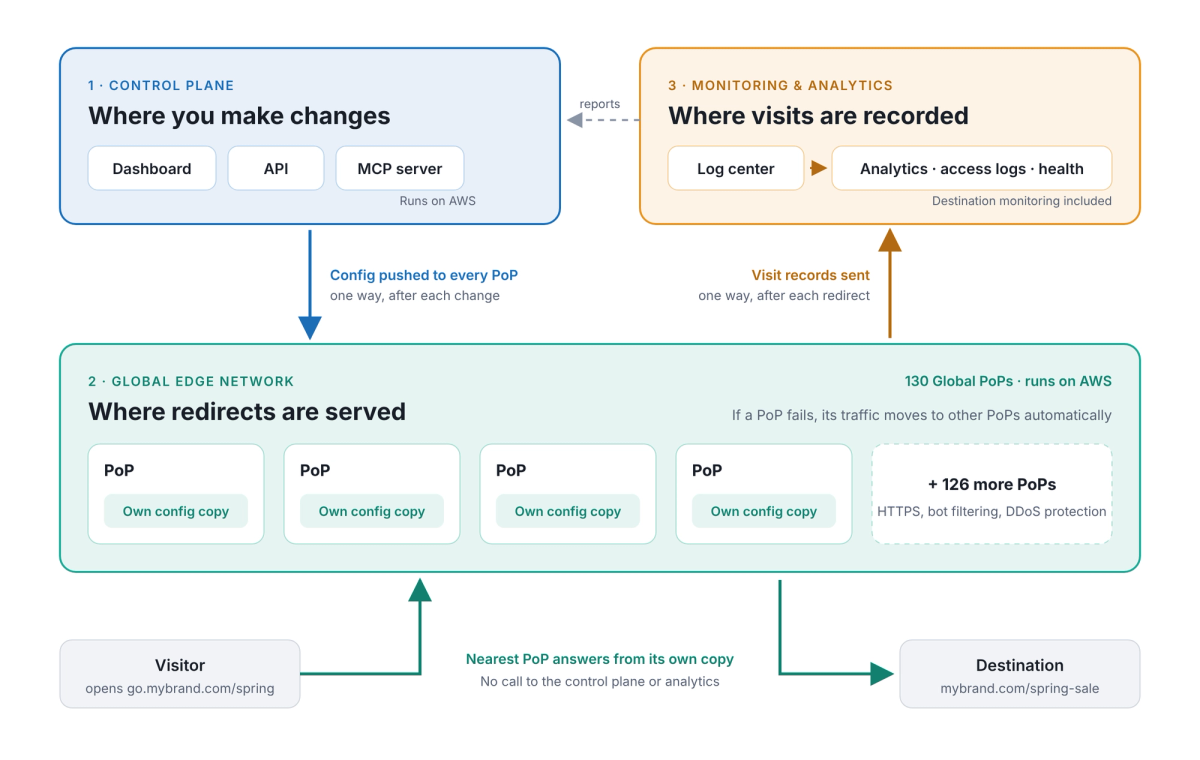
Configuration flows down to every PoP; visit records flow up to the log center. A redirect never waits on either.
1. Control plane: where you make changes#
The dashboard, the API and the MCP server make up the control plane. When you save a change, the control plane pushes the new configuration to every PoP in the edge network.
2. Global edge network: where redirects are served#
RedirHub serves redirects from 130 Global PoPs. Each PoP keeps its own copy of your redirect configuration and answers visitors from it, with automatic HTTPS, bot filtering and DDoS protection. A redirect never calls the control plane or the analytics pipeline.
If a PoP fails, its traffic moves to other PoPs automatically.
3. Monitoring and analytics: where visits are recorded#
After each redirect, the PoP sends a visit record to the RedirHub log center. From there the pipeline builds your click and scan reports and access logs, and runs destination monitoring. If the pipeline is delayed, no visits are lost: the records stay in the log center and your reports catch up once it is back.
What happens if one layer has a problem#
| Layer with a problem | Redirects | Changing links | Reports and monitoring |
|---|---|---|---|
| Control plane (dashboard, API, MCP) | Keep working | Paused until it is back | Keep recording |
| One PoP | Keep working: traffic moves to other PoPs | Keep working | Keep recording |
| Monitoring and analytics | Keep working | Keep working | Delayed, no visits lost |
This separation is part of how RedirHub delivers 99.99% platform uptime. On Enterprise, any SLA is set by your contract. See Product facts for the full list of what RedirHub offers.
Frequently asked questions
No. Every PoP serves redirects from its own copy of your configuration, so redirects keep working. You can make changes again once the dashboard and API are back.
No. Visit records stay in the RedirHub log center, and your reports catch up once the pipeline is back.
Its traffic moves to other PoPs automatically, and visitors keep being redirected.
RedirHub runs on AWS, with 130 Global PoPs serving redirects.