
Your brand, in every link
Short links and dynamic QR codes on the domains you own, run by your whole team. Moving from Bitly or Rebrandly? Import your links yourself or with our support team, and every URL you already shared keeps working.

Try the live demo, no sign-up →
Trusted by teams that run links on their own domains
- Global PoPs
- 130
- global average response time*
- ~90ms
- uptime
- 99.99%
* Average total time (DNS lookup, connection, TLS handshake and response) to edge.redirhub.com, measured by updown.io from 8 locations. See the live status page
Switch without breaking a link
Bring your links. Every shared URL keeps working.
Links in email signatures, ads and printed QR codes can’t be re-shared. So the move keeps every path and destination exactly as it is.
- 1Bring your exportA CSV from Bitly, Rebrandly, Short.io or any other tool. Import it yourself, or send it to our support team and we help you through it.
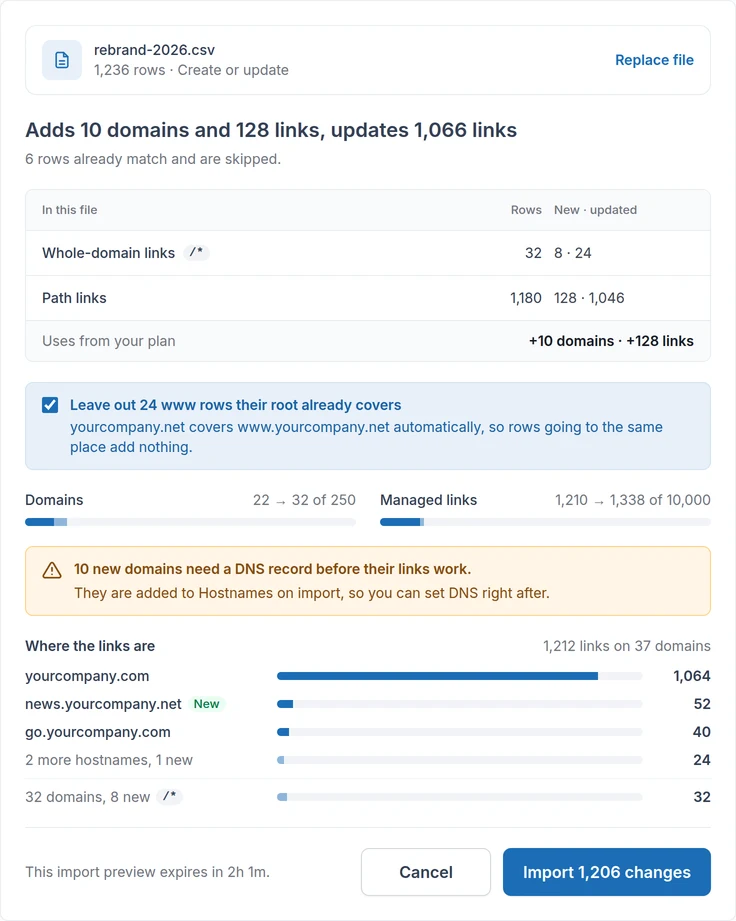
- 2Every link keeps its pathBulk import keeps the same short paths and destinations, QR codes included. You review before anything goes live.
- 3Point the domain, and you’re doneOne DNS change. HTTPS is issued automatically, and the old links answer from RedirHub.
Built for the whole team
One workspace for every domain, link and code your company runs.
Every domain in one workspace
go.mybrand.com, mybrand.link and each regional domain side by side. Core includes 25 domains, Pro 250.
Roles for every teammate
Viewer, editor or manager on each workspace. Pro adds unlimited members and an audit log; Enterprise adds SSO.
History on every link
See who changed a destination, when, and from where: dashboard, API or MCP.
QR codes on the same links
Dynamic QR codes with your logo and colors. Never reprint; change the destination instead.
Bulk, API and MCP
CSV import and export, bulk edits with a preview, a REST API, and an MCP server for AI assistants.
Clicks you own
Sources, devices and countries per link and campaign, with UTM tags kept through the redirect.

Change the destination of many links in one step, with a preview before anything changes.
One link, every channel
The same branded link in print, ads and inboxes. Change where it goes any time.
- Email signatures
- SMS & messaging
- Paid social
- Packaging QR codes
- Receipts & inserts
- Podcasts
- Signage & events
“I like RedirHub because it's simple and straightforward with no fluff. The redirect tool is particularly useful, especially for mass URL redirection and capturing old traffic from an unused subdomain to our main site.”
- URL rules managed
- 10,000+
- visits redirected each month
- 150k+
- workspace for the whole team
- One
“it was very easy to setup and use and provides valuable reporting on how effective the redirects are.”
Comparing platforms?
Side by side, with prices checked
FAQ