



To connect a domain redirect, update the DNS record for the hostname at its authoritative DNS provider so requests reach RedirHub. RedirHub then returns the configured 301 or 302 redirect. Use the exact A, CNAME, and—when shown—TXT verification values from your dashboard, and keep the hostname DNS-only without a proxy or CDN.
To redirect a domain through RedirHub, point that hostname’s DNS to RedirHub first. RedirHub then receives the web request and returns the HTTP redirect you configured for the destination.
yourdomain.com → DNS → RedirHub → destination.com
DNS itself does not perform a URL redirect. DNS tells browsers where to send a request; RedirHub handles the actual 301 or 302 HTTP redirect.
Why does RedirHub need DNS changes?#
A domain redirect has three parts: DNS points a hostname to RedirHub, RedirHub receives the HTTP request, and RedirHub returns the configured 301 or 302 redirect with the destination URL. The DNS record connects the hostname to the redirect service; it is not a “DNS redirect.”
Where do I change my DNS records?#
Make DNS changes at the authoritative DNS provider—the service named by your domain’s nameservers. That can differ from the company where you registered the domain. For example, a domain registered with GoDaddy but managed through Cloudflare must be updated in Cloudflare.
How do I find my DNS provider?#
Check your domain’s nameservers in your registrar account or with a nameserver lookup. The provider operating those nameservers is where you add or update the record.
Provider guides: Cloudflare,
Google Cloud DNS, and
Which DNS record should I use?#
Always use the DNS values shown in your RedirHub dashboard, as the exact configuration can depend on your setup. Typical choices are:
- example.com (root or apex domain): A record
- www.example.com: CNAME record
- go.example.com: CNAME record
- links.example.com: CNAME record
A record#
An A record points a hostname directly to an IPv4 address and is commonly used for a root or apex domain such as example.com. When you use an A record or an apex domain, RedirHub may also require a separate TXT record to verify domain ownership.
CNAME record#
A CNAME points one hostname to another hostname and is typically used for subdomains such as www.example.com or go.example.com. See What DNS types can I use? for the supported record types and additional requirements.
How to connect your domain to RedirHub#
- Create your redirect in RedirHub.
- Open its hostname or domain configuration.
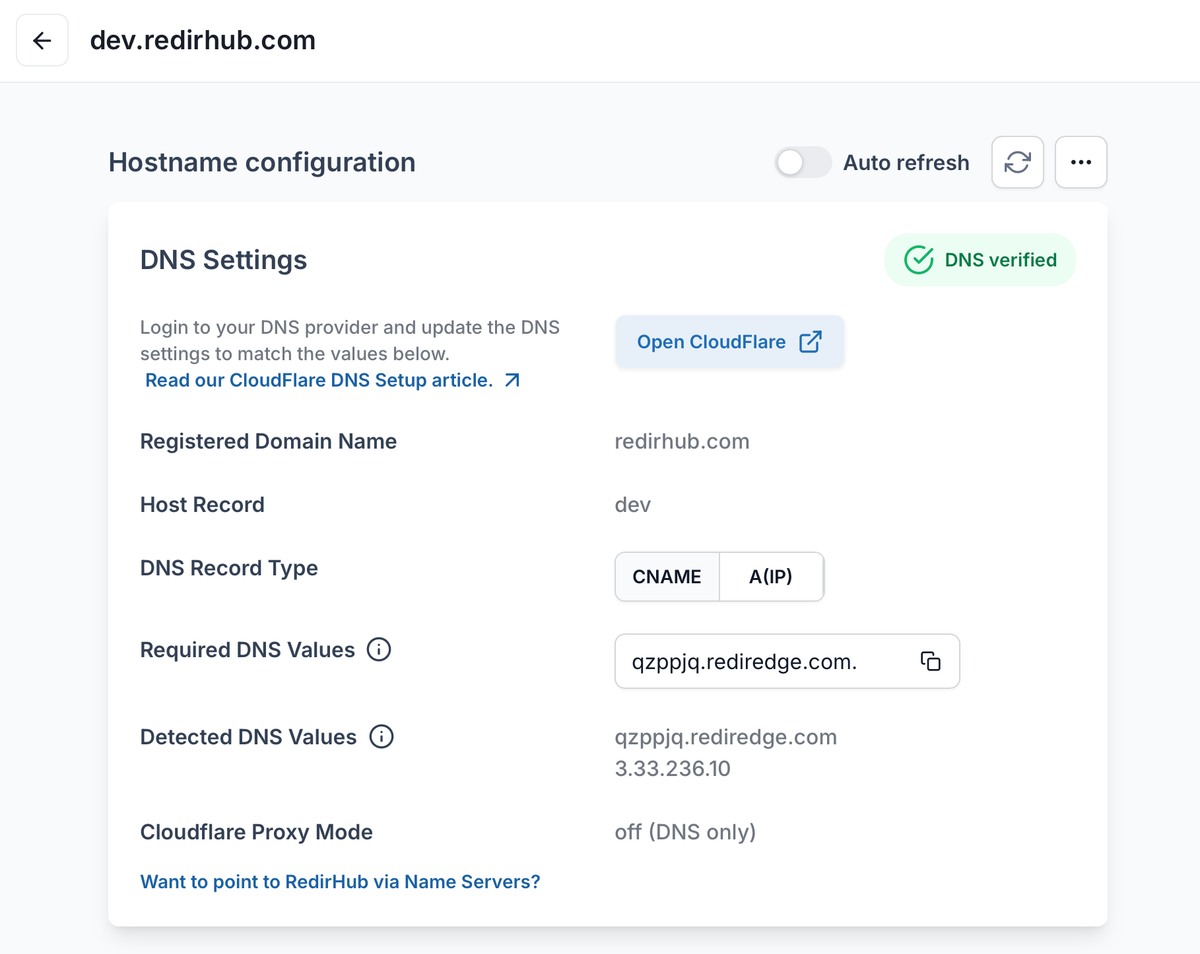
Use the exact records shown for your hostname. TXT verification values are domain-specific.
- Copy the DNS record RedirHub shows for that hostname.
- Open your authoritative DNS provider.
- Add or update the required A or CNAME record.
- For an A record or apex domain, also add the TXT ownership-verification record shown in your RedirHub dashboard. Use the exact host and value displayed there; the TXT value is specific to your domain.
- Return to RedirHub and wait for DNS verification.
- After direct DNS verification, RedirHub can provision HTTPS for the redirect and handle future renewal.
Keep your RedirHub hostname DNS-only#
To issue and renew HTTPS certificates automatically, RedirHub must receive certificate-validation traffic directly. Do not place a CDN, reverse proxy, or TLS-terminating load balancer in front of a hostname connected to RedirHub.
If you use Cloudflare, create the required DNS record but keep Proxy status set to DNS only (gray cloud). An orange-cloud proxy can prevent validation and cause certificate issuance or renewal to fail.
Will changing DNS affect my website or email?#
Changing an A or CNAME record affects traffic for the specific hostname you modify. Changing example.com affects web traffic for example.com; changing go.example.com normally affects only that subdomain.
Will this affect email?#
Usually not, as long as you do not change MX records, mail-related DNS records, or nameservers. Do not delete or replace unrelated DNS records unless RedirHub specifically instructs you to do so.
How long do DNS changes take?#
Most changes take a few minutes to a few hours. TTL settings, recursive DNS caches, and provider caching can extend this to up to 24 hours. See How long do DNS changes take?.
Why is my domain redirect not working yet?#
Check the following before changing your configuration again:
- The DNS record has not propagated yet.
- The configured hostname does not match the DNS record.
- An old A, AAAA, or CNAME record is still in place.
- The record was changed at the registrar instead of the authoritative DNS provider.
- A Cloudflare proxy, CDN, or another TLS-terminating layer is in front of the hostname.
- The redirect has not been configured or activated in RedirHub.
For the full checklist, read Troubleshooting new redirects.
Ready to connect your domain?
Open your redirect and use the DNS records shown under its hostname configuration.
Open RedirHubFrequently asked questions
Not by itself. DNS directs a hostname to a service. The actual URL redirect happens over HTTP, after RedirHub receives the request.
Root or apex domains commonly use an A record, while subdomains commonly use a CNAME record. Always follow the DNS configuration shown in your RedirHub dashboard.
For an A record or apex domain, RedirHub may require a TXT record to verify domain ownership. Add the exact host and TXT value shown in your RedirHub dashboard; do not reuse a value from another domain.
Yes. RedirHub can receive requests for a connected domain and return the configured redirect, so you do not need traditional web hosting solely to redirect that domain.
Usually, no. Most RedirHub setups work with your existing DNS provider by adding or updating the required DNS records.
Changing a web-related A or CNAME record normally does not change MX records. Leave unrelated email DNS records untouched.
Once the domain is correctly connected, verified, and reachable directly for certificate validation, RedirHub can provision HTTPS for the redirect.
Reviewed By

Krisbo
Krisbo is the founder of RedirHub, a modern URL redirection platform built for marketers, developers, and growing businesses. He writes about SaaS, growth, AI, infrastructure, and the systems behind building internet products at scale.