
redirect.pizza Review 2026: Pricing & Alternatives
A fair comparison of redirect.pizza and RedirHub using current pricing and documentation, including where redirect.pizza is the better buy.
We build RedirHub. We point out where redirect.pizza is the better buy, and how to check against your own setup.
The short answer
Choose RedirHub if
- You manage a growing portfolio where apex and www both need coverage
- You need hundreds to thousands of individually managed migration mappings
- You want domain capacity and managed-link capacity to scale separately
Choose redirect.pizza if
- You have a small number of straightforward redirects
- Its Free or lower-cost plans cover your hostname and path limits
- Its Terraform, Zapier and redirect-focused automation fit your workflow better
The quick answer#
redirect.pizza and RedirHub are both capable redirect platforms. redirect.pizza has the stronger low-cost entry: its Free plan supports five source hostnames, while Basic costs $14.95/month for 15. RedirHub Core starts at $49/month and includes 25 domains plus 2,500 managed links.
The better value changes when the setup grows. redirect.pizza counts a root domain and its www version as two source hostnames. RedirHub covers that pair as one domain and counts individually managed paths separately. That makes RedirHub more attractive for many paired domains or large path-level migrations.
A few straightforward domain redirects
Free covers 5 source hostnames. Basic covers 15 for $14.95/month.
A portfolio where both apex and www must work
RedirHub counts the root and www pair as one domain. redirect.pizza counts them separately.
Hundreds or thousands of individual URL mappings
Core includes 2,500 managed links for $49/month and can expand to 10,000 for $89.
Advanced redirect automation and integrations
Both provide API and MCP access. redirect.pizza also documents Terraform, Zapier and API bulk imports via CSV or JSON with status polling.
The dashboards side by side#
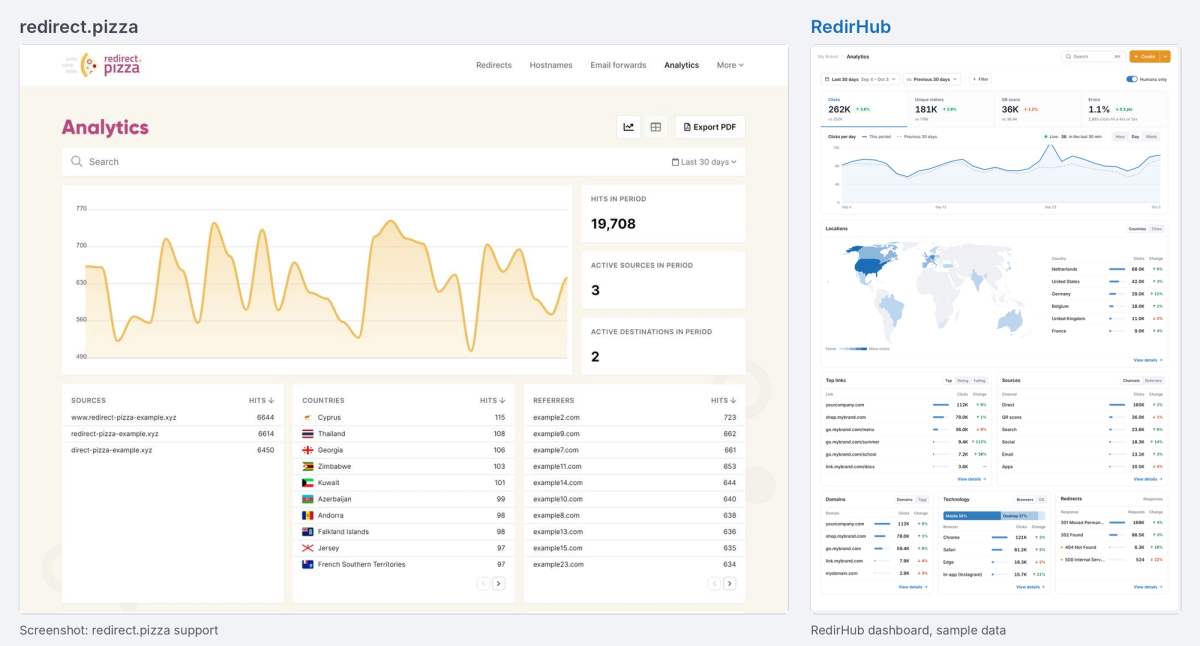
redirect.pizza's analytics overview, from redirect.pizza's support docs (left), next to RedirHub's Analytics page (right)
redirect.pizza's analytics overview, shown on the left from its analytics guide, has hits per day, totals for hits, active sources and active destinations, and top-10 lists of sources, countries and referrers. You narrow it by typing field:value filters into the search box, and Business adds raw per-request logs. Analytics history is 3 months on Basic, 6 months on Pro and 12 months on Business.
RedirHub's Analytics page shows each number next to its change from the previous period: clicks, unique visitors, QR scans and the share of clicks that ended in an error, with the previous period drawn as a dashed line on the chart. Below it come a world map of clicks by country, top links with rising and falling tabs, sources by channel or referrer, domains and tags, browsers and devices, and redirects by response code. In the example, clicks are 262K, up 3.8%, and 1.1% of them hit a 4xx or 5xx. Filters come from a menu rather than typed syntax: pick a field such as country, tag or referrer, tick the values (each shows its click count) and the whole page follows. Analytics history is 90 days on Core and 6 months on Pro.
You can try it in RedirHub's read-only demo dashboard, no sign-up needed.
1. A few simple domain redirects#
For a personal project or a small collection of domains, redirect.pizza is usually the cheaper choice.
Its Free plan includes 5 source hostnames, 250,000 monthly requests and 10 unique paths per hostname.[1] Basic costs $14.95/month and includes 15 source hostnames, 1 million monthly requests and 100 unique paths per hostname. Free and Basic each allow one team member.
RedirHub Core starts at $49/month.[2] That higher entry price includes 25 domains and 2,500 managed links, with unlimited request traffic. It is designed for a broader workload, but you may not need that capacity for a handful of simple redirects.
Our call
Choose redirect.pizza if the free or Basic limits comfortably cover the whole job.
Paying for unused RedirHub capacity would not make sense.
2. A portfolio of brand, typo or retired domains#
This comparison depends on how many hostnames you need to connect.
redirect.pizza defines a source hostname as a hostname with its own SSL certificate[3]. For example, example.com and www.example.com are two source hostnames. Paths under the same hostname share that hostname allowance. A wildcard source counts as 10 source hostnames.
RedirHub counts a root domain and its www version together as one domain. A different subdomain counts separately. A basic whole-domain redirect uses domain capacity and no managed links.
Consider two examples where every root domain and its www version must redirect:
| Portfolio | RedirHub | redirect.pizza |
|---|---|---|
| 25 root domains plus www | 25 domains: Core at $49 | 50 source hostnames: Pro at $55 |
| 100 root domains plus www | 100-domain Core tier at $89 | 200 source hostnames: Business at $219 |
Managing 100 root domains plus www? See what your current setup would cost on RedirHub.
Calculate your setupThese examples assume basic whole-domain redirects and no additional subdomains. If you only redirect one hostname per root domain, redirect.pizza can be less expensive: its Pro plan includes 100 source hostnames for $55/month.
Our call
Choose RedirHub when both apex and www coverage causes the source-hostname count to multiply, especially across a growing portfolio.
Choose redirect.pizza when you need one hostname per domain and its lower tier covers the portfolio.
3. A website migration with individual URL mappings#
A page count is not automatically a mapping count. If every path stays the same after a domain move, path forwarding may handle the migration with a basic domain redirect. Individual mappings matter when old paths need different destinations.
For 500 independently configured paths on one source domain, RedirHub Core costs $49/month. redirect.pizza Basic stops at 100 unique paths per hostname, so this workload needs Pro at $55/month. The price difference is small.
At 10,000 independently configured paths, RedirHub Core with 10,000 managed links costs $89/month. redirect.pizza Pro allows 5,000 unique paths per hostname, so the next published tier is Business at $219/month with 25,000 paths per hostname.
| Individual mappings on one domain | RedirHub | redirect.pizza |
|---|---|---|
| 100 | Core: $49 | Basic: $14.95 |
| 500 | Core: $49 | Pro: $55 |
| 2,500 | Core: $49 | Pro: $55 |
| 10,000 | Core with added link capacity: $89 | Business: $219 |
Operational workflow matters as well as capacity. redirect.pizza’s API import[4] accepts CSV or JSON, exposes import-status polling and can update a destination when an existing source is re-imported. This is useful for repeated or automated migration batches. RedirHub provides bulk link import/export and a REST API, but buyers should not assume the two APIs have identical batch behavior. redirect.pizza does not publish a maximum API-import batch size on the reviewed official surface.
Our call
redirect.pizza Basic is the better buy for no more than 100 paths on one hostname.
The two are close from 101 to 2,500 mappings. RedirHub has the clearer price advantage once the mapping set exceeds redirect.pizza Pro’s 5,000-path limit. Choose redirect.pizza when its newly documented API import, Terraform or Zapier workflow reduces more operational work than the capacity-price difference.
Capabilities that may change the decision#
The two products overlap more than you might expect. Both offer automatic HTTPS, global delivery, import and export, path and query forwarding, 301/302/307/308 redirects, API access and MCP access[5]. Since October 6, 2026, redirect.pizza also documents REST API bulk imports with CSV or JSON payloads, status polling and destination updates for existing sources.
redirect.pizza Pro adds regex matching, dynamic destinations, redirect flattening, wildcard subdomains, automatic DNS, email forwarding and destination monitoring. Business adds WAF, access control, raw analytics and SAML SSO.
RedirHub combines domain redirects with branded links, dynamic QR codes and website-migration mappings under one managed-link model. Core includes the capacity most teams need; Pro adds advanced routing, monitoring, longer analytics history and additional controls.
Do not choose between them from a feature checklist alone. Choose based on the capacity unit, the plan where your required feature appears and the way your domains are configured.
Switching from redirect.pizza to RedirHub#
Before switching, check whether your current workflow depends on redirect.pizza’s API bulk import, Terraform or Zapier automation. Map that workflow to RedirHub’s bulk import/export and REST API before changing DNS. Then export a representative set of redirects, import it into RedirHub and test it on a hostname you control. Check apex and www behavior, path and query forwarding, status codes, wildcard rules and unusual ports before changing production DNS.
A provider change does not guarantee SEO results. Preserve the intended destinations, avoid unintended chains and verify important URLs after cutover.
Choose RedirHub if you manage a growing portfolio where apex and www both need coverage
You need hundreds to thousands of individually managed migration mappings and want domain capacity and managed-link capacity to scale separately.
Start free trialFrequently asked questions
For small setups, yes. redirect.pizza offers a free plan and a $14.95 Basic plan. RedirHub becomes more competitive when you need many paired apex/www domains or larger sets of individual mappings.
No. redirect.pizza counts them as two source hostnames. RedirHub covers a root domain and its www version together as one domain.
A basic whole-domain redirect uses domain capacity and no managed links. Individual migration mappings, branded links and dynamic QR codes use managed-link capacity.
Yes. redirect.pizza documents MCP access on all plans, using its API tokens and scopes. RedirHub also provides an MCP server.
Yes. Its documented REST import endpoint accepts CSV or JSON, supports status polling and can update the destination of an existing source. The reviewed official source does not state a maximum batch size.
It depends on the number of separately configured paths. redirect.pizza Basic is cheaper for up to 100 paths on one hostname. RedirHub Core includes 2,500 managed links and becomes more cost-effective for larger mapping sets.

TC is the Operations Manager at RedirHub, leading the company’s operational strategy and execution to ensure reliable, scalable redirect infrastructure. He oversees internal processes, cross-team coordination, and platform readiness while supporting customers through complex redirect implementations. With a strong understanding of large-scale domain operations and real-world edge cases, TC plays a key role in aligning product and customer success to deliver stable, high-performance redirection solutions.
Sources · checked October 2026
Related comparisons
redirs Review 2026: Pricing & Alternatives
redirs and RedirHub are close managed-redirect alternatives. redirs is often cheaper for low-cost forwarding; RedirHub fits mixed domains, large mapping sets, CSV and branded short links.
Read moreSiteDetour Review 2026: Pricing & Alternatives
SiteDetour is the better value for small and mid-sized redirect programs; RedirHub is more compelling at larger scale, and its Integration Mode (Nov 2026) keeps DNS unchanged.
Read moreurllo (EasyRedir) Review 2026: Pricing & Alternatives
RedirHub returned redirects faster in our three-location HTTPS test and keeps a 500-mapping migration on $49. urllo offers unlimited teammates and detailed analytics at $49 for a small footprint.
Read moreFreeDirector Review 2026: Pricing & Alternatives
FreeDirector is the cheaper choice for simple HTTP forwarding, but it cannot redirect HTTPS source domains. RedirHub starts at $49/month with automatic HTTPS and 2,500 managed links.
Read more