
Bulk 301 redirects for your website migration.No old server to keep alive.
Build the redirect map from your sitemaps with the free Migration Redirect Mapper, import it, review every change, then point the old domain at RedirHub. Old links, bookmarks and search results land on the right pages of the new site, with HTTPS, after the old server is gone.
14-day free trial on Pro. Core starts right away.

Try the live demo, no sign-up →
Trusted by teams that run links on their own domains
- Global PoPs
- 130
- median first byte. Bitly: 114ms*
- 15ms
- platform uptime
- 99.99%
* From our public redirect speed test: median time to first byte over the last 7 days, averaged over Washington, D.C., Frankfurt and Tokyo. See the provider rankings · Uptime status page
Built for every kind of website move
- Domain changes
- Rebrands
- Acquired & legacy-site consolidation
- Country-domain consolidation
- Mergers
- Retiring old infrastructure
Same hostname? Keep the hostname on your CDN or app. They apply the redirects you manage in RedirHub through the API.
How it works
A migration redirect tool from the first sitemap to a server you can switch off
Three steps. Build the map in the free Migration Redirect Mapper, without an account. Import and review it in the RedirHub dashboard, then connect the old domain. Nothing goes live until you confirm it.
- 1Build the mapFree Mapper
- 2Import and reviewDashboard
- 3Connect and go liveDashboard
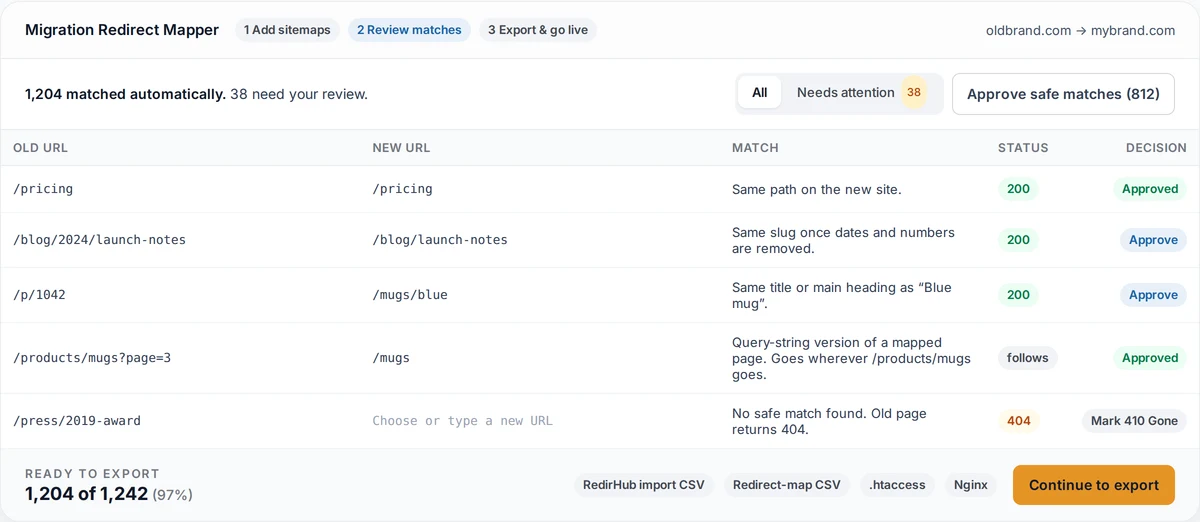
Map
SEO redirects for a website migration: same paths or changed URLs
You choose every destination. One whole-domain rule handles a domain change; a CSV handles the URLs that moved. Mix them: the rule catches everything the map does not name.
Keep the same paths
One rule, every URL
Only the domain changes. The path and query string are forwarded, the root domain covers its www, and a 301 tells search engines the move is permanent.
- oldbrand.com/pricingmybrand.com/pricing
- oldbrand.com/blog/launch?ref=mailmybrand.com/blog/launch?ref=mail
- www.oldbrand.com/aboutmybrand.com/about
A whole-domain redirect uses a domain and no managed links.
Changed URLs
Old URL → the new URL you pick
Paths changed in the rebuild. Each row of the CSV is one managed link: source, destination, type. Add more rows later with another import; a source URL can never be edited once created, so the review is your checkpoint.
| source | destination | type |
|---|---|---|
| oldbrand.com/p/1042 | https://mybrand.com/mugs/blue | 301 |
| oldbrand.com/blog/2024/launch-notes | https://mybrand.com/blog/launch-notes | 301 |
| oldbrand.com/press/2019-award | https://mybrand.com/press | 301 |
- 301, 302, 307 or 308. Permanent by default for migrations; temporary while the new site is still in testing.
- The home page and the catch-all are free. oldbrand.com/ and oldbrand.com/* do not use managed-link capacity.
- All subdomains at once. Add *.oldbrand.com as an extra source with the same settings.Pro & Enterprise
Review
Bulk 301 redirects from the old site to the new site, with nothing written until you confirm
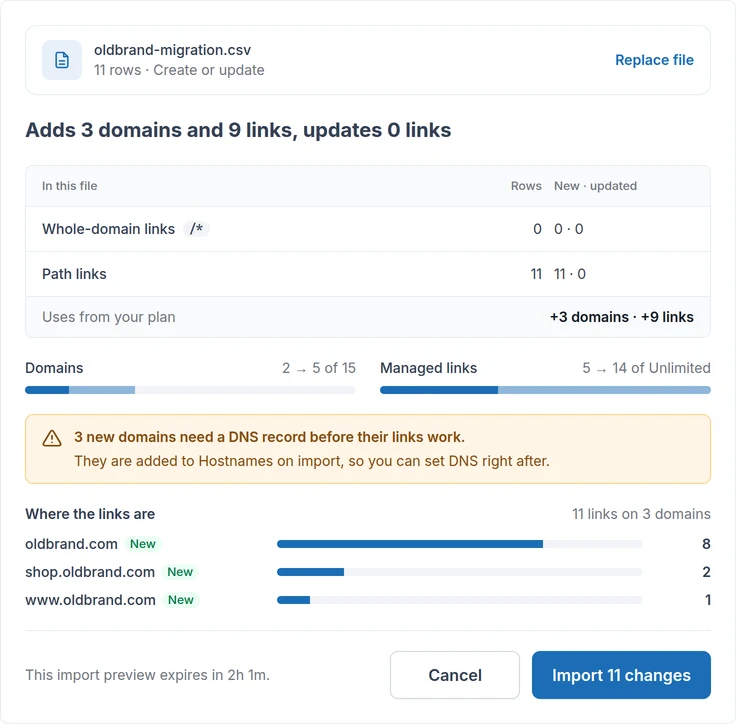
Upload the map and the dashboard checks the file against your plan: destinations without https://, unsupported types, duplicate www rows, capacity. Errors are grouped by cause, and the common ones are fixed in one click.
- 01Fix invalid rows. “Add https:// to all 11”, “Change all to 301”.
- 02Review every change. What will be added or updated, and plan capacity after the import.
- 03Confirm and import. Live on 130 Global PoPs in seconds. The DNS records still to set are listed right after.
The review checks the file and your plan, not the pages your destinations point to. Pro and Enterprise can turn on monitoring, which checks the destination behind each redirect.
Connect
Connect the old domain. Manage every redirect in one place.
However traffic reaches the old domain, its redirects live in one dashboard. Point its DNS here, or connect the CDN or app framework you already run through the RedirHub API.
DNS
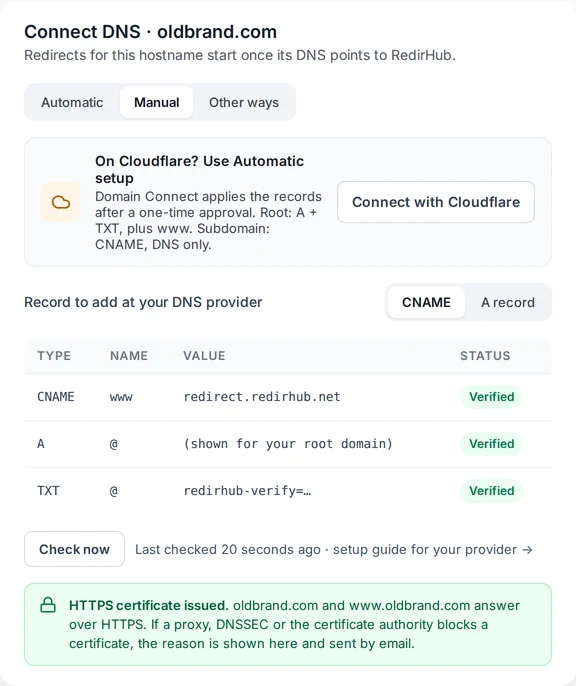
Fully managedAutomatic setup with Cloudflare after a one-time approval, or the CNAME or A record shown, checked live. HTTPS follows once DNS is in place.
Your CDN
Via APIKeep the CDN already in front of your site. It applies the redirects you manage here through the API.
Your framework
Via APIAny framework can read the same redirect list from the API. Its AI coding agent can write the integration for you.
Cutover steps
DNS connected
The dashboard's record, at your DNS provider, or applied by Cloudflare.
DNS verified
RedirHub sees the old hostname pointing here.
HTTPS provisioning
Requested automatically for the old hostname. A blocked certificate says why: proxied, DNSSEC or rejected.
Redirect active
Old URLs are answered over HTTPS from 130 Global PoPs.
Check key URLsyour step
Trace them with the free Redirect Checker: every hop, its status code and timing from three regions.
Retire the old serveryour step
Once everything looks good, turn it off. Certificates on the old domain are now RedirHub's job.
Many hostnames to move? Custom name servers give the workspace its own name-server pairPro add-on · Enterprise, and Auto-Redirect creates the redirect as soon as a domain starts pointing hereEnterprise · Pro with dedicated cluster
After cutover
Know which old URLs are still used, and why each redirect exists
A migration is one entry in the Links list, with its own tag, note and analytics. Change a destination later without a deploy, and retire redirects deliberately instead of guessing.

- Analytics per migration. Clicks, unique visitors and errors (4xx and 5xx answers), top old URLs, sources and a Redirects card by response code, filtered by tag, domain or a single link. History: 90 days on Core, 6 months on Pro.
- A private note on every link. Why it exists and why it is set up this way, kept in the link's history and accepted by the API and MCP tools too.
- Who changed what. Each link's change history on Pro, and a workspace audit log with CSV export on Pro and Enterprise.Pro
- Redirects as code. The Management API, the official Terraform provider (migration mappings included, with Idempotency-Key so a retried CI run creates nothing twice) and the MCP server for Claude, ChatGPT and Cursor.All plans
“I use RedirHub to manage URL forwarding and bulk redirects without manual server configuration. Unlike self-hosted Nginx rules, it is built specifically for technical redirects with automatic SSL, bulk management, and wildcard support.”
“It works like a charm. Redirecting domain names with SSL is a huge pain, and I have to do it frequently, often at mass. Now it is a few clicks. It just works.”
Before / after
Website redirects migration, the old way and with RedirHub
What changes when the redirects leave the old server.
Capacity
Sized by domains and managed links
Count the old hostnames you are moving and the changed URLs you will map. A whole-domain redirect uses a domain and no managed links. Either self-serve plan can add capacity.
Core
25 domains · 2,500 managed links
Pro
250 domains · 10,000 managed links
Enterprise
Set by contract
Talk to sales →
Example: 1 domain + 1,240 changed URLs fits Core. Enter your numbers in the pricing calculator to see the price. When a plan ends, links are paused, not deleted, and redirect again as soon as a plan covers them.
FAQ